1. הקדמה
The ANCEL FX1000 is a professional vehicle diagnostic tool designed to read and clear trouble codes, view live data, and perform various special functions for a single-car manufacturer. It supports full OBD service modes and is compatible with vehicles manufactured from 1996 onwards. This manual provides detailed instructions for setting up and operating your device.
2. פּראָדוקט פֿעיִקייטן
- Full OBDII Service Modes: Supports 8 OBDII service modes for comprehensive diagnostics.
- Multi-System Diagnostics: Capable of diagnosing all major vehicle systems including Engine, Transmission, SRS (Supplemental Restraint System), SAS (Steering Angle Sensor), TPMS (Tire Pressure Monitoring System), ABS (Anti-lock Braking System), and more.
- ספּעציעלע פאַנגקשאַנז: Includes advanced functions such as DPF (Diesel Particulate Filter) Regeneration, Battery Replacement, ABS Bleeding, Oil Service Reset, EPB (Electronic Parking Brake) Reset, and Throttle Position Adaption.
- Multi-Language Support: Supports 7 languages: English, French, Spanish, German, Russian, Polish, and Portuguese.
- Manufacturer-Specific Tool: Designed for a single-car manufacturer, allowing in-depth diagnostics for a specific brand's vehicle series.
- Lifetime Free Online Updates: Ensures your device always has the latest software and vehicle coverage.
3. פּעקל אינהאַלט
Your ANCEL FX1000 package should include the following items:
- ANCEL FX1000 Diagnostic Tool
- OBDII קאַנעקשאַן קאַבל
- Micro USB Cable (for PC connection and updates)
- אראפקאפיע גייד
- שווער שאָל קעריינג פאַל
4. מיטל אויסלייג
Familiarize yourself with the buttons and ports on your ANCEL FX1000 device for optimal operation.

Image: ANCEL FX1000 device showing LCD display, Return button, Scroll Left/Right/Up/Down buttons, Fn button, and Ok button. Dimensions are also indicated.
- LCD ווייַז: Shows diagnostic information and menu options.
- צוריקקומען קנעפּל: נאַוויגירט צוריק צום פריערדיקן עקראַן אָדער מעניו.
- Scroll Buttons (Up/Down/Left/Right): Used to navigate through menus and select options.
- Fn קנעפּל: Function button, may have context-specific uses.
- OK קנעפּל: באַשטעטיקט אויסוואַלן אָדער גייט אַרײַן אין אונטער-מעניועס.
- OBDII קאַנעקטאָר: Connects the device to the vehicle's OBDII port.
- וסב פּאָרט: For connecting to a computer for software updates.
5. סעטאַפּ און קאַנעקשאַן
Follow these steps to connect your ANCEL FX1000 to your vehicle:
- Locate your vehicle's OBDII port. This is typically found under the dashboard on the driver's side.
- Ensure the vehicle's ignition is ON, but the engine is NOT running. For push-button start vehicles, press the start button until all dashboard lights illuminate without starting the engine.
- Plug the OBDII connector from the ANCEL FX1000 into your vehicle's OBDII port. The device will power on automatically.
- Once powered on, the device is ready for use.
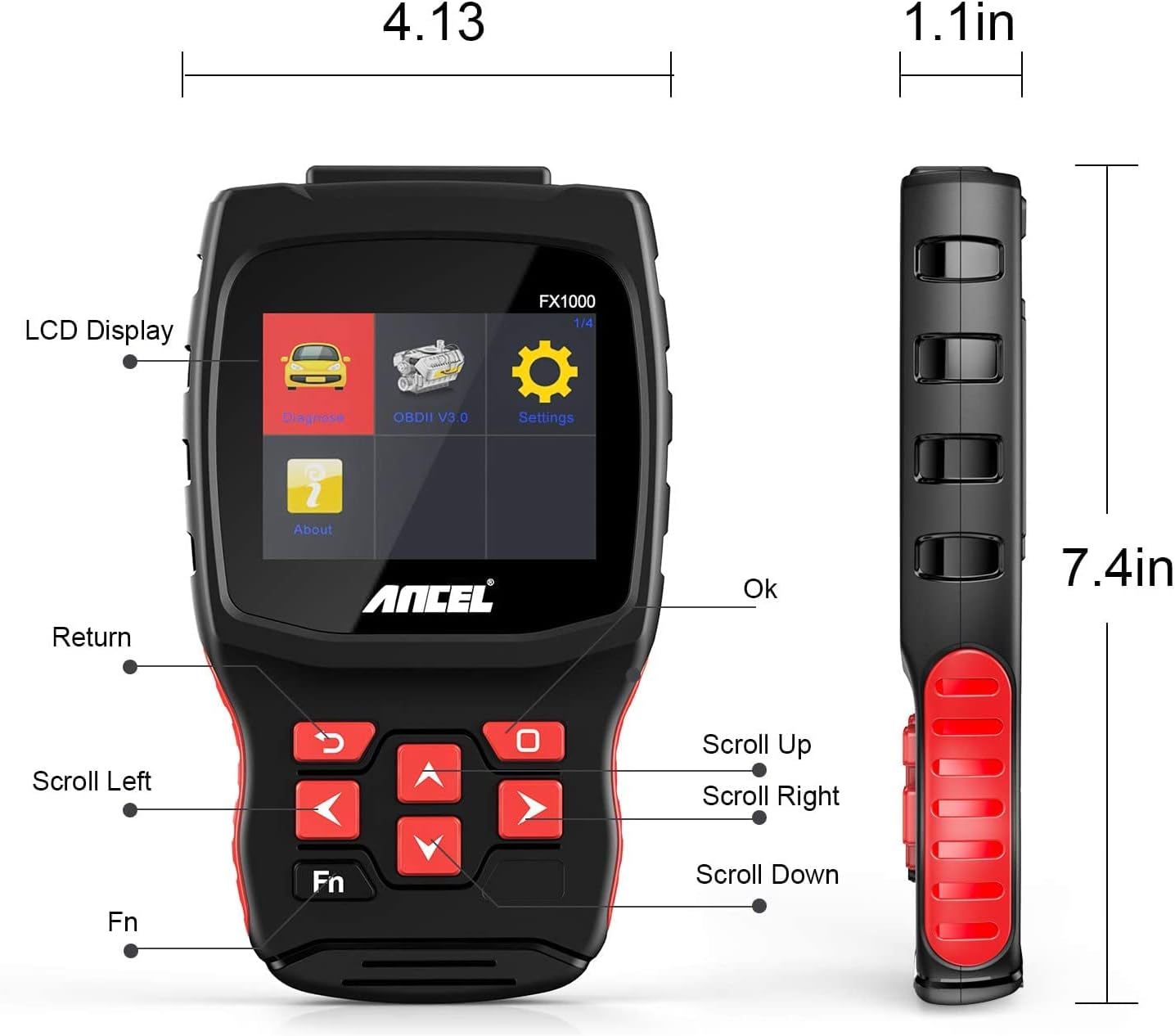
Image: A hand holding the ANCEL FX1000 connected to a vehicle's OBDII port, with the car's dashboard visible.
6. נאַוויגאַציע און סעטטינגס
The ANCEL FX1000 features a user-friendly interface. Use the arrow buttons to navigate and the OK button to select.
- דיאַגנאָזירן: Access vehicle-specific diagnostic functions.
- OBDII V3.0: Access general OBDII functions for all compatible vehicles.
- סעטטינגס: קאָנפֿיגורירן דיווייס פּרעפֿערענצן.
- וועגן: View device information such as serial number, firmware version, and software version.
סעטטינגס מעניו אָפּציעס:
- שפּראַך: טוישן די אַרויסווייַזן שפּראַך.
- איינהייט: באַשטימען צווישן סעלסיוס און פאַהרענהעיט פֿאַר טעמפּעראַטור רידינגז.
- ביפּ: Enable or disable audible feedback.
- רעקאָרד: View recorded diagnostic data.
- קנעפּל טעסט: Test the functionality of the device buttons.
- LCD Test: Test the LCD display.
7. סיסטעם דיאַגנאָסטיקס
The ANCEL FX1000 allows you to perform in-depth diagnostics on various vehicle systems. After selecting 'Diagnose' and your vehicle's manufacturer (e.g., Toyota), you can choose specific systems.
Image: Visual representation of systems diagnosed by FX1000, including Engine, ABS, TPMS, Transmission, Oil Service, Airbag, Battery, Audio, and Headlight Activate.
דיאַגנאָסטיק פאַנגקשאַנז:
- Read Trouble Code: Retrieves current, pending, and history Diagnostic Trouble Codes (DTCs).
- Clear Trouble Code: Erases DTCs from the vehicle's computer.
- לייענען דאַטאַ סטרים: ווײַזט רעאַל-צייט דאַטן פּאַראַמעטערס פֿון די פֿאָרמיטל'ס סענסאָרן.
- אַקטיוו טעסט: Allows bidirectional control to test specific components.
- ספּעציעלע פֿונקציע: Accesses advanced maintenance and service functions.
8. ספּעציעלע פאַנגקשאַנז
The ANCEL FX1000 offers several special functions for vehicle maintenance:

Image: Visual representation of special functions including Oil Service Reset, ABS Bleeding, TPMS Reset, and EPB Reset.
- אויל סערוויס איבערשטעלן: ריסעטז די אויל סערוויס ליכט נאך אן אויל טויש.
- ABS בלוטונג: פירט אויס בלידינג פונקציעס פֿאַר די אַנטי-לאַק ברעיקינג סיסטעם.
- EPB צוריקשטעלן: ריסעטז די עלעקטראָנישע פּאַרקינג ברעיק סיסטעם.
- טראָטל פּאָזיציע אַדאַפּטאַציע: אַדאַפּטירט דעם גאַז פּאָזיציע סענסאָר.
- די.פי.עף. רעגענעראַציע: הייבט אן דעם רעגענעראַציע פּראָצעס פֿאַר די דיזל פּאַרטיקולאַט פילטער.
- באַטערי פאַרבייַט: רעגיסטרירט נייע באַטעריע פאַרבייַטן.
9. OBDII Functions (General)
The 'OBDII V3.0' menu provides general diagnostic functions compatible with all OBDII-compliant vehicles (1996 and newer).
- Read Current Trouble Code: Displays active DTCs.
- Clear Trouble Code: Erases all stored DTCs.
- Read Current Data: View live sensor data.
- Read Pending Trouble Code: Displays DTCs that have not yet fully matured.
- לייענט פריז ראַם דאַטן: Shows a snapshot of vehicle conditions when a DTC was set.
- Readiness Tests: קאָנטראָלירט דעם סטאַטוס פון עמיסיע-פֿאַרבונדענע מאָניטאָרן.
Readiness Test:
The Readiness Test is crucial for emissions inspections. It indicates whether various emission control systems have completed their self-tests. Look for 'Complete' or 'Supported' status for all monitors. If a monitor shows 'Not Complete' or 'Not Supported', it may indicate an issue or that the drive cycle has not been completed.
10. Clearing Trouble Codes
To clear trouble codes, navigate to the 'Clear Trouble Code' option within the relevant diagnostic menu. The device will prompt you to confirm. After clearing, it is recommended to cycle the vehicle's ignition off and on to ensure all related warning lights are reset.
Note: The ANCEL FX1000 can only read and clear SRS error codes; it does NOT support SRS reset functions.
11. ווייכווארג אַפּדייט
To ensure your ANCEL FX1000 has the latest vehicle coverage and features, regular software updates are recommended. The device offers lifetime free online updates.
- Connect the device to your computer using the provided Micro USB cable.
- Follow the instructions in the 'Download Guide' included in your package to install the update software on your computer.
- Register your device using the serial number and your email address.
- Select the specific car manufacturer software you need for your device.
- Perform the update as prompted by the software.

Image: ANCEL FX1000 connected via USB cable to a laptop, illustrating the update process.
12. טראָובלעשאָאָטינג
If you encounter issues while using your ANCEL FX1000, refer to the following common scenarios:
-
פֿאַרבונדענע דאָקומענטן - FX1000

ANCEL VD500 באַניצער מאַנואַל: OBD2 דיאַגנאָסטיק געצייַג גייד
א פולשטענדיגע באַניצער מאַנואַל פֿאַר די ANCEL VD500 OBD2 דיאַגנאָסטיק סקאַנער. לערנט וועגן זיכערהייט מיטלען, פֿעיִקייטן, אָפּעראַציע, ספּעציפֿיקאַציעס און וואָראַנטי אינפֿאָרמאַציע פֿאַר דיין אָטאָמאָטיוו דיאַגנאָסטיק געצייַג.
ANCEL VOD700 באַניצער מאַנואַל - וואָלוואָ מולטי-סיסטעם סקאַנער
א פולשטענדיגע באַניצער מאַנואַל פֿאַר די ANCEL VOD700 מולטי-סיסטעם סקאַנער, וואָס גיט דעטאַלירטע אינסטרוקציעס פֿאַר וואָלוואָ וועהיקלעס, אַרייַנגערעכנט דיאַגנאָסטיק, ספּעציעלע פאַנגקשאַנז, געצייַג סעטאַפּ און דערהייַנטיקונגען.
ANCEL DS160, DS100, DS200 באַניצער מאַנואַל - אויטאָמאָטיוו דיאַגנאָסטיק מכשירים
באַניצער מאַנואַל פֿאַר ANCEL DS160, DS100, און DS200 אויטאָמאָטיוו דיאַגנאָסטיק מכשירים. דעקט פֿעיִקייטן, פּאַראַמעטערס, באַניץ, פֿונקציעס, אָפֿט געשטעלטע פֿראַגעס, און וואָראַנטי פֿאַר די OBD2 סקאַנערס.
ANCEL BD300 OBD2 סקענער באַניצער מאַנואַל
א פולשטענדיגע באַניצער מאַנואַל פֿאַר די ANCEL BD300 OBD2 סקאַנער. לערנט ווי צו דאַונלאָודן די ANCEL אַפּ, פאַרבינדן דורך בלועטוט, דורכפירן פאָרמיטל דיאַגנאָסטיק, דערהייַנטיקן ווייכווארג, און נוצן ספּעציעלע פאַנגקשאַנז ווי EPB, CBS, ABS, און Airbag ריסעטס. שטיצט פולשטענדיק סיסטעם דיאַגנאָסטיק פֿאַר BMW און אנדערע פאָרמיטלען.
ANCEL FD500 באַניצער מאַנואַל: קאָמפּרעהענסיוו גייד צו קאַר דיאַגנאָסטיק
אַנטדעקט דעם ANCEL FD500, אַן אויספירלעכער מולטי-סיסטעם OBD2 סקאַנער אין גרוי, דיזיינד פֿאַר פֿאָרד, לינקאָלן און מערקורי וועהיקלעס. די באַניצער מאַנואַל גיט דעטאַלירטע אינסטרוקציעס וועגן זיינע פֿעיִקייטן, זיכערהייט מיטלען און דיאַגנאָסטישע פֿונקציעס, אַרייַנגערעכנט מאָטאָר, ABS, SRS, טראַנסמיסיע, 4WD סיסטעמען, EPB, אויל ריסעט און באַטערי רעגיסטראַציע.
ANCEL BD300 באַניצער מאַנואַל און שנעל אָנהייב גייד
א פולשטענדיגע באַניצער מאַנואַל פֿאַר די ANCEL BD300 בלועטוט OBD2 דיאַגנאָסטיק געצייַג, וואָס דעקט סעטאַפּ, אָפּעראַציע און פֿעיִקייטן פֿאַר BMW/מיני וועהיקלעס. כולל אינסטרוקציעס פֿאַר אַפּ קאַנעקשאַן, סיסטעם דיאַגנאָסטיק און סערוויס ריסעטס.