1. הקדמה
This manual provides comprehensive instructions for the setup, operation, and maintenance of your Behringer Q802USB Premium 8-Input 2-Bus Mixer. The Q802USB is a versatile and feature-packed analog mixer designed for various audio applications, including small project recording, rehearsals, and podcasting. It features 8 inputs, including 2 mono channels with XENYX mic preamps and 2 stereo channels, along with a built-in USB/audio interface.
ביטע ליינט דעם מאַנואַל גרינטלעך איידער איר ניצט דעם מיטל צו ענשור ריכטיק נוצן און צו מאַקסאַמיזירן זיין פאָרשטעלונג און לאַנגלעבעדיקייט.
2. שליסל פֿעיִקייטן
- Premium ultra-low noise, high headroom analog mixer.
- Two state-of-the-art XENYX mic preamps, comparable to stand-alone boutique preamps.
- Studio-grade compressors with super-easy "one-knob" functionality and control LED for professional vocal and instrumental sound.
- Built-in stereo USB/Audio Interface for direct connection to your computer.
- 8 total input channels.
- קאָמפּאַקט און דוראַבאַל פּלאַן.
3. וואָס איז אין דער קעסטל
ביים אויספּאַקן, ביטע באַשטעטיקן אַז אַלע קאָמפּאָנענטן וואָס זענען ליסטעד אונטן זענען פאַראַן און אין גוטן צושטאַנד:
- Behringer Q802USB 8-Input 2-Bus Mixer
- מאַכט אַדאַפּטער
- וסב קאַבלע
- באַניצער מאַנואַל (דעם דאָקומענט)
If any items are missing or damaged, please contact your retailer or Behringer customer support immediately.
4. פּראָדוקט איבערview

פיגורע 4.1: פראָנט view of the Behringer Q802USB mixer, showing all input channels, controls, and the main section.
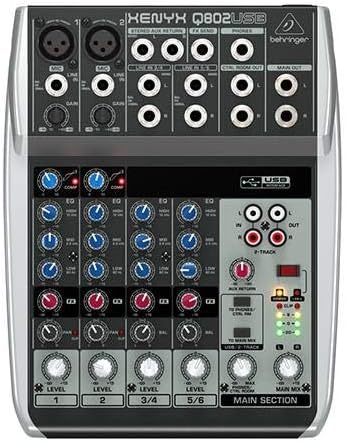
פיגורע 4.2: Top-down view of the Behringer Q802USB mixer, highlighting the layout of knobs, faders, and input/output jacks.

פיגורע 4.3: דערציען view of the Behringer Q802USB mixer, showing the power input, USB port, and serial number label.
5. סעטאַפּ
5.1 מאַכט קאַנעקשאַן
- זיכער מאַכן אַז דער מיקסער'ס מאַכט סוויטש איז אין דער אויסגעלאָשן פּאָזיציע.
- Connect the included power adapter to the "AC POWER IN" port on the rear of the mixer.
- צאַפּן די מאַכט אַדאַפּטער אין אַ פּאַסיק עלעקטריקאַל ווענטיל.
5.2 אַודיאָ קאַנעקשאַנז
The Q802USB offers various input and output options:
- Microphone Inputs (Channels 1-2): Use XLR cables to connect microphones to the MIC inputs. Ensure phantom power (+48V) is only enabled if your microphones require it (e.g., condenser microphones).
- Line Inputs (Channels 1-2): Use 1/4" TRS or TS cables for line-level instruments or devices.
- Stereo Line Inputs (Channels 3/4, 5/6): Use 1/4" TS cables for stereo instruments or playback devices.
- הויפּט אַוטפּוץ: פֿאַרבינדט אייערע הויפּט רעדנערס אָדער amplifier to the MAIN OUT (1/4" TRS) jacks.
- קאָנטראָל צימער אַוטפּוץ: Connect studio monitors to the CTRL ROOM OUT (1/4" TS) jacks.
- כעדפאָון רעזולטאַט: Connect headphones to the PHONES (1/4" TRS) jack.
5.3 וסב קאַנעקשאַן
To use the Q802USB as an audio interface with your computer:
- Connect one end of the USB cable to the USB port on the rear of the mixer.
- פאַרבינדן די אנדערע סוף פון די וסב קאַבלע צו אַ בנימצא וסב פּאָרט אויף דיין קאָמפּיוטער.
- The mixer should be recognized automatically by most modern operating systems. For advanced features or specific drivers, visit Behringer's official webפּלאַץ.
6. אַפּערייטינג ינסטרוקטיאָנס
6.1 יקערדיק אָפּעראַציע
- מאַכט אויף: After all connections are made, switch the mixer's power to ON.
- געווינען קאָנטראָל: Adjust the GAIN knob for each input channel to set the input level. Aim for the signal to peak around 0 dB on the level meters during the loudest parts of your audio.
- Compressor (Channels 1-2): Use the COMP knob to apply compression to microphone inputs. Turn clockwise to increase compression.
- יקוואַליזיישאַן (EQ): Use the HIGH, MID, and LOW knobs on each channel to adjust the tonal balance.
- Level Faders/Knobs: Adjust the LEVEL faders (or rotary knobs for stereo channels) to control the volume of each channel in the main mix.
- הויפּט מיקס: Use the MAIN MIX fader to control the overall output volume of the mixer.
- Headphone/Control Room Level: Adjust the PHONES/CTRL ROOM knob to set the monitoring volume.
6.2 USB Audio Interface Usage
When connected to a computer via USB, the Q802USB acts as a 2-in/2-out audio interface:
- רעקאָרדינג: The main mix output of the mixer is sent to your computer via USB. You can record this stereo signal in your digital audio workstation (DAW) software.
- פּלייבאַק: Audio from your computer can be routed back to the mixer via USB. Use the 2-TRACK/USB TO MAIN MIX button to send this audio to the main mix, or 2-TRACK/USB TO PHONES/CTRL ROOM to send it only to your headphones/control room monitors.
7. וישאַלט
Proper maintenance ensures the longevity and optimal performance of your Behringer Q802USB mixer.
- רייניקונג:
- שטענדיק דיסקאַנעקט די מאַכט איידער רייניקונג.
- Use a soft, dry, lint-free cloth to wipe down the exterior.
- פֿאַר שווערן שמוץ, אַ ביסל דamp מען קען ניצן אַ שטאָף מיט מילדער זייף, און דערנאָך אַ טרוקענעם שטאָף.
- Avoid abrasive cleaners, solvents, or waxes, as they can damage the finish.
- סטאָרידזש:
- האַלט דעם מיקסער אין אַ קיל, טרוקן אָרט אַוועק פון דירעקט זונשייַן און עקסטרעמע טעמפּעראַטורן.
- Protect it from dust and moisture when not in use, ideally with a dust cover.
- ווענטילאַטיאָן: Ensure proper airflow around the unit. Do not block ventilation openings.
- קאַבלע פאַרוואַלטונג: Avoid tightly bending or crimping cables, especially near connectors, to prevent damage.
8. טראָובלעשאָאָטינג
If you encounter issues with your Q802USB mixer, refer to the following common problems and solutions:
| פּראָבלעם | מעגלעך סיבה | לייזונג |
|---|---|---|
| קיין מאַכט | Power cable not connected; power outlet faulty; mixer power switch off. | קאָנטראָלירט די פֿאַרבינדונג מיטן עלעקטרישן קאַבל; פּרוּווט אַן אַנדער אַוטלעט; מאַכט זיכער אַז די עלעקטרישע קנעפּל איז אָן. |
| קיין געזונט רעזולטאַט | Main Mix fader down; channel level knobs down; output cables disconnected; incorrect input selection. | Increase Main Mix fader; increase channel level knobs; check all audio cable connections; ensure correct input is selected. |
| פאַרקרימט געזונט | אינפוט געווינס צו הויך; אויסגאַנג לעוועל צו הויך; דעפעקטיווער קאַבל. | Reduce input GAIN; reduce Main Mix fader; try different cables. |
| USB audio not working | USB cable disconnected; incorrect audio settings on computer; driver issue. | Check USB cable connection; verify audio input/output settings in your computer's sound preferences and DAW; install/update Behringer drivers if necessary. |
If the problem persists after trying these solutions, please contact Behringer customer support.
9. ספּעסאַפאַקיישאַנז
| שטריך | דעטאַל |
|---|---|
| פּראָדוקט דימענשאַנז | 14 X 12.2 X 4.3 אינטשעס |
| פּונקט וואָג | 2.2 פונט (בעערעך 1 קילאָ) |
| נומער פון טשאַנאַלז | 8 (2 מאָנאָ, 2 סטערעאָ) |
| מיק פּרעamps | 2 רענטגענ קסעניקס |
| קאַמפּרעסערז | Studio-grade "one-knob" on mono channels |
| וסב צובינד | Built-in stereo USB/Audio Interface |
| קאַנעקטיוויטי טעכנאָלאָגיע | וסב |
| מאַכט מקור | קאָרדעד עלעקטריק |
| מאָדעל נומער | Q802USB |
10. וואָראַנטי און שטיצן
For detailed warranty information, please refer to the warranty card included with your product or visit the official Behringer website. Behringer provides comprehensive support for its products.
- אָנליין שטיצן: באַזוכן בעהרינגער שטיצע פֿאַר אָפֿט געשטעלטע פֿראַגעס, דרייווער דאַונלאָודז, און פּראָדוקט רעגיסטראַציע.
- פּראָדוקט פאַרשרייבונג: Register your product online to receive the latest updates and warranty information.
- קאָנטאַקט: For technical assistance or service, please contact Behringer customer service through their webפּלאַץ.
You can also visit the official Behringer store on Amazon for more information and related products: Behringer Store.


