1. הקדמה
Thank you for choosing the Xigmatek Galaxy II ARGB Fan Series. This product is designed to provide efficient cooling and vibrant addressable RGB lighting for your computer case. This manual provides detailed instructions for installation, operation, and maintenance to ensure optimal performance and longevity of your fans.
2. פּעקל אינהאַלט
ביטע באַשטעטיקן אַז אַלע קאָמפּאָנענטן וואָס זענען ליסטעד אונטן זענען אַרייַנגערעכנט אין דיין פּעקל:
- 3 x Xigmatek AX120 ARGB Fans
- 1 x ARGB Control Box
- 1 x רימאָוט קאָנטראָללער
- מאַונטינג סקרוז
- קאַנעקשאַן קאַבלעס

Image: Three Xigmatek AX120 ARGB fans, showcasing their translucent blades and black frames, designed for computer case cooling and lighting.
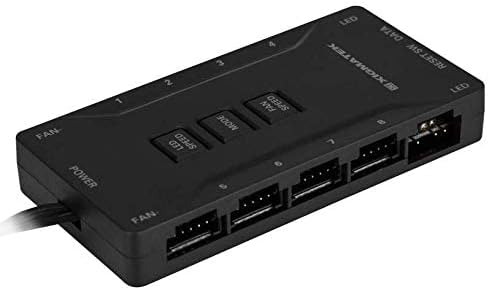
Image: The Xigmatek ARGB Control Box, a black rectangular unit with multiple ports for fan and LED connections, and buttons for LED speed, fan speed, and mode control.
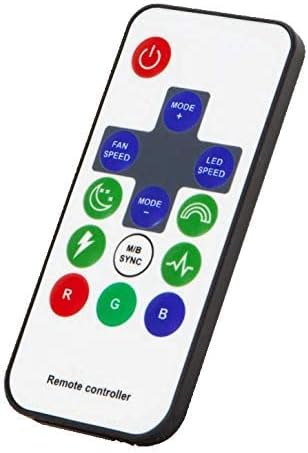
Image: The Xigmatek ARGB Remote Controller, a white handheld device with various buttons for controlling fan speed, LED modes, LED speed, and color selection (R, G, B).
3. ספּעסאַפאַקיישאַנז
| שטריך | דעטאַל |
|---|---|
| מאָדעל | EN42104 (Galaxy II ARGB Fan Series) |
| פאָכער טיפּ | AX120 ARGB Fan |
| נומער פון פאַנס | 3 |
| מאַקסימום ראָוטיישאַנאַל גיכקייַט | 2200 רפּם |
| Voltage | 12 וואלטס (דק) |
| מאַכט קאַנעקטער טיפּ | 3-Pin (Fan), ARGB (LED) |
| קאָאָלינג אופֿן | לופט |
| מאַטעריאַל | פּלאַסטיק |
| קאַמפּאַטאַבאַל דעוויסעס | Desktop Computer Cases |
4. סעטאַפּ און ייַנמאָנטירונג
איידער איר הייבט אן די אינסטאַלאַציע, זאָרגט אַז אייער קאָמפּיוטער איז אויסגעלאָשן און אַרויסגעצויגן פון דער וואַנט-אַויטלעט. עס איז רעקאָמענדירט צו טראָגן אַן אַנטי-סטאַטישן האַנטגעלענק-רימען צו פאַרמייַדן שאָדן צו קאָמפּאָנענטן.
4.1. פאָכער ייַנמאָנטירונג
- Identify suitable mounting locations within your computer case (e.g., front, top, rear, bottom).
- Position each fan in the desired location, ensuring proper airflow direction (typically, air flows from the open side of the fan towards the side with the support struts).
- Secure each fan using the provided mounting screws. Tighten screws until snug, but do not overtighten.

Image: A single Xigmatek AX120 ARGB fan, showing its black frame, translucent fan blades, and the central Xigmatek logo. This image helps visualize the fan for installation.
4.2. Control Box and Cable Connections
- Mount the ARGB Control Box in a convenient location within your case, away from moving parts and heat sources.
- Connect the 3-pin fan power cable from each AX120 fan to the "FAN" ports on the control box. The control box typically has numbered ports (e.g., 1-8).
- Connect the ARGB lighting cable from each AX120 fan to the "LED" ports on the control box. Ensure correct orientation to avoid damage.
- Connect the main power cable from the control box to a compatible power supply unit (PSU) connector (e.g., SATA power or Molex, depending on the control box design).
- (Optional) If your motherboard supports Addressable RGB (ARGB) synchronization, connect the control box's M/B Sync cable to the appropriate 5V ARGB header on your motherboard. Refer to your motherboard manual for header location.
- Ensure all cables are neatly routed and secured to prevent interference with other components or airflow.
5. אַפּערייטינג ינסטרוקטיאָנס
Once installed and powered on, you can control the fan speed and ARGB lighting effects using the included remote controller or the buttons on the control box.
5.1. ניצן די רימאָוט קאָנטראָללער
- מאַכט קנעפּל: Turns the lighting on/off.
- מאָדע +/-: Cycles through various ARGB lighting effects.
- LED SPEED: Adjusts the speed of the lighting effects.
- פאָכער גיכקייַט: Adjusts the fan rotation speed (Low, Medium, High).
- Color Buttons (R, G, B): Selects static red, green, or blue colors.
- M/B SYNC: Toggles between control box/remote control and motherboard ARGB synchronization (if connected).
- Other buttons may offer specific pre-set lighting patterns or brightness adjustments.
5.2. Using the Control Box Buttons
The control box typically features physical buttons for basic control:
- LED SPEED: Adjusts the speed of the lighting effects.
- DIRECTIONS: Cycles through various ARGB lighting effects.
- פאָכער גיכקייַט: אַדזשאַסטירט די פאָכער ראָטאַציע גיכקייט.
6. וישאַלט
Regular maintenance helps ensure optimal performance and extends the lifespan of your fans.
- באַזייַטיקונג פון שטויב: Periodically (e.g., every 3-6 months), power off your computer and use compressed air to gently remove dust buildup from the fan blades and frames. Hold the fan blades to prevent them from spinning rapidly during cleaning, which can damage the bearings.
- קאַבלע פאַרוואַלטונג: Ensure all cables remain securely connected and properly routed to avoid obstructing airflow or being caught by moving parts.
- דורכקוק: Occasionally inspect the fans and control box for any signs of wear, damage, or loose connections.
7. טראָובלעשאָאָטינג
| פּראָבלעם | מעגלעך סיבה | לייזונג |
|---|---|---|
| פאַנס נישט ספּיננינג | No power to control box; Loose fan connection; Faulty fan. | Check power cable to control box; Re-seat fan cables; Test individual fans if possible. |
| ARGB lights not working | Loose LED connection; Control box not powered; Motherboard sync issue; Faulty LED. | Check LED cables; Ensure control box has power; Toggle M/B SYNC; Try different LED port. |
| ווייַט קאָנטראָללער ניט ריספּאַנדינג | Battery depleted; Obstruction; Remote out of range. | Replace remote battery; Ensure clear line of sight to control box; Operate within range. |
| פאַנס זענען טומלדיק | Dust buildup; Loose mounting screws; Fan bearing issue. | Clean fans; Tighten mounting screws; If noise persists, fan may need replacement. |
8. זיכערקייַט אינפֿאָרמאַציע
- Always power off and unplug your computer before installing or performing maintenance on the fans.
- Avoid touching moving fan blades.
- Do not expose the control box or fans to moisture or extreme temperatures.
- האַלטן אויס פון דערגרייכן פון קינדער.
- ניצט נאָר די צוגעשטעלטע קייבלען און אַקסעסאָריעס.
9. וואָראַנטי און שטיצן
Xigmatek products are manufactured to high quality standards. For warranty information, technical support, or service inquiries, please refer to the official Xigmatek webזייטל אדער קאָנטאַקט אייער לאקאלן הענדלער. ביטע באַהאַלטן אייער קויפן-באַווייַז פֿאַר וואָראַנטי-קליימז.
באַאַמטער Webפּלאַץ: www.xigmatek.com


