הקדמה
The EVOLVEO EASYPHONE FM is a user-friendly mobile phone designed for straightforward communication. It features large, separated keys, a clear display, and essential functions to ensure ease of use. This manual provides instructions for setting up, operating, and maintaining your device.
1. פּעקל אינהאַלט
ביטע טשעק די פּאַקעט פֿאַר די פאלגענדע זאכן:
- EVOLVEO EASYPHONE FM Mobile Phone
- טשאַרדזשינג דאָק
- אַק אַדאַפּטער
- Li-ion 1000 mAh Battery
- באַניצער מאַנואַל
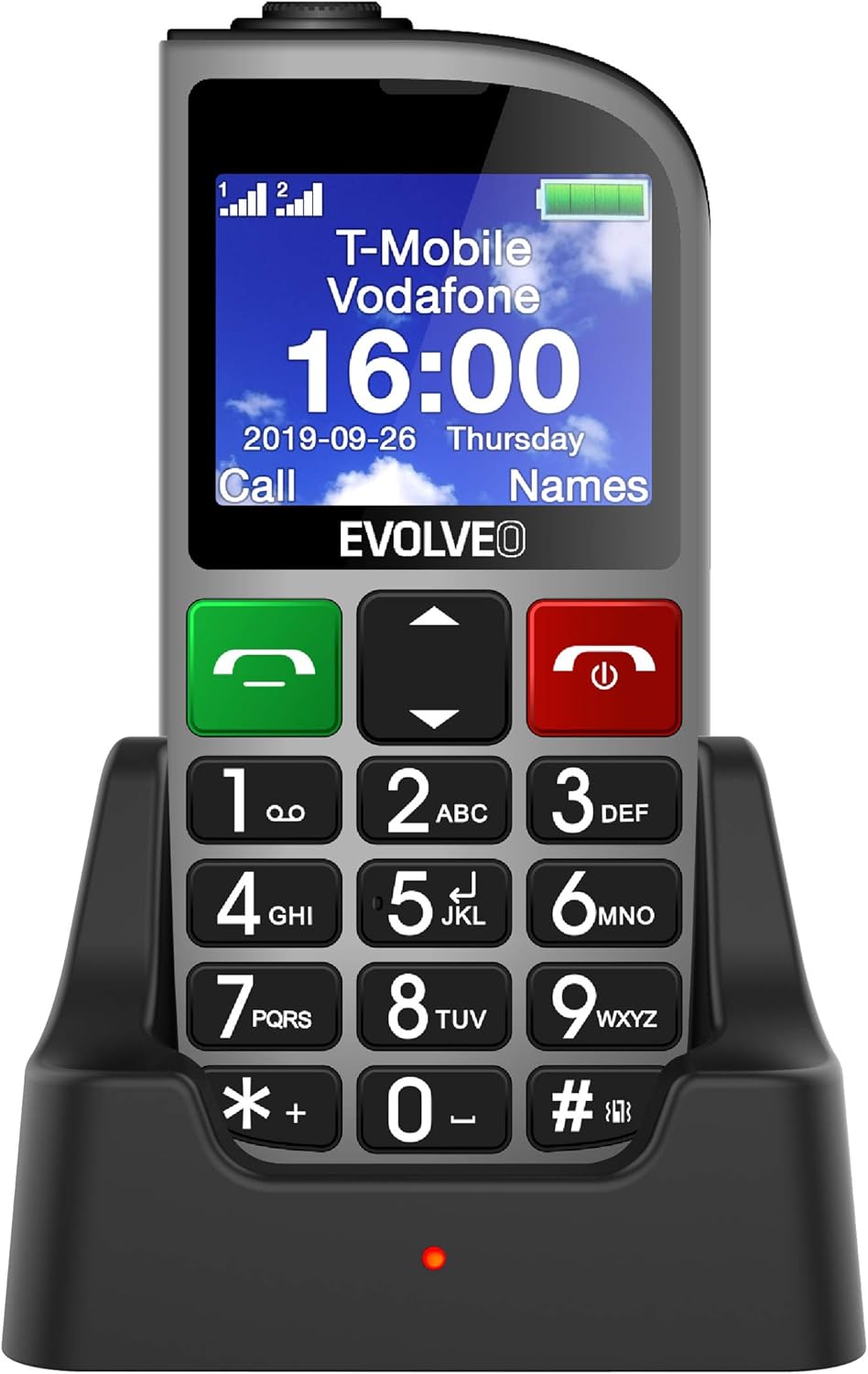
פיגורע 1.1: EVOLVEO EASYPHONE FM placed in its charging dock. The phone features a large display showing time and network information, with prominent green call and red end call buttons, and a numeric keypad below.
2. סעטאַפּ
2.1. באַטאַרייע ייַנמאָנטירונג און טשאַרדזשינג
- אַראָפּנעמען די צוריק דעקן פון די טעלעפאָן.
- Insert the Li-ion 1000 mAh battery, ensuring the contacts align correctly.
- פאַרבייַטן די צוריק דעקן.
- Connect the AC adapter to the charging dock.
- Place the phone into the charging dock. The charging indicator light will illuminate.
- לאָזט דעם טעלעפאָן גאָר אויפלאָדן איידער איר ניצט עס צום ערשטן מאָל.
2.2. אריינשטעלן סים קארטל(ן)
The phone supports two SIM cards (Dual SIM) for GSM/GPRS 850/900/1800/1900 MHz networks.
- מאַכן זיכער אַז די טעלעפאָן איז פּאַוערד אַוועק.
- אַראָפּנעמען די צוריק דעקן און באַטאַרייע.
- געפינט די סים קאַרטל סלאָץ.
- Insert your SIM card(s) into the designated slots, ensuring correct orientation.
- רעינסערט די באַטאַרייע און צוריק דעקן.
2.3. Inserting a MicroSDHC Card
You can expand the phone's storage for music, photos, and other files by inserting a MicroSDHC card.
- מאַכן זיכער אַז די טעלעפאָן איז פּאַוערד אַוועק.
- אַראָפּנעמען די צוריק דעקן און באַטאַרייע.
- Locate the MicroSDHC card slot.
- Gently insert the MicroSDHC card until it clicks into place.
- רעינסערט די באַטאַרייע און צוריק דעקן.
3. אַפּערייטינג ינסטרוקטיאָנס
3.1. מאַכט אויף / אויסגעלאשן
- צו אנצינדן: דריק און האלט די Red End Call/Power קנעפּל ביז די פאַרשטעלן לייץ אַרויף.
- צו אויסלעשן: דריק און האלט די Red End Call/Power button until the power off options appear, then confirm.

פיגורע 3.1: פראָנט view of the EVOLVEO EASYPHONE FM, highlighting the large display, call buttons, and numeric keypad for easy dialing.
3.2. מאכן און ריסיווינג קאַללס
- מאַכן אַ רוף: Dial the number using the numeric keypad and press the גרין רוף קנעפּל.
- ספּיד דייל: The phone supports quick access to 8 popular contacts. Assign numbers to keys 2-9 for speed dialing. Press and hold the assigned key to dial.
- באַקומען אַ רוף: דרוק די גרין רוף קנעפּל צו ענטפֿערן אַ ינקאַמינג רופן.
- ענדיקן אַ רוף: דרוק די Red End Call/Power button to end an active call.
3.3. Sending and Receiving SMS Messages
The separated keyboard keys facilitate easy writing of SMS messages.
- Navigate to the Messaging menu.
- Select "Write Message" to compose a new SMS.
- אַרייַן די נומער פון דעם באַקומער אָדער סעלעקטירן פון קאָנטאַקטן.
- טיפּ דיין אָנזאָג ניצן די קיפּאַד.
- Press "Send" to transmit the message.
3.4. באַנד קאָנטראָל
Adjust the call and ringtone volume using the dedicated volume control button located on the left side of the phone.

פיגורע 3.2: Left side of the phone, showing the volume control buttons and the FM radio activation button.
3.5. סאָס עמערגענסי קנעפּל
The SOS button, located on the back of the device, allows for quick emergency calls and messages.
- Before use, configure up to five emergency contact numbers in the phone settings.
- אין א נויטפאַל, דריק און האַלט די סאָס קנעפּל.
- The phone will automatically dial the predefined emergency numbers sequentially and send an emergency message to these contacts.

פיגורע 3.3: דערציען view of the EVOLVEO EASYPHONE FM, showing the prominent red SOS emergency button and the camera lens.
3.6. עפעם ראַדיאָ
The phone includes an FM radio with a dedicated activation button.
- To turn on the FM radio, press the independent FM button on the side of the device.
- The radio can play in the background, allowing you to use other phone functions.
- During an incoming or outgoing call, the radio will automatically mute and resume playback after the call ends.
3.7. פלאַשליגהט
A powerful flashlight is integrated into the phone, activated by a dedicated button.
- Press the dedicated flashlight button on the side of the phone to turn the flashlight on or off.

פיגורע 3.4: Right side of the phone, showing the dedicated flashlight button.
3.8. אנדערע פֿעיִקייטן
- אַפּאַראַט: The phone includes a VGA camera for basic photo capture.
- מוזיק שפּילער: שפּיל מוזיק files stored on your MicroSDHC card.
- Digital Recorder (Dictaphone): Record voice notes.
- קאַלענדאַר: האַלטן שפּור פון וויכטיק דאַטעס און געשעענישן.
- וועקער זייגער: שטעלן אַלאַרמס פֿאַר רימיינדערז.
- קאַלקולאַטאָר: דורכפירן יקערדיק חשבונות.
- Magnifying Glass: Utilize the screen as a magnifying glass.
4. וישאַלט
4.1. רייניקונג די מיטל
- Use a soft, dry cloth to clean the phone's surface and screen.
- פֿאַרמײַדט די נוצן פֿון פֿליסיגע רייניקונגס־מיטלען אָדער אַברייזיווע מאַטעריאַלן, ווײַל זיי קענען שאַטן דעם אַפּאַראַט.
- Ensure no moisture enters the charging port or other openings.
4.2. באַטערי קער
- To prolong battery life, avoid exposing the phone to extreme temperatures.
- Charge the battery regularly, but avoid overcharging or letting it completely drain for extended periods.
- If the phone will not be used for a long time, charge the battery to about 50% before storing it.
5. טראָובלעשאָאָטינג
If you encounter issues with your EVOLVEO EASYPHONE FM, refer to the following common problems and solutions:
5.1. Phone Does Not Turn On
- ענשור אַז די באַטאַרייע איז ריכטיק אינסטאַלירן און טשאַרדזשינג.
- Connect the phone to the charger and wait a few minutes before attempting to power it on again.
- Check if the battery contacts are clean.
5.2. קען נישט מאַכן אָדער באַקומען רופן
- Check if the SIM card(s) are correctly inserted and activated.
- Ensure you have network coverage.
- Verify that the phone is not in airplane mode (if applicable).
- Check your account balance or subscription status with your service provider.
5.3. FM Radio Not Working
- Ensure you are in an area with good FM signal reception.
- Check if the FM radio is properly activated using its dedicated button.
5.4. פּראָבלעמען מיטן אַרויסווייַזן
- If the display is dim, check the brightness settings.
- If the screen is unresponsive, try restarting the phone.
6. ספּעסאַפאַקיישאַנז
| סאָרט | עוואָלוועאָ |
| מאָדעל | EASYPHONE FM |
| ווייַז גרייס | 1.8 אינטשעס |
| ווייַז האַכלאָטע | 320 רענטגענ 240 פּקס |
| סעליאַלער טעכנאָלאָגיע | 2G (GSM/GPRS 850/900/1800/1900 MHz) |
| סים שטיצן | צווייענדיק סים |
| קאַנעקטיוויטי | Bluetooth, 3.5 mm Jack |
| באַטערי | לי-יאָן 1000 מאַה |
| דימענשאַנז | 130 × 61 × 16.5 מם |
| וואָג | 105 ג (מיט באַטאַרייע) |
| אַפּאַראַט | VGA |
| סטאָרידזש יקספּאַנשאַן | מיקראָSDHC קאָרט שפּעלטל |
באַמערקונג: ספּעסאַפאַקיישאַנז זענען אונטערטעניק צו טוישן אָן פריערדיק באַמערקן.
7. וואָראַנטי און שטיצן
For warranty information and technical support, please refer to the warranty card included in your package or visit the official Evolveo webזייטל. האַלט דיין קויפן באַווייַז פֿאַר וואָראַנטי קליימז.