1. הקדמה
Thank you for choosing the Hoco ES34 Wireless Bluetooth Earphones. This manual provides detailed instructions on how to set up, operate, maintain, and troubleshoot your new earphones. Please read this manual carefully before use to ensure optimal performance and longevity of your device.
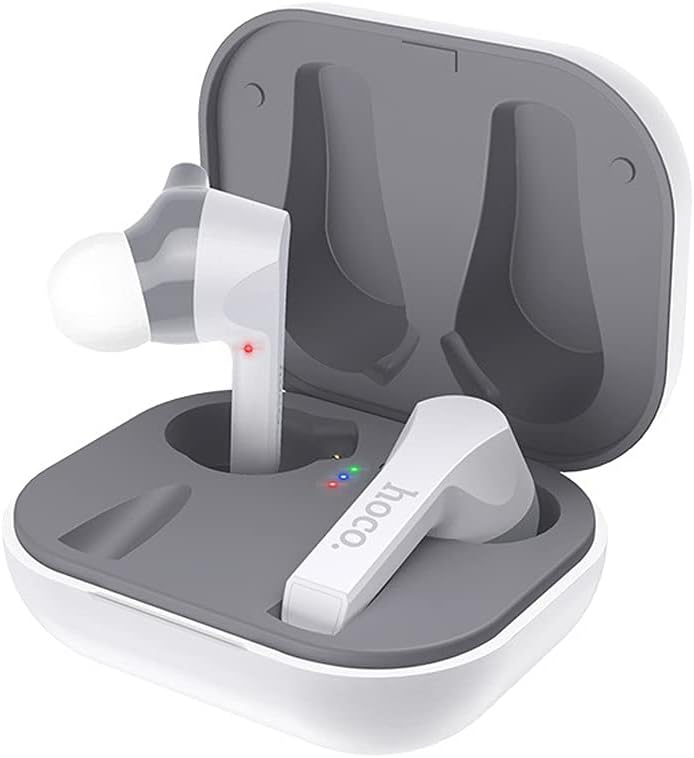
Image: Hoco ES34 Wireless Bluetooth Earphones securely placed within their charging case, indicating charging status with LED lights.
2. פּעקל אינהאַלט
ביטע טשעק די פּאַקעט פֿאַר די פאלגענדע זאכן:
- Hoco ES34 Wireless Bluetooth Earphones (Left and Right)
- טשאַרדזשינג קאַסע
- וסב טשאַרדזשינג קאַבלע
- באַניצער מאַנואַל

Image: The retail packaging for the Hoco ES34 earphones, displaying the product image and key features.
3. סעטאַפּ
3.1 אויפלאָדן די אויערפאָונז און קעסטל
פארן ערשטן באַנוץ, לאָדן די אויערפאָונז און די טשאַרדזשינג קעסטל גאָר אויף.
- לייגט די אויערפאָונז אין דעם טשאַרדזשינג קעסטל. מאַכט זיכער אַז זיי זענען ריכטיק אַרײַנגעזעצט.
- פֿאַרבינדט דעם USB טשאַרדזשינג קאַבל צום טשאַרדזשינג פּאָרט אויף דער קעיס און דעם אַנדערן עק צו אַ USB מאַכט אַדאַפּטער (נישט אַרייַנגערעכנט) אָדער אַ קאָמפּיוטער'ס USB פּאָרט.
- די אינדיקאַטאָר ליכטלעך אויף דער קעסטל וועלן ווייַזן דעם טשאַרדזשינג סטאַטוס. אַמאָל גאָר טשאַרדזשד, וועלן די ליכטלעך אָנווייַזן אַז עס איז געענדיקט אָדער זיך אויסלעשן.
- Charging time for the case is approximately 2 hours. Earphones charge in about 1.5 hours within the case.
3.2 פּאָרן מיט דיין מיטל
Follow these steps to pair your Hoco ES34 earphones with a Bluetooth-enabled device:
- זיכער מאַכן אַז די אויערפאָונז זענען אויפגעלאָדן און געשטעלט אין די טשאַרדזשינג קעסטל.
- Open the charging case. The earphones will automatically enter pairing mode (or manually remove them from the case).
- אויף אייער דעווייס (סמאַרטפאָן, טאַבלעט, אאז"וו), גייט צו בלועטוט סעטטינגס און אַקטיווירט בלועטוט.
- זוכן פֿאַר available devices. You should see "Hoco ES34" or a similar name in the list.
- Select "Hoco ES34" to connect. Once connected, a voice prompt will confirm successful pairing.
- The earphones support master-slave switching, meaning either earphone can be used independently.

Image: The Hoco ES34 earphones positioned next to a smartphone, illustrating their wireless connectivity for audio playback.
4. אַפּערייטינג ינסטרוקטיאָנס
The Hoco ES34 earphones feature touch controls for various functions.
4.1 מאַכט אויף / אַוועק
- מאַכט אויף: Open the charging case, and the earphones will automatically power on. Alternatively, long-press the touch area on both earphones for a few seconds.
- מאַכט אַוועק: Place the earphones back into the charging case and close the lid. Alternatively, long-press the touch area on both earphones for a few seconds until they power off.
4.2 מוזיק פּלייבאַק
- שפּיל / פּויזע: Single tap the touch area on either earphone.
- ווייַטער שפּור: Double tap the touch area on the right earphone.
- פֿריִערדיקע שפּור: Double tap the touch area on the left earphone.
4.3 רוף פאַרוואַלטונג
- ענטפֿערן / סוף רופן: Single tap the touch area on either earphone.
- אָפּוואַרפן רופן: Long-press the touch area on either earphone for 2 seconds.
4.4 Voice Assistant (Siri)
- אַקטאַווייט קול אַססיסטאַנט: Triple tap the touch area on either earphone to activate your device's voice assistant (e.g., Siri, Google Assistant).
5. וישאַלט און קער
Proper care will extend the life of your Hoco ES34 earphones.
- רייניקונג: ניצט אַ ווייכע, טרוקענע, לינט-פֿרייע שטאָף צו רייניקן די אויערפֿאָנען און די טשאַרדזשינג קעסטל. ניצט נישט קיין שאַרפֿע כעמיקאַלן אָדער אַברייסיוו מאַטעריאַלן.
- סטאָרידזש: When not in use, store the earphones in their charging case to protect them from dust and damage. Keep them in a cool, dry place.
- באַטערי זאָרגן: כדי צו שפּאָרן די באַטאַרייע לעבן, זאָלט איר נישט אָפט גאָר אויסלאָדן די אויערפאָונז און קעסטל. לאָדט זיי רעגולער אויף, אפילו אויב זיי ווערן נישט קעסיידער גענוצט.
- וואַסער קעגנשטעל: The earphones are not waterproof. Avoid exposure to water, sweat, or high humidity.
6. טראָובלעשאָאָטינג
If you encounter issues with your Hoco ES34 earphones, refer to the table below for common problems and solutions.
| פּראָבלעם | מעגלעך סיבה | לייזונג |
|---|---|---|
| די אויערפאָונז פאַרבינדן זיך נישט מיטן אַפּאַראַט. | Bluetooth is off on device; earphones not in pairing mode; interference. | Ensure Bluetooth is on. Place earphones in case, then open to re-enter pairing mode. Move closer to device. Forget device in Bluetooth settings and re-pair. |
| קיין קלאַנג פֿון איין אָדער ביידע אויערפֿאָנען. | Earphones not connected; low battery; volume too low. | Check Bluetooth connection. Charge earphones. Increase volume on device. |
| די טשאַרדזשינג קעיס טשאַרדזשט זיך נישט. | דעפעקטיווער קאַבל/אַדאַפּטער; שמוציק טשאַרדזשינג פּאָרט. | Try a different USB cable and power adapter. Clean the charging port gently. |
| ריר קאָנטראָלס ריספּאַנד נישט. | Incorrect touch gesture; temporary software glitch. | Ensure you are using the correct touch gesture. Place earphones back in case, close, then reopen to reset. |
7. ספּעסאַפאַקיישאַנז
Detailed technical specifications for the Hoco ES34 Wireless Bluetooth Earphones:
| שטריך | באַשרייַבונג |
|---|---|
| בלועטאָאָטה ווערסיע | 5.0 |
| בלועטאָאָטה טשיפּ | Jerry 6936D |
| טשאַרדזשינג קאַסע באַטאַרייע קאַפּאַציטעט | 400 מאַה |
| ירפאָון באַטערי קאַפּאַציטעט | 55 מאַה (יעדער) |
| טשאַרדזשינג צייט (קאַסע) | בעערעך. 2 שעה |
| טשאַרדזשינג צייט (אויערפאָונז) | בעערעך. 1.5 שעה |
| Call/Music Playback Time | בעערעך. 5 שעה |
| סטאַנדביי צייט | בעערעך. 100 שעה |
| גאַנץ וואָג | 41 גראַמז |
| פּעקל דימענשאַנז | 17.6 X 11.2 X 4.6 סענטימעטער |
| קאָליר | ווייַס |
| כעדפאָונז פאָרעם פאַקטאָר | אין אויער |
| ראַש קאָנטראָל | אַקטיוו ראַש קאַנסאַליישאַן |
| אַרייַנגערעכנט קאַמפּאָונאַנץ | טשאַרדזשינג קאַבלע |
8. וואָראַנטי און שטיצן
Hoco products are designed and manufactured to the highest quality standards. For information regarding warranty coverage, technical support, or service inquiries, please refer to the warranty card included with your product or visit the official Hoco webפּלאַץ.
ביטע באַהאַלטן אייער קויפן-באַווייַז פֿאַר יעדע וואָראַנטי-פאָדערונג.


