1. הקדמה און איבערview
The Hercules DJControl Inpulse 500 is a 2-deck USB DJ controller designed for aspiring and performing DJs. It features a built-in audio interface and hardware input mixer, offering comprehensive control for mixing audio. The controller is compatible with Serato DJ and DJUCED software.
Key features include high-definition jog wheels with touch detection, 16 backlit RGB pads for performance, and a dedicated Filter/FX area for smooth transitions. The unit is also designed with retractable feet for improved ergonomics and protection.
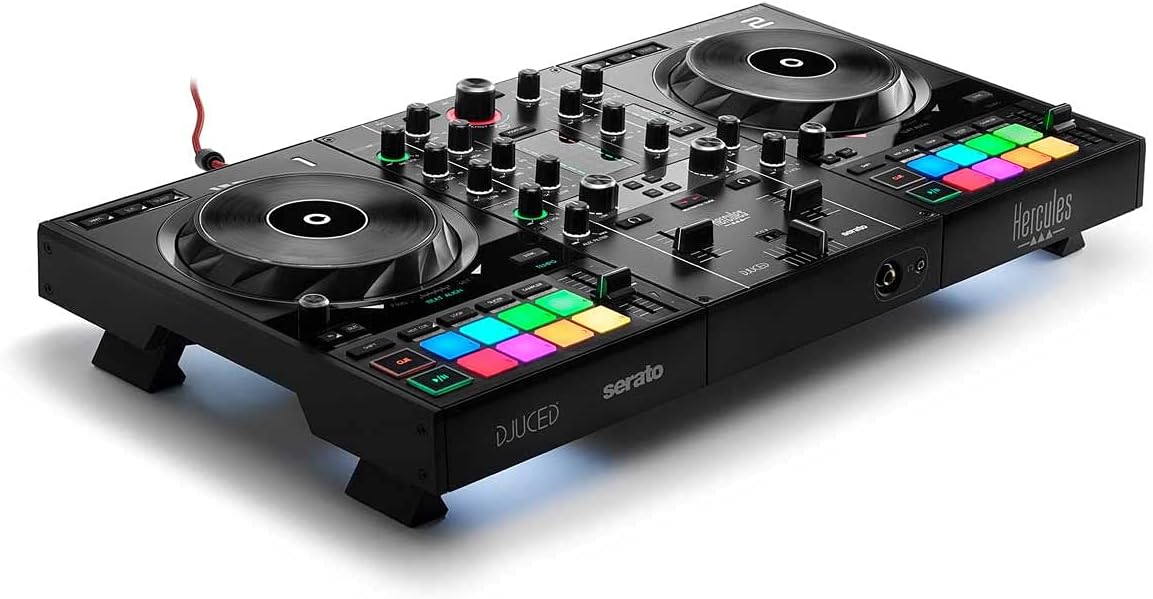
Figure 1: Hercules DJControl Inpulse 500 DJ Controller
This image displays the overall design of the Hercules DJControl Inpulse 500, highlighting its two decks, central mixer, and performance pads.
2. וואָס איז אין דער קעסטל
Upon unboxing your Hercules DJControl Inpulse 500, please ensure all the following items are present:
- DJ Deck (Hercules DJControl Inpulse 500)
- וסב קאַבלע
- באַזיצער ס מאַנואַל
3. סעטאַפּ
3.1. קאַנעקטינג די קאָנטראָללער
To begin using your DJControl Inpulse 500, connect it to your computer and audio system as follows:
- Connect the supplied USB cable from the controller's USB port to an available USB port on your computer.
- Connect your speakers to the MASTER output (RCA) on the rear of the controller.
- For monitoring, plug your headphones into the headphone jack on the front of the controller.
- (Optional) Connect a microphone to the unbalanced MIC input on the rear panel.

פיגור 2: הינטערשטע פּאַנעל קאַנעקשאַנז
This image illustrates the rear panel of the DJControl Inpulse 500, showing the USB, Master (RCA), and Microphone input connections.
3.2. ווייכווארג ינסטאַלירונג
The Hercules DJControl Inpulse 500 is designed for use with Serato DJ and DJUCED software. Please download and install the latest versions of your preferred DJ software from the official webזייטלעך.

Figure 3: Software Compatibility
This image highlights the compatibility of the DJControl Inpulse 500 with DJUCED and Serato DJ Lite software.
4. אַפּערייטינג ינסטרוקטיאָנס
4.1. איבערview פון קאָנטראָלס
The DJControl Inpulse 500 features a standard 2-deck layout with a central mixer section. Familiarize yourself with the main components:
- דזשאַג ווילז: Large, touch-sensitive jog wheels for scratching and track navigation.
- פאָרשטעלונג פּאַדס: 16 backlit RGB pads for triggering hot cues, loops, samples, and effects.
- מיקסער אָפּטיילונג: Includes gain, EQ (High, Mid, Low), filter, and volume faders for each deck, along with a crossfader.
- Filter/FX Area: Dedicated controls for applying filters and effects to your mix.
- Beatmatch Guide: Visual guides to assist with manual beatmatching.

פיגור 4: אויבערשטער פּאַנעל אויסלייג
דאס בילד גיט א קלארע פון אויבן אראפ view of the controller, showing the layout of all buttons, knobs, and jog wheels.
4.2. גרונטלעכע מישונג
- Loading Tracks: Use the Browse knob to navigate your music library in Serato DJ or DJUCED. Press the LOAD buttons (1 or 2) to assign tracks to the respective decks.
- Playing and Pausing: Use the Play/Pause buttons located below each jog wheel.
- Beatmatching: Adjust the tempo faders and use the jog wheels to align the beats of two tracks. The Beatmatch Guide LEDs will assist you in achieving perfect synchronization.
- EQ and Filter: Use the EQ knobs (High, Mid, Low) to adjust the frequency balance of each track. The Filter knob allows for creative frequency sweeps.
- קראָסספאַדער: Blend between Deck 1 and Deck 2 using the central crossfader.

Figure 5: Beatmatch Guide on Jog Wheel
This close-up shows the jog wheel and the Beat Align guide, which illuminates to indicate when tracks are synchronized.
4.3. פאָרשטעלונג פֿעיִקייטן
- הייסע קיוז: Use the performance pads to set and trigger cue points within your tracks.
- לופּס: Create instant loops using the dedicated loop buttons (Loop In/Loop Out).
- Sampלער: טריגער פאַר-לאָודיד samples using the performance pads in sampלער מאָדע.
- עפעקטן: Apply various effects using the FX paddles and buttons in the Filter/FX area.

Figure 6: Performance Pads and Filter/FX
This image details the multi-colored performance pads and the intuitive Filter/FX controls.
5. שליסל פֿעיִקייטן
- Integrated Audio Interface: Provides high-quality audio output directly from the controller, eliminating the need for external sound cards.
- Hardware Input Mixer: Allows for direct connection of external audio sources, such as a microphone, independent of the computer.
- High-Definition Jog Wheels: Large, touch-sensitive jog wheels offer precise control for scratching and track manipulation.
- RGB Performance Pads: 16 backlit pads provide tactile feedback and visual cues for triggering various performance modes.
- Retractable Feet: Unique design feature that elevates the controller, improving ergonomics and protecting it from spills.
Figure 7: Retractable Feet
This image shows the DJControl Inpulse 500 with its retractable feet extended, demonstrating how it can be elevated.
6. וישאַלט
- רייניקונג: ניצט אַ ווייכע, טרוקענע שטאָף צו רייניקן די ייבערפלאַך פון דעם קאָנטראָללער. פֿאַרמייַדט אַברייסיוו רייניגער אָדער סאָלווענטן.
- סטאָרידזש: Store the controller in a dry, dust-free environment. If transporting, use a protective case.
- קאַבלע זאָרגן: Handle USB and audio cables carefully to prevent damage. Avoid sharp bends or excessive pulling.
7. טראָובלעשאָאָטינג
- קיין מאַכט / קשר: Ensure the USB cable is securely connected to both the controller and your computer. Try a different USB port or cable.
- קיין קול: Check all audio connections (Master output to speakers, headphones). Verify that the volume levels on the controller and in your software are not muted or too low. Ensure the correct audio device is selected in your DJ software settings.
- ווייכווארג דערקענט נישט קאנטראלער: Restart your computer and DJ software. Ensure the latest drivers (if required) and software updates are installed.
8. ספּעסאַפאַקיישאַנז
| שטריך | דעטאַל |
|---|---|
| סאָרט | הערקולעס |
| מאָדעל נומער | 4780909 |
| פּונקט וואָג | 10.44 פונט |
| פּראָדוקט דימענשאַנז | 10.54 X 20.26 X 5.12 אינטשעס |
| ייַזנוואַרג צובינד | וסב |
| מאַטעריאַל טיפּ | מעטאַל, פּלאַסטיק |
| מאַכט מקור | קאָרדעד עלעקטריק |
| נומער פון טשאַנאַלז | 2 |
| קאַנעקטיוויטי טעכנאָלאָגיע | וסב |
9. אפיציעלע פּראָדוקט ווידעאָס
Hercules DJ Lifestyle Video
This video showcases the Hercules DJControl Inpulse 500 in various lifestyle settings, demonstrating its portability and ease of use for different DJ scenarios.
Hercules DJControl Inpulse 500 Overview
דאס ווידעא גיט א דעטאלירטע איבערזיכטview of the Hercules DJControl Inpulse 500, highlighting its features and functionalities for effective DJ performance.
10. וואָראַנטי און שטיצן
For detailed warranty information and technical support, please refer to the official Hercules webזייטל אדער קאנטאקט זייער קאסטומער סערוויס. האלט אייער קויף קוויטל אלס באווייז פון קויפן.


