1. הקדמה
א דאנק פארן קויפןasing the TWS i17 Dual Earbuds. This manual provides essential information for setting up, operating, and maintaining your new wireless earbuds. Please read this manual thoroughly before use to ensure optimal performance and longevity of your device.
2. זיכערקייַט אינפֿאָרמאַציע
To prevent damage to your earbuds or injury to yourself or others, please observe the following precautions:
- שטעלט נישט אויס די אויערן-קנעפּלעך אדער טשאַרדזשינג קעסטל צו עקסטרעמע טעמפּעראַטורן, הומידיטי, אדער פליסיקייטן.
- פֿאַרמײַדט צו פֿאַלן, קלאַפּן אָדער צענעמען דאָס אַפּאַראַט.
- Do not use abrasive cleaners or solvents. Clean with a soft, dry cloth.
- הערט אויף מיטלמעסיגע קול לעוועלס צו פארמיידן הערן שאדן.
- האַלטן אויס פון דערגרייכן פון קינדער.
- This product is not water resistant. Avoid exposure to water or excessive moisture.
3. פּעקל אינהאַלט
באַשטעטיקן אַז אַלע זאכן זענען פאַראַן אין דיין פּעקל:
- TWS i17 Dual Earbuds (Left and Right)
- טשאַרדזשינג קאַסע
- וסב טשאַרדזשינג קאַבלע
- באַניצער מאַנואַל

Image: The TWS i17 Dual Earbuds, with one earbud partially removed from its charging case, showcasinג דעם גלאַטן שוואַרצן דיזיין.
4. סעטאַפּ
4.1 אויפלאָדן די אויערקנעפּלעך און קעסטל
פארן ערשטן באַנוץ, לאָדן די אויערקנעפּלעך און די טשאַרדזשינג קעסטל גאָר אויף.
- לייגט ביידע אויערקנעפּלעך אין דעם טשאַרדזשינג קעסטל. מאַכט זיכער אַז זיי זענען ריכטיק אַרײַנגעזעצט.
- Connect the USB charging cable to the charging port on the bottom of the case and the other end to a USB power source (e.g., computer, wall adapter).
- The indicator light on the case will show charging status. It will turn off or change color when fully charged.
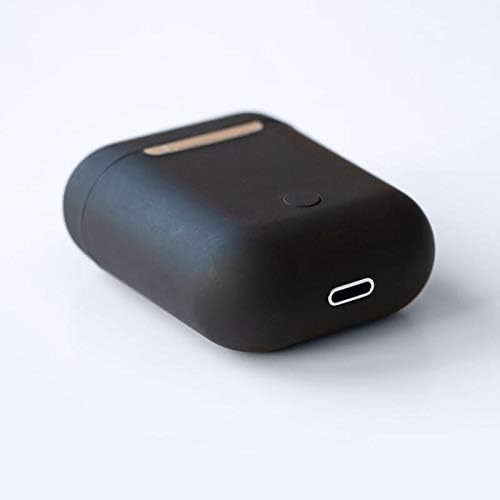
בילד: א נאָענטע בילד view of the bottom of the TWS i17 charging case, highlighting the USB charging port and a small button.
4.2 פּאָרן מיט דיין מיטל
The i17 earbuds use Bluetooth for wireless connection.
- מאַכן זיכער אַז די עאַרבודז זענען באפוילן.
- עפֿנט דעם טשאַרדזשינג קעסטל. די אויערקנעפּלעך וועלן אויטאָמאַטיש אַרײַן אין פּערינג מאָדע (די אינדיקאַטאָר ליכט וועלן בליצן).
- On your mobile phone or Bluetooth-enabled device, go to Bluetooth settings and turn Bluetooth on.
- זוכן פֿאַר available devices. Select "i17" from the list.
- Once connected, the indicator lights on the earbuds will stop flashing. You are now ready to use your earbuds.

Image: The TWS i17 Dual Earbuds resting inside their open charging case, ready for pairing or use.
5. אַפּערייטינג ינסטרוקטיאָנס
5.1 מאַכט אויף / אַוועק
- מאַכט אויף: Take the earbuds out of the charging case. They will automatically power on and connect to the last paired device.
- מאַכט אַוועק: לייגט די אויערקנעפּלעך צוריק אין די טשאַרדזשינג קעסטל. זיי וועלן זיך אויטאָמאַטיש אויסלעשן און אָנהייבן טשאַרדזשינג.
5.2 מוזיק פּלייבאַק
- שפּיל / פּויזע: צאַפּן איין עאַרבוד אַמאָל.
- ווייַטער שפּור: טאָפּל צאַפּן אויף די רעכט עאַרבוד.
- פֿריִערדיקע שפּור: טאָפּל צאַפּן אויף די לינקס עאַרבוד.
5.3 רוף פאַרוואַלטונג
- ענטפֿערן / סוף רופן: צאַפּן איין עאַרבוד אַמאָל.
- אָפּוואַרפן רופן: דריקן און האַלטן יעדער עאַרבוד פֿאַר 2 סעקונדעס.
5.4 ווויס אַססיסטאַנט
- אַקטיווירן שטימע אַסיסטאַנט (סירי/גוגל אַסיסטאַנט): דריי מאָל צאַפּן אויף יעדער עאַרבוד.
6. וישאַלט
Proper maintenance ensures the longevity of your earbuds:
- רייניקונג: Use a soft, dry, lint-free cloth to clean the earbuds and charging case. Do not use liquids or sprays.
- סטאָרידזש: ווען נישט אין באַנוץ, לייגט די אויערן-קנעפּלעך אין זייער טשאַרדזשינג קעסטל צו באַשיצן זיי און האַלטן זיי טשאַרדזשד. לייגט זיי אין אַ קיל, טרוקן אָרט.
- באַטערי זאָרגן: כדי צו פארלענגערן די לעבן פון די באַטעריעס, זאָלט איר נישט אָפט אויסלאָדן די אויערקנעפּלעך. לאָדט זיי אָפט אויף.

Image: The TWS i17 Dual Earbuds securely stored within their closed charging case, ready for transport or charging.
7. טראָובלעשאָאָטינג
| פּראָבלעם | מעגלעך סיבה | לייזונג |
|---|---|---|
| עאַרבודס נישט פּערינג | Low battery; Out of range; Not in pairing mode; Bluetooth off on device. | Charge earbuds; Move closer to device; Ensure case is open for pairing; Turn on Bluetooth on device. |
| בלויז איין עאַרבוד אַרבעט | One earbud not charged; Earbuds not properly synced. | Ensure both earbuds are charged; Place both earbuds back in case, close, then reopen to re-sync. |
| קיין געזונט | Volume too low; Not connected; Media paused. | Increase volume on device; Reconnect earbuds; Check media playback status. |
| טשאַרדזשינג פאַל ניט טשאַרדזשינג | Faulty cable/adapter; Loose connection. | Try a different USB cable or power adapter; Ensure cable is securely plugged in. |
8. ספּעסאַפאַקיישאַנז
| שטריך | דעטאַל |
|---|---|
| מאָדעל נומער | i17 |
| סאָרט | TWS |
| קאַנעקטיוויטי טעכנאָלאָגיע | ווירעלעסס (בלועטאָאָטה) |
| כעדפאָונז פאָרעם פאַקטאָר | אין אויער |
| מיקראָפאָן אַרייַנגערעכנט | יא |
| ראַש קאַנסאַלינג | ניין |
| קאַמפּאַטאַבאַל מיט | מאָביל פאָנעס |
| קאָליר | שוואַרץ |
| מאַטעריאַל | פּלאַסטיק |
| קאַבלע שטריך | קאַבל-פֿרײַ |
| וואַסער קעגנשטעל מדרגה | ניט וואַסער קעגנשטעליק |
| שיפּינג דימענשאַנז | 12.6 X 8.8 X 3.6 סענטימעטער |
| וואָג | 96 גראַמז |
| ערשטער בנימצא טאָג | 15 יאנואר 2020 |
9. וואָראַנטי און שטיצן
For warranty information and customer support, please refer to the contact details provided on the product packaging or the official TWS webזייטל. האַלט דיין קויפן באַווייַז פֿאַר וואָראַנטי קליימז.
For further assistance, please contact TWS customer service.


