1. הקדמה
This manual provides detailed instructions for the safe and effective operation of your PIXEL G1s RGB Video Light. Please read this manual thoroughly before use and retain it for future reference. The PIXEL G1s is a versatile and portable RGB video light designed for various photography and videography applications, featuring app control, a high-capacity battery, and multiple lighting effects.
2. פּעקל אינהאַלט
באַשטעטיקט אַז אַלע זאכן וואָס זענען אויסגערעכנט אונטן זענען אַרייַנגערעכנט אין אייער פּעקל. אויב עפּעס פעלנדיק אָדער צעבראָכן, ביטע קאָנטאַקט אייער הענדלער.
- 1 x PIXEL G1s RGB Video Light
- 1 x 1/4” Screw
- 1 x Ball Head Adapter
- 1 X Type-C טשאַרדזשינג קאַבלע
- 1 x באַניצער מאַנואַל

Image: Contents of the PIXEL G1s package.
3. פּראָדוקט פֿעיִקייטן
- באַקוועם אַפּ קאָנטראָל: Adjust hue (0-359°), saturation (0-100%), brightness (0-100%), and color temperature (2500K-8500K) via smartphone.
- הויך-קאַפּאַציטעט באַטערי: Built-in 6400mAh battery provides over 210 minutes of runtime at 100% brightness. Full charge in approximately 2.5 hours via USB Type-C.
- ווערסאַטאַל מאַונטינג: 360° rotating arm with cold shoe allows for flexible positioning on cameras, microphones, or smartphones.
- Precision LCD Display: Intuitive screen provides real-time readings of settings and battery level.
- 10 Scene Effects: Pre-programmed lighting effects for various creative scenarios.
- דוראַבאַל קאַנסטראַקשאַן: Aluminum alloy body ensures longevity and portability.

בילד: איבערview of the PIXEL G1s RGB Video Light.
4. סעטאַפּ
4.1 ערשט טשאַרדזשינג
Before first use, fully charge the PIXEL G1s using the provided Type-C charging cable. Connect the cable to the USB Type-C port on the device and a compatible USB power source. The LCD display will indicate charging status.

Image: Charging the PIXEL G1s via USB Type-C.
4.2 Attaching the Ball Head Adapter
The included ball head adapter allows for versatile mounting. Screw the 1/4” screw into the bottom of the light, then attach the ball head adapter to the screw. This assembly can then be mounted onto tripods, light stands, or camera hot shoes.

Image: Demonstrating the 360° rotating arm and mounting options.
5. אַפּערייטינג ינסטרוקטיאָנס
5.1 מאַכט אויף / אַוועק
To power on the device, slide the power switch located on the side of the unit. To power off, slide the switch back to the OFF position.
5.2 קאָנטראָלן און אַרויסווייַזונג
The PIXEL G1s features an intuitive LCD display on the back and control dials/buttons on the side for easy adjustment.

Image: LCD display and control buttons.
5.3 מאָדעס פון אָפּעראַציע
The light offers several modes for different lighting needs:
- CCT Mode (Color Temperature): Adjust brightness from 0-100% and color temperature from 2500K (warm) to 8500K (cool).
- RGB מאָדע: Adjust hue (0-359°), saturation (0-100%), and brightness (0-100%) to achieve any desired color.
- Special Effects Mode: Choose from 10 pre-programmed scene effects like lightning, ambulance, police, fire truck, candle light, and more.

Image: Visual guide for brightness, color temperature, and RGB adjustments.
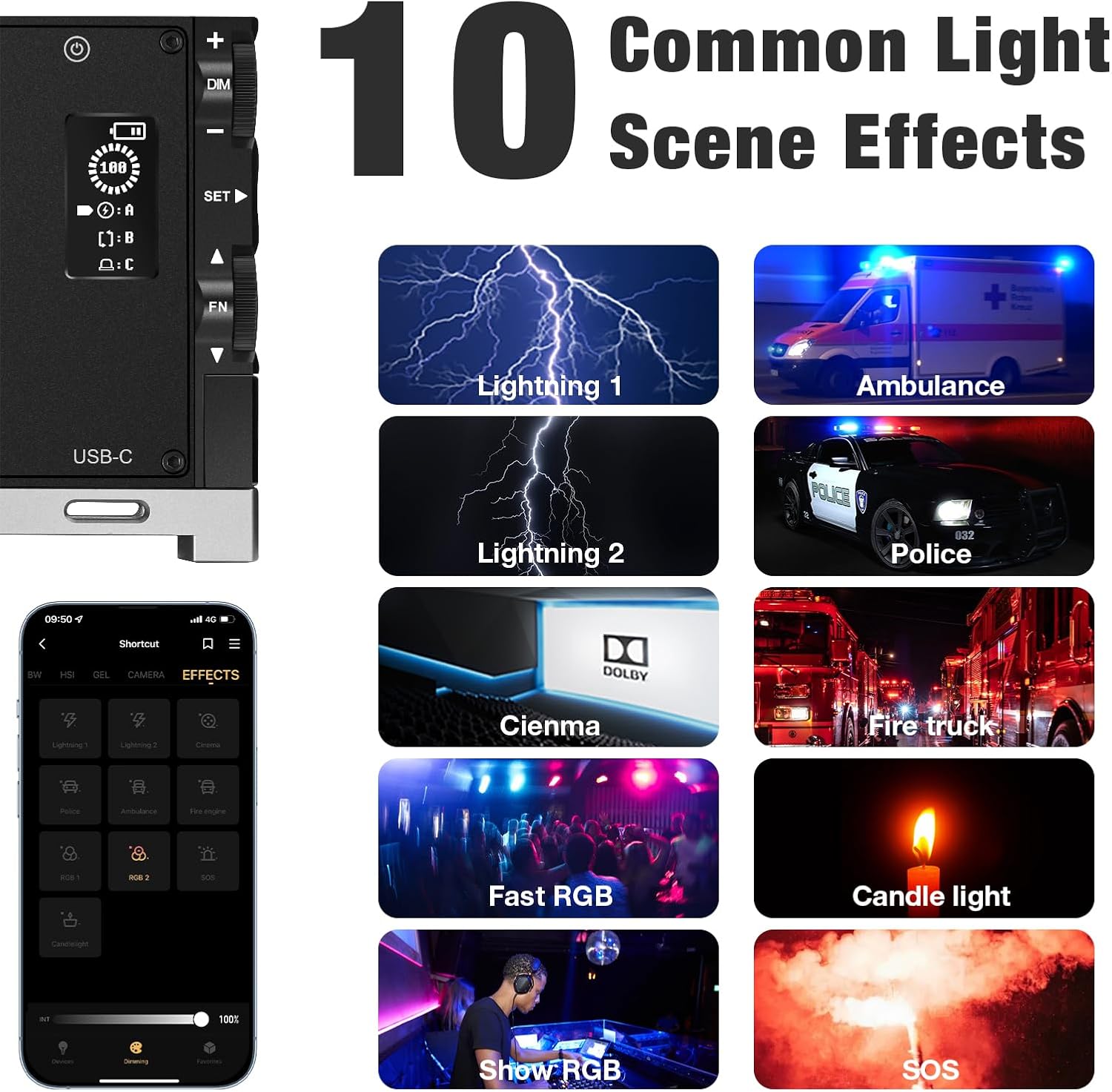
בילד: עקסamples of the 10 common light scene effects.
5.4 אַפּ קאָנטראָל
Download the official PIXEL app to control the G1s light wirelessly via your smartphone. The app provides comprehensive control over all settings and effects, offering enhanced flexibility.

Image: Smartphone app interface for wireless control.
Official Product Video: PIXEL G1s RGB Video Light Overview
דאס ווידעא גיט א קורצע איבערבליקview of the PIXEL G1s RGB Video Light's features and functionality.
6. טשאַרדזשינג און באַטאַרייע
The PIXEL G1s is equipped with a 6400mAh rechargeable Lithium-Ion battery. A full charge takes approximately 2.5 hours using the provided USB Type-C cable. The battery provides up to 210 minutes of continuous use at 100% brightness. The device includes built-in overheating protection for safe operation.
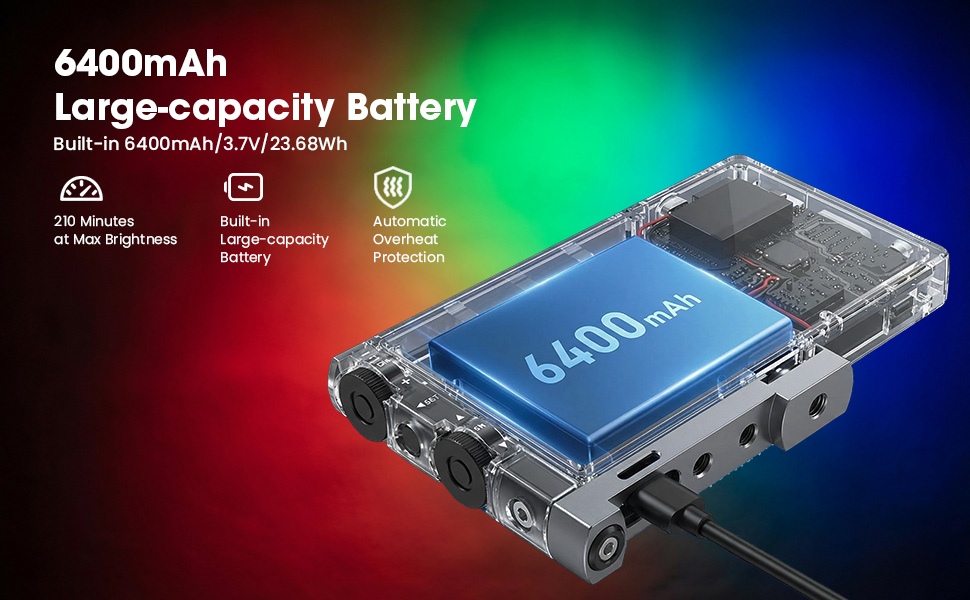
Image: Battery specifications and charging details.
7. מאַונטינג אָפּציעס
The PIXEL G1s is designed for flexible mounting:
- 1/4” Screw Hole: Standard screw hole for attaching to tripods, light stands, or other photography accessories.
- Ball Head Adapter: Use the included ball head adapter for 360° rotation and tilt, allowing precise light positioning.
- קאלט שוך בארג: The rotating arm features a cold shoe mount for attaching to cameras or other compatible devices.

Image: Different mounting and positioning examples.
8. וישאַלט
- Keep the device dry. Do not expose it to moisture or rain.
- Clean the light panel and body with a soft, dry cloth. Avoid using harsh chemicals or abrasive materials.
- סטאָר די מיטל אין אַ קיל, טרוקן אָרט ווען ניט אין נוצן.
- ויסמיידן דראַפּינג אָדער אונטערטעניק די מיטל צו שטאַרק ימפּאַקץ.
9. טראָובלעשאָאָטינג
- ליכט נישט קערן אויף: Ensure the battery is charged. Check the power switch position.
- אַפּ קאַנעקשאַן פּראָבלעמען: Ensure Bluetooth is enabled on your smartphone and the light. Restart both the app and the light.
- Inconsistent brightness/color: Check the settings on the LCD display or within the app. Ensure the device is not in a low power state.
10. ספּעסאַפאַקיישאַנז
| באַשרייַבונג | דעטאַל |
|---|---|
| סאָרט | פּיקסעל |
| מאָדעל נומער | G1s |
| פּראָדוקט דימענשאַנז | 5.1"ל x 0.6"ברייט x 2.1"ה (5.1 x 0.6 x 2.7 אינטשעס) |
| פּונקט וואָג | 1.06 פונט |
| באַטערי טיפּ | 1 ליטהיום יאָן באַטאַרייע (אַרייַנגערעכנט) |
| באַטאַרייע קאַפּאַציטעט | 6400 מאַה |
| באַטאַרייע לעבן (100% ברייטנאַס) | קסנומקס מינוט |
| טשאַרדזשינג צייט | בעערעך. 2.5 שעה |
| קאָליר טעמפּעראַטור ראַנגע | 2500K-8500K |
| קאַנעקטיוויטי טעכנאָלאָגיע | וסב |
| ייַזנוואַרג צובינד | וסב |
11. וואָראַנטי און שטיצן
For warranty information and customer support, please refer to the official PIXEL webזייטל אדער קאָנטאַקט אייער הענדלער. האַלט אייער קויף קוויטל ווי אַ באַווייַז פון קויפן.


