1. הקדמה און איבערview
The OSD Audio MX1680 GEN2 is a high-performance, multi-channel amplifier designed for distributed audio systems. This Class D amplifier provides 16 channels across 8 independent zones, delivering 80 Watts per channel into 4 Ohms or 50 Watts per channel into 8 Ohms. It is suitable for both residential and commercial audio installations, serving as a main amplifier for multi-room audio or integrating into home theater systems.
Key features include front-panel on/off buttons for each zone, efficient Class D amplification for low distortion, and built-in protection circuitry against thermal overload and short circuits. Its slim, 2U rack-mountable design (hardware included) allows for flexible installation.

בילד 1.1: פאָרנט און הינטן view of the OSD Audio MX1680 GEN2 Multi-Zone Digital Ampליפער.
2. זיכערקייַט אינפֿאָרמאַציע
Please read and understand all safety instructions before operating this device. Retain this manual for future reference.
- מאַכט מקור: פאַרבינדן די amplifier only to the type of power source indicated on the unit. Ensure the voltage איז ריכטיק פֿאַר דיין געגנט.
- ווענטילאַטיאָן: Do not block any ventilation openings. Install in accordance with the manufacturer's instructions. Maintain adequate space around the unit for proper airflow.
- וואַסער און נעץ: שטעלט נישט אויס דעם אַפּאַראַט צו רעגן אָדער פייכטקייט. שטעלט נישט קיין זאכן אָנגעפילט מיט פליסיקייטן, ווי וואַזעס, אויף דעם אַפּאַראַט.
- היץ: דו זאלסט נישט ינסטאַלירן לעבן קיין היץ קוואלן אַזאַ ווי ראַדיאַטאָרס, היץ רעדזשיסטערז, סטאָוווז אָדער אנדערע אַפּאַראַט (אַרייַנגערעכנט ampליפיערס) וואָס פּראָדוצירן היץ.
- גראָונדינג: This appliance must be grounded. Ensure the power cord is connected to a properly grounded outlet.
- סערוויס: דו זאלסט נישט פּרווון צו דינען דעם פּראָדוקט זיך. קאָנטאַקט אַלע קוואַלאַפייד סערוויס פּערסאַנעל.
- רייניקונג: נעמט ארויס דעם אַפּאַראַט פֿון דער עלעקטרישער אַוטלעט איידער איר רייניגט. ניצט אַ טרוקענעם שטאָף פֿאַר רייניגן.
3. סעטאַפּ און ייַנמאָנטירונג
3.1 אַנפּאַקינג
קערפאַלי אַראָפּנעמען די amplifier from its packaging. Verify that all components listed in the 'What's in the Box' section are present. This includes the MX1680 GEN2 amplifier and the Quick Start Guide.
3.2 פּלייסמאַנט
The MX1680 GEN2 is designed for rack mounting (2U height) or placement on a flat, stable surface. Ensure adequate ventilation around the unit to prevent overheating. Avoid placing it near other heat-generating equipment.
3.3 קאַנעקשאַנז
Refer to the rear panel diagram for all input and output connections.
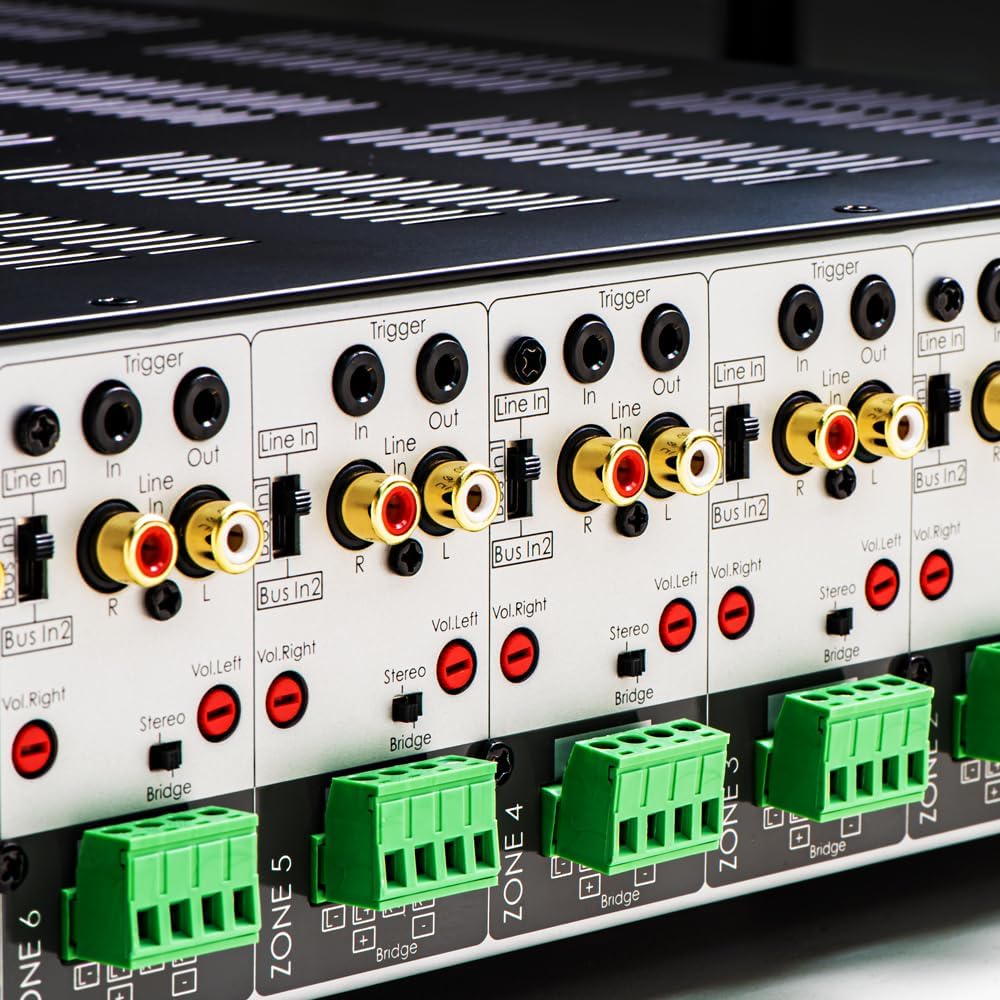
בילד 3.1: דעטאַלירט view of the rear panel input and output connections.
- רעדנער אַוטפּוץ: Connect your speakers to the corresponding zone terminals. Ensure correct polarity (+ to + and - to -). The amplifier supports both 4-ohm and 8-ohm speakers. For bridged mode operation, refer to section 4.3.
- ליניע איינגאבעס (RCA): Each zone has a dedicated stereo RCA Line In. Connect your audio sources (e.g., pre-amplifier, media player) to these inputs.
- Bus Inputs (RCA): די amplifier features two stereo Bus Inputs (Bus In 1, Bus In 2). These allow a single audio source to be distributed to multiple zones.
- שורה אַוטפּוץ (RCA): Each zone also has a stereo RCA Line Out, allowing the audio signal from that zone to be passed to another ampליפיער אָדער אַודיאָ מיטל.
- טריגער אין/אויס: The 12V Trigger In allows the amplifier to be turned on/off by an external device. The 12V Trigger Out can be used to control other devices.
- אַק מאַכט אַרייַנשרייַב: Connect the supplied power cord to the AC IN receptacle and then to a suitable wall outlet.

בילד 3.2: דעטאַלירט view of Bus inputs and Trigger connections on the rear panel.
4. אַפּערייטינג ינסטרוקטיאָנס
4.1 מאַכט אויף / אַוועק
דריק דעם הויפּט מאַכט קנעפּל אויף דער פראָנט פּאַנעל צו דרייען די amplifier on or off. A red LED indicator will illuminate when the unit is powered on.

Image 4.1: Front panel power button.
4.2 זאָנע קאָנטראָל
Each of the 8 zones has a dedicated button on the front panel. Pressing a zone button will activate or deactivate that specific audio zone. The corresponding LED will indicate the zone's status.

Image 4.2: Front panel zone selection buttons.
4.3 Input Selection and Volume Adjustment
On the rear panel, each zone features switches for input selection and rotary controls for volume adjustment:
- איינגאבע סעלעקטאר: A slide switch allows you to select the audio input for each zone: שורה אין (dedicated input for that zone), Bus In 1, אָדער Bus In 2.
- באנד קאָנטראָלס: Separate rotary controls for Left and Right channels (Vol. Left, Vol. Right) allow for precise volume balancing within each zone.
- סטערעאָ/בריק סוויטש: A switch allows you to configure the zone for stereo operation or bridged mono operation. In bridged mode, two amplifier channels combine to deliver higher power to a single speaker. Ensure the speaker impedance is appropriate for bridged mode (typically 8 ohms minimum).
4.4 Audio Sensing
די amplifier incorporates an audio sense feature that automatically activates a zone when an input signal is detected and turns it off after a period of no signal. This helps conserve power and prolong the unit's lifespan.

בילד 4.3: עקס.ample of multi-zone audio distribution with the ampליפער.
5. וישאַלט
The OSD Audio MX1680 GEN2 amplifier requires minimal maintenance. Follow these guidelines to ensure optimal performance and longevity:
- רייניקונג: Periodically wipe the exterior surfaces with a soft, dry cloth. Do not use liquid cleaners or aerosol sprays, as they may damage the finish or internal components.
- ווענטילאַטיאָן: Ensure that the ventilation openings on the top and sides of the unit remain clear of dust and obstructions. Dust accumulation can impede airflow and lead to overheating.
- פֿאַרבינדונגען: Occasionally check all cable connections to ensure they are secure and free from corrosion. Loose connections can lead to signal loss or degradation.
- סטאָרידזש: אויב סטאָרינג די amplifier for an extended period, disconnect it from power and store it in a cool, dry place, away from direct sunlight and extreme temperatures.
6. טראָובלעשאָאָטינג
If you experience issues with your MX1680 GEN2 amplifier, consult the following troubleshooting guide. For problems not resolved here, please contact OSD Audio support.
| פּראָבלעם | מעגלעך סיבה | לייזונג |
|---|---|---|
| קיין מאַכט | Power cord disconnected; Power outlet faulty; Ampליפיער פיוז צעבראכן | קאָנטראָלירט די פֿאַרבינדונג פֿון דער עלעקטרישער שנור; פּרובירט די אַוטלעט מיט אַן אַנדער אַפּאַראַט; קאָנטאַקטירט די סערוויס פֿאַר אַ פֿיוז-טויש. |
| קיין קלאַנג פֿון אַ זאָנע | Zone not activated; Incorrect input selected; Source device off/muted; Speaker wires loose/incorrectly connected; Volume too low | Press the zone button on the front panel; Verify input selector switch position; Check source device; Inspect speaker connections; Adjust zone volume controls. |
| פאַרקרימט געזונט | Input signal too high; Speaker impedance mismatch; Faulty speaker cable; Ampליפער אָוווערכיטינג | Reduce source device output level; Ensure correct speaker impedance (4 or 8 ohms, or 8 ohms for bridged); Check speaker cables; Ensure proper ventilation. |
| Amplifier shuts off unexpectedly | Overheating; Short circuit in speaker wiring; Protection circuit activated | Ensure proper ventilation; Check all speaker wiring for shorts; Allow unit to cool down before restarting. |
7. ספּעסאַפאַקיישאַנז
| שטריך | באַשרייַבונג |
|---|---|
| מאָדעל נומער | MX1680-GEN2 |
| טשאַנאַלז | 16 Channels (8 Zones) |
| מאַכט רעזולטאַט (4 אָום) | 80 Watts per channel (1KHz) |
| מאַכט רעזולטאַט (8 אָום) | 50 Watts per channel (1KHz) |
| Ampליפיער קלאַס | קלאַס די |
| פּראָדוקט דימענשאַנז (L x W x H) | 16.81 X 16.14 X 3.46 אינטשעס |
| פּונקט וואָג | 23 פונט |
| געשטעל מאַונטאַבאַל | Yes (2U, hardware included) |
| פאַבריקאַנט | OSD אַודיאָ |
| ערשטער דאַטע בנימצא | 31 יאנואר 2020 |
8. וואָראַנטי אינפֿאָרמאַציע
Warranty information for the OSD Audio MX1680 GEN2 amplifier is typically provided with your purchase documentation or can be found on the official OSD Audio webזייטל. ביטע זעט די רעסורסן פאר פרטים וועגן גאַראַנטיע קאַווערידזש, טערמינען און באדינגונגען.
9. שטיצן
For technical assistance, product inquiries, or service requests, please contact OSD Audio customer support. You can typically find contact information, including phone numbers and email addresses, on the official OSD Audio webפּלאַץ:
Please have your model number (MX1680-GEN2) and purchase details ready when contacting support.