הקדמה
This manual provides essential instructions for the proper use, setup, and maintenance of your BYTECH Lightning Cable (Model: CLMFCBLASST). This cable is designed for charging and data transfer with compatible Apple iOS devices, including iPhones, iPads, and iPods, as well as connecting to laptops and personal computers.
פּראָדוקט איבערview
The BYTECH Lightning Cable is a durable accessory for your Apple devices. It features a Lightning connector on one end and a USB-A connector on the other, facilitating both power delivery for charging and data exchange. The cable supports fast charging capabilities for compatible devices.
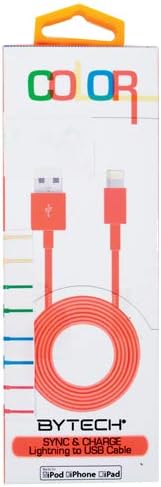
This image displays the retail packaging for the BYTECH Lightning to USB Cable. The packaging is white with 'COLOR' printed at the top in multi-colored letters. An orange Lightning to USB cable is visible through a clear window, coiled neatly. The bottom of the package indicates 'BYTECH SYNC & CHARGE Lightning to USB Cable' and compatibility with iPod, iPhone, and iPad.
קאַמפּאָונאַנץ:
- בליץ קאַנעקטאָר: Connects to your Apple iOS device (iPhone, iPad, iPod).
- יו-עס-בי-א קאַנעקטאָר: Connects to a USB power adapter, computer USB port, or other USB charging source.
- קאַבלע: The flexible cord connecting the two connectors, designed for durability and efficient power/data transfer.
סעטאַפּ
To begin using your BYTECH Lightning Cable, follow these steps:
- ידענטיפיצירן קאַנעקטערז: Locate the Lightning connector (smaller, 8-pin) and the USB-A connector (larger, rectangular).
- Connect to Power Source or Computer:
- For charging, insert the USB-A connector into a compatible USB wall adapter or car charger.
- For charging and data transfer, insert the USB-A connector into an available USB port on your laptop or personal computer.
- Connect to iOS Device: Insert the Lightning connector into the charging port of your iPhone, iPad, or iPod. Ensure it is fully seated.
- באַשטעטיקן קשר: Your device should indicate that it is charging or connected to a computer.
אַפּערייטינג ינסטראַקשאַנז
טשאַרדזשינג דיין מיטל:
Once connected as described in the "Setup" section, your iOS device will begin charging automatically. The cable supports fast charging when paired with a compatible power adapter and device.
דאַטאַ אַריבערפירן:
When connected to a computer, the cable enables data transfer between your iOS device and the computer. This allows for syncing media, documents, and other files using iTunes or Finder (macOS Catalina and later).
- Connect your iOS device to your computer using the BYTECH Lightning Cable.
- Unlock your iOS device and respond to any "Trust This Computer?" prompts by tapping "Trust" and entering your passcode if required.
- Open iTunes (Windows/older macOS) or Finder (macOS Catalina and later) on your computer.
- Select your device within the application to manage and transfer data.
וישאַלט
Proper care extends the life of your cable:
- סטאָרידזש: ווען נישט אין באַנוץ, דרייט דעם קאַבל לויז אויף. פֿאַרמייַדט שטרענגע וויקלונגען אָדער שאַרפע בייגן, ספּעציעל לעבן די קאַנעקטאָרס, ווײַל דאָס קען שאַטן די אינעווייניקסטע דראָטן.
- רייניקונג: Use a soft, dry cloth to gently wipe the cable and connectors. Do not use liquid cleaners or abrasive materials.
- האַנדלינג: Always grasp the connector head when plugging or unplugging the cable. Avoid pulling directly on the cable itself.
- סוויווע: האַלט דעם קאַבל אַוועק פון עקסטרעמע טעמפּעראַטורן, דירעקט זונשייַן און פייכטקייט.
טראָובלעשאָאָטינג
If you encounter issues with your BYTECH Lightning Cable, consider the following:
- מיטל ניט טשאַרדזשינג:
- מאַכן זיכער אַז ביידע ענדס פון די קאַבלע זענען סיקיורלי פארבונדן.
- Try a different USB power adapter or computer USB port.
- Check the charging port on your iOS device for debris or lint.
- Test the cable with a different compatible iOS device, if available.
- דאַטן אַריבערפירן ישוז:
- Ensure your iOS device is unlocked and you have tapped "Trust This Computer" when prompted.
- Restart both your iOS device and your computer.
- Update iTunes or Finder to the latest version.
- פּרוּווט אַ אַנדערש וסב פּאָרט אויף דיין קאָמפּיוטער.
- קאַבלע שעדיקן: Inspect the cable for any visible signs of damage, such as fraying, cuts, or bent connectors. Discontinue use if damage is found.
ספּעסאַפאַקיישאַנז
| אַטריביוט | דעטאַל |
|---|---|
| סאָרט | בייטעק |
| מאָדעל נומער | CLMFCBLASST |
| UPC | 805112016938 |
| קאַנעקטער טיפּ | Lightning (Male) to USB-A (Male) |
| טיפּ קאַבלע | בליץ |
| קאַמפּאַטאַבאַל דעוויסעס | iPhone, iPad, iPod, Laptop, Personal Computer |
| ספּעציעלע שטריך | שנעל טשאַרדזשינג |
| רעקאָממענדעד ניצט | Charging, data transfer for iOS devices |
| נומער פון פּינס | 8 (Lightning) |
| פּונקט וואָג | 1.76 אונסעס |
| פּראָדוקט דימענשאַנז | 1 x 1 x 1 אינטשעס (פּאַקעטינג) |
וואָראַנטי און שטיצן
For warranty information or technical support regarding your BYTECH Lightning Cable, please refer to the official Bytech webזייטל אדער קאנטאקט זייער קאסטומער סערוויס גלייך. האלט אייער קויף קוויטל פאר גאראנטיע טענות.
פֿאַר אַלגעמיינע פֿראַגעס, קענט איר באַזוכן די Bytech brand page on Amazon.


