הקדמה
The Jackery Explorer 1000 is a portable power station designed to provide reliable power for various applications, including home backup, emergency situations, outdoor camping, and RV trips. With a 1002Wh capacity and 1000W AC output, it can power a wide range of devices and small appliances. This manual provides essential information for safe and efficient use of your Explorer 1000.
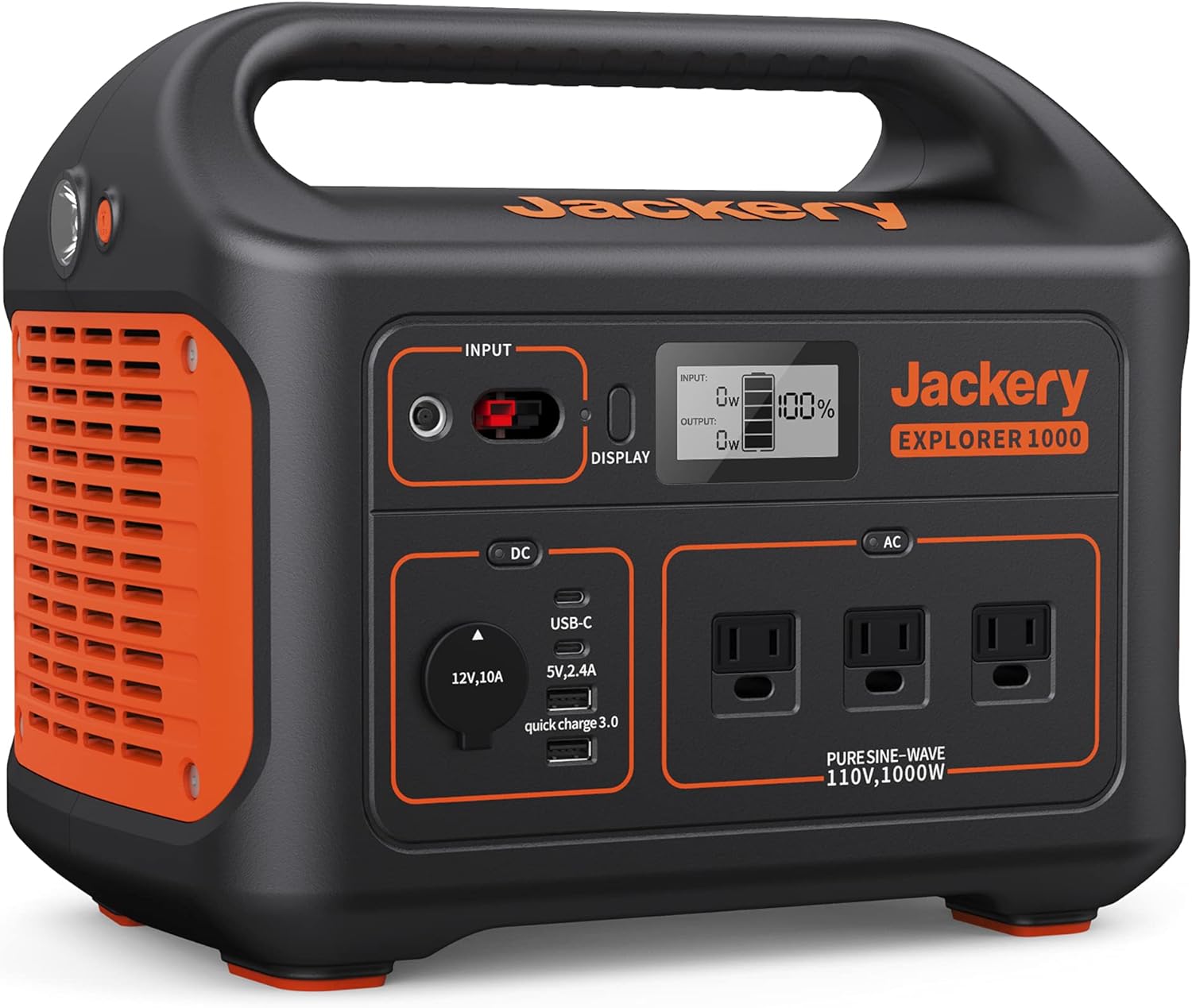
פיגורע 1: פראָנט view of the Jackery Explorer 1000 Portable Power Station, showcasing its various ports and digital display.
סעטאַפּ
Before first use, ensure your Jackery Explorer 1000 is fully charged. The unit offers multiple charging options for convenience.
טשאַרדזשינג מעטהאָדס
- AC וואנט אָוטלעט: Connect the provided AC adapter to the INPUT port on the power station and then to a standard wall outlet. A full charge typically takes approximately 5.5 hours.
- מאַשין טשאַרדזשער: Use the included car charger cable to connect the power station to your vehicle's 12V car outlet. This method is ideal for charging while traveling.
- זונ פּאַנאַלז: For eco-friendly charging, connect up to two Jackery SolarSaga 100W solar panels (sold separately) to the INPUT port using the SolarSaga Parallel Adapter Cable. With optimal sunlight, the unit can be fully charged in about 6 hours.

Figure 2: Illustration of the three primary charging methods for the Jackery Explorer 1000: AC wall outlet, car charger, and solar panels.
אַפּערייטינג ינסטראַקשאַנז
The Jackery Explorer 1000 features a user-friendly interface with multiple output options to power various devices.
דיגיטאַל ווייַז
The integrated digital display provides real-time information about the power station's status, including:
- באַטערי פּראָצענטtage רוען.
- אַרייַן וואָסtage (when charging).
- רעזולטאַט וואָסtage (when powering devices).
רעזולטאַט פּאָרץ
The Explorer 1000 is equipped with 8 versatile outlets:
- 3 x AC Outlets (1000W Pure Sine Wave): פֿאַר נאָרמאַלע הויזגעזינד אַפּפּליאַנסעס.
- 1 x USB-A Port.
- 1 x USB-A Quick Charge 3.0 Port: פֿאַר שנעלערער טשאַרדזשינג פון קאָמפּאַטיבלע דעוויסעס.
- 2 x USB-C PD Ports: For modern devices requiring USB-C Power Delivery.
- 1 x Car Outlet (12V, 10A): For 12V DC powered devices.
Each section (DC and AC) has a dedicated power button to activate or deactivate the respective outputs, helping to conserve battery life when not in use.

Figure 3: The Jackery Explorer 1000 simultaneously powering a coffee maker, electric grill, and mini cooler, demonstrating its multi-device capability.
ינטעגראַטעד פלאַשליגהט
The unit includes a built-in flashlight for convenience in low-light conditions or emergencies. Activate it using the dedicated button on the side of the unit.
וישאַלט
Proper maintenance ensures the longevity and optimal performance of your Jackery Explorer 1000.
- רעגולער טשאַרדזשינג: To prolong battery life, it is recommended to fully charge the power station every 3-6 months, even when not in active use.
- סטאָרידזש: האַלט דעם אַפּאַראַט אין אַ קיל, טרוקן אָרט אַוועק פון דירעקט זונשייַן און עקסטרעמע טעמפּעראַטורן.
- רייניקונג: ניצט אַ טרוקענעם, ווייכן שטאָף צו רייניקן די אויסערלעכע זייט. פֿאַרמייַדט ניצן שטרענגע כעמיקאַלן אָדער שרײַבנדיקע מאַטעריאַלן.
- באַטערי שוץ: The unit features industry-leading cylindrical batteries that meet UL safety standards and are certified with Impact-Resistance Class 9. The pure sine wave inverter protects connected equipment from damage by delivering constant voltage.

Figure 4: An internal diagram illustrating the robust and safe battery construction of the Jackery Explorer 1000.
טראָובלעשאָאָטינג
If you encounter issues with your Jackery Explorer 1000, please refer to the following common solutions:
- די אַפּאַראַט איז נישט אַקטיוו: Ensure the battery is charged. If not, connect to an AC wall outlet for charging.
- Outputs Not Working: Verify that the DC or AC output buttons are pressed to activate the respective ports. Check the digital display for any error codes.
- מיטל ניט טשאַרדזשינג: Confirm that the device's power requirements do not exceed the Explorer 1000's output capacity (1000W AC output). Try a different port or cable.
- פּאַמעלעך זונ טשאַרדזשינג: Ensure solar panels are placed in direct sunlight without obstruction. Clean the solar panel surface. Check all cable connections.
For further assistance, please contact Jackery customer support.
ספּעסאַפאַקיישאַנז
| שטריך | דעטאַל |
|---|---|
| סאָרט | דזשאַקקערי |
| מאָדעל נאָמען | Explorer 1000 |
| קאַפּאַציטעט | 1002ווה |
| רעזולטאַט וואָסtage | 1000 Watts (2000W Peak) |
| AC אַוטלעץ | 3 (Pure Sine Wave 110V) |
| וסב-א פּאָרץ | 1 (5V, 2.4A) + 1 (Quick Charge 3.0) |
| יו-עס-בי-סי פּי-די פּאָרטן | 2 |
| מאַשין אָוטלעט | 1 (12V, 10A) |
| טשאַרדזשינג מעטהאָדס | AC Wall Outlet, Car Charger, Solar Panels (SolarSaga 100W x2) |
| דימענשאַנז | 13.1"ל x 9.2"בר x 11.1"ה |
| פּונקט וואָג | 22 פונט |
| ספּעציעלע פֿעיִקייטן | 3 Ways to Recharge, Lightweight and Portable, Long Battery Standby, Robust and Durable, Shock and Fire Resistance, Supports 8 Devices Simultaneously |
אפיציעלער פּראָדוקט איבערview
קוקט דעם אפיציעלן ווידעא פאר א פולשטענדיגע איבערזיכטview of the Jackery Explorer 1000 Portable Power Station.
ווידעא 1: אן אפיציעלער איבערview of the Jackery Explorer 1000, detailing its features and benefits for various uses.
וואָראַנטי און שטיצן
The Jackery Explorer 1000 comes with a 2-יאָר פאַבריקאַנט וואָראַנטי. For warranty claims, technical support, or any inquiries, please refer to the contact information provided in your product packaging or visit the official Jackery webפּלאַץ.
This user manual is intended to provide general guidance. Always refer to the included physical user manual for the most detailed and up-to-date information.


