הקדמה
The Hyperkin Armor3 NuWave Controller is designed to provide accurate and fluid motion control for your Nintendo Wii U and Wii consoles. Featuring built-in Nu+ technology, this controller enhances your gaming experience by offering a wider range of motion in compatible titles. This manual provides essential information on setting up, operating, maintaining, and troubleshooting your NuWave Controller.
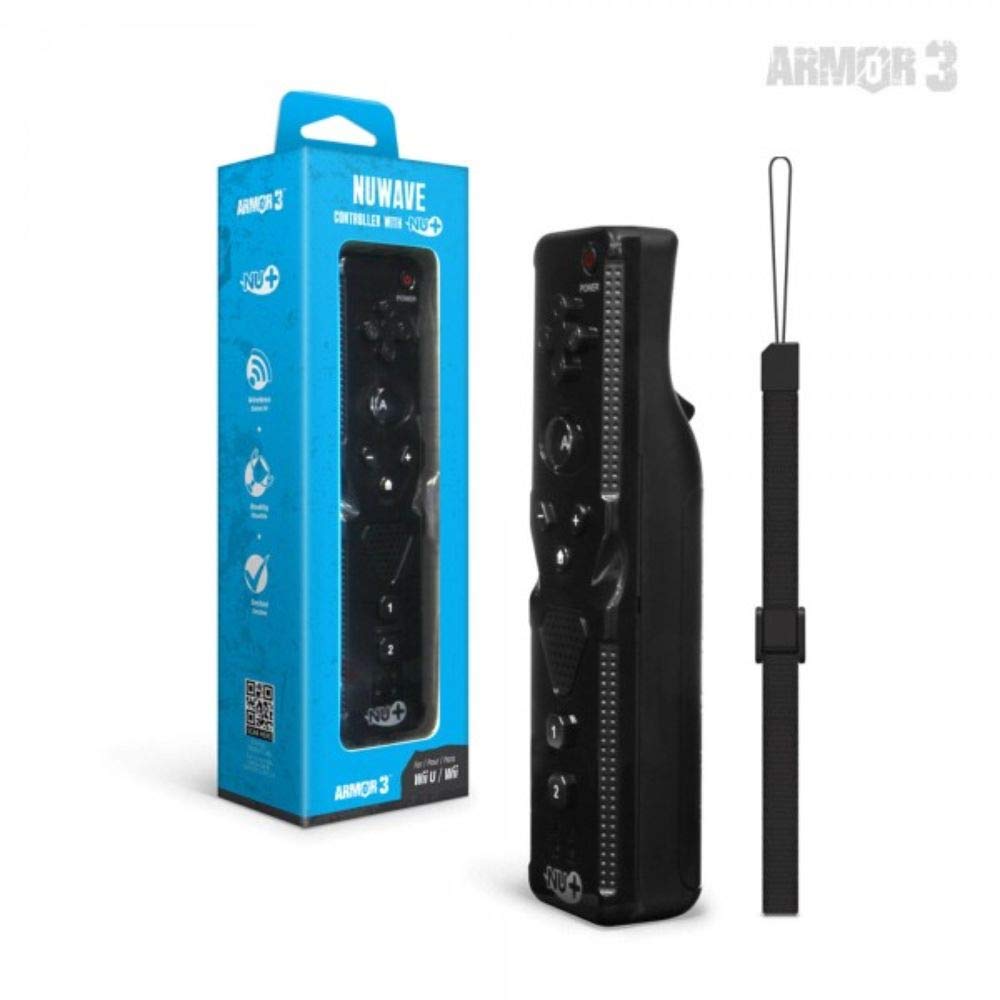
פיגורע 1: Hyperkin Armor3 NuWave Controller and its packaging. The controller is black with a wrist strap, and the packaging highlights its Nu+ technology and compatibility with Wii U and Wii.
פּראָדוקט איבערview
The Armor3 NuWave Controller is a motion-sensing controller compatible with both Wii U and Wii systems. It integrates advanced Nu+ technology for enhanced motion detection and precision in supported games.
שליסל פֿעיִקייטן:
- קאַמפּאַטאַבילאַטי: Fully compatible with Nintendo Wii U and Nintendo Wii consoles.
- Nu+ Technology: Built-in technology for a wider range of motion and improved accuracy in compatible titles.
- ערגאָנאָמיק פּלאַן: Designed for comfortable grip and extended gameplay sessions.
- מאַכט מקור: ריקווייערז 2 אַאַ באַטעריז (ניט אַרייַנגערעכנט).
סעטאַפּ
1. באַטאַרייע ייַנמאָנטירונג
- געפינט די באַטאַרייע אָפּטייל אויף דער צוריק פון דעם קאָנטראָללער.
- רוקט דעם באַטעריע דעקל אַראָפּ צו עס עפענען.
- אַרײַנשטעלן צוויי (2) AA באַטעריעס, און זיכער מאַכן אַז די פּאָלאַריטעט (+/-) איז ריכטיק ווי אָנגעוויזן אין דעם אָפּטייל.
- Replace the battery cover by sliding it upwards until it clicks into place.
2. Connecting to Your Console
To connect the NuWave Controller to your Wii U or Wii console, follow these steps:
- Ensure your console is powered on.
- On your Wii U or Wii console, press the SYNC button (usually located near the SD card slot or battery compartment).
- On the NuWave Controller, open the battery cover and locate the small red SYNC button inside the battery compartment.
- Press and release the SYNC button on the controller.
- The player indicator lights on the bottom of the controller will flash. Once a single light remains lit, the controller is successfully connected.
- If connection fails, repeat steps 2-5. Ensure the controller is within range of the console.
אַפּערייטינג ינסטראַקשאַנז
יקערדיק קאָנטראָלס:
- ריכטונגס-פאד (די-פאד): Used for menu navigation and character movement.
- א קנעפּל: Primary action button, often used for selection or interaction.
- B Button (Trigger): Located on the underside, typically used for grabbing or firing.
- 1 & 2 Buttons: Auxiliary action buttons, functions vary by game.
- היים קנעפּל: Returns to the console's Home Menu.
- Plus (+) & Minus (-) Buttons: Often used for zooming, adjusting settings, or specific in-game actions.
- מאַכט קנעפּל: טוט אן/אויסדרייען דעם קאנטראלער.
Motion Sensing with Nu+ Technology:
The built-in Nu+ technology provides enhanced motion tracking. For games that support it, you will experience more precise and responsive movements. Hold the controller firmly and ensure clear line of sight to the sensor bar for optimal performance.
- קאליבראציע: Some games may require initial calibration. Follow on-screen prompts.
- האַנטגעלענק רימען: Always use the included wrist strap to prevent accidental drops during active gameplay.
וישאַלט
רייניקונג:
- ווישט דעם קאָנטראָללער מיט אַ ווייכן, טרוקענעם שטאָף.
- פֿאַר שווערן שמוץ, אַ ביסל דampווייקט דעם שטאָף מיט וואַסער. ניצט נישט קיין שאַרפע כעמיקאַלן אדער אַברייסיוו רייניקונגסמיטלען.
- Ensure no liquid enters the controller's openings.
סטאָרידזש:
- האַלט דעם קאָנטראָללער אין אַ קיל, טרוקן אָרט אַוועק פון דירעקט זונשייַן און עקסטרעמע טעמפּעראַטורן.
- אויב איר לאָזט עס אָפּ פֿאַר אַ לענגערע צײַט, נעמט אַרויס די באַטעריעס כּדי צו פֿאַרמײַדן ליקאַדזש.
באַטערי זאָרגן:
- ניצט שטענדיק נייע, הויך-קוואַליטעט AA באַטעריעס.
- דו זאלסט נישט מישן אַלט און נייַ באַטעריז, אָדער פאַרשידענע טייפּס פון באַטעריז.
- אָפּזאָגן געוויינט באַטעריז ריספּאַנסאַבלי לויט די היגע רעגיאַליישאַנז.
טראָובלעשאָאָטינג
| פּראָבלעם | מעגלעך סיבה | לייזונג |
|---|---|---|
| דער קאָנטראָללער צינדט זיך נישט אָן. | טויטע אדער נישט ריכטיק אריינגעשטעלטע באַטעריעס. | פאַרבייטן די באַטעריעס מיט נייַע AA באַטעריעס, און זאָרגט אַז די פּאָלאַריטעט איז ריכטיק. |
| Controller does not sync with console. | Incorrect syncing procedure; out of range; console interference. | Ensure console is on. Repeat syncing steps (press SYNC on console, then on controller). Move closer to console. Check for other wireless device interference. |
| Buttons are unresponsive or delayed. | Low battery; connection issue; physical obstruction. | Replace batteries. Re-sync the controller. Ensure buttons are not stuck. |
| Motion control is inaccurate. | Sensor bar obstruction; improper calibration; environmental factors. | Ensure clear line of sight to the sensor bar. Re-calibrate in-game if prompted. Avoid strong light sources directly facing the sensor bar. |
ספּעסאַפאַקיישאַנז
- מאָדעל: M07399-bk
- סאָרט: היפּערקין
- קאַמפּאַטאַבילאַטי: Nintendo Wii U, Nintendo Wii
- מאַכט מקור: 2 קס אַאַ באַטעריז (ניט אַרייַנגערעכנט)
- דימענסיעס: 2.8 X 1.8 X 8 אינטשעס (בעערעך)
- וואָג: 3.88 אונסעס (אומגעפער, אָן באַטעריעס)
- טעכנאָלאָגיע: Built-in Nu+ motion technology
- קאָליר: שוואַרץ
וואָראַנטי און שטיצן
For specific warranty information and terms, please refer to the documentation included with your purchase or visit the official Hyperkin website. Hyperkin provides customer support for their products.
אָנליין שטיצן: Visit the official Hyperkin webפּלאַץ פֿאַר FAQ, טראָובלעשאָאָטינג פירער און קאָנטאַקט אינפֿאָרמאַציע. www.hyperkin.com
קאָנטאַקט: Refer to the Hyperkin website for the most current customer service contact methods (phone, email, etc.).


