1. הקדמה
The August AUDAR E1 Smart Health Watch is designed to help you monitor your health and fitness activities. It features advanced sensors for heart rate, blood pressure, and ECG measurements, along with comprehensive fitness tracking capabilities. This manual provides detailed instructions to help you get the most out of your device.
2. וואָס איז אין דער קעסטל
Upon unboxing your August AUDAR E1 Smart Health Watch, please ensure all the following items are present:
- August AUDAR E1 Smart Health Watch
- וסב טשאַרדזשינג קאַבלע
- באַניצער מאַנואַל (דעם דאָקומענט)

Figure 2.1: Contents of the AUDAR E1 packaging, showing the smartwatch, charging cable, and documentation.
3. פּראָדוקט איבערview
The AUDAR E1 features a sleek design with a circular display and a comfortable silicone strap. Key components include the display, side button, and health sensors on the rear.

פיגורע 3.1: פראָנט view of the AUDAR E1 Smart Health Watch, showing the display with an ECG reading.

Figure 3.2: Dimensions of the AUDAR E1 Smart Health Watch.
4. סעטאַפּ
4.1 טשאַרדזשינג די מיטל
Before first use, fully charge your AUDAR E1. Connect the magnetic USB charging cable to the charging points on the back of the watch and plug the USB end into a power source (e.g., computer USB port, USB wall adapter).

Figure 4.1: Charging the AUDAR E1 Smart Health Watch.
4.2 Downloading the AUDAR App
The AUDAR E1 requires the companion AUDAR app for full functionality. Download the app from your smartphone's app store:
- פֿאַר אַנדרויד דעוויסעס: זוכן פֿאַר "AUDAR" on the Google פּלייַ סטאָר.
- For Apple iOS devices: זוכן פֿאַר "AUDAR" on the עפּל אַפּ סטאָר.
4.3 פארבינדן מיט אייער סמאַרטפאָון
- מאַכן זיכער אַז בלועטאָאָטה איז ענייבאַלד אויף דיין סמאַרטפאָנע.
- Open the AUDAR app.
- Follow the in-app instructions to search for and connect to your AUDAR E1 device. The app will guide you through the pairing process.
- אַמאָל פּערד, וועט די זייגער סינקראָניזירן צייט און דאַטן מיט דיין טעלעפאָן.

Figure 4.2: AUDAR E1 compatibility with iOS and Android devices via the Audar app.
5. אַפּערייטינג ינסטרוקטיאָנס
5.1 יקערדיק נאַוויגאַציע
The AUDAR E1 features a touch-sensitive display and a side button for navigation:
- שלעפּן אַרויף / אַראָפּ: סקראל דורך מעניוז און נאָוטאַפאַקיישאַנז.
- שלעפּן לינקס / רעכט: Access different data screens (e.g., heart rate, steps, calories).
- צאַפּן: Select an item or enter a menu.
- זייַט קנעפּל: דריק צו צוריקקומען צום היים עקראַן אדער אויפוועקן דעם דעווייס.
6. געזונט מאָניטאָרינג פֿעיִקייטן
The AUDAR E1 provides comprehensive health data monitoring:
- האַרץ קורס מאָניטאָר: The watch regularly measures your heart rate. Manual measurements can be taken via the enhanced ECG function for a deeper understanding of your heart health. Daily and weekly reports are available in the AUDAR app.
- בלוט דרוק מאָניטאָר: Measure and visualize systolic and diastolic blood pressure throughout the day. Weekly reports provide clear insights into your blood pressure trends.
- שלאָף טראַקינג: Monitor your sleep patterns, including sleep duration and quality. This feature helps you understand your rest routine.
- Fatigue Levels: The watch tracks and reports on your fatigue levels, contributing to a holistic view of your current health and fitness routine.

Figure 6.1: The AUDAR E1 monitoring heart rate, blood pressure, and ECG during activity.
7. פֿיטנעס טראַקינג פֿעיִטשערז
The AUDAR E1 can be used as a fitness tracker for various activities:
- געניטונג מאָדע: Activate exercise mode for activities such as walking, running, and cycling.
- אַקטיוויטעט טראַקינג: Track steps taken, calories burned, and GPS route data (utilizes your phone's GPS). The watch adapts to your personal profile פֿאַר גענויע דאַטן.
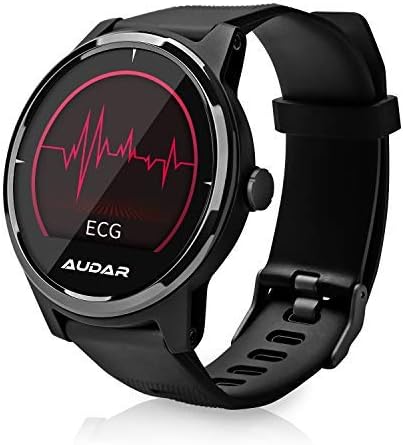
Figure 7.1: Fitness tracking metrics displayed on the AUDAR E1.
8. נאטיפיקאציעס און קלוגע פֿעיִטשערס
Stay connected with your AUDAR E1:
- Message and Call Reception: Receive notifications for SMS messages, incoming calls, and alarms directly on your watch.
- דערמאָנונגען און אַלאַרמס: Set reminders and alarms through the app, which will vibrate on your wrist, ensuring you don't miss important events.

Figure 8.1: Message and call notifications on the AUDAR E1.
9. CareMate Function
The AUDAR app provides access to the innovative CareMate network. This feature allows you to designate a trusted responder to receive your health data, enabling remote care for vulnerable or elderly individuals while maintaining their independence.

Figure 9.1: The CareMate function allows monitoring of loved ones' health data.
10. באַטאַרייע און טשאַרדזשינג
The AUDAR E1 is designed for extended use, offering significant battery life:
- באַטאַרייע לעבן: The E1 can last up to 10 days on a single 2-hour charge. In standby mode, it can last up to 20 days.
- טשאַרדזשינג: Use the provided magnetic USB charging cable. Ensure the charging pins align correctly with the contacts on the back of the watch.
11. וישאַלט
To ensure the longevity and optimal performance of your AUDAR E1 Smart Health Watch, follow these maintenance guidelines:
- רייניקונג: Regularly wipe the watch and strap with a soft, dry cloth. If necessary, use a slightly damp שטאָף און מילדע זייף, און דערנאָך טרוקן גוט אויס. פֿאַרמייַדן שטרענגע כעמיקאַלן אָדער אַברייסיוו מאַטעריאַלן.
- וואַסער קעגנשטעל: The AUDAR E1 has an IPX7 water resistance rating, meaning it can withstand splashes, rain, and brief immersion in water (up to 1 meter for 30 minutes). It is suitable for daily use but not recommended for swimming, showering, or diving. Avoid exposing the watch to hot water or steam.
- סטאָרידזש: ווען נישט אין באַנוץ פֿאַר לענגערע פּעריאָדן, זאָל מען האַלטן די זייגער אין אַ קיל, טרוקן אָרט, אַוועק פֿון דירעקטער זון און עקסטרעמע טעמפּעראַטורן.
12. טראָובלעשאָאָטינג
If you encounter issues with your AUDAR E1, please refer to the following common solutions:
| פּראָבלעם | מעגלעך סיבה / לייזונג |
|---|---|
| די זייגער צינדט זיך נישט אן און רעאגירט נישט. | Battery may be depleted. Charge the watch for at least 30 minutes. Ensure the charging cable is properly connected. |
| קען נישט פאַרבינדן מיטן סמאַרטפאָן. | Ensure Bluetooth is enabled on your phone. Make sure the watch is charged and within range. Restart both the watch and your phone. Try unpairing and re-pairing in the app. |
| Inaccurate health readings (HR, BP, ECG). | Ensure the watch is worn snugly on your wrist, not too tight or too loose. Clean the sensors on the back of the watch. Avoid excessive movement during measurements. Readings are for reference and not medical diagnoses. |
| נאָטיפיקאַציעס דערשייַנען נישט. | Check app permissions on your phone to ensure the AUDAR app has access to notifications. Verify notification settings within the AUDAR app. Ensure the watch is connected via Bluetooth. |
| קורץ באַטאַרייע לעבן. | Frequent use of certain features (e.g., continuous heart rate monitoring, bright screen) can drain the battery faster. Reduce screen brightness or turn off unnecessary features. Ensure the watch is fully charged. |
| Watch strap breaks or deteriorates. | Contact August customer support for replacement strap options. |
13. ספּעסאַפאַקיישאַנז
| שטריך | דעטאַל |
|---|---|
| סאָרט | אויגוסט |
| מאָדעל נומער | AUD E1 |
| קאָליר | שוואַרץ |
| אָפּערייטינג סיסטעם | אַנדרויד (קאָמפּאַטיבל מיט iOS) |
| פאַרשטעלן גרייס | 1 אינטשעס |
| קאַנעקטיוויטי | בלועטאָאָטה |
| ספּעציעלע פֿעיִקייטן | Heart Rate Monitor, Sleep Monitor, Notification, Blood Pressure Monitor, Calorie Tracker, ECG |
| קאַמפּאַטאַבאַל דעוויסעס | סמאַרטפאָנע |
| באַטערי טיפּ | ליטהיום-יאָן |
| באַטאַרייע קאַפּאַציטעט | 220 mAh (אומגעפער) |
| וואַסער קעגנשטעל | IPX7 |
| גפּס | Uses phone's GPS |
| פאָרעם | קייַלעכיק |
14. וואָראַנטי און שטיצן
For warranty information and technical support, please refer to the August brand's official website or contact their customer service directly. Details can typically be found on the August support page or within the product packaging.
You can visit the August brand store on Amazon for more information: August Brand Store


