1. הקדמה
This manual provides essential information for the setup, operation, and maintenance of your Xtrfy K4 RGB Mechanical Gaming Keyboard. Please read these instructions carefully to ensure optimal performance and longevity of your device. The Xtrfy K4 RGB is designed for high-performance gaming and typing, featuring durable mechanical switches and customizable RGB illumination.
2. פּעקל אינהאַלט
באַשטעטיקן אַז אַלע זאכן זענען פאַראַן אין דיין פּעקל:
- Xtrfy K4 RGB Mechanical Gaming Keyboard
- USB קאַבל (אַטאַטשט)
- באַניצער מאַנואַל (דעם דאָקומענט)
3. סעטאַפּ
Follow these steps to set up your Xtrfy K4 RGB keyboard:
- ופשליסן די קלאַוויאַטור: נעמט פֿאָרזיכטיק אַרויס די קלאַוויאַטור פֿון איר פּאַקעט.
- פאַרבינדן צו קאָמפּיוטער: Plug the attached USB-A cable from the keyboard into an available USB port on your computer. The keyboard is plug-and-play and does not require additional drivers for basic functionality.
- אָרט: Position the keyboard comfortably on your desk. Ensure stable placement for optimal use.
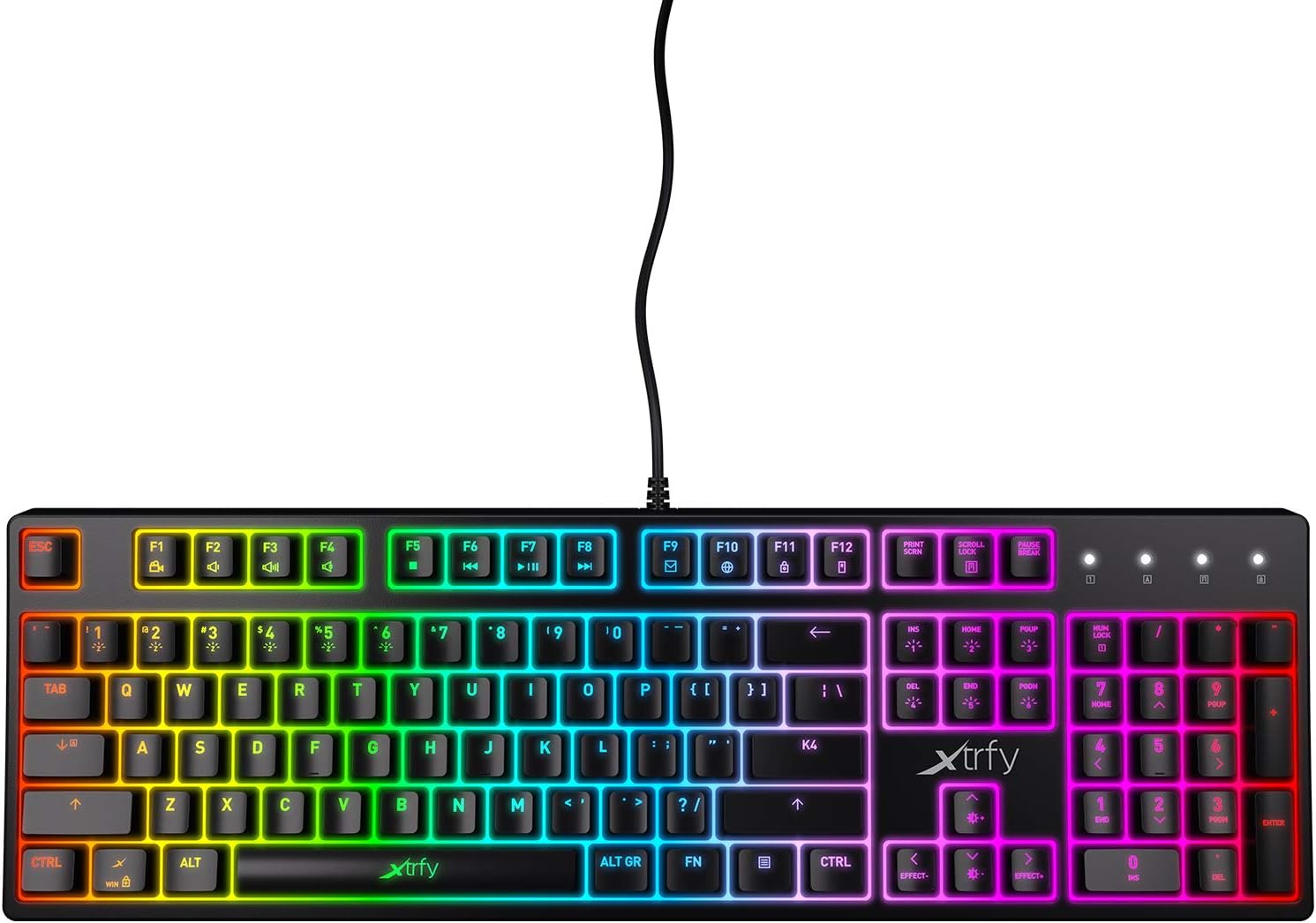
פיגור 3.1: פון אויבן אַראָפּ view of the Xtrfy K4 RGB keyboard, showing key layout and attached USB cable.
4. אַפּערייטינג ינסטרוקטיאָנס
4.1 גרונטלעכע קלאַוויאַטור פונקציעס
The Xtrfy K4 RGB functions as a standard mechanical keyboard. All keys are pre-programmed for their respective characters and functions. It features full N-key rollover and a 1000 Hz polling rate for precise and responsive input.
4.2 RGB Illumination Control
The keyboard features customizable RGB illumination. Use the Function (FN) key in combination with specific keys to adjust lighting effects, brightness, and colors. Refer to the keycap legends for specific lighting controls.
- FN + F1-F12: These keys often control media functions or system shortcuts. Specific functions are indicated by icons on the keycaps.
- FN + פײַל קנעפּלעך: Typically used to adjust brightness or change lighting directions/patterns.
- FN + Insert/Home/Page Up/Delete/End/Page Down: These keys are commonly used to cycle through different RGB lighting modes and effects.

Figure 4.1: The Xtrfy K4 RGB keyboard showcasinג זיין קאַסטאַמייזאַבאַל RGB לייטינג.
5. וישאַלט
געהעריגע אויפהאלטונג גאראנטירט די לאנגעוויטי און פאָרשטעלונג פון אייער קלאַוויאַטור:
- רייניקונג: Use a soft, dry cloth to wipe the surface of the keyboard. For deeper cleaning, use compressed air to remove dust and debris from between the keycaps. Avoid using harsh chemicals or abrasive materials.
- קלאַוויאַטור אַראָפּנעמען (אַוואַנסירט): If necessary, keycaps can be carefully removed using a keycap puller for thorough cleaning. Exercise caution to avoid damaging the switches.
- סטאָרידזש: ווען נישט אין באַנוץ, האַלט די קלאַוויאַטור אין אַ ריינער, טרוקענער סביבה אַוועק פון דירעקטער זון און עקסטרעמע טעמפּעראַטורן.
6. טראָובלעשאָאָטינג
If you encounter issues with your Xtrfy K4 RGB keyboard, refer to the following common solutions:
- קלאַוויאַטור ניט ריספּאַנדינג:
- זייט זיכער אַז דער USB קאַבל איז זיכער איינגעשטעקט אין ביידע דעם קלאַוויאַטור און דעם קאָמפּיוטער.
- פרובירט אריינצושטעקן די קלאַוויאַטור אין אַן אַנדער USB פּאָרט.
- ריסטאַרט דיין קאָמפּיוטער.
- RGB לייטינג ארבעט נישט/נישט ריכטיג:
- Check if the lighting is turned off or set to a very low brightness using the FN key combinations.
- Ensure no software conflicts are present if you are using third-party lighting control applications.
- שליסלען רעגיסטרירט זיך נישט:
- Clean the affected key area to remove any debris that might be obstructing the switch.
- If the issue persists, contact Xtrfy support.
7. ספּעסאַפאַקיישאַנז
| שטריך | דעטאַל |
|---|---|
| סאָרט | Xtrfy |
| מאָדעל נומער | XG-K4-RGB-R-US |
| סעריע | ק4 רגב |
| קלאַוויאַטור באַשרייַבונג | מעטשאַניקאַל |
| שליסל סוויטטשעס | Mechanical key switches (e.g., Kailh Red, depending on variant) |
| Illumination | קאַסטאַמייזאַבאַל RGB |
| פּאָללינג קורס | 1000 הז |
| N-Key ראָולאָוווער | Full N-key rollover |
| קאַנעקטיוויטי | USB-A (Corded Electric) |
| קאַמפּאַטאַבאַל דעוויסעס | פּיסי / מעק |
| פּונקט וואָג | 2.2 פונט (אומגעפער 1 ק"ג) |
| פּראָדוקט דימענשאַנז (LxWxH) | 17.44" x 17.44" x 1.54" (approx. 44.3 x 44.3 x 3.9 cm) |
| קאָליר | שוואַרץ |
8. וואָראַנטי און שטיצן
Xtrfy products are manufactured to high standards and come with a limited warranty. For specific warranty terms and conditions, please refer to the official Xtrfy webפּלאַץ אָדער קאָנטאַקט זייער קונה שטיצן.
For technical assistance, troubleshooting beyond this manual, or warranty claims, please visit the official Xtrfy support page or contact their customer service directly. Keep your purchase receipt as proof of purchase.
אָנליין שטיצן: www.xtrfy.com/support