הקדמה
א דאנק פארן קויפןasing the Caliber Alarm Clock with QI Charging Station. This device combines a digital alarm clock with a convenient wireless charging pad and a USB charging port, designed to simplify your bedside setup. It also features an adjustable night light and a large LED display for clear visibility.
This manual provides detailed instructions on how to set up, operate, maintain, and troubleshoot your new alarm clock. Please read it thoroughly before use to ensure optimal performance and longevity of the product.
סעטאַפּ
אויספּאַקן: נעמט פֿאָרזיכטיק אַרויס דעם וועקער זייגער פֿון זײַן פּאַקעט. מאַכט זיכער אַז אַלע קאָמפּאָנענטן זענען פֿאַראַן: דער וועקער זייגער און דער מאַכט אַדאַפּטער.
מאַכט קשר: Connect the provided power adapter to the DC input port on the back of the alarm clock. Plug the other end of the adapter into a standard wall outlet. The display will illuminate.
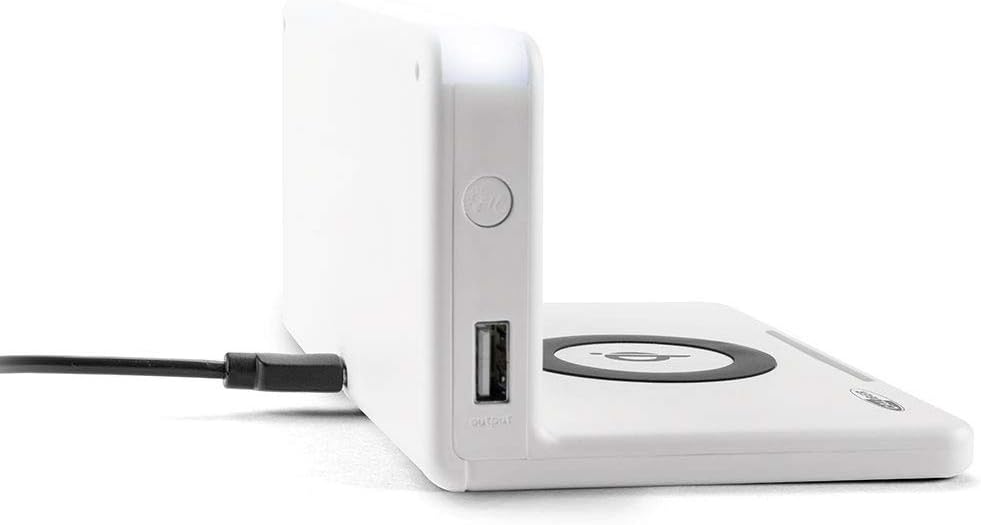
בילד: זייט view of the alarm clock, illustrating the power input port (left) and the USB output port (right).
באַטעריע אינסטאַלאַציע (באַקאַפּ): The unit includes 1 Lithium Ion battery for backup. This battery maintains time settings during power outages. No user installation is typically required for this pre-installed battery.
ערשטע צייט איינשטעלונג: Upon first power-up, the clock may display a default time or require manual setting. Refer to the "Operating" section for detailed instructions on setting the time.
אַפּערייטינג ינסטראַקשאַנז
באַשטעטיקן צייט און דאַטע
- דריקן און האַלטן די צייט שטעלן button (location may vary, typically on the back or top) until the hour digits flash.
- ניצן די + or - קנעפּלעך צו סטרויערן די שעה.
- דרוק צייט שטעלן נאכאמאל צו גיין צו מינוטן, דערנאך צופאסן מיט + or -.
- Repeat for year, month, and day if applicable.
- דרוק צייט שטעלן one last time to confirm and exit.
באַשטעטיקן אַלאַרמס
- דריקן און האַלטן די אַלאַרם שטעלן button (or similar) until the alarm hour digits flash.
- Adjust the alarm hour and minutes using the + or - קנעפּלעך.
- דרוק אַלאַרם שטעלן צו באַשטעטיקן.
- צו אַקטיווירן/דעאַקטיווירן דעם אַלאַרם, דריק די ALARM ON / OFF קנעפּל. אן אלארם אייקאן וועט דערשיינען/פארשווינדן אויפן דיספלעי.
- ווען דער שרעק סאָונדס, דריקן די SNOOZE button for a temporary pause, or any other button to turn it off for the day.
Using the QI Wireless Charging Station
The alarm clock features a built-in QI wireless charging pad for compatible devices.
- זייט זיכער אז דער וועקער זייגער איז אנגעצונדן.
- Place your QI-compatible smartphone or device directly onto the charging pad, centering it over the קיו לאָגאָ.
- A charging indicator (e.g., an LED light or on-screen icon) will illuminate to confirm charging has begun. If charging does not start, reposition your device.

Image: A smartphone placed on the QI charging pad of the alarm clock, showing the charging interface on the phone screen.

Image: The alarm clock with a phone positioned on its wireless charging surface, indicating active charging.
ניצן די וסב טשאַרדזשינג פּאָרט
A USB output port is available on the side of the unit for charging non-QI compatible devices or for faster wired charging.
- Connect your device's USB charging cable to the USB output port on the alarm clock.
- פֿאַרבינדט דעם אַנדערן עק פֿונעם קאַבל צו אייער דעווייס. דאָס אָפּלאָדן וועט זיך אויטאָמאַטיש אָנהייבן.
Adjusting Display Brightness and Night Light
- The alarm clock features adjustable display brightness. Look for a דיממער or ברייטנאַס button, typically on the back or top. Press it repeatedly to cycle through brightness levels.
- To activate or adjust the night light, locate the dedicated נאַכט ליכט button. Press it to turn the light on/off or cycle through different brightness settings if available.
וישאַלט
- רייניקונג: Disconnect the power adapter before cleaning. Use a soft, dry cloth to wipe the surface of the alarm clock. Do not use abrasive cleaners, waxes, or solvents as they may damage the finish.
- סטאָרידזש: אויב איר לייגט דאָס אַפּאַראַט אַוועק פֿאַר אַ לענגערע צייט, זאָלט איר עס אָפּשטעקן פֿון עלעקטריציטעט און עס אַוועקלייגן אין אַ קילן, טרוקענעם אָרט.
- האַנדלינג: Avoid dropping the unit or subjecting it to strong impacts. Keep it away from water and high humidity.
טראָובלעשאָאָטינג
| פּראָבלעם | מעגלעך סיבה | לייזונג |
|---|---|---|
| די זייגער אויסשטעלונג איז ליידיק. | קיין מאַכט קשר. | זיכער מאַכן אַז דער מאַכט אַדאַפּטער איז זיכער אַרייַנגעשטעקט אין דעם אַפּאַראַט און אַ אַרבעטנדיק וואַנט ווענטיל. |
| QI charging not working. | Device not QI-compatible; device not properly aligned; foreign objects on pad; phone case too thick. | Verify device compatibility. Reposition device on the center of the pad. Remove any foreign objects. Remove thick phone cases. |
| דער אַלאַרם קלינגט נישט. | Alarm not activated; volume too low; incorrect alarm time. | Ensure the alarm icon is displayed. Check alarm volume settings. Verify the alarm time is set correctly. |
| די צייט איז נישט ריכטיק. | Time not set correctly; power interruption. | Reset the time manually. If power was interrupted, the backup battery should maintain time, but a manual check is recommended. |
ספּעסאַפאַקיישאַנז
| שטריך | דעטאַל |
|---|---|
| סאָרט | קאַליבער |
| מאָדעל נומער | HCG018QI/W |
| קאָליר | ווייַס |
| ווייַז טיפּ | דיגיטאַל |
| ספּעציעלע שטריך | Night light, QI charging station, USB charging port |
| מאַכט מקור | קאָרדעד עלעקטריק |
| פּראָדוקט דימענשאַנז | 7.09 X 4.25 X 3.86 אינטשעס |
| פּונקט וואָג | 7.9 אונסעס (225 גראַם) |
| באַטעריז | 1 Lithium Ion battery (included, for backup) |
| GTIN | 08714505047157 |
וואָראַנטי און שטיצן
This Caliber product is designed for reliability and performance. For information regarding warranty coverage, please refer to the warranty card included with your purchase or visit the official Caliber webפּלאַץ.
Should you encounter any issues not covered in the troubleshooting section, or require further assistance, please contact Caliber customer support. Contact details can typically be found on the product packaging or the manufacturer's official webפּלאַץ.


