פּראָדוקט איבערview
This manual provides instructions for the Elekpia Replacement Remote Control, designed for use with various MAG IPTV Linux Set-Top Box models. This remote offers a direct replacement solution, requiring no complex programming or pairing.
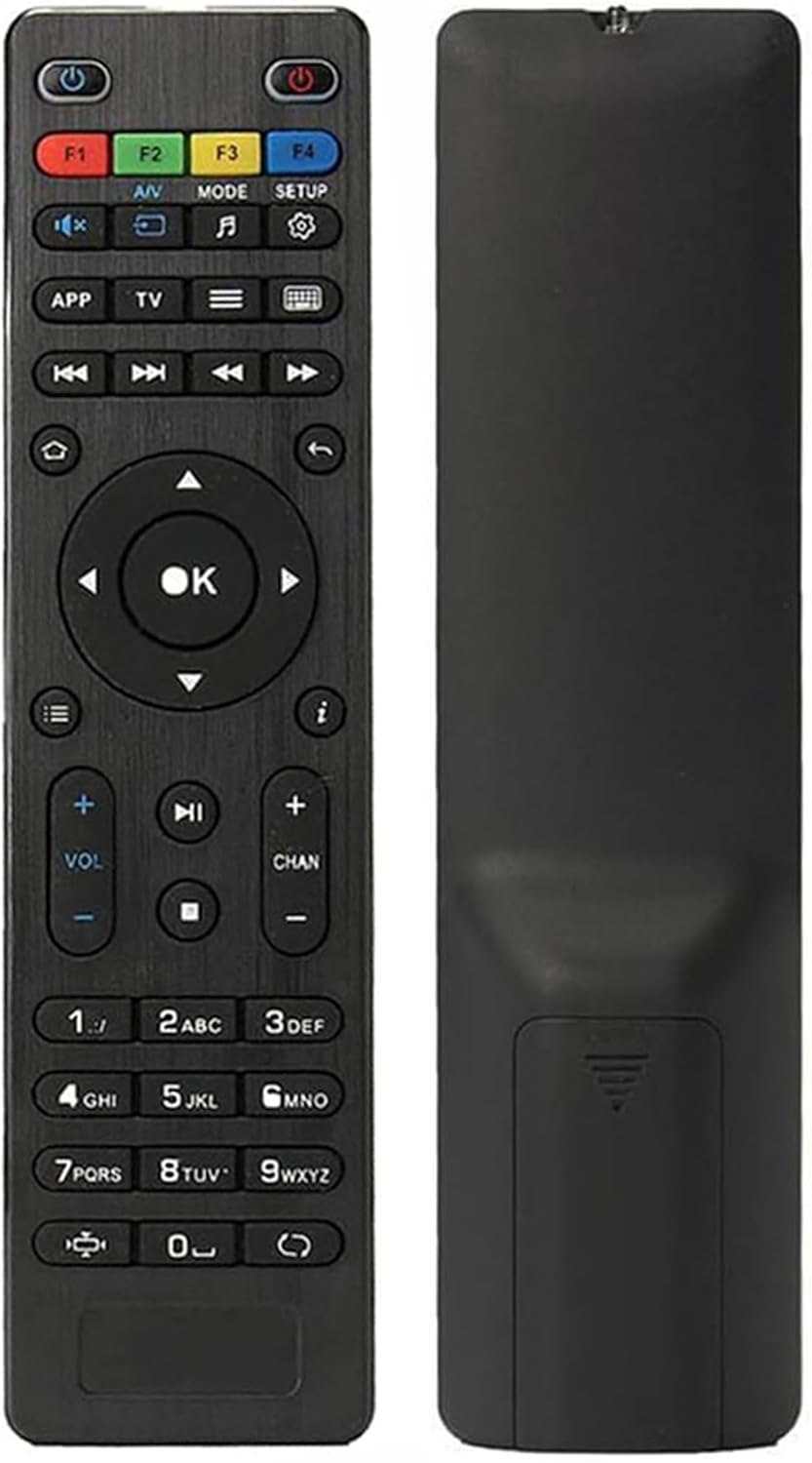
בילד: פאָרנט און הינטן view of the Elekpia replacement remote control. The remote is black with clearly labeled buttons on the front, and a smooth, ergonomic back.
שליסל פֿעיִקייטן:
- Compatible with a wide range of MAG IPTV Linux Set-Top Box models, including MAG250, MAG254, 255, 256, 257, 260, 275, 349, 350, 351, 352, and MAG322W1.
- No programming or pairing required; functions immediately upon battery installation.
- Powered by two AAA batteries (not included).

Image: The remote control is shown alongside a list of compatible MAG models, emphasizing its broad compatibility with various MAG IPTV Linux Set-Top Boxes.
סעטאַפּ
Setting up your new Elekpia remote control is a straightforward process. Follow these steps to begin using your remote.
1. באַטאַרייע ייַנמאָנטירונג
- געפֿינען די באַטאַרייע אָפּטייל אויף די צוריק פון די ווייַט קאָנטראָל.
- רוק דעם דעקן פון די באַטאַרייע אָפּטייל.
- Insert two (2) AAA batteries, ensuring the positive (+) and negative (-) terminals align correctly with the indicators inside the compartment.
- פאַרמאַכן די באַטאַרייע אָפּטייל דעקן סיקיורלי.
2. ערשט נוצן
This remote control is designed to work directly with compatible MAG IPTV Linux Set-Top Boxes without the need for programming or pairing. Once batteries are installed, point the remote at your set-top box and begin using it.
אַפּערייטינג ינסטראַקשאַנז
Familiarize yourself with the functions of each button on your Elekpia remote control to effectively navigate and control your MAG IPTV Linux Set-Top Box.

Image: A detailed diagram illustrating the layout and function of each button on the remote control, including power, navigation, volume, channel, and media playback controls.
רימאָוט קאָנטראָל קנעפּל פאַנגקשאַנז| קנעפּל | פֿונקציע |
|---|
| מאַכט קנעפּל (⏻) | Turns the Media Player On/Off. |
| פ1, פ2, פ3, פ4 | Additional functions (may vary by device). |
| א/וו | Changes audio mode. |
| מאָדע | Accesses setup menu. |
| SETUP | Accesses setup menu. |
| APP | קאָנטעקסט מעניו. |
| TV | Quick TV access. |
| מעניו (☰) | טעלעוויזיע גייד. |
| קלאַוויאַטור (⌨) | Virtual keyboard. |
| נאַוויגאַציע אַראָוז (אַרויף, אַראָפּ, לינקס, רעכטס) | נאַוויגירט דורך מעניוז און אָפּציעס. |
| OK קנעפּל | קאַנפערמז סאַלעקשאַנז. |
| צוריק / צוריקקומען (↩) | גייט צוריק צום פריערדיקן עקראַן. |
| היים (⌂) | קערט צו די היים פאַרשטעלן. |
| אינפֿאָרמאַציע (ⓘ) | דיספּלייז אינפֿאָרמאַציע. |
| באַנד אַרויף / אַראָפּ (VOL + / -) | אַדזשאַסץ די באַנד מדרגה. |
| קאַנאַל אַרויף / אַראָפּ (CHAN + / -) | Switches channels. |
| שטום (🔇) | טאָגלעס געזונט אויף / אַוועק. |
| שפּיל / פּויזע (▶⏸) | שפּילט אָדער פּויזירט מעדיע. |
| האַלטן (⏹) | שטעלט אפ מעדיע ווידערשפּיל. |
| איבערשפרינגען פאָרויס/צוריק (⏭⏮) | Skips to the next/previous track or chapter. |
| שנעל שפּיל (⏩) | שנעל פאָרווערטס דורך די מעדיע. |
| נומעריק קיפּאַד (0-9) | Direct input for channel numbers or other numerical data. |
| אַספּעקט פאַרהעלטעניש (◧) | ענדערונגען אַספּעקט פאַרהעלטעניש. |
| דערהייַנטיקן (↻) | Initiates an update (functionality may vary). |
וישאַלט
געהעריגע אויפהאלטונג גאראנטירט די לאנגעוויטי און אפטימאלע פאָרשטעלונג פון אייער ווײַטקאָנטראָל.
1. באַטערי פאַרבייַט
Replace batteries when the remote's responsiveness decreases or it stops functioning. Always use new AAA batteries and dispose of old batteries responsibly according to local regulations.
2. רייניקונג
צו רייניקן די ווײַטקאָנטראָל, ווישט אָפּ זײַן ייבערפֿלאַך מיט אַ ווייכן, טרוקענעם שטאָף. פֿאַר שווערן שמוץ, ווישט אַ ביסלampen the cloth with water or a mild, non-abrasive cleaner. Avoid using excessive liquid or harsh chemicals, as these can damage the remote's electronics or finish.
3. סטאָרידזש
When not in use for extended periods, it is recommended to remove the batteries to prevent potential leakage and damage to the remote.
טראָובלעשאָאָטינג
If you encounter issues with your remote control, refer to the following common problems and their solutions.
פּראָסט ישוז און סאַלושאַנז| פּראָבלעם | מעגלעך סיבה | לייזונג |
|---|
| ווײַטקאָנטראָל רעאַגירט נישט. | Dead or incorrectly installed batteries. Obstruction between remote and set-top box. Remote out of range. | Replace batteries with new AAA batteries, ensuring correct polarity. Remove any obstructions. Ensure you are within effective range of the set-top box. |
| Buttons are sticky or hard to press. | Accumulation of dirt or debris under the buttons. Internal mechanism issue. | Gently clean around the buttons with a soft, dry cloth or a cotton swab. If the issue persists, it may indicate internal wear. |
| די ווײַטקאָנטראָל אַרבעט צווישנצײַטיק. | Low battery power. Infrared sensor on remote or set-top box is dirty or obstructed. | Replace batteries. Clean the infrared sensor on both the remote and the set-top box. Ensure a clear line of sight. |
| Remote does not control the set-top box. | Incompatible set-top box model. | Verify that your MAG IPTV Linux Set-Top Box model is listed as compatible (MAG250, MAG254, 255, 256, 257, 260, 275, 349, 350, 351, 352, MAG322W1). |
ספּעסאַפאַקיישאַנז
פּראָדוקט ספּעסאַפאַקיישאַנז| שטריך | דעטאַל |
|---|
| מאָדעל נומער | Elekpia mag 254 remote |
| קאַמפּאַטאַבאַל דעוויסעס | MAG250, MAG254, 255, 256, 257, 260, 275, 349, 350, 351, 352 IPTV Linux Set-Top Box, MAG322W1 |
| מאַכט מקור | 2 X AAA באַטעריז (ניט אַרייַנגערעכנט) |
| דימענסיעס (L X W X H) | 7 X 1.8 X 0.6 אינטשעס (בעערעך) |
| פּונקט וואָג | 1.76 אונסעס (אומגעפער) |
| קאָליר | שוואַרץ |
| ספּעציעלע שטריך | ערגאַנאַמיק פּלאַן |
וואָראַנטי און שטיצן
Information regarding product warranty and customer support is not provided within this instruction manual. For warranty details or technical assistance, please refer to the product packaging or contact the retailer/manufacturer directly.
Manufacturer: Elekpia Factory


