הקדמה
Thank you for choosing the TIMEMORE Basic 2.0 Digital Coffee Scale. This manual provides detailed instructions for the setup, operation, and maintenance of your new coffee scale. Designed for precision and versatility, this scale features accurate weighing, an integrated timer, automatic tare, and flow rate display, making it ideal for various coffee brewing methods including espresso and pour-over.
שליסל פֿעיִקייטן
- Precise Weighing: Equipped with a high-precision sensor, offering measurements up to 2000g (70oz) with 0.1g (0.01oz) accuracy.
- ינטעגראַטעד טיימער: Allows simultaneous measurement of weight and brewing time for consistent results.
- Multiple Brewing Methods: Suitable for pour-over, espresso, French press, Aeropress, and more, thanks to its high capacity, accuracy, and flow rate display.
- באַניצער-פרייַנדלעך צובינד: Features a clear LCD screen for instant and accurate readings, intuitive controls, automatic tare, and auto-off function.
- פּאָרטאַטיוו און קריקאָנלאָדלעך: Compact design with a built-in rechargeable battery and Type-C charging port for convenience at home or on the go.
סעטאַפּ
- אויספּאַקן: פֿאָרזיכטיק אַרויסנעמען די וואָג און אַלע אַקסעסאָריעס פֿון דער פּאַקאַדזשינג.
- ערשט אָפּצאָל: Before first use, fully charge the scale using the provided Type-C cable. The battery indicator on the display will show charging status.
- אָרט: שטעלט די וואָג אויף אַ פלאַכער, סטאַבילער ייבערפלאַך צו ענשור גענויע מעסטונגען.
- מאַכט אויף: Press the Power ON/OFF switch button (usually labeled ⏻ or similar) to turn on the scale.

Image: The TIMEMORE Basic 2.0 Coffee Scale, ready for use.
אַפּערייטינג ינסטראַקשאַנז
1. מאַכט אויף / אויסגעלאשן
דרוק די מאַכט אויף / אַוועק button (usually on the side or bottom) to turn the scale on. Press and hold the same button to turn it off.
2. Unit Conversion (g/oz)
דרוק די "U" button to switch between grams (g) and ounces (oz).

Image: The scale displaying weight in grams, with an option to switch to ounces.
3. טארע פונקציע
Place an empty container on the scale. Press the "T" button (often integrated with the power button) to reset the weight to zero before adding ingredients.
4. Manual Timer Mode
In manual timer mode, press the שפּיל / פּויזע button (often labeled with a triangle icon) to start or pause the timer. Press the "T" button to reset the timer and weight to zero.
Video: Demonstrating the manual timer mode and tare function on the coffee scale.
5. Automatic Timer Mode (Espresso/Pour-Over)
The scale can automatically detect when water is poured and start the timer. Place your brewing setup (e.g., portafilter with cup, pour-over dripper with server) on the scale. After taring, the timer will start automatically once liquid is detected. The display will show both time and weight, and for some models, flow rate.

Image: The scale automatically starting the timer when water is poured for pour-over coffee.
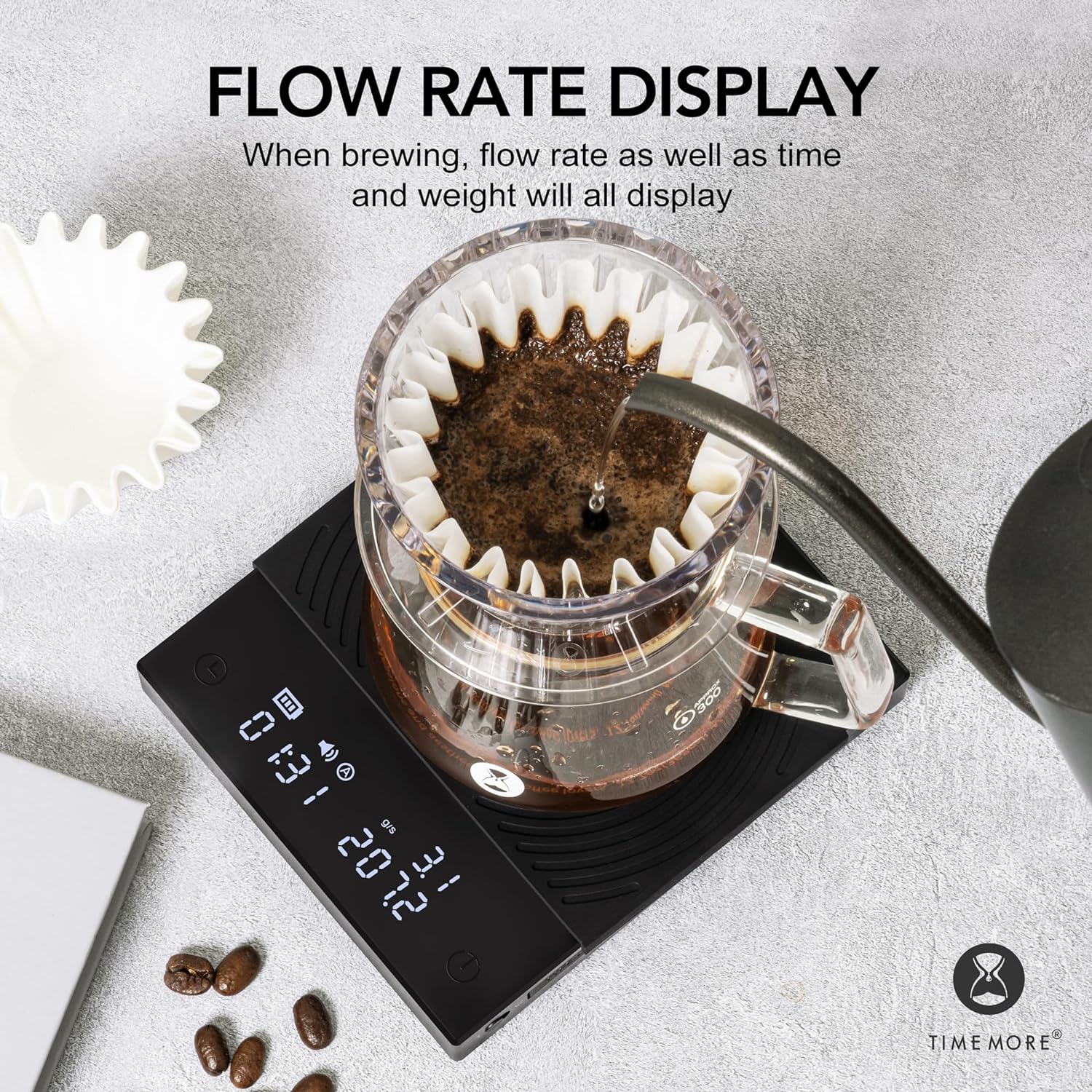
Image: The scale displaying flow rate, time, and weight during brewing.
וישאַלט
- רייניקונג: ווישט די וואָג ייבערפלאַך מיט אַ ווייכן, דamp טוך. ניצט נישט קיין שרײַבנדיקע רייניגער און טונקט נישט אײַן די וואָג אין וואַסער.
- סיליקאָנע פּאַד: The heat-resistant and waterproof silicone pad can be removed for cleaning. Ensure it is dry before placing it back on the scale.
- סטאָרידזש: Store the scale in a dry place away from extreme temperatures and direct sunlight.
- באַטערי זאָרגן: Recharge the battery when the low battery indicator appears. Avoid fully draining the battery frequently to prolong its lifespan.

Image: The removable heat-resistant and waterproof silicone pad for easy cleaning.

Image: The Type-C charging port and built-in rechargeable battery for convenience.
טראָובלעשאָאָטינג
| פּראָבלעם | מעגלעך סיבה | לייזונג |
|---|---|---|
| וואָג טוט נישט קער אויף | נידעריגע באַטעריע אדער מאַכט קנעפּל נישט ריכטיק געדריקט. | Charge the scale using the Type-C cable. Press and hold the power button firmly. |
| ומפּינקטלעך רידינגז | Uneven surface, scale overloaded, or external interference. | Place on a flat, stable surface. Ensure weight does not exceed 2000g. Avoid strong vibrations or air currents. |
| Timer not starting automatically | Not in automatic timer mode or insufficient liquid flow detected. | Ensure the scale is in the correct mode. Pour liquid steadily to trigger the sensor. |
| דיספּליי ווייזט "לאָ" | נידעריק באַטאַרייע. | לאָד אויף די וואָג. |
| Display shows "O-Ld" | אָווערלאָאַד. | Remove items from the scale immediately to prevent damage. Do not exceed 2000g. |
ספּעסאַפאַקיישאַנז
| שטריך | דעטאַל |
|---|---|
| סאָרט | TIMEMORE |
| מאָדעל נומער | TM56 |
| פּראָדוקט דימענשאַנז | 14.99 x 14.99 x 3.94 ס״מ (אומגעפער 5.9 x 5.9 x 1.55 אינטשעס) |
| פּונקט וואָג | 391.22 גראַם (אומגעפער 13.8 אונסעס) |
| קאָליר | Basic 2.0 (Black) |
| רעקאָממענדעד ניצט | קאַווע ברוינג |
| ספּעציעלע פֿעיִקייטן | אָטאַמאַטיק פאַרמאַכן-אַוועק, טימער |
| ווייַז טיפּ | לקד |
| וואָג לימיט | 2 קילאָגראַמס (2000 ג) |
| פאָרם פאַקטאָר | Handheld (Portable) |
| מאַטעריאַל | אַקריליק |
| לייענען אַקיעראַסי | +/- 0.1 grams |
וואָראַנטי און שטיצן
For warranty information or technical support, please refer to the warranty card included with your product or contact TIMEMORE customer service directly. Keep your purchase receipt as proof of purchase.
For further assistance, you may visit the official TIMEMORE webזייטל אדער קאָנטאַקט אייער לאקאלן דיסטריביאַטאָר.


