הקדמה
Thank you for choosing the Celly PBE10000BK Power Bank. This portable external battery is designed to provide convenient and reliable power for your mobile devices. With a 10,000 mAh capacity and dual USB outputs, it allows you to charge multiple devices on the go. Please read this manual carefully before using the product to ensure proper operation and to maximize its lifespan.

בילד: פראָנט view of the Celly PBE10000BK Power Bank, showcasinג זײַן קאָמפּאַקטן דיזײַן און טעקסטשערירטן שוואַרצן ענדיק.
פּראָדוקט איבערview
שליסל פֿעיִקייטן:
- 10,000 mAh קאַפּאַציטעט: Provides multiple charges for smartphones and other small electronic devices.
- צווייענדיק וסב רעזולטאַט: Equipped with two 2.1A USB outputs for charging up to two devices simultaneously.
- מיקראָ וסב אַרייַנשרייַב: Features a 2A micro USB input for recharging the power bank.
- סאָליד פּלאַן: Lightweight and ultra-compact for portability.
- LED ינדיקאַטאָרס: Four LED lights display the remaining battery charge level.
- אָטאַמאַטיק פאַרמאַכן: Includes an automatic shut-off feature for safety and power saving.
קאַמפּאָונאַנץ:
- Power Bank Unit
- Micro USB Charging Cable (for recharging the power bank)
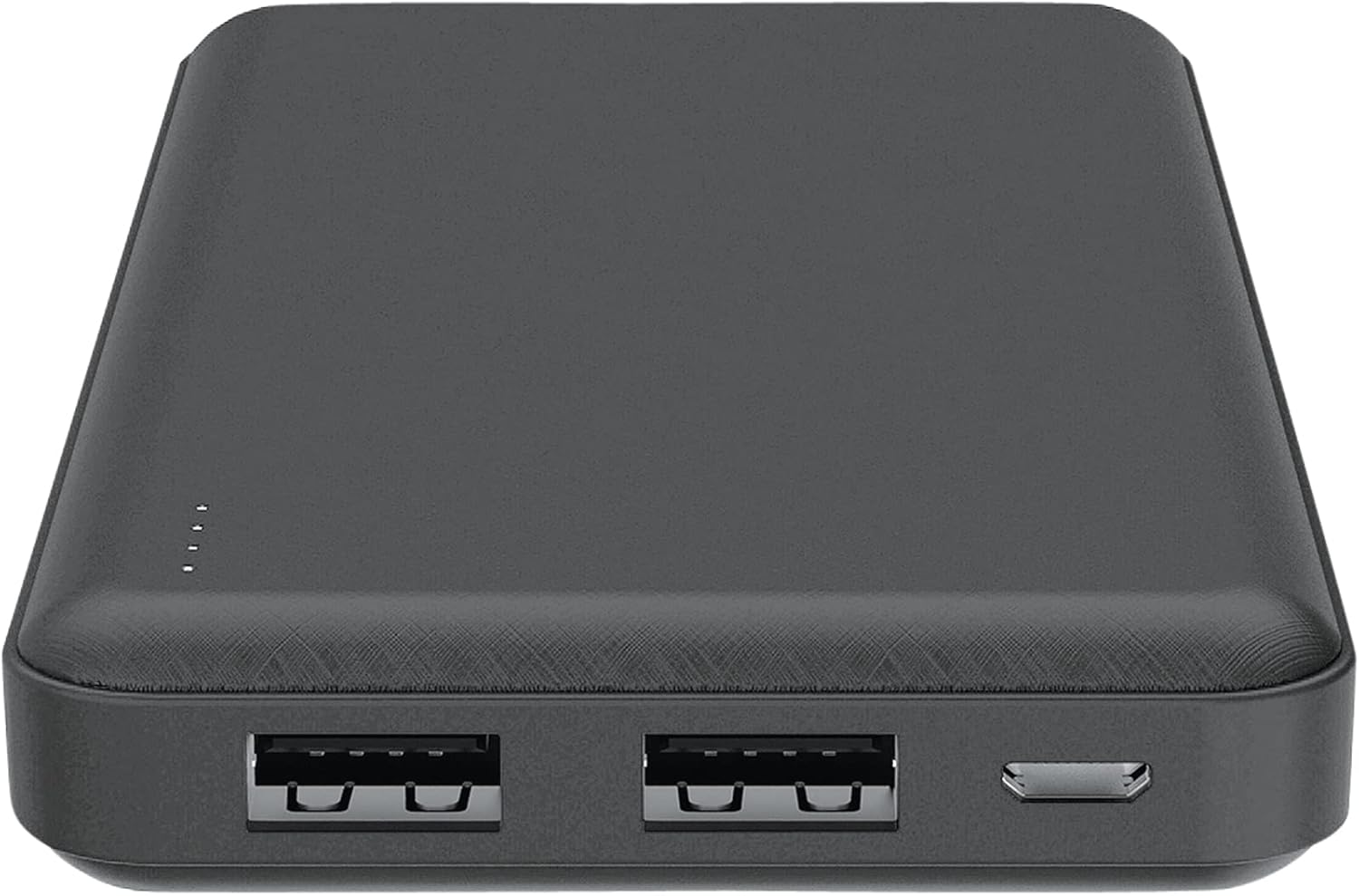
בילד: אויבן view of the Celly PBE10000BK Power Bank, showing the two USB-A output ports, the micro USB input port, and the LED indicators.
סעטאַפּ
טשאַרדזשינג די מאַכט באַנק:
- Connect the supplied micro USB cable to the micro USB input port on the power bank.
- Connect the other end of the micro USB cable to a USB power source (e.g., a wall adapter, computer USB port).
- The LED indicators will illuminate to show the charging progress. When all four LEDs are solid, the power bank is fully charged.
- דיסקאַנעקט די קאַבלע אַמאָל די טשאַרדזשינג איז גאַנץ.
Note: For optimal charging speed, use a 2A USB power adapter.
אַפּערייטינג
טשאַרדזשינג פונדרויסנדיק דעוויסעס:
- Connect your device's charging cable (not included) to one of the USB output ports on the power bank.
- פאַרבינדן די אנדערע סוף פון די קאַבלע צו דיין מיטל.
- The power bank will automatically begin charging your device. If it does not, press the power button on the side of the power bank.
- The LED indicators will show the remaining charge level of the power bank during use.
- Once your device is fully charged, or when you wish to stop charging, disconnect the cable. The power bank features an automatic shut-off function to conserve power.
You can charge up to two devices simultaneously using both USB output ports.
געפירט ינדיקאַטאָרס
The Celly PBE10000BK Power Bank is equipped with four LED lights to indicate its battery status:
- 4 לעדס האַרט: 75% - 100% charge remaining
- 3 לעדס האַרט: 50% - 75% charge remaining
- 2 לעדס האַרט: 25% - 50% charge remaining
- 1 לעד פעסט: 0% - 25% charge remaining (recharge soon)
- LEDs Flashing: Indicates the power bank is currently being charged.
זיכערקייַט אינפֿאָרמאַציע
ביטע האַלטן די פאלגענדע זיכערהייט מיטלען צו פאַרמייַדן שעדיקן צו דעם פּראָדוקט אָדער שאָדן צו זיך:
- Do not expose the power bank to water, moisture, or extreme temperatures (hot or cold).
- Do not disassemble, modify, or attempt to repair the device. This may void the warranty and pose safety risks.
- ויסמיידן דראַפּינג אָדער אונטערטעניק די מאַכט באַנק צו שטאַרק ימפּאַקץ.
- האַלטן אויס פון דערגרייכן פון קינדער.
- ניצן בלויז קאַמפּאַטאַבאַל טשאַרדזשינג קייבאַלז און אַדאַפּטערז.
- ניצט נישט די פּאַוער באַנק אויב זי איז קענטיק געשעדיגט, געשוואָלן, אָדער לעקט.
- אַוועקוואַרפן די פּאַוער באַנק פאַראַנטוואָרטלעך לויט די לאָקאַלע רעגולאַציעס פֿאַר עלעקטראָנישן אָפּפאַל.
וישאַלט
To ensure the longevity and optimal performance of your Celly PBE10000BK Power Bank:
- רייניקט די פּאַוער באַנק מיט אַ ווייכן, טרוקענעם שטאָף. ניצט נישט קיין שאַרפע כעמיקאַלן אָדער אַברייסיוו מאַטעריאַלן.
- האַלט די פּאַוער באַנק אין אַ קיל, טרוקן אָרט אַוועק פון דירעקט זונשייַן און עקסטרעמע טעמפּעראַטורן.
- אויב נישט גענוצט פאר לענגערע צייטן, ריטשאַרדזש די פּאַוער באַנק לפּחות איין מאָל יעדע דריי חדשים צו האַלטן די באַטאַרייע געזונט.
טראָובלעשאָאָטינג
פּראָסט ישוז און סאַלושאַנז:
- פּאַוער באַנק לאָדט זיך נישט אויף:
- Ensure the micro USB cable is securely connected to both the power bank and the power source.
- Try a different micro USB cable or power adapter.
- באַשטעטיקן אַז די מאַכט מקור איז אַקטיוו.
- אפאראט לאדט זיך נישט אויף פון פאוער באנק:
- זיכער מאַכן אַז אייער דעווייס'ס טשאַרדזשינג קאַבל איז זיכער פארבונדן צו ביידע די פּאַוער באַנק און אייער דעווייס.
- דריק דעם מאַכט קנעפּל אויף דער מאַכט באַנק צו אַקטיווירן טשאַרדזשינג.
- קאָנטראָלירט צי די פּאַוער באַנק האט גענוג אָפּצאָל (זעט די LED אינדיקאַטאָרן).
- Try a different USB output port or a different charging cable for your device.
- פּאַמעלעך טשאַרדזשינג:
- Ensure you are using a 2A power adapter to charge the power bank itself.
- For charging devices, ensure your device's cable is not faulty.
- Charging multiple devices simultaneously may result in slower charging for each device.
ספּעסאַפאַקיישאַנז
| שטריך | דעטאַל |
|---|---|
| מאָדעל נאָמען | PBE10000BK |
| באַטאַרייע קאַפּאַציטעט | 10,000 מאַה |
| אַרייַנשרייַב | Micro USB, 2A |
| רעזולטאַט | 2 x USB-A, 2.1A total |
| דימענסיעס (L X W X H) | 6 X 7 X 14 סענטימעטער |
| וואָג | 198 גראַמז |
| באַטערי טיפּ | ליטהיום-יאָן |
| Voltage | 5 וואלטס |
| ספּעציעלע פֿעיִקייטן | Automatic Shut-off, LED Indicators |
וואָראַנטי און שטיצן
This product is covered by a warranty in accordance with local consumer protection laws. Please refer to the purchase documentation for specific warranty terms and conditions.
Spare parts availability is typically 2 years from the date of purchase.
For technical support or warranty claims, please contact your retailer or the manufacturer directly. Contact information can usually be found on the product packaging or the manufacturer's official webפּלאַץ.


