1. הקדמה
The Korg Nu:Tekt NTS-1 is a unique digital synthesizer kit designed for enthusiasts to build and customize. This compact and portable instrument features a powerful sound engine with analog modeling and digital effects, offering a wide range of sonic possibilities. It is compatible with Korg's logue-SDK for custom oscillators and effects, providing extensive creative freedom.
שליסל פֿעיִקייטן אַרייַננעמען:
- Easy-to-assemble DIY digital synthesizer kit.
- Compact and portable design for music creation anywhere.
- Powerful sound engine with analog modeling and digital effects.
- Versatile oscillator section for diverse sounds and textures.
- Integrated arpeggiator for dynamic and rhythmic patterns.
- Logue-SDK compatibility for custom oscillators and effects.
- Single-oscillator monosynth with a distinctive sound profile.
- Built-in multimode filter for precise sound shaping.
- Multiple modulation sources, including LFO and envelope generator.
- Onboard effects section with reverb, delay, and modulation effects.
2. סעטאַפּ און אַסעמבלי
The Korg Nu:Tekt NTS-1 is a DIY kit that requires assembly. Follow these steps to build your synthesizer:
2.1. פּאַרץ רשימה
איידער איר אָנהייבט, זיכער מאַכן אַז אַלע קאָמפּאָנענטן זענען פאַראַן:
- הויפּט פּקב (געדרוקטע קרייַז ברעט)
- פראָנט פּאַנעל
- צוריק פּאַנעל
- Side Panels (metal)
- Corner Pieces (metal)
- Touch Keyboard Ribbon Cable
- שרויפן (פאַרשידענע גרייסן)
- שרויפנ - ציער
- וסב קאַבלע
- באַזיצער ס מאַנואַל
אַן איבערview of the kit components is shown below:

2.2. אַסעמבלי סטעפּס
- צוגרייטן דעם שאַסי: Carefully detach the front, back, and side panels from their perforated sheets. Ensure all edges are smooth.
- אַסעמבאַל זייַט פּאַנאַלז: Attach the metal side panels to the main PCB using the provided screws.
- Connect Touch Keyboard: Secure the touch keyboard ribbon cable to the designated connector on the main PCB.
- צוטשעפּען פראָנט פּאַנעל: Align the main PCB with the front panel, ensuring all knobs and buttons fit correctly. Secure with screws.
- צוטשעפּען הינטערשטע פּאַנעל: Place the back panel onto the assembled unit and secure it with the remaining screws.
- Add Rubber Feet: Apply the self-adhesive rubber feet to the designated spots on the bottom of the back panel for stability.
Once assembled, your Korg Nu:Tekt NTS-1 will resemble the image below:

2.3. פּאַוערינג די מיטל
The NTS-1 can be powered via USB. Connect the included USB cable to the USB port on the device and to a compatible USB power source (e.g., a computer, USB wall adapter, or power bank).

3. אַפּערייטינג ינסטרוקטיאָנס
The NTS-1 offers a range of controls for sound synthesis and manipulation. Familiarize yourself with the layout and functions:
3.1. קאָנטראָלס איבערview
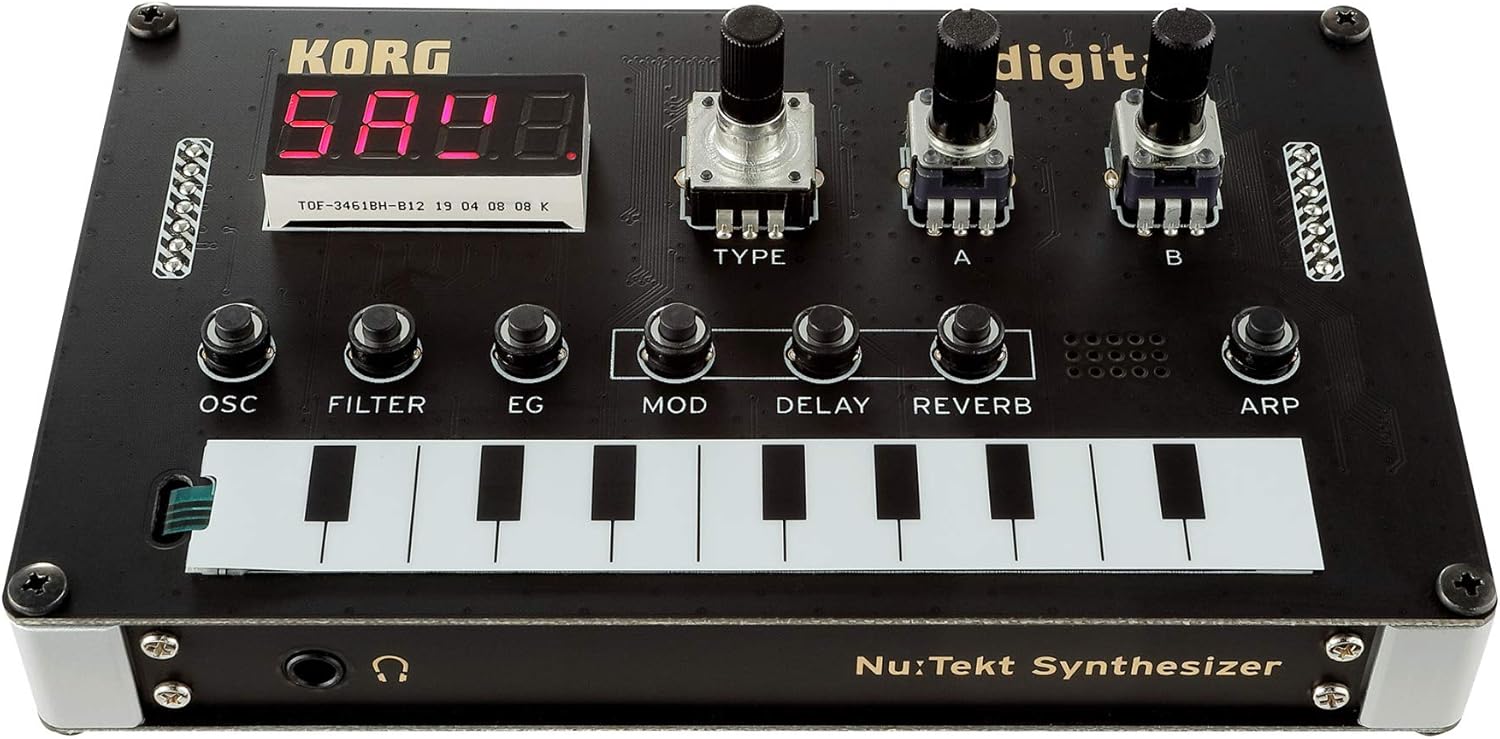
- OSC (Oscillator): Controls the primary sound source. Adjust TYPE, A, and B knobs to select and modify oscillator types and parameters.
- פילטער: Shapes the tonal characteristics of the sound. Use the dedicated knob to adjust the multimode filter.
- EG (Envelope Generator): קאָנטראָלס די ampליטוד קאָנווערט פון די געזונט.
- מאָד (מאַדזשאַליישאַן): Adjusts modulation sources and destinations, including LFO.
- פאַרהאַלטן: Controls the delay effect parameters.
- ריווערב: Controls the reverb effect parameters.
- ARP (Arpeggiator): Activates and controls the arpeggiator for rhythmic patterns.
- ריר קלאַוויאַטור: A ribbon controller for playing notes and inputting sequences.
- געפֿירט ווייַז: Shows current parameter values and settings.
3.2. יקערדיק אָפּעראַציע
- מאַכט אויף: Connect the NTS-1 to a USB power source. The LED display will light up.
- שפּיל הערות: Use the touch keyboard to play notes. Experiment with different pressure and slide techniques.
- Adjust Oscillator: Turn the OSC TYPE knob to select different oscillator types. Use knobs A and B to modify their characteristics.
- Apply Filter: Adjust the FILTER knob to change the cutoff frequency and resonance, shaping the sound.
- ניצן עפֿעקטן: Experiment with the DELAY and REVERB knobs to add spatial effects to your sound.
- אַרפּעגיאַטאָר: Press the ARP button to activate the arpeggiator. Adjust its parameters for varied rhythmic patterns.
3.3. קאַנעקטיוויטי

- וסב: For power and MIDI communication with a computer.
- MIDI IN: Connect external MIDI controllers or sequencers.
- OUT/SYNC-IN: Audio output and synchronization input for other Korg Volca series devices.
- אַודיאָ אין: Input for processing external audio signals through the NTS-1's effects.
3.4. אפיציעלע פּראָדוקט ווידעאָס
Watch these official videos from the seller for more insights into the Korg Nu:Tekt NTS-1:
4. וישאַלט
To ensure the longevity and optimal performance of your Korg Nu:Tekt NTS-1, follow these maintenance guidelines:
- רייניקונג: Use a soft, dry cloth to wipe down the surface of the synthesizer. Avoid abrasive cleaners or solvents, as they may damage the finish.
- סטאָרידזש: Store the NTS-1 in a cool, dry place away from direct sunlight, extreme temperatures, and high humidity.
- האַנדלינג: Handle the device with care to prevent physical damage. Avoid dropping it or exposing it to excessive force.
- מאַכט: Always use the recommended USB power source. Disconnect power when the device is not in use for extended periods.
5. טראָובלעשאָאָטינג
If you encounter issues with your Korg Nu:Tekt NTS-1, try the following troubleshooting steps:
- קיין מאַכט: Ensure the USB cable is securely connected to both the NTS-1 and a working power source. Try a different USB cable or power source.
- קיין קול: Check that the volume is turned up. Ensure headphones or speakers are properly connected to the output jack. Verify that an oscillator type is selected and the filter cutoff is open.
- MIDI פראבלעמען: Confirm that MIDI cables are correctly connected. Check MIDI settings on both the NTS-1 and your external device/software.
- אומגעריכטע אויפפירונג: Try resetting the device to its factory settings (refer to the owner's manual for specific instructions).
6. ספּעסאַפאַקיישאַנז
| שטריך | דעטאַל |
|---|---|
| פּונקט וואָג | 10.2 אונסעס (290 גראַם) |
| פּראָדוקט דימענשאַנז | 5.08 X 3.07 X 1.54 אינטשעס |
| גוף מאַטעריאַל | אַלומינום, קאַרבאָן פיבער |
| ענדיקן טיפּ | פּאַלישט |
| קאָליר | שוואַרץ |
| מאַכט מקור | Corded Electric (USB Type B) |
| Voltage | 9 וואלטס (AC) |
| נומער פון קלאַוויאַטור קיז | 49 (virtual ribbon keyboard) |
| פאַבריקאַנט | KORG |
| ערשטער דאַטע בנימצא | 3 סעפטעמבער 2019 |
7. וואָראַנטי און שטיצן
KORG offers various protection plans for your Nu:Tekt NTS-1 Digital Synthesizer Kit:
- 3-יאָר שוץ פּלאַן: בנימצא פֿאַר אַן איין-מאָל צאָלונג פֿון $21.99.
- 4-יאָר שוץ פּלאַן: בנימצא פֿאַר אַן איין-מאָל צאָלונג פֿון $29.99.
- גאַנץ באַשיצן: A monthly plan covering all eligible past and future purchases for $16.99.
For returns, a 30-day refund/replacement policy is typically available. For detailed warranty information and technical support, please refer to the official KORG webפּלאַץ אָדער קאָנטאַקט זייער קונה דינסט.


