1. הקדמה
The Maxell Bass 13 Wireless Headphones (Model B13-WHPS) are designed to provide a versatile audio experience. These headphones feature 40mm drivers for clear sound, an integrated microphone for communication, and comfortable ear pads for extended listening. They offer both wireless Bluetooth connectivity and a traditional 3.5mm wired option.
2. וואָס איז אין דער קעסטל
- Maxell Bass 13 Wireless Headphones
- וסב טשאַרדזשינג קאַבלע
- 3.5mm Audio Cable (if applicable, not explicitly listed but common for hybrid headphones)
- באַניצער מאַנואַל
3. פּראָדוקט איבערview
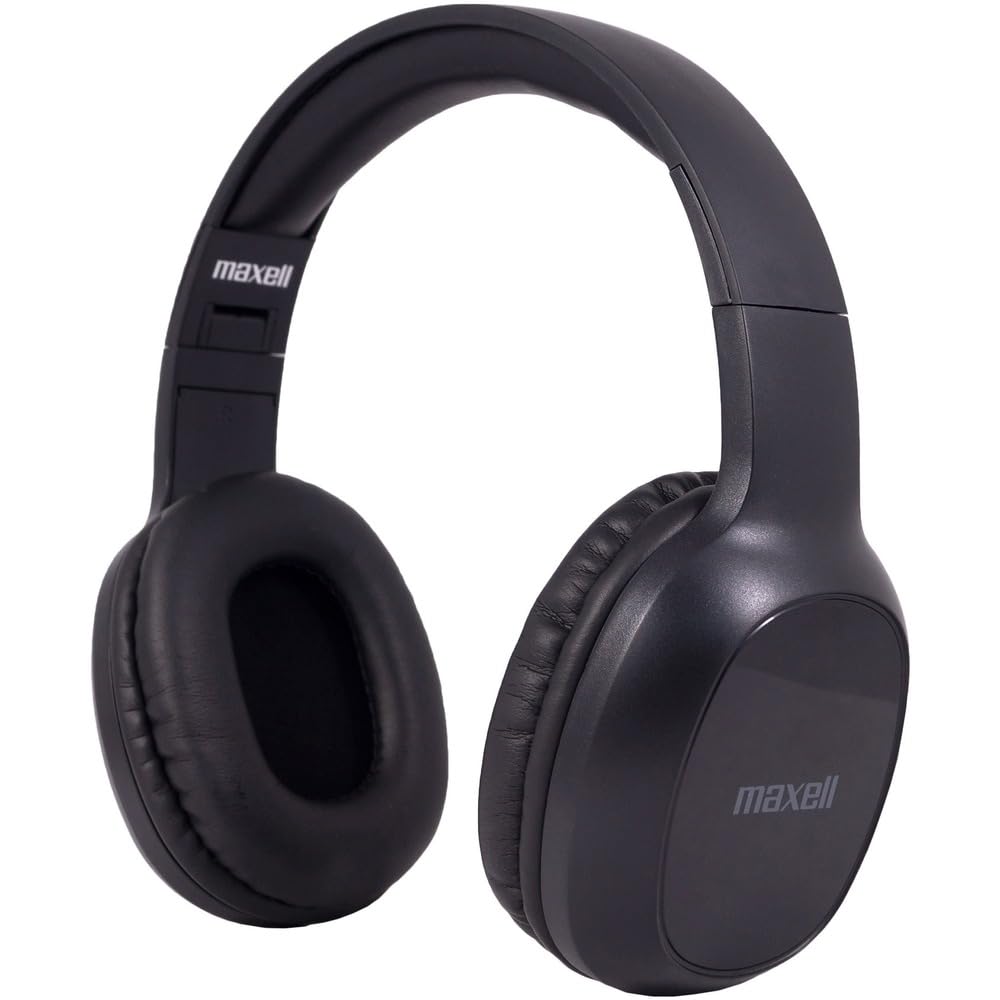
Figure 1: Maxell Bass 13 Wireless Headphones

Figure 2: Earcup Controls (Power, Volume, Play/Pause)
שליסל פֿעיִקייטן:
- 40 מם דינאַמיש דריווערס: Deliver clear and powerful audio performance.
- ינטעגראַטעד מיקראָפאָן: ערמעגליכט הענט-פריי רופן.
- Noise-Isolating Earpads: Provide comfort and help reduce external distractions.
- בלועטאָאָטה 5.0 קאַנעקטיוויטי: פֿאַר אַ סטאַבילע וויירלעסע פֿאַרבינדונג.
- 3.5 מם אַודיאָ דזשאַק: Allows for wired connection to compatible devices.
- אַדזשאַסטאַבאַל כעדבאַנד: זיכערט אַ באַקוועמע פּאַסיק פֿאַר פֿאַרשידענע קאָפּ סיזעס.
- ביז 8 שעה באַטעריע לעבן: For extended listening and talk time.
4. סעטאַפּ
4.1 אויפלאָדן די קאָפּהערער

Figure 3: Connecting the USB Charging Cable
- Locate the charging port on the headphone earcup.
- Connect the small end of the provided USB charging cable to the headphone's charging port.
- Connect the larger end of the USB cable to a USB power source (e.g., computer USB port, USB wall adapter).
- The LED indicator on the headphones will illuminate to show charging status. It will typically turn off or change color when fully charged.
- A full charge provides up to 8 hours of continuous talk/play time.
4.2 בלועטאָאָטה פּערינג
- זיכער מאַכן אַז די כעדפאָונז זענען גאָר אויפגעלאָדן.
- Press and hold the Power button on the headphone earcup until the LED indicator flashes blue and red, indicating pairing mode.
- אויף אייער דעווייס (סמאַרטפאָן, טאַבלעט, קאָמפּיוטער), גייט צו די בלועטוט סעטטינגס.
- זוכן פֿאַר available devices. Select "Maxell Bass 13" from the list.
- Once paired, the LED indicator will typically show a solid blue light or flash blue slowly.
- אויב געבעטן פֿאַר אַ פּאַראָל, אַרייַן "0000".
4.3 Wired Connection (3.5mm Audio Jack)

Figure 4: Connecting the 3.5mm Audio Cable
פֿאַר דעוויסעס אָן בלועטוט אָדער ווען די באַטאַרייע איז נידעריק, קענט איר נוצן דעם 3.5 מם אַודיאָ קאַבל:
- Plug one end of the 3.5mm audio cable into the audio input jack on the headphone earcup.
- שטעקט אריין דעם אנדערן עק אין דעם 3.5 מ״מ אודיאָ־אויסגאַנג דזשעק פֿון אייער דעווייס.
- The headphones will operate in passive mode, and Bluetooth functionality will be disabled.
5. אַפּערייטינג ינסטרוקטיאָנס
5.1 מאַכט אויף / אַוועק
- מאַכט אויף: דריק און האלט דעם פּאַוער קנעפּל פֿאַר אַרום 3 סעקונדעס ביז דער LED אינדיקאַטאָר צינדט זיך אָן.
- מאַכט אַוועק: דריק און האלט דעם פּאַוער קנעפּל פֿאַר אַרום 3-5 סעקונדעס ביז דער LED אינדיקאַטאָר גייט אויס.
5.2 באַנד קאָנטראָל
- פאַרגרעסערן באַנד: דריק דעם באַנד אַרויף (+) קנעפּל.
- פאַרמינערן באנד: דריק דעם באַנד אַראָפּ (-) קנעפּל.
5.3 מוזיק פּלייבאַק
- שפּיל / פּויזע: Press the Multi-function button (often the Power button or a dedicated Play/Pause button) once.
- ווייַטער שפּור: Press and hold the Volume Up (+) button (or double-press, refer to specific product button layout).
- פֿריִערדיקע שפּור: Press and hold the Volume Down (-) button (or double-press, refer to specific product button layout).
5.4 רוף פאַרוואַלטונג
- ענטפֿערן / סוף רופן: דרוק אַ מאָל אויף די מולטי-פונקציאָנירן.
- אָפּוואַרפן רופן: דריק און האַלט דעם מולטי-פונקציע קנעפּל פֿאַר אַרום 2 סעקונדעס.
- ריאַל די לעצטע נומער: טאָפּל דריקן די מולטי-פונקציע קנעפּל.
6. וישאַלט
6.1 רייניקונג
- ווישט די כעדפאָונז מיט אַ ווייכן, טרוקענעם, לינט-פֿרייע שטאָף.
- ניצט נישט קיין שרײַבענדיקע רייניגער, סאָלווענטן אדער אַעראָסאָל ספּרײַ.
- פֿאַרמײַדט אַרײַנצוקומען פֿײַכטקײַט אין קיין עפענונגען.
6.2 סטאָרידזש

Figure 5: Headphones Folded for Storage
- Store the headphones in a cool, dry place away from extreme temperatures.
- ווען נישט אין באַנוץ פֿאַר לענגערע פּעריאָדן, זיכער מאַכן אַז די כעדפאָונז זענען גאָר אָפּגעלאָדן איידער זיי ווערן אַוועקגעלייגט, כּדי צו באַוואָרענען די באַטאַריע געזונט.
- The headphones feature a foldable design for compact storage and portability.
6.3 באַטערי קער
- פֿאַרמײַדט אָפֿט פֿולשטענדיק אויסצולאָדן די באַטעריע.
- Charge the headphones regularly, even if not used often.
- Do not expose the battery to excessive heat or direct sunlight.
7. טראָובלעשאָאָטינג
| פּראָבלעם | מעגלעך סיבה | לייזונג |
|---|---|---|
| קאָפּהערער ווערן נישט אָנגעצינדן | נידעריק באַטאַרייע | טשאַרדזש די כעדפאָונז גאָר. |
| קען נישט צוזאמענשטעלן דורך בלוטוט | כעדפאָונז נישט אין פּערינג מאָדע; מיטל בלועטוט אויסגעלאָשן; צו ווייט פון מיטל | Ensure headphones are in pairing mode (flashing blue/red). Turn on device Bluetooth. Move headphones closer to device. |
| קיין געזונט | Volume too low; Incorrect audio source; Headphones not connected | Increase headphone and device volume. Check if headphones are properly paired/connected. Verify audio output settings on your device. |
| נעבעך רופן קוואַליטעט | Weak Bluetooth signal; Microphone obstructed | ריקט זיך נענטער צו אייער אפאראט. מאַכט זיכער אַז דער מיקראָפאָן איז נישט באדעקט. |
8. ספּעסאַפאַקיישאַנז
| שטריך | דעטאַל |
|---|---|
| מאָדעל נומער | B13-WHPS |
| סאָרט | מאַקסעל |
| קאַנעקטיוויטי טעכנאָלאָגיע | בלועטאָאָטה 5.0 |
| אַודיאָ דרייווער גרייס | 40 מם |
| באַטערי לעבן | Up to 8 Hours (continuous talk/play time) |
| כעדפאָונז דזשאַק | 3.5 מם דזשאַק |
| ראַש קאָנטראָל פֿעיִקייטן | Sound Isolation, Noise Cancelling |
| ימפּידאַנס | 32 אָהמס |
| סענסיטיוויטי | 100 דב |
| אָפטקייַט ענטפער | 20 הז |
| אויער פּלייסמאַנט | אויף אויער |
| פאָרם פאַקטאָר | איבער אויער |
| פּראָדוקט דימענשאַנז | 7.25 X 3 X 9 אינטשעס |
| פּונקט וואָג | 8.4 אונסעס |
| מאַטעריאַל | Electronic Components, Foam, Plastic, Wire |
| קאַמפּאַטאַבאַל דעוויסעס | Tablets, Laptops, Desktops, Portable Devices with 3.5mm Audio Jack |
9. אפיציעלע פּראָדוקט ווידעאָ
Video 1: Maxell Bass 13 Bluetooth Headphones Overview. This video provides a visual demonstration of the headphones' features and design.
10. וואָראַנטי און שטיצן
Maxell products are designed for reliability and performance. For specific warranty information, please refer to the warranty card included with your purchase or visit the official Maxell website. For technical support or customer service inquiries, please contact Maxell customer support through their official channels.


