1. הקדמה
Thank you for choosing the Kaidi KD-750 Bluetooth Headphones. This manual provides essential information for the proper setup, operation, and maintenance of your device. Please read it thoroughly before use to ensure optimal performance and longevity of your headphones.
2. פּעקל אינהאַלט
באַשטעטיקן אַז אַלע זאכן זענען פאַראַן אין דיין פּעקל:
- 1 x Kaidi KD-750 Bluetooth Headphones
- 1 x וסב טשאַרדזשינג קאַבלע
- 1 x Reinforced 3.5mm Audio Cable with Microphone (P2 Cable)
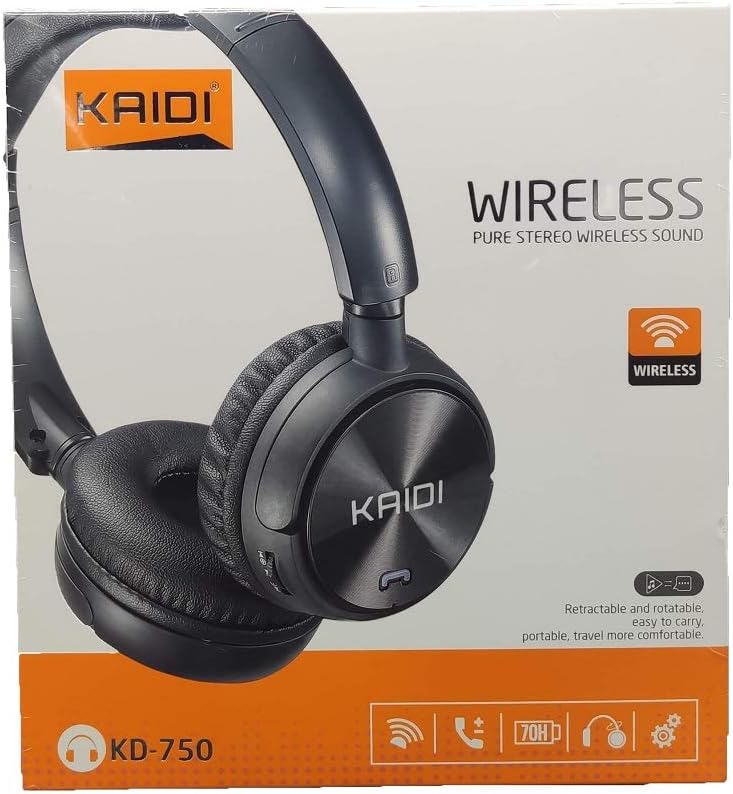
בילד: פראָנט view of the Kaidi KD-750 retail packaging, showing the headphones and branding.
3. פּראָדוקט איבערview
Familiarize yourself with the various parts and controls of your Kaidi KD-750 headphones.

בילד: פראָנט view of the Kaidi KD-750 Bluetooth Headphones, showcasing the earcups with Kaidi logo and the adjustable headband.
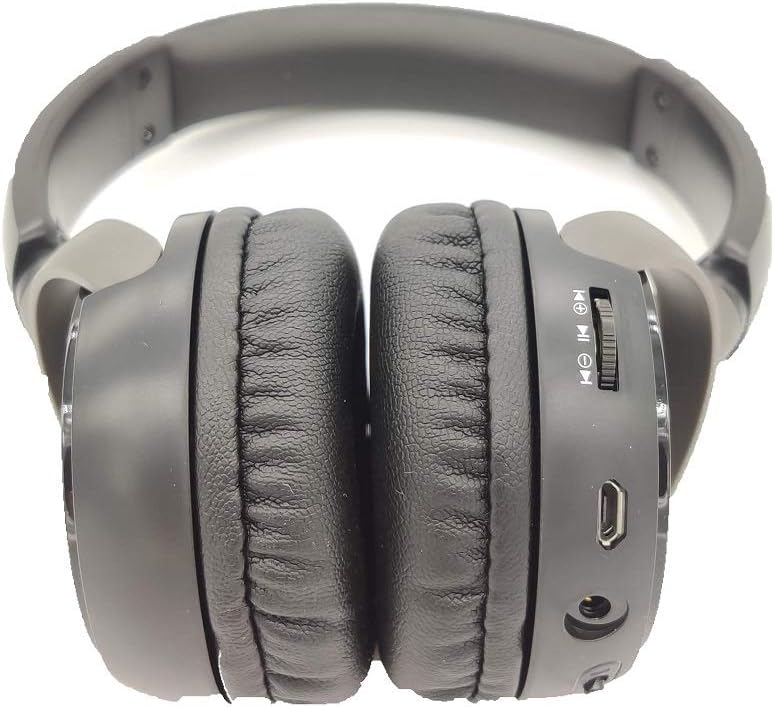
בילד: זייט view of the Kaidi KD-750 Bluetooth Headphones, highlighting the control buttons, charging port, and audio jack on the earcup.

Image: Back of the Kaidi KD-750 retail box, featuring a diagram of the headphone controls and key product features.
3.1. קאָנטראָלן און פּאָרטן
- מאַכט קנעפּל / מולטי-פונקציע קנעפּל: מאַכט אויף/אויס, שפּילן/פּויזע, ענטפֿערן/ענדיגן רוף.
- באַנד אַרויף / ווייַטער ליד קנעפּל: קורץ דריקן פֿאַר וואָלומען אַרויף, לאַנג דריקן פֿאַר דער ווייַטער ליד.
- באַנד אַראָפּ / פריערדיקע ליד קנעפּל: קורץ דריקן פֿאַר באַנד אַראָפּ, לאַנג דריקן פֿאַר פֿריִערדיקע ליד.
- מאָדע קנעפּל (M): Switch between Bluetooth, FM Radio, and SD Card modes.
- מיקראָ וסב טשאַרדזשינג פּאָרט: פֿאַר טשאַרדזשינג די כעדפאָונז.
- 3.5 מם AUX אַרייַנשרייַב: פֿאַר דראָטיקער פֿאַרבינדונג ניצנדיק דעם אַרייַנגערעכנטן אַודיאָ קאַבל.
- מיקראָ סד קאָרט שפּעלטל: פֿאַר שפּילן מוזיק גלייך פֿון אַ מיקראָ SD קאַרטל.
- מיקראָפאָן: פֿאַר הענט-פריי קאַללס.
4. סעטאַפּ
4.1. טשאַרדזשינג די כעדפאָונז
פארן ערשטן באַנוץ, זאָלט איר גאָר אויפלאָדן אייערע כעדפאָונז.
- Connect the Micro USB end of the charging cable to the charging port on the headphones.
- פֿאַרבינדט דעם USB-A עק פֿונעם טשאַרדזשינג קאַבל צו אַ USB מאַכט אַדאַפּטער (נישט אַרייַנגערעכנט) אָדער אַ קאָמפּיוטער'ס USB פּאָרט.
- The LED indicator will illuminate (usually red) during charging.
- Once fully charged (approximately 2 hours), the LED indicator will change color or turn off (refer to specific LED behavior in the specifications).
באַמערקונג: די באַטאַרייע לעבן איז בעערעך 5 שעה אויף אַ פול אָפּצאָל.
4.2. בלועטאָאָטה פּערינג
Pair your headphones with a Bluetooth-enabled device.
- מאַכן זיכער אַז די כעדפאָונז זענען אויסגעדרייט אַוועק.
- Press and hold the Power Button for approximately 3-5 seconds until the LED indicator flashes blue and red alternately, indicating pairing mode.
- אויף אייער דעווייס (סמאַרטפאָן, טאַבלעט, קאָמפּיוטער), אַקטיווירט בלועטוט און זוכט פֿאַר פֿאַראַן דעווייסעס.
- Select "KD-750" from the list of found devices.
- Once paired, the LED indicator will typically flash blue slowly or remain solid blue.
- אויב אַ פּאַראָל איז פארלאנגט, אַרייַן "0000".
The effective Bluetooth range is approximately 10 meters (33 feet).
5. אַפּערייטינג ינסטרוקטיאָנס
5.1. מאַכט אויף / אויסגעלאשן
- מאַכט אויף: Press and hold the Power Button for 2-3 seconds until the LED indicator lights up.
- מאַכט אַוועק: Press and hold the Power Button for 3-4 seconds until the LED indicator turns off.
5.2. מוזיק ווידערשפּיל (בלוטוט מאָדע)
- שפּיל / פּויזע: קורץ דריקן די מאַכט קנעפּל.
- ווייַטער שפּור: לאַנג דריקן די באַנד אַרויף קנעפּל.
- פֿריִערדיקע שפּור: לאַנג דריקן די באַנד אַראָפּ קנעפּל.
- באַנד אַרויף: דריק קורץ דעם "Volume Up" קנעפל.
- באַנד אַראָפּ: דריק קורץ דעם באַנד אַראָפּ קנעפּל.
5.3. טעלעפאָן קאַללס
- ענטפער רופן: Short press the Power Button when an incoming call rings.
- סוף רופן: Short press the Power Button during a call.
- אָפּוואַרפן רופן: Long press the Power Button when an incoming call rings.
- ריאַל די לעצטע נומער: דריקט צוויי מאָל דעם מאַכט קנעפּל.
5.4. Mode Switching (FM Radio / SD Card / AUX)
דרוק די מאָדע (ב) קנעפּל to cycle through available modes: Bluetooth, FM Radio, and SD Card playback.
5.4.1. עפעם ראַדיאָ מאָדע
- Switch to FM mode using the Mode (M) Button.
- Long press the Power Button to automatically scan and save available FM stations.
- Short press the Volume Up/Down buttons to adjust volume.
- Long press the Volume Up/Down buttons to switch between saved stations.
5.4.2. מיקראָ סד קאַרטל פּלייבאַק
- Insert a Micro SD card (with MP3 files) into the SD card slot.
- Switch to SD Card mode using the Mode (M) Button. The headphones will automatically begin playing music from the card.
- Use the Play/Pause, Volume Up/Down, and Next/Previous Track controls as in Bluetooth mode.

בילד: נאָענט-אַרויף view of the Micro SD card slot on the Kaidi KD-750 headphones.
5.4.3. AUX Wired Mode
- Connect one end of the included 3.5mm audio cable to the AUX input on the headphones.
- פֿאַרבינדט דעם אַנדערן עק צום 3.5 מ״מ אַודיאָ אַרויסגאַנג פֿון אייער דעווייס.
- The headphones will automatically switch to AUX mode.
- In AUX mode, controls on the headphones (volume, track control) may not function; use your connected device for control.
6. וישאַלט און קער
- רייניקט די כעדפאָונז מיט אַ ווייכן, טרוקענעם שטאָף. ניצט נישט קיין שרײַבנדיקע רייניגערס אדער סאָלווענטן.
- פֿאַרמײַדט אויסשטעלן די כעדפאָונז צו עקסטרעמע טעמפּעראַטורן, פֿײַכטקייט, אָדער דירעקטער זון.
- דו זאלסט נישט ייַנטונקען די כעדפאָונז אין וואַסער אָדער קיין אנדערע ליקווידס.
- סטאָר די כעדפאָונז אין אַ קיל, טרוקן אָרט ווען ניט אין נוצן.
- לאָדט די כעדפאָונז רעגולער, אפילו אויב זיי ווערן נישט גענוצט פֿאַר לענגערע פּעריאָדן, כּדי צו האַלטן די באַטאַריע געזונט.
7. טראָובלעשאָאָטינג
7.1. Headphones do not power on.
לייזונג: The battery may be depleted. Connect the headphones to a power source using the USB charging cable and allow them to charge for at least 30 minutes before attempting to power on again.
7.2. Cannot pair with a Bluetooth device.
- לייזונג 1: Ensure the headphones are in pairing mode (LED flashing blue and red alternately).
- לייזונג 2: זייט זיכער אז בלועטוט איז ענייבאַלד אויף אייער דעווייס און עס איז אינערהאלב 10 מעטער פון די כעדפאָונז.
- לייזונג 3: אויסלעשן בלוטוט אויף אייער דעווייס, דערנאך עס צוריק אנצינדן און פרובירן נאכאמאל זוכן.
- לייזונג 4: If previously paired, try "forgetting" or "unpairing" the headphones from your device's Bluetooth list and then re-pairing.
7.3. No sound or low volume.
- לייזונג 1: קאָנטראָלירט די וואָלומען לעוועלס אויף ביידע די כעדפאָונז און אייער פֿאַרבונדענע מיטל.
- לייזונג 2: Ensure the headphones are properly connected via Bluetooth or the 3.5mm AUX cable.
- לייזונג 3: If using AUX mode, ensure the cable is fully inserted into both the headphones and the audio source.
7.4. FM radio reception is poor.
לייזונג: Move to an open area away from obstructions or electronic interference. The 3.5mm audio cable can sometimes act as an antenna; try connecting it even if not using AUX mode for improved reception.
8. ספּעסאַפאַקיישאַנז
| בלועטאָאָטה ווערסיע: | v4.2 |
| שטיצט פּראָטאָקאָלס: | אַוורקפּ 1.3, אַ 2 דפּ 1.0, הפפּ 1.5, הספּ 1.0 |
| עפעקטיוו קייט: | 10 מעטער (33 פֿיס) |
| אַרבעט אָפטקייַט: | 2.402GHz - 2.480GHz |
| באַטערי טיפּ: | איינגעבויטע 3.7V 300mAh ריטשאַרדזשאַבאַל ליטהיום באַטאַרייע |
| טשאַרדזשינג וואָלtage: | גלייכשטראָם 4.2V - 5.5V |
| טשאַרדזשינג צייט: | בעערעך 2 שעה |
| באַטאַרייע געדויער: | Approximately 5 hours (playback) |
| רעדנער ימפּידאַנס: | 32 אָהמס |
| ראַש קאָנטראָל: | פּאַסיוו ראַש קאַנסאַליישאַן |
| קאַנעקטיוויטי טעכנאָלאָגיע: | בלועטאָאָטה, 3.5 מם דזשאַק |
| קאַמפּאַטאַבאַל דעוויסעס: | Any device supporting Bluetooth connectivity |
| פּראָדוקט וואָג: | 190 ג |
| קאָליר: | שוואַרץ |
9. וואָראַנטי און שטיצן
The Kaidi KD-750 Bluetooth Headphones come with a standard manufacturer's warranty against defects in materials and workmanship. Please refer to the warranty card included with your purchase for specific terms and conditions, including the warranty period.
For technical support, troubleshooting assistance, or warranty claims, please contact your retailer or the official Kaidi customer service. Contact information can typically be found on the product packaging or the official Kaidi webפּלאַץ.
ביטע באַהאַלטן אייער קויפן-באַווייַז פֿאַר גאַראַנטיע צוועקן.


