1. הקדמה
The eKids Frozen 2 Bluetooth Karaoke Machine with Light Show is designed to provide an interactive music experience. This portable device allows users to stream audio wirelessly via Bluetooth, sing along with the included wired microphone, and expand content through a USB port. It features a multi-colored LED light show and built-in memory for storing music.
2. וואָס איז אין דער קעסטל
- Bluetooth MP3 Karaoke Machine
- ווייערד מיקראָפאָן
- וסב טשאַרדזשינג קאַבלע
3. פּראָדוקט פֿעיִקייטן
- בלועטאָאָטה קאַנעקטיוויטי: Connect to any compatible Bluetooth device to stream audio wirelessly.
- ווייערד מיקראָפאָן: Includes one real working wired microphone for singing along. An additional mic jack is available for a second microphone (sold separately).
- יו-עס-בי אַודיאָ שפּילער: Features a USB port to play MP3 files from a USB flash drive (not included).
- רעקאָרדינג פֿונקציע: Record performances while singing along to streaming music. Requires a USB flash drive (not included).
- Multi-colored LED Light Show: Integrated light show to enhance the performance experience.
- געבויט-אין זכּרון: Store hours of music directly on the device.
- קריקאָנלאָדלעך באַטערי: Portable design with a built-in rechargeable battery for on-the-go use.

פיגורע 1: איבערview of the Karaoke Machine's Controls and Features.

Figure 2: Bluetooth Compatibility with various devices.
4. סעטאַפּ
4.1 אנשטעלן דעם איינהייט
The karaoke machine operates on a built-in rechargeable battery. Ensure the unit is fully charged before first use for optimal performance.
- Connect the supplied USB charging cable to the USB charging port on the back of the unit.
- Connect the other end of the USB cable to a standard USB power adapter (not included) or a powered USB port.
- The charging indicator will illuminate. Allow sufficient time for a full charge.
4.2 פֿאַרבינדן דעם מיקראָפֿאָן
The wired microphone connects to the microphone jack on the unit.
- Locate the microphone jack on the side or back of the karaoke machine.
- Insert the microphone plug firmly into the jack.

Figure 3: Karaoke Machine with Microphone Connected.
5. אַפּערייטינג ינסטרוקטיאָנס
5.1 מאַכט אויף / אַוועק
דריקן און האַלטן די מאַכט button located on the control panel to turn the unit on or off.
5.2 בלועטאָאָטה פּערינג
- Turn on the karaoke machine. The Bluetooth indicator on the display will flash, indicating it is in pairing mode.
- אויף אייער בלוטוט-ענייבאַלד מיטל (סמאַרטפאָן, טאַבלעט, אאז"וו), גייט צו די בלוטוט סעטטינגס און ענייבלט בלוטוט.
- Select "eKids Frozen 2 Karaoke" (or similar name) from the list of available devices.
- Once paired, the Bluetooth indicator will stop flashing and remain solid. You can now stream audio from your device.
5.3 Playing Music via USB
- אַרייַנלייגן אַ וסב בליץ פאָר מיט mp3 fileס אין די וסב פּאָרט אויף די אַפּאַראַט.
- The unit should automatically switch to USB mode and begin playing music. If not, press the מאָדע קנעפּל צו אויסקלייַבן וסב מאָדע.
- ניצן די שפּיל / פּויזע, ווייַטער שפּור, און פֿריִערדיקע שפּירט קנעפּלעך צו קאָנטראָלירן פּלייבאַק.
5.4 מיקראָפאָן באַניץ
- Ensure the microphone is securely plugged into the mic jack.
- דרוק די מיקראָפאָן אויף / אַוועק button to activate the microphone.
- Adjust the microphone volume using the dedicated volume controls if available, or the main volume controls.
5.5 ליכט ווייַזן
דרוק די ליכט אויף / אַוועק button to activate or deactivate the multi-colored LED light show.
5.6 Recording Performances
To record your singing, a USB flash drive (not included) must be inserted into the USB port.
- Ensure a USB flash drive is inserted.
- Start playing your desired music (via Bluetooth or USB).
- דרוק די REC קנעפּל צו אָנהייבן רעקאָרדינג.
- Sing into the microphone.
- דרוק די REC button again to stop recording. Your performance will be saved to the USB flash drive.
6. וישאַלט
- רייניקט דעם אַפּאַראַט מיט אַ ווייכן, טרוקענעם שטאָף. ניצט נישט קיין שרײַבנדיקע רייניגערס אדער סאָלווענטן.
- האַלט דעם אַפּאַראַט אַוועק פון דירעקט זונשייַן, היץ קוועלער און נעץ.
- Store the microphone in its designated compartment on the back of the unit when not in use to prevent loss or damage.
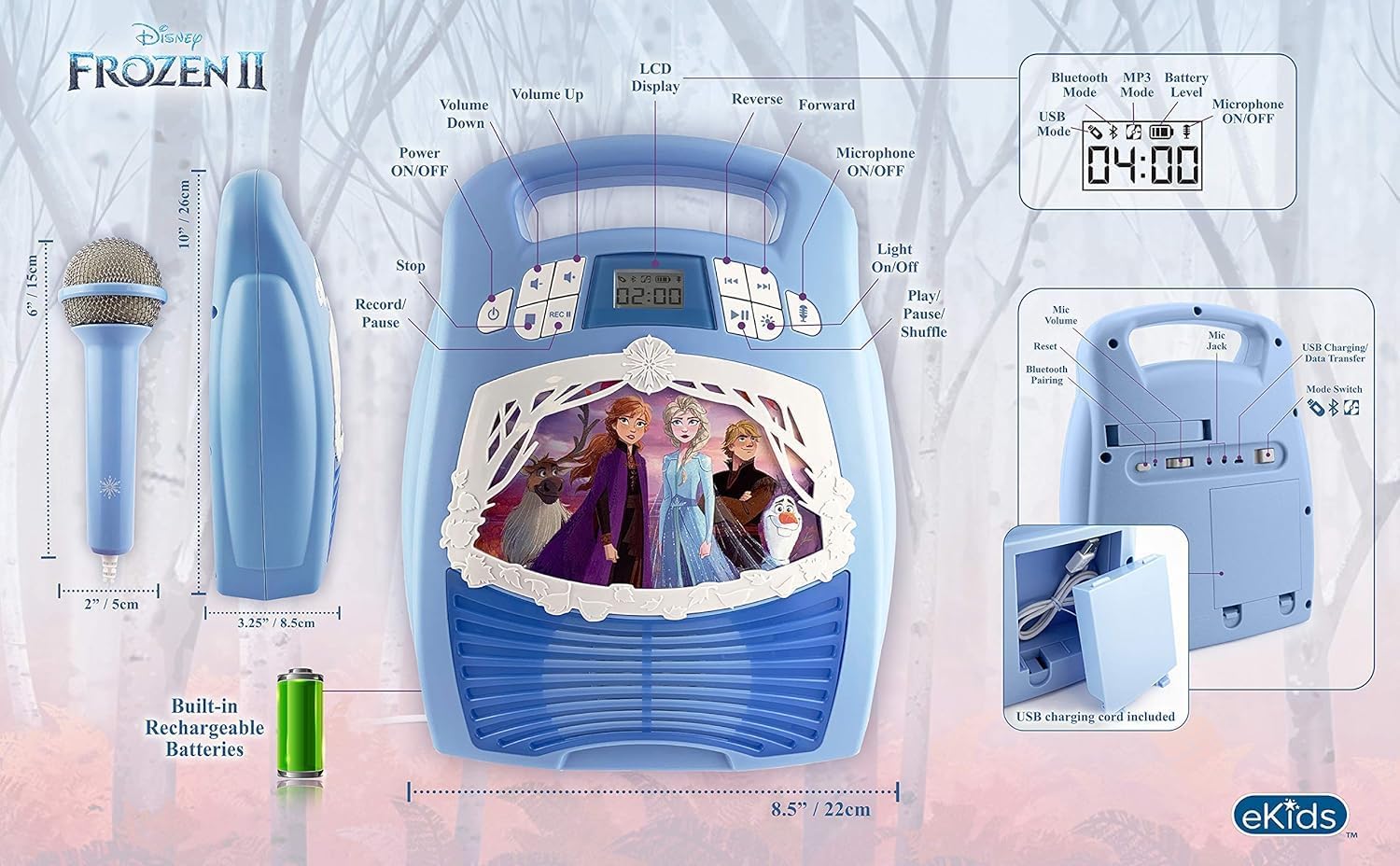
פיגורע 4: דערציען view with microphone storage compartment.
7. טראָובלעשאָאָטינג
- קיין מאַכט: Ensure the unit is charged. Connect the USB charging cable and allow it to charge.
- קיין קול: Check the volume levels on both the karaoke machine and your connected Bluetooth device. Ensure the microphone is turned on if using it.
- בלועטאָאָטה ניט קאַנעקטינג: Make sure Bluetooth is enabled on your device and the karaoke machine is in pairing mode. Try restarting both devices. Ensure no other devices are currently connected to the karaoke machine.
- מיקראָפאָן איז נישט ארבעטן: Verify the microphone is securely plugged into the correct jack and the microphone ON/OFF button is activated.
- רעקאָרדינג ישוז: Ensure a compatible USB flash drive is inserted and has sufficient free space.
8. ספּעסאַפאַקיישאַנז
| שטריך | דעטאַל |
|---|---|
| פּראָדוקט דימענשאַנז | 8 X 3 X 10 אינטשעס |
| פּונקט וואָג | 2.64 פונט |
| מאָדעל נומער | FR-553v9M |
| רעקאַמענדיד עלטער | 3 - 35 חדשים |
| באַטעריז | 3 AA באַטעריעס פארלאנגט (אריינגערעכנט) - Note: Product description also mentions built-in rechargeable battery. Please refer to packaging for exact battery type. |
| ספּעציעלע שטריך | פּאָרטאַטיוו, קריקאָנלאָדלעך |
| קאָליר | Older Version |
| פאַבריקאַנט | קינד דיזיינס |
9. זיכערקייַט אינפֿאָרמאַציע
Please read and follow all safety instructions provided with the product packaging. This product is intended for use by children aged 3 and up, under adult supervision.
10. וואָראַנטי און שטיצן
דער פּראָדוקט קומט מיט אַ איין יאָר לימיטעד וואָראַנטי. For warranty claims or technical support, please refer to the contact information provided in your product packaging or visit the eKids official webפּלאַץ.
11. פּראָדוקט ווידעאָ
Video 1: An official product video from KIDdesigns, Inc. showcasing the eKids Frozen 2 Bluetooth Karaoke Machine with Light Show, highlighting its features and design.


