1. הקדמה
This manual provides essential information for the safe and efficient operation of your Tesvor Robot Vacuum. The Tesvor X500Pro is a versatile 2-in-1 robotic vacuum and mop cleaner designed to provide thorough cleaning on various floor types, from hard floors to low-pile carpets. It features strong suction, smart navigation, and convenient control options via Wi-Fi, app, and voice commands.
ביטע לייענען דעם מאַנואַל קערפאַלי איידער איר נוצן דעם פּראָדוקט און האַלטן עס פֿאַר צוקונפֿט רעפֿערענץ.
2. זיכערקייַט אינפֿאָרמאַציע
To reduce the risk of injury or damage, read these safety instructions carefully and keep them at hand when setting up, using, and maintaining your robot vacuum.
- The robot vacuum is for indoor use only. Do not use it outdoors or on commercial surfaces.
- Do not use the robot vacuum in wet environments or on floors with standing water.
- אַראָפּנעמען עלעקטרישע קאָרדס, קליינע אָביעקטן און שוואַכע זאַכן פֿון דער ערד איידער איר רייניקן, כּדי צו פֿאַרמייַדן פֿאַרפּלעכטונג אָדער שאָדן.
- האַלטן האָר, פרייַ קליידער, פינגער און אַלע גוף טיילן אַוועק פון אָופּאַנינגז און מאָווינג טיילן.
- Do not operate the robot vacuum near open flames or flammable materials.
- Ensure the charging dock is placed against a wall on a level surface and is not easily moved.
- The robot vacuum is not suitable for high-pile carpets over 0.6 inches, dark-colored rugs, or carpets with black strips/edges, as these may interfere with sensors.
- Only use the original power adapter and charging dock provided by the manufacturer.
- היט אויף קינדער און חיות ווען דער ראָבאָט וואַקוום קלינער אַרבעט.
3. פּעקל אינהאַלט
באַשטעטיקן אַז אַלע קאָמפּאָנענטן זענען פאַראַן און אין גוטן צושטאַנד:
- Tesvor Robot Vacuum Unit
- טשאַרדזשינג דאָק
- מאַכט אַדאַפּטער
- זייט ברושעס (2 פּאָר)
- הויפּט באַרשט
- מיסט
- וואַסער טאַנק מיט מאַפּ שטאָף
- רייניקונג טול
- ווייַט קאָנטראָל
4. פּראָדוקט איבערview
Familiarize yourself with the main components of your Tesvor Robot Vacuum.

Image: The Tesvor Robot Vacuum main unit, showing its sleek white design, accompanied by its charging dock, a mop cloth, and the transparent water tank.

בילד: דער שלאַנקער פּראָfile of the Tesvor Robot Vacuum, measuring 75mm in height, allowing it to easily clean under low-clearance furniture like sofas and cabinets.

Image: A close-up of the Tesvor Robot Vacuum's electronic water tank, highlighting its 350ml capacity and water distribution system for mopping.
5. סעטאַפּ
5.1 ערשט טשאַרדזשינג
- Place the charging dock against a wall in an open, uncluttered area. Ensure there are no obstacles within 1 meter (3 feet) to the front and 0.5 meters (1.5 feet) to the sides of the dock.
- Connect the power adapter to the charging dock and plug the other end into a wall outlet.
- שטעלט דעם ראָבאָט וואַקוום קלינער אויף דער טשאַרדזשינג דאָק. מאַכט זיכער אַז די טשאַרדזשינג קאָנטאַקטן אויף דעם ראָבאָט זענען גלייך מיט די אויף דער דאָק. די אינדיקאַטאָר ליכט אויף דעם ראָבאָט וועט ווייַזן דעם טשאַרדזשינג סטאַטוס.
- Fully charge the robot before its first use (approximately 4-5 hours).
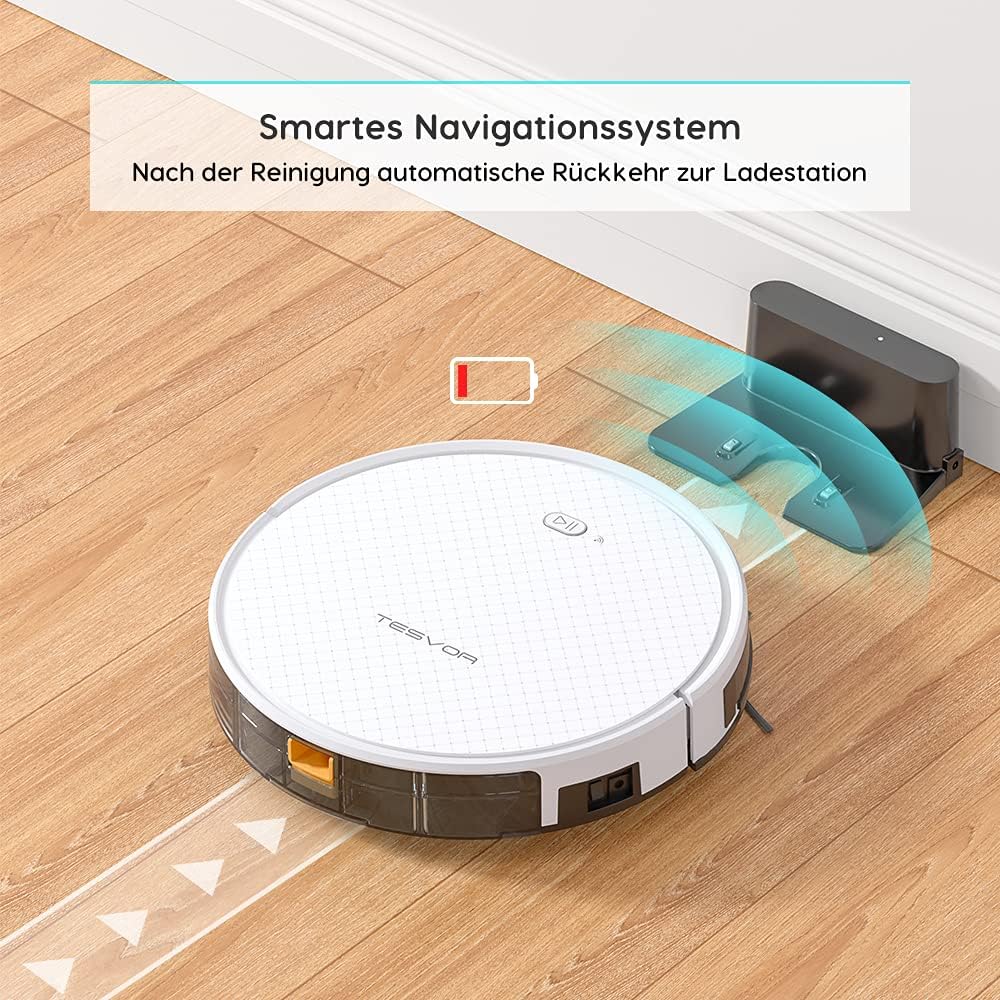
Image: The Tesvor Robot Vacuum intelligently navigating back to its charging station when its battery is low or cleaning is complete, indicated by a battery icon.
5.2 Installing Side Brushes and Dustbin/Water Tank
- דריי דעם ראָבאָט וואַקוום קאַפּויער.
- Align the side brushes with the corresponding posts (L and R) and press them down until they click into place.
- For vacuuming, ensure the dustbin is securely inserted into the robot.
- For mopping, fill the water tank with clean water (and a small amount of cleaning fluid if desired, as per manufacturer's guidelines) and attach the mop cloth. Insert the water tank into the robot.
6. אַפּערייטינג ינסטרוקטיאָנס
6.1 רייניקונג מאָדעס
The Tesvor X500Pro offers various cleaning modes:
- אַוטאָ רייניקונג: The robot intelligently navigates in an S-shape path to cover the entire area.
- אָרט רייניקונג: פאָקוסירט אויף אַ ספּעציפֿיש שמוציקע געגנט.
- ברעג רייניקונג: רייניקט לעבן ווענט און מעבל עדזשאַז.
- סקעדזשולד רייניקונג: Set a cleaning schedule via the app.

Image: The Tesvor Robot Vacuum demonstrating its systematic S-shaped cleaning path, ensuring comprehensive coverage of the floor area.
The robot provides intense 1800Pa suction, effective for dust, crumbs, and pet hair on hard floors and low-pile carpets.

Image: The Tesvor Robot Vacuum actively cleaning a wooden floor, demonstrating its strong suction power by collecting scattered debris.
6.2 אַפּ און שטימע קאָנטראָל
The Tesvor X500Pro can be controlled via the Tesvor Smart App or voice commands through Alexa and Google Assistant.
- Download the "Tesvor Smart" app from your mobile app store.
- Ensure your Wi-Fi network is set to 2.4GHz for connection.
- Follow the in-app instructions to connect your robot vacuum.
- Once connected, you can use the app for scheduling, changing cleaning modes, real-time monitoring of the cleaning path, and direction control.
- For voice control, enable the Tesvor skill in your Alexa or Google Home app and link your Tesvor account.

Image: A smartphone displaying the Tesvor app interface, showing a real-time map of the robot's cleaning progress and various control options, along with icons for 2.4G Wi-Fi, Amazon Alexa, and Google Home compatibility.
7. וישאַלט
רעגולערע אויפהאלטונג גאראנטירט אפטימאלע פאָרשטעלונג און פארלענגערט די לעבנס-צייט פון אייער ראָבאָט וואַקוום.
7.1 רייניקן דעם מיסטקאַסטן און פילטער
- דריק דעם מיסטקאסטן אויסלאז קנעפל און ציעט ארויס דעם מיסטקאסטן.
- עפֿנט דעם דעקל פֿונעם מיסטקאַסטן און ליידיקט אויס דעם אינהאַלט אין אַ מיסטקאַסטן.
- אַרויסנעמען דעם HEPA פֿילטער און פּינע פֿילטער. קלאַפּט זיי לײַכט צו אַרויסנעמען שטויב. וואַשט נישט דעם HEPA פֿילטער מיט וואַסער.
- שווענקט אויס דעם מיסטקאסטן מיט וואסער אויב נויטיג, און מאכט זיכער אז עס איז אינגאנצן טרוקן איידער איר לייגט עס צוריק אריין.
- שטעלט צוריק צוזאם די פילטערס און דעם מיסטקאסטן, און לייגט עס צוריק אריין אין ראָבאָט.
7.2 רייניקן די הויפּט באַרשט און זייט באַרשטן
- דריי דעם ראָבאָט וואַקוום קאַפּויער.
- אַראָפּנעמען דעם דעקל פֿון דער הויפּט־באַרשט און אַרויסנעמען די הויפּט־באַרשט. ניצן דאָס רייניקונגס־געצייַג צו אַראָפּנעמען האָר און שמוץ.
- Pull the side brushes upwards to remove them. Clean any hair or debris wrapped around them.
- Reinstall the main brush and side brushes.
7.3 רייניקן דעם וואַסער טאַנק און מאַפּ שטאָף
- אַראָפּנעמען דעם וואַסער טאַנק פֿון דעם ראָבאָט.
- ליידיקט אויס אלע איבערבליבענע וואסער און שווענקט אויס דעם טאנק גוט.
- Remove the mop cloth and wash it by hand or machine. Allow it to air dry completely.
- Ensure the water tank is dry before storing or refilling.
8. טראָובלעשאָאָטינג
| פּראָבלעם | מעגלעך סיבה | לייזונג |
|---|---|---|
| ראָבאָט טוט נישט קער אויף. | נידעריגע באַטעריע; מאַכט אויסשאַלטן. | Charge the robot; Turn on the main power switch. |
| ראָבאָט בלייבט אָפט שטעקן. | Obstacles (cords, small objects); High-pile carpet. | Clear the area; Avoid using on unsuitable carpets. |
| שלעכטע רייניקונג פאָרשטעלונג. | פולער מיסטקאסטן; פארשטאפטער פילטער; פארפלאנטערטע בירשטן. | ליידיקן דעם מיסטקאסטן; רייניקן/פארבייטן דעם פילטער; רייניקן די בירשטן. |
| קען נישט פאַרבינדן צו Wi-Fi/אַפּ. | Incorrect Wi-Fi band (not 2.4GHz); Incorrect password. | Ensure 2.4GHz Wi-Fi; Re-enter password; Restart router/robot. |
| ראָבאָט טוט נישט צוריקקומען צו טשאַרדזשינג דאָק. | Dock obstructed; Robot too far from dock. | Clear area around dock; Manually place robot closer to dock. |
9. ספּעסאַפאַקיישאַנז
| שטריך | דעטאַל |
|---|---|
| סאָרט | Tesvor |
| מאָדעל נומער | Tesvor X500Pro |
| סאַקשאַן מאַכט | 1800 פּאַ |
| באַטערי לעבן | אַרויף צו 100 מינוט |
| דוסטבין קאַפּאַציטעט | 0.6 ליטער |
| וואַסער טאַנק קאַפּאַציטעט | 350 מל |
| קאָנטראָל מעטאָד | אַפּ, שטימע (אַלעקסאַ, גוגל אַסיסטאַנט) |
| פּראָדוקט דימענשאַנז | 19.69 X 19.69 X 11.02 אינטשעס |
| פּונקט וואָג | 11 פונט |
| ספּעציעלע פֿעיִקייטן | 2-in-1 Vacuum & Mop, Anti-Collision Sensors, Smart Navigation |
10. וואָראַנטי און שטיצן
For warranty information, technical support, or further assistance, please refer to the official Tesvor webזייטל אדער קאנטאקט זייער קאסטומער סערוויס גלייך.
איר קענט אויך באַזוכן די יו Tesvor Brand Store on Amazon פֿאַר מער פּראָדוקט דעטאַילס און שטיצע רעסורסן.


