1. הקדמה
This manual provides comprehensive instructions for the installation, operation, and maintenance of your Alpine INE-W970HD Audio/Video/Nav System. This advanced in-dash unit offers seamless integration with Apple CarPlay and Android Auto, built-in navigation, and a wide array of multimedia features. Please read this manual thoroughly before using the product to ensure proper and safe operation.
2. שליסל פֿעיִקייטן
- עפל קאַרפּליי און אַנדרויד אויטאָ קאָמפּאַטאַביליטי: Seamlessly integrate your smartphone for navigation, communication, and entertainment.
- Built-in Navigation: Advanced 3D & 2D mapping with turn-by-turn directions.
- מולטימעדיאַ פּלייבאַק: Supports DVD, AAC, MP3, DivX playback, and HDMI input.
- בלועטאָאָטה קאַנעקטיוויטי: Hands-free calling and audio streaming.
- USB קשר: For iPod, iPhone, or USB memory devices.
- פאר-amp אויסגאבעס: Three 4-Volt pre-amp outputs for system expansion.
3. סעטאַפּ און ייַנמאָנטירונג
Installation of the Alpine INE-W970HD should ideally be performed by a qualified professional. Incorrect installation can lead to damage to the unit or vehicle's electrical system.
3.1. פאַר-ינסטאַלירונג טשעקס
- זיכער מאַכן אַז די באַטאַרייע פֿון דער פֿאָרמיטל איז אָפּגעטיילט איידער איר הייבט אָן די אינסטאַלאַציע.
- Verify all included components are present: main unit, wiring harness, GPS antenna, microphone, and mounting hardware.
- Consult your vehicle's specific wiring diagram for proper connections.
3.2. וויירינג קאַנעקשאַנז
Connect the main wiring harness to the vehicle's power, ground, and speaker wires. Ensure proper polarity for all speaker connections. Connect the GPS antenna to the designated port on the rear of the unit and mount it in a location with a clear view of the sky. The microphone should be positioned for optimal voice pickup during hands-free calls.
3.3. ערשטע אויפשטעל און קאנפיגוראציע
After installation, reconnect the vehicle battery. The unit will power on. Follow the on-screen prompts for initial setup, including language selection, time zone, and basic audio settings. Refer to the "Operating" section for detailed configuration of features like Apple CarPlay and Android Auto.
4. אַפּערייטינג ינסטרוקטיאָנס
4.1. באַניצער צובינד איבערview
The INE-W970HD features a responsive touchscreen display and physical buttons on the left side for quick access to key functions like Navigation, Audio, and Home. The main screen provides access to various sources and settings.

Image: Main screen displaying the Apple CarPlay interface.

Image: All Menus screen, providing access to various audio sources and connectivity options.

Image: Second page of the All Menus screen, showing additional media and input options.
4.2. Apple CarPlay and Android Auto
Connect your compatible iPhone or Android smartphone via USB. The unit will automatically detect and launch the respective interface. Follow on-screen prompts on both the unit and your phone to complete the connection. This allows access to approved apps for navigation, music, messaging, and calls directly from the unit's display.

Image: Screen displaying the Android Auto interface.
4.3. נאַוויגאַציע סיסטעם
דרוק די NAV button on the side panel or select the Navigation icon from the main menu to access the built-in navigation. Enter destinations using the touchscreen keyboard or voice commands (if supported by the system's current software version). The system provides visual maps and spoken turn-by-turn directions.
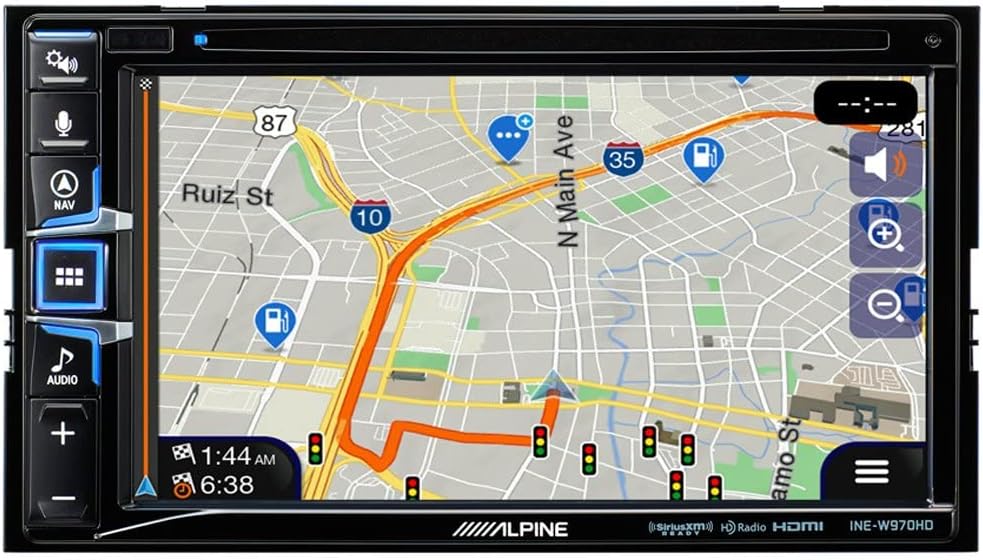
Image: Navigation map display with active route guidance.
4.4. אַודיאָ סעטטינגס
Access audio settings by pressing the AUDIO button or selecting the Audio icon. Adjust bass, mid, treble, fader, and balance settings to optimize sound quality for your vehicle's interior. The unit also supports various audio sources including Radio, SiriusXM, Disc, Bluetooth Audio, USB Music, and AUX input.

Image: Audio adjustment screen for tone, fader, and balance.
5. וישאַלט
- סקרין רייניקונג: Use a soft, lint-free cloth to gently wipe the touchscreen. For stubborn smudges, dampen the cloth with a small amount of screen cleaner designed for electronics. Do not use abrasive cleaners or solvents.
- ווייכווארג דערהייַנטיקונגען: Periodically check the Alpine support website for firmware updates. Updates can improve performance, add features, and resolve known issues. Follow the instructions provided with the update package carefully.
- אַלגעמיינע זאָרגן: פֿאַרמײַדט אויסשטעלן דעם אַפּאַראַט צו עקסטרעמע טעמפּעראַטורן, דירעקטע זונשײַן פֿאַר פֿאַרלענגערטע פּעריאָדן, אָדער איבערגעטריבענע פֿײַכטקייט. זאָרגט פֿאַר געהעריקע ווענטילאַציע אַרום דעם אַפּאַראַט.
6. טראָובלעשאָאָטינג
| פּראָבלעם | מעגלעך סיבה | לייזונג |
|---|---|---|
| דער אַפּאַראַט טוט נישט מאַכט אויף. | נישט ריכטיגע וויירינג; דורכגעבלאָזן פיוז; פּראָבלעם מיט דער באַטעריע פון דעם אויטאָ. | Check power and ground connections. Inspect vehicle fuses. Ensure battery is charged. |
| קיין געזונט פון ספּיקערז. | Speaker wires disconnected; Mute function active; Incorrect audio settings. | Verify speaker connections. Check if mute is enabled. Adjust fader/balance settings. |
| Navigation is slow or inaccurate. | Poor GPS signal; Outdated map data; System overload. | זיכער מאַכן אַז די GPS אַנטענע איז קלאָר view of sky. Check for map updates. Perform a system reset (if available). |
| עפּל קאַרפּליי/אַנדרויד אויטאָ פֿאַרבינדט זיך נישט. | Faulty USB cable; Phone software issue; Unit software issue. | Use a certified USB cable. Restart phone and unit. Check for software updates for both phone and unit. |
| CD/DVD playback issues (e.g., skipping, not reading folders). | Dirty or scratched disc; Incompatible disc format; Unit mechanism issue. | Clean disc. Ensure disc format is supported (e.g., MP3/4 folder navigation may not be supported). Try a different disc. |
If problems persist after attempting these solutions, please contact Alpine customer support or a certified service center.
7. ספּעסאַפאַקיישאַנז
- מאָדעל: INE-W970HD
- סאָרט: אַלפּיין
- פּראָדוקט דימענשאַנז: 12 X 12 X 12 אינטשעס
- נומער וואָג: 6 פונט
- ספּעציעלע פֿעיִקייטן: טאָוטשסקרעען
- וואָסtage: 18 וואטס
- קאַנעקטיוויטי טעכנאָלאָגיע: וסב
- קאָנטראָללער טיפּ: אַנדרויד
- קאַמפּאַטאַבאַל דעוויסעס: סמאַרטפאָנע
- גאַנץ HDMI פּאָרץ: 1
- קאַנעקטער טיפּ: וסב, הדמי
- אַודיאָ רעזולטאַט מאָדע: סטערעאָ
- סאָונד סאָונד קאַנאַל קאַנפיגיעריישאַן: 4.0
- ווידעא קאָדירונג: H.264, H.265/HEVC
8. וואָראַנטי און שטיצן
Alpine products are manufactured to high quality standards. For specific warranty details, please refer to the warranty card included with your product or visit the official Alpine website. For technical support, product registration, or service inquiries, please contact Alpine customer service through their official channels. Keep your proof of purchase for warranty claims.
איר קענט געפֿינען מער אינפֿאָרמאַציע און שטיצע אויף דער Alpine Store on Amazon.


