1. הקדמה
This manual provides essential information for the proper installation, operation, and maintenance of your Raymarine Element 7 HV marine chartplotter. The Element 7 HV is a powerful navigation and sonar system designed for marine environments, featuring a 7-inch display and pre-loaded Nav+ charts for the US and Canada. This specific model (E70532-00-NAG) includes the main display unit and charting capabilities but does not include a transducer for sonar functions. A compatible transducer must be purchased separately to utilize the HyperVision, DownVision, SideVision, and conventional sonar features.

פיגורע 1.1: פראָנט view of the Raymarine Element 7 HV Chartplotter, displaying its user interface with navigation, fishfinder, and dashboard screens. The control keypad is visible on the right side of the unit.
2. סעטאַפּ און ייַנמאָנטירונג
2.1 אַנפּאַקינג
Carefully unpack all components and verify the contents against the packing list. The standard package for model E70532-00-NAG typically includes:
- Element 7 HV Display Unit
- Trunnion Bracket with mounting knobs
- Flush Mount Kit (gasket, studs, thumb nuts)
- Power/NMEA2000 Cable
- דאַקיומענטיישאַן פּאַק
באַמערקונג: A transducer is not included with this model and must be purchased separately for sonar functionality.
2.2 מאַונטינג אָפּציעס
The Element 7 HV can be installed using either a trunnion bracket mount or a flush mount.
- Trunnion Bracket Mount: Secure the bracket to a flat surface using appropriate fasteners. The display unit then attaches to the bracket, allowing for angle adjustment.
- פלאש בארג: Cut an opening in the mounting surface according to the provided template. Insert the display unit and secure it from behind using the flush mount studs and thumb nuts. Ensure the gasket is properly seated for a watertight seal.
Always choose a mounting location that provides good visibility, protection from excessive vibration, and allows for adequate ventilation around the unit.
2.3 מאַכט קאַנעקשאַן
Connect the supplied Power/NMEA2000 cable to a 12V DC power source. Ensure the power circuit is protected by an appropriate fuse (refer to the specifications section for fuse rating). Connect the red wire to the positive (+) terminal and the black wire to the negative (-) terminal of your boat's power supply. Incorrect wiring can damage the unit.
2.4 Transducer Connection (Optional)
If you have purchased a compatible Raymarine HV-series transducer, connect its cable to the designated transducer port on the back of the Element 7 HV unit. Ensure the connection is secure and watertight. Refer to your transducer's specific installation guide for optimal placement and mounting.
2.5 ערשט מאַכט אויף
Once all connections are made, power on the unit. The Element 7 HV will typically guide you through an initial setup wizard, allowing you to configure language, time zone, units of measurement, and other basic settings.
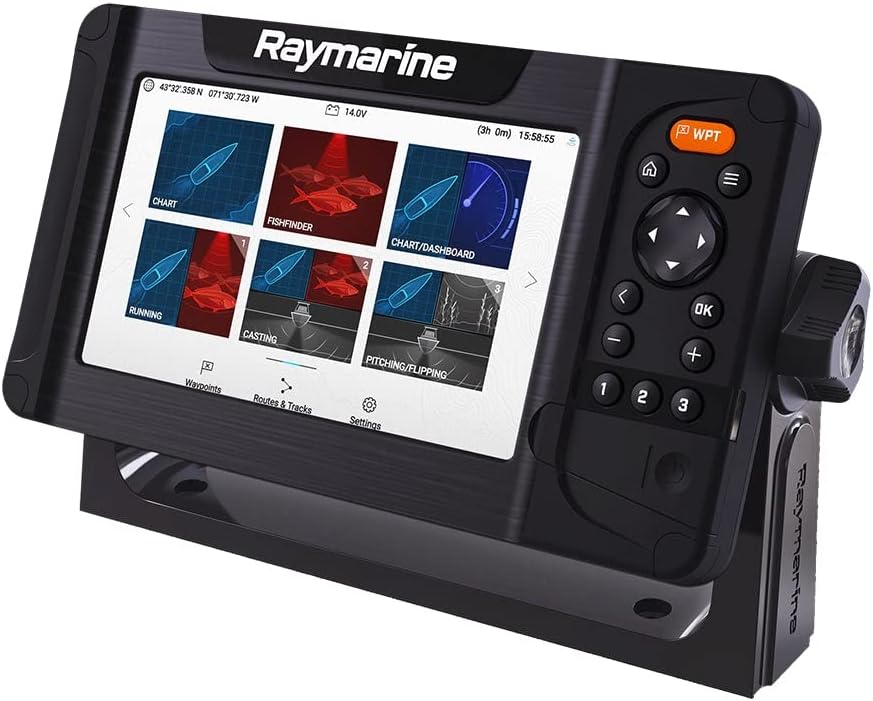
פיגורע 2.1: אַנגגאַלד view of the Raymarine Element 7 HV Chartplotter, illustrating the unit's profile and its connection to the mounting bracket.
3. Operating the Element 7 HV
3.1 באַניצער צובינד
The Element 7 HV features a bright LCD display and a combination of physical buttons and a rotary dial for navigation and control. The keypad on the right side provides quick access to common functions and menu navigation.
3.2 היים פאַרשטעלן
The Home screen is the central hub for accessing all applications. It typically displays large icons for:
- טשאַרט: For navigation, viewing charts, creating waypoints and routes.
- Fishfinder: (Requires transducer) For viewing sonar data, including HyperVision, DownVision, SideVision, and conventional sonar.
- דאַשבאָרד: Displays key vessel data such as speed, depth, heading, and engine information (if connected to NMEA2000 network).
- סעטטינגס: Access to system configuration, display options, and network settings.
3.3 Chart Application
In the Chart application, you can:
- Pan and Zoom: Use the keypad or rotary dial to move around the chart and adjust the zoom level.
- Create Waypoints: Mark specific locations on the chart.
- Plan Routes: Create a series of waypoints to define a navigation path.
- גיין צו: Navigate directly to a waypoint or a specific point on the chart.
3.4 Fishfinder Application (with optional transducer)
If a compatible transducer is connected, the Fishfinder application provides advanced sonar views:
- HyperVision: Ultra-high resolution sonar for incredibly detailed underwater imaging.
- DownVision: Picture-like view of the underwater world directly below your boat.
- SideVision: Expansive side-scanning sonar to see fish and structure to the left and right of your vessel.
- Conventional Sonar: Traditional CHIRP sonar for reliable fish targeting and depth readings.
Adjust gain, range, and frequency settings for optimal performance in different water conditions.
3.5 סעטטינגס מעניו
Access the Settings menu from the Home screen to customize your Element 7 HV. Here you can adjust:
- Display brightness and color palette.
- Units of measurement (e.g., feet/meters, knots/mph).
- GPS and chart settings.
- Network configuration (NMEA2000).
4. וישאַלט
4.1 רייניקונג
To maintain optimal performance and longevity, regularly clean your Element 7 HV unit:
- ווייַז פאַרשטעלן: ניצן אַ ריין, ווייך, דamp cloth with fresh water. For stubborn marks, a mild soap solution can be used. Avoid abrasive cleaners, solvents, or harsh chemicals, as these can damage the screen coating.
- יחידה סיasing: ווישט אַראָפּ די casinג מיט אַדamp cloth. Ensure all port covers are securely closed to prevent water ingress.
4.2 ווייכווארג דערהייַנטיקונגען
Raymarine periodically releases software updates to improve performance, add features, and fix bugs. It is recommended to keep your Element 7 HV software up-to-date.
- Visit the official Raymarine website to check for the latest software version for your Element 7 HV.
- אראפקאפיע די דערהייַנטיקן file צו אַ מיקראָסד קאָרט.
- Insert the microSD card into the Element 7 HV's card slot and follow the on-screen instructions to initiate the update process.
4.3 סטאָרידזש
When storing the unit for extended periods, especially in cold or damp conditions, it is advisable to:
- דיסקאַנעקט די מאַכט קאַבלע.
- Remove the unit from its mounting bracket and store it in a dry, temperature-controlled environment.
5. טראָובלעשאָאָטינג
This section addresses common issues you might encounter with your Element 7 HV. For more complex problems, refer to the Raymarine support resources.
| פּראָבלעם | מעגלעך סיבה | לייזונג |
|---|---|---|
| דער אַפּאַראַט טוט נישט מאַכט אויף | No power supply; Blown fuse; Loose connection | Check power cable connections; Verify 12V DC supply; Inspect and replace fuse if necessary. |
| קיין GPS פאזיציע פיקס | פארמאכט view of sky; Internal GPS fault | Ensure the unit has a clear, unobstructed view of the sky; Move to an open area; Perform a soft reset. |
| No sonar data (if transducer connected) | Transducer not connected; Incorrect transducer type selected; Transducer fault | Verify transducer cable is securely connected; Check transducer settings in the menu; Ensure transducer is submerged and clean. |
| דער עקראַן איז טונקל אָדער נישט ליינעוודיק | Brightness setting too low; Glare | Adjust display brightness in the Settings menu; Reposition unit or use a sun cover to reduce glare. |
| Unit freezes or becomes unresponsive | Software issue; Temporary glitch | Perform a soft reset (power cycle); If persistent, consider a factory reset (backup data first) or software update. |
6. ספּעסאַפאַקיישאַנז
Key technical specifications for the Raymarine Element 7 HV (Model E70532-00-NAG):
| שטריך | באַשרייַבונג |
|---|---|
| סאָרט | Raymarine |
| מאָדעל נאָמען | E70532-00-NAG |
| פאַרשטעלן גרייס | 7 אינטשעס |
| ווייַז טיפּ | לקד |
| מאַכט מקור | Battery Powered (12V DC system) |
| פּונקט וואָג | 5.9 פונט |
| נומער דימענשאַנז (LxWxH) | 6 x 4 x 1 inches (approximate unit dimensions) |
| פּעקל דימענשאַנז (LxWxH) | 16 X 12 X 6 אינטשעס |
| UPC | 723193831403 |
| אַרייַנגערעכנט קאַמפּאָונאַנץ | Display unit, mounting hardware, power cable (Transducer NOT included) |
7. וואָראַנטי אינפֿאָרמאַציע
Raymarine products are covered by a manufacturer's warranty. The specific terms and duration of the warranty may vary by region and product. For detailed warranty information, including coverage, limitations, and how to make a claim, please refer to the official Raymarine website or the warranty card included with your product. Keep your proof of purchase for warranty validation.
8. שטיצן
For further assistance, technical support, or to access additional resources, please utilize the following Raymarine support channels:
- באַאַמטער Webפּלאַץ: באַזוכן www.raymarine.com for product manuals, FAQs, software downloads, and support contact information.
- קונה סערוויס: Contact Raymarine customer service directly for personalized support. Contact details are available on their webפּלאַץ.
- אָטערייזד דילערז: Your local authorized Raymarine dealer can provide installation assistance, troubleshooting, and service.


