1. הקדמה
Thank you for choosing the Soundmaster Eliteline IR300SI Internet DAB+ FM Radio. This device offers a wide range of audio entertainment options, including Internet Radio, DAB+ digital radio, FM radio, Bluetooth connectivity, and USB playback. It also features Amazon Alexa compatibility for voice control and can be managed via the UNDOK app. This manual provides essential information for setting up, operating, and maintaining your radio.
2. זיכערקייַט אינפֿאָרמאַציע
- לייענט קערפֿול אַלע אינסטרוקציעס איידער נוצן און היט זיי פֿאַר צוקונפֿטיקע רעפֿערענץ.
- שטעלט נישט אויס דעם אפאראט צו רעגן, פייכטקייט, אדער עקסטרעמע טעמפעראטורן.
- זאָרגט פֿאַר געהעריקע ווענטילאַציע; פֿאַרשטאָפּט נישט קיין ווענטילאַציע עפענונגען.
- ניצן בלויז די מאַכט אַדאַפּטער סאַפּלייד מיט די אַפּאַראַט.
- פרובירט נישט צו עפענען אדער פאררעכטן דעם איינהייט אליין. לאָזט איבער אלע סערוויסעס צו קוואַליפֿיצירטע פּערסאָנעל.
- האַלטן די מיטל אַוועק פון שטאַרק מאַגנעטיק פעלדער.
3. פּעקל אינהאַלט
ביטע קאָנטראָלירט אַז אַלע זאכן זענען פאַראַן:
- Soundmaster Eliteline IR300SI Internet DAB+ FM Radio
- מאַכט אַדאַפּטער
- ווייַט קאָנטראָל
- באַניצער מאַנואַל (דעם דאָקומענט)
- Installation material (e.g., antenna, if separate)
4. פּראָדוקט איבערview
Familiarize yourself with the various parts and controls of your Soundmaster IR300SI radio.

פיגור 4.1: פראָנט ווינקלעד view of the Soundmaster IR300SI radio, showing the display, speakers, and control buttons.
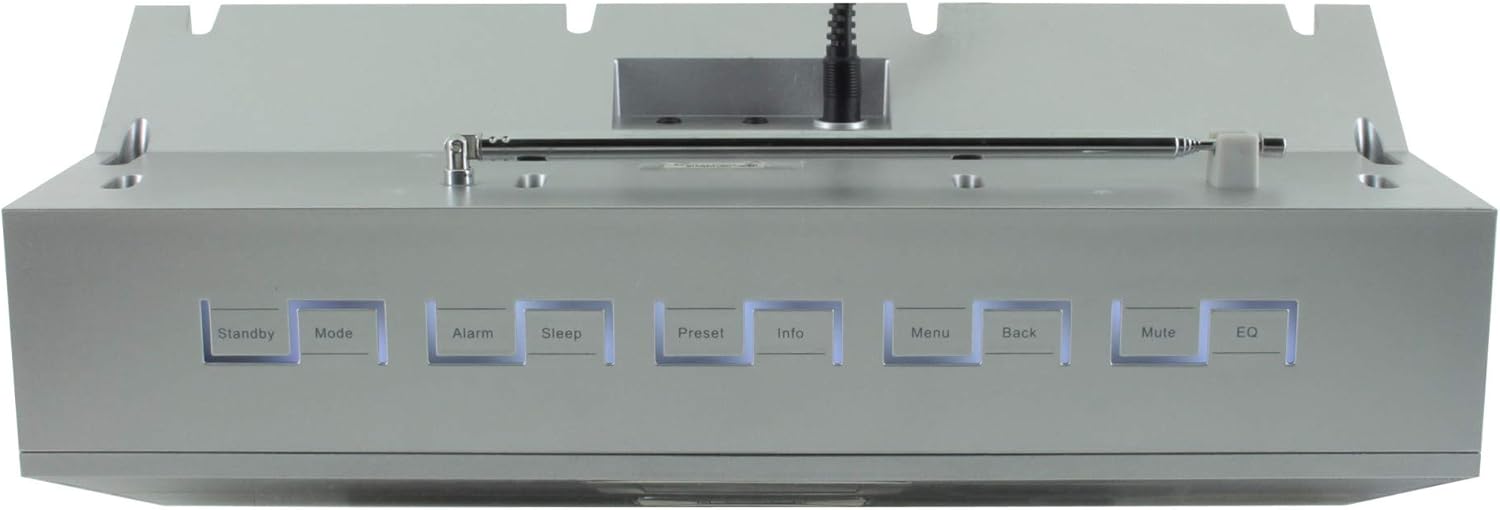
פיגורע 4.2: שפּיץ view of the Soundmaster IR300SI radio, highlighting the control buttons: Standby, Mode, Alarm, Sleep, Preset, Info, Menu, Back, Mute, and EQ.
פראָנט פּאַנעל
- 2.4" / 6 cm TFT Color Display: Shows station information, menus, and time.
- רעדנער: Stereo sound output.
- קאָנטראָל דיאַל/קנעפּלעך: פֿאַר נאַוויגאַציע און אויסוואַל.
Top פּאַנעל קאָנטראָלס
- סטאַנדביי: מאַכט אויף / אַוועק.
- מאָדע: Switch between Internet Radio, DAB+, FM, Bluetooth, USB, AUX.
- שרעק: שטעלן און פאַרוואַלטן אַלאַרמס.
- שלאָף: Activate sleep timer.
- פּריסעט: צוטריט און ראטעווען באַליבסטע סטאַנציעס.
- אינפֿאָרמאַציע: Display additional information about the current broadcast.
- מעניו: צוטריט סיסטעם סעטטינגס און אָפּציעס.
- צוריק: צוריקקומען צו די פריערדיקע מעניו.
- שטום: שטום/אויף שטום אודיאָ.
- EQ: אויסקלייַבן פּרעסעץ יקוואַלייזער.
Rear/Side Panel Connections
- מאַכט אַרייַנשרייַב: פאַרבינדן די סאַפּלייד מאַכט אַדאַפּטער.
- טעלאַסקאָפּיק אַנטענע: For DAB+ and FM reception.
- וסב פּאָרט: For MP3 playback from USB storage devices.
- 3.5mm Aux-In Port: פֿאַרבינדן עקסטערנע אַודיאָ קוועלער.
- כעדפאָון דזשאַק: פֿאַר פּריוואַט צוגעהערט.
5. סעטאַפּ
5.1 מאַכט קאַנעקשאַן
- Connect the power adapter to the DC input on the rear of the radio.
- צאַפּן די מאַכט אַדאַפּטער אין אַ וואַנט ווענטיל.
- דרוק די סטאַנדביי button on the top panel or remote control to turn on the radio.
5.2 אַנטענע סעטאַפּ
פארלענגערט די טעלעסקאָפּישע אַנטענע גאָר פֿאַר אָפּטימאַלער DAB+ און FM ראַדיאָ אָפּנאַם.
5.3 Initial Wi-Fi Network Setup
Upon first power-on, the radio will guide you through the initial setup wizard:
- Select your preferred language using the control dial and confirm.
- The radio will scan for available Wi-Fi networks.
- אויסקלייַבן דיין נעץ פון דער רשימה.
- Enter your Wi-Fi password using the on-screen keyboard and control dial. Confirm to connect.
- Once connected, the radio will display the main menu.
6. אַפּערייטינג ינסטרוקטיאָנס
ניצן די מאָדע button to switch between different audio sources.
6.1 אינטערנעט ראַדיאָ
- דרוק מאָדע to select "Internet Radio".
- Navigate through categories (e.g., Location, Genre, Popular) using the control dial.
- אויסקלייבן אַ סטאַנציע צו אָנהייבן ווידערשפּילן.
- צו ראַטעווען אַ סטאַנציע ווי אַ פּרעסעט, דריק און האַלט די פּריסעט button, then select a preset number.
6.2 DAB+ ראַדיאָ
- דרוק מאָדע to select "DAB+ Radio".
- די ראַדיאָ וועט אויטאָמאַטיש סקענען פֿאַר פֿאַראַן DAB+ סטאַציעס.
- Use the control dial to browse and select stations.
- דריקן און האַלטן פּריסעט to save a station.
6.3 עפעם ראַדיאָ
- דרוק מאָדע to select "FM Radio".
- The radio will automatically scan for available FM stations.
- Use the control dial to browse and select stations.
- דריקן און האַלטן פּריסעט to save a station.
6.4 בלועטוט קאָנעקטיוויטי
- דרוק מאָדע to select "Bluetooth". The radio will enter pairing mode.
- אויף אייער מאָבילער מיטל (סמאַרטפאָן, טאַבלעט), אַקטיווירט בלועטוט און זוכט פֿאַר פֿאַראַן דעוויסעס.
- Select "Soundmaster IR300SI" from the list to pair.
- Once connected, you can stream audio from your device to the radio.
6.5 יו-עס-בי פּלייבּעק
- Insert a USB storage device (formatted as FAT32) containing MP3 fileס אין די וסב פּאָרט.
- דרוק מאָדע to select "USB".
- Navigate through folders and select tracks using the control dial.
6.6 AUX אַרייַנשרייַב
- Connect an external audio device (e.g., MP3 player) to the 3.5mm Aux-In port using an audio cable (not supplied).
- דרוק מאָדע to select "AUX".
- קאָנטראָל פּלייבאַק פון דיין פונדרויסנדיק מיטל.
6.7 Alarms and Sleep Timer
- אַלאַרמס: דרוק די שרעק button to set up to two alarms. Configure time, source (buzzer, radio), and frequency (daily, weekdays, weekends).
- שלאָפן טימער: דרוק די שלאָף button to set a countdown timer (e.g., 15, 30, 60 minutes) after which the radio will automatically turn off.
6.8 עקוואַליזער (EQ)
דרוק די EQ button to cycle through pre-programmed sound settings (e.g., Normal, Jazz, Rock, Classical, Pop, News) to optimize audio output for different content.
6.9 Amazon Alexa and UNDOK App Control
- אַמאַזאָן אַלעקסאַ: The radio is compatible with Amazon Alexa. Follow the instructions in the Alexa app to link your Soundmaster IR300SI for voice control functionalities.
- UNDOK אַפּ: Download the UNDOK app from your mobile device's app store. Ensure your mobile device and the radio are on the same Wi-Fi network. The app allows you to control the radio, browse stations, and manage settings remotely.
7. וישאַלט
7.1 רייניקונג
- שטענדיק ארויסנעמען דעם ראַדיאָ פֿון דער עלעקטרישער אַוטלעט איידער איר רייניגט.
- ניצט אַ ווייכן, טרוקענעם שטאָף צו ווישן די אויסערלעכע ייבערפלאַכן.
- ניצט נישט קיין שרײַבנדיקע רייניגער, וואַקסן אדער סאָלווענטן, ווײַל זיי קענען שאַטן די ענדיקונג.
7.2 סטאָרידזש
אויב איר פּלאַנירט צו לאַגערן דעם ראַדיאָ פֿאַר אַ לענגערע צייט, נעמט עס אַרויס פֿון דער מאַכט-מקור און לייגט עס אַוועק אין אַ קיל, טרוקן אָרט, אַוועק פֿון דירעקטער זון און עקסטרעמע טעמפּעראַטורן.
8. טראָובלעשאָאָטינג
אויב איר טרעפט פּראָבלעמען, זעט די פאלגענדע געוויינטלעכע פּראָבלעמען און לייזונגען:
| פּראָבלעם | מעגלעך סיבה | לייזונג |
|---|---|---|
| קיין מאַכט | שטראָם אַדאַפּטער נישט פארבונדן אדער אַ דעפעקטיווע אַוטלעט. | קאָנטראָלירט די עלעקטרישע פֿאַרבינדונגען. פּרוּווט אַן אַנדער אַוטלעט. |
| קיין געזונט | Volume too low, muted, or incorrect source selected. | פֿאַרגרעסערן די באַנד. דריקן שטום. Ensure correct mode (Internet Radio, DAB+, etc.) is selected. |
| קענען ניט פאַרבינדן צו ווי-פי | אומרעכט פּאַראָל, שוואַך סיגנאַל, אָדער ראַוטער פּראָבלעם. | Verify password. Move radio closer to router. Restart router. |
| שלעכטע DAB+/FM אויפנאמע | אַנטענע נישט אויסגעשטרעקט אָדער שלעכט סיגנאַל געגנט. | Fully extend the telescopic antenna. Reposition the radio. |
| בלועטאָאָטה פּערינג פיילז | Radio not in pairing mode, or device too far. | Ensure radio is in Bluetooth mode. Move devices closer. Restart Bluetooth on both devices. |
9. ספּעסאַפאַקיישאַנז
| שטריך | באַשרייַבונג |
|---|---|
| מאָדעל נאָמען | IR300SI |
| סאָרט | סאָונדמאַסטער |
| קאַנעקטיוויטי טעכנאָלאָגיע | בלועטוט, יו-עס-בי, וויי-פיי |
| ספּעציעלע פֿעיִקייטן | Integrated Clock, Internet Radio, DAB+, FM, Bluetooth, USB MP3 Playback, AUX-In, Headphone Jack, 2 Alarms with Weekend Function, Sleep Timer, Equalizer, Amazon Alexa Compatible, UNDOK App Control, Network Music Player (DLNA) |
| אַודיאָ רעזולטאַט מאָדע | סטערעאָ |
| מאַקסימום רעדנער אַרויסגאַנג מאַכט | 2 קס 10 וואטס רמס |
| ווייַז | 2.4" / 6 cm TFT Color Display |
| קאָנטראָל מעטאָד | Remote Control, UNDOK App, On-device Buttons |
| מאַכט מקור | AC Powered (100 Volts input) |
| פּראָדוקט דימענשאַנז (L x W x H) | 17 X 18 X 15 סענטימעטער |
| פּונקט וואָג | 2.3 קילאָגראַמס |
| קאָליר | זילבער |
| קאַמפּאַטאַבאַל דעוויסעס | Personal Computer, Television, Tablet, Smartphone, Laptop |
| מאַונטינג טיפּ | טאַבלעטאָפּ |
10. וואָראַנטי און שטיצן
The Soundmaster Eliteline IR300SI comes with a spare parts availability period of 1 year from the date of purchase. For technical support, warranty claims, or further assistance, please contact your retailer or the Soundmaster customer service department. Refer to the contact information provided with your purchase documentation.


