1. הקדמה
Thank you for choosing the ZIPRO Nitro Exercise Bike. This manual provides essential information for the safe and efficient assembly, operation, and maintenance of your new fitness equipment. Please read this manual thoroughly before use and keep it for future reference.

Figure 1.1: The ZIPRO Nitro Exercise Bike, showcasing its sleek design and compact footprint, ideal for home fitness.
פּראָדוקט איבערview ווידעא
דאס ווידעא גיט אן אלגעמיינע איבערבליקview of the ZIPRO product range, demonstrating various fitness equipment in use. While not specific to the Nitro model's assembly, it illustrates the brand's commitment to quality and user experience.
2. זיכערקייַט אינפֿאָרמאַציע
Before using the exercise bike, please observe the following safety precautions:
- באַראַט זיך מיט אַ דאָקטער איידער איר הייבט אָן קיין נייע געניטונג פּראָגראַם.
- האַלטן קינדער און פּעץ אַוועק פון די ויסריכט בעשאַס נוצן.
- Place the bike on a flat, stable surface. Ensure adequate space around the bike.
- טראָגט פּאַסיקע ספּאָרט קליידער און ספּאָרט שיך. פֿאַרמייַדט לויזע קליידער וואָס קענען זיך פֿאַרהאַנגען אין באַוועגלעכע טיילן.
- קאָנטראָלירט דעם וועלאָסיפּעד פֿאַר לויזע אָדער פֿאַרנוצטע טיילן פֿאַר יעדן באַנוץ. ניצט עס נישט אויב עס איז געשעדיגט.
- נישט איבערשטייגן דעם מאקסימום באַניצער וואָג פון 150 ק"ג (330 פונט).
- הער אויף צו טאָן געניטונגען גלייך אויב איר פילט זיך שוואַך, שווינדלדיק, אָדער דערפאַרט ווייטיק.
3. פּעקל אינהאַלט
Carefully unpack all components and verify that all parts are present. If any parts are missing or damaged, contact customer support immediately.
קאָמפּאָנענט רשימה:
- הויפּט פריים
- פראָנט סטאַביליזער
- דערציען סטאַביליזער
- פּעדאַלז (לינקס און רעכט)
- זיץ פּאָסטן און זיץ
- האַנטלבאַר פּאָסטן און האַנטלבאַרס
- Console/Monitor
- וואַסער באָטטלע האָלדער
- פֿאַרזאַמלונג האַרדווער (באָלץ, וואַשערס, ניסלעך, מכשירים)
4. אַסעמבלי אינסטרוקציעס
Follow these steps to assemble your ZIPRO Nitro Exercise Bike. It is recommended to have two people for assembly.
- צוטשעפּען סטאַביליזאַטאָרן: באַפעסטיקט די פראָנט און הינטערשטע סטאַביליזאַטאָרן צום הויפּט ראַם מיט די צוגעשטעלטע באָלץ און וואַשערס. מאַכט זיכער אַז זיי זענען פעסט באַפעסטיקט פֿאַר פעסטקייט.
- ינסטאַלירן פּעדאַלז: Identify the left (L) and right (R) pedals. The left pedal screws counter-clockwise, and the right pedal screws clockwise. Thread them into the crank arms and tighten securely. Pedals are equipped with adjustable straps for foot stability.

Figure 4.1: Pedals with adjustable straps, designed to keep your feet secure during exercise.
- Assemble Seat: Attach the seat to the seat post. Insert the seat post into the main frame and adjust to your desired height. Secure with the adjustment knob. The ergonomic seat offers precise two-level adjustment for comfort during long training sessions.

Figure 4.2: The seat post with multiple adjustment holes for vertical positioning.

Figure 4.3: The seat can also be adjusted horizontally for optimal riding posture.
- אינסטאַלירן האַנדלער פּאָסטן און האַנדלער באַרס: Connect the handlebar post to the main frame. Attach the handlebars to the post. Ensure all connections are secure. The handlebars allow for convenient angle adjustment.

Figure 4.4: The console and handlebars, featuring integrated pulse sensors for heart rate monitoring.
- צוטשעפּען קאַנסאָול: Mount the console onto the handlebar post. Connect any necessary sensor cables from the main frame to the console. The advanced computer with a clear screen facilitates monitoring your workout and performance.

Figure 4.5: The console includes a convenient holder for your smartphone, allowing for entertainment or fitness app integration during workouts.

Figure 4.6: The console's holder is also suitable for larger devices like tablets, enhancing your workout experience.
- Install Water Bottle Holder: Secure the water bottle holder to the designated spot on the main frame.
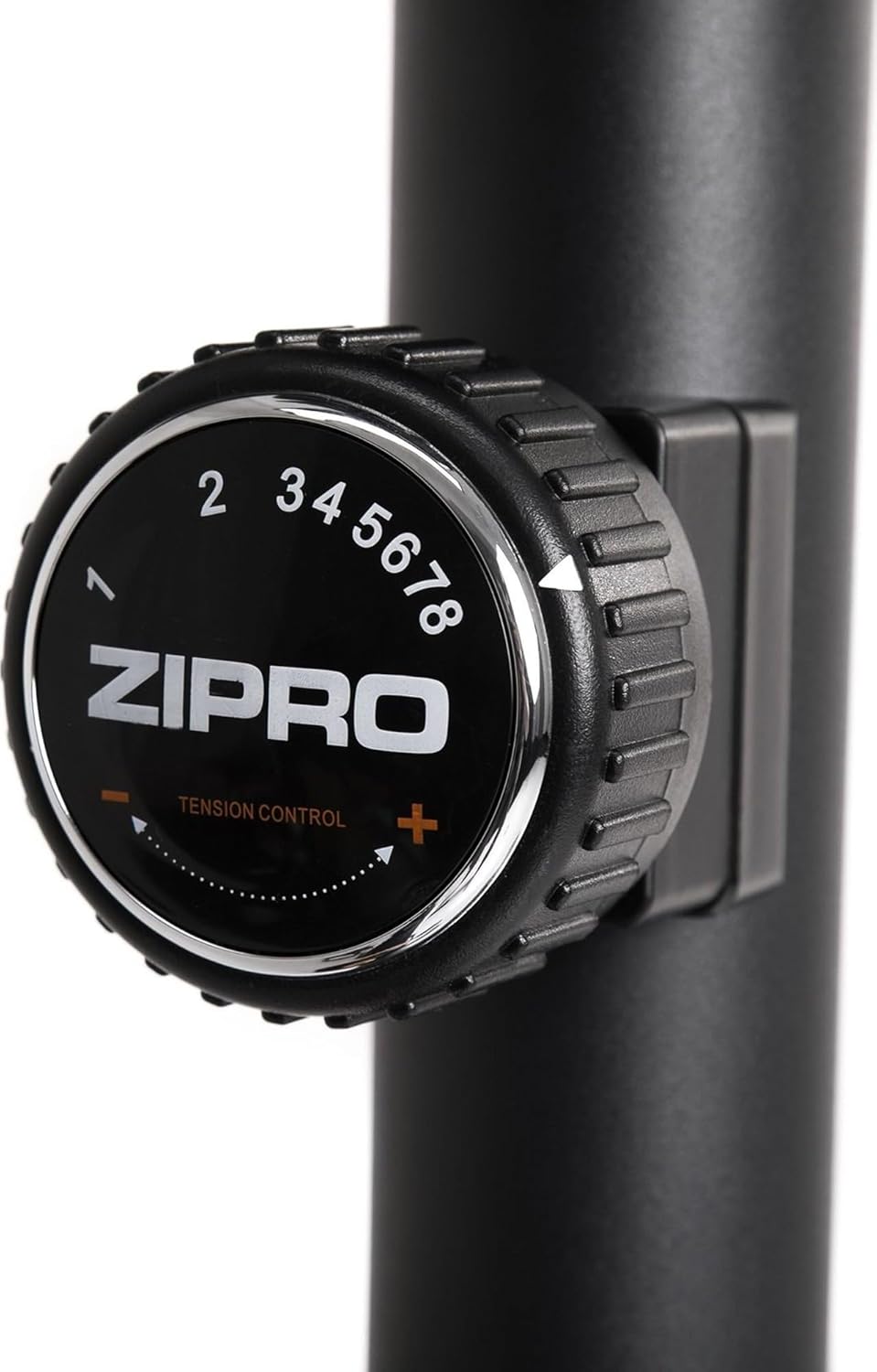
Figure 4.7: A practical water bottle holder ensures hydration is always within reach during your workout.
5. אַפּערייטינג ינסטרוקטיאָנס
5.1. אַדזשאַסטירן קעגנשטעל
The ZIPRO Nitro Exercise Bike features 8 levels of magnetic resistance. To adjust the resistance, turn the tension control knob located below the console. Turn clockwise to increase resistance (harder) and counter-clockwise to decrease resistance (easier).

Figure 5.1: The resistance knob allows for easy adjustment of workout intensity across 8 levels.
5.2. קאנסאל פונקציעס
The console displays various workout metrics. Use the buttons below the screen to navigate and reset data.
- יבערקוקן: Automatically cycles through display functions.
- צייט: Displays workout duration.
- SPEED: ווייזט קראַנט גיכקייַט.
- AFSTAND: Tracks distance covered.
- קאַלאָריעס: שאַצט קאַלאָריעס פארברענט.
- ODOMETER (TOTAL DIST): דיספּלייז גאַנץ אַקיומיאַלייטיד ווייַטקייט.
- דויפעק: Shows heart rate when hands are on the pulse sensors.
- באַשטעטיק: דריקן צו ויסמעקן די איצטיקע וואָרקאַוט דאַטן.
- DIRECTIONS: Selects specific display functions.
- שטעלן: Used for setting target values (e.g., time, distance, calories).
5.3. Adjusting Seat and Handlebars
For optimal comfort and effectiveness, adjust the seat and handlebars to your body size.
- זיצפּלאַץ הייך: Loosen the adjustment knob on the seat post, raise or lower the seat until your leg has a slight bend at the knee when the pedal is at its lowest point. Tighten the knob securely.
- Seat Horizontal Position: Loosen the knob under the seat, slide the seat forward or backward to find a comfortable position relative to the handlebars. Tighten the knob.
- האַנטלבאַר ווינקל: Loosen the adjustment knob on the handlebar post to tilt the handlebars to a comfortable angle. Tighten the knob.
6. וישאַלט
רעגולערע אויפהאלטונג גאראנטירט די לאנגעוויטי און זיכערע אפעראציע פון אייער עקסערסייז בייק.
- רייניקונג: ווישן אַראָפּ די בייק מיט אַדamp טוך נאך יעדן באניץ צו באזייטיגן שווייס און שטויב. פארמיידט שווארצע רייניגער.
- דורכקוק: קאָנטראָלירט פּעריִאָדיש אַלע באָלץ, ניסלעך און באַוועגלעכע טיילן פֿאַר פעסטקייט און אָפּנוץ. פֿעסטשטעלט אַלע לויזע פֿעסטערס.
- שמירן: די מאַגנעטישע קעגנשטעל סיסטעם איז בכלל אָן קיין אויפהאלטונג. אָבער, אויב איר באַמערקט עפּעס קוויטשען פון באַוועגלעכע טיילן (למשל, פּעדאַל אַקסלען), טראָגט אויף אַ קליינע מאָס סיליקאָן-באַזירט לובריקאַנט.
- סטאָרידזש: האַלט דאָס וועלאָסיפּעד אין אַ טרוקענעם, קילן אָרט אַוועק פון דירעקטער זון און עקסטרעמע טעמפּעראַטורן.
7. טראָובלעשאָאָטינג
די סעקציע באהאנדלט אלגעמיינע פראבלעמען וואס איר קענט באגעגענען מיט אייער עקסערסייז בייק.
| פּראָבלעם | מעגלעך סיבה | לייזונג |
|---|---|---|
| קוויטשענדיק אדער קראַצנדיק גערויש | Loose bolts; lack of lubrication; internal component issue. | Check and tighten all assembly bolts. Apply lubricant to moving joints if accessible. If noise persists, contact customer support. |
| Console not displaying data | Batteries low or incorrectly installed; loose sensor cable connection. | Replace console batteries (battery operated). Check that the sensor cable from the main frame is securely connected to the console. |
| קעגנשטעל נישט טשאַנגינג | Resistance cable disconnected or damaged; magnetic mechanism issue. | Inspect the resistance cable connection. Ensure the knob turns freely. If the issue persists, contact customer support. |
| וועלאָסיפּעד וואַקלט בעת באַניץ | Uneven floor; loose stabilizers. | Adjust the leveling caps on the stabilizers to compensate for uneven surfaces. Ensure stabilizer bolts are tight. |
8. ספּעסאַפאַקיישאַנז
Key technical specifications for the ZIPRO Nitro Exercise Bike:
| שטריך | דעטאַל |
|---|---|
| מאָדעל נאָמען | ניטראָ |
| קעגנשטעל מעקאַניזאַם | מאַגנעטיק |
| קעגנשטעל לעוועלס | 8 |
| מאַקסימום באַניצער וואָג | 150 קג (330 לבס) |
| פּראָדוקט דימענשאַנז (L x W x H) | 92 X 60 X 143 סענטימעטער (36.2 X 23.6 X 56.3 אינטשעס) |
| פּראָדוקט וואָג | 28.6 קג (63 לבס) |
| מאַכט מקור | Battery Operated (for console) |
| מאַטעריאַל | פּלאַסטיק, מעטאַל |
| קאָליר | שוואַרץ |

Figure 8.1: Detailed dimensions of the exercise bike, indicating length (115 cm), width (59 cm), and height (145 cm).
9. וואָראַנטי און שטיצן
ZIPRO products are designed for durability and performance. For warranty information and customer support, please refer to the warranty card included with your purchase or visit the official ZIPRO webפּלאַץ.
If you encounter any issues not covered in this manual or require further assistance, please contact ZIPRO customer service:
- פאַבריקאַנט: Morele.net Sp. ז אָאָ
- סאָרט: ZIPRO
- מאָדעל נומער: 5304090
- ASIN: B07T94XY4F
Please have your model number and purchase date ready when contacting support.


