1. פּראָדוקט איבערview
די שווארצעview BV5500 Plus is a rugged smartphone designed for durability and performance in challenging environments. It features an IP68 waterproof rating, drop-proof construction, and is powered by Android 10. This manual provides essential information for setting up, operating, and maintaining your device.

בילד 1.1: Package contents of the Blackview BV5500 Plus, including the smartphone, adapter, USB cable, card needle, earphone, and manual.
בילד 1.2: פראָנט view of the Blackview BV5500 Plus smartphone, showcasinג זײַן אַרויסווײַזונג.

בילד 1.3: דערציען view of the Blackview BV5500 Plus smartphone, highlighting its rugged design and camera module.
שליסל פֿעיִקייטן:
- 5.5-אינטש IPS ווייַז: Clear and vibrant visuals.
- אַנדרויד 10: Latest operating system for smooth performance.
- 3 גיגאבייט ראַם + 32 גיגאבייט ראָם: Ample memory and storage for apps and media.
- 4400 מאַה באַטאַרייע: לאַנג-דויערנדיקע קראַפט פֿאַר פֿאַרלענגערט נוצן.
- IP68 Waterproof & Drop Proof: געבויט צו וויטסטאַנד האַרב טנאָים.
- צוויי סים שטיצן: Flexibility for multiple networks.
- מולטיפונקציאָנעל NFC: Convenient for payments and data transfer.
2. סעטאַפּ
2.1 אריינשטעלן SIM און SD קארטלעך
To begin using your Blackview BV5500 Plus, you will need to insert your SIM card(s) and optionally an SD card for expanded storage. The device supports either two Nano-SIM cards or one Nano-SIM card and one microSD card.
- געפינט די SIM טאַץ אויף דער זייט פון אייער טעלעפאָן.
- Insert the provided SIM ejector tool into the small hole on the SIM tray. Push gently until the tray pops out.
- פֿאָרזיכטיק אַרויסציען די סים טאַץ.
- Place your Nano-SIM card(s) and/or microSD card into the designated slots on the tray. Ensure the gold contacts are facing upwards and the cards are correctly oriented according to the tray's diagram.
- שטופּ אָפּ דעם טאַץ צוריק אין טעלעפאָן ביז עס איז גלייך מיט דער זייט פון דעם אַפּאַראַט.
2.2 ערשטע אײַנפֿיר און קאָנפֿיגוראַציע
After inserting your cards, press and hold the Power button on the side of the phone until the Blackview logo appears. Follow the on-screen prompts to complete the initial setup, including selecting your language, connecting to Wi-Fi, and setting up your Google account.
3. אַפּערייטינג ינסטרוקטיאָנס
3.1 יקערדיק נאַוויגאַציע
- טאָוטשסקרין דזשעסטשערז: Swipe, tap, pinch-to-zoom to navigate the interface.
- היים פאַרשטעלן: צוטריט אייערע אַפּפּס, ווידזשעטס און נאָוטאַפאַקיישאַנז.
- נאַוויגאַציע באַר: ניצט די צוריק, היים, און לעצטע אַפּפּס קנעפּלעך אין די דנאָ פון די פאַרשטעלן.
3.2 רופן און מעסעדזשינג
To make a call, open the Phone app and dial the number or select a contact. To send a message, open the Messages app and compose your text.
3.3 קאַמעראַ באַניץ
Open the Camera app to capture photos and videos. Tap the shutter button to take a picture or the record button to start/stop video recording. The phone features a Sony 8MP Dual Camera for enhanced photography.
3.4 פּנים אידענטיפֿיקאַציע אַנלאָק
For quick and secure access, you can set up Face ID. Navigate to סעטטינגס > זיכערהייט און לאקאציע > פנים אויפשליסן and follow the instructions to register your face. This allows for speedy facial unlocking.
ווידעא 3.1: דער ווידעא גיט אַן איבערבליקview of the Blackview BV5500 Plus, highlighting its rugged features, camera, battery, and other functionalities.
3.5 Multifunctional NFC
די שווארצעview BV5500 Plus supports NFC (Near Field Communication) for various functions, including contactless payments, quick data transfer with other NFC-enabled devices, and reading NFC tags. To use NFC, ensure it is enabled in סעטטינגס > פארבונדענע דעווייסעס > NFC.
4. וישאַלט
4.1 רייניקן דיין דעווייס
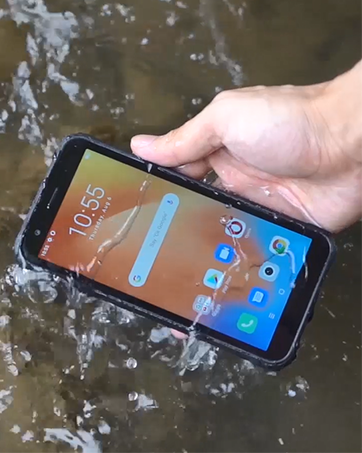
Due to its rugged design and IP68 rating, the BV5500 Plus can be cleaned with water. Use a soft, damp cloth to wipe down the device. For stubborn dirt, a mild soap solution can be used, followed by rinsing with clean water. Ensure all ports are securely closed before cleaning.
4.2 באַטערי קער
צו מאַקסאַמיזירן די לעבנסדויער פון דיין 4400mAh באַטאַרייע:
- ויסמיידן עקסטרעם טעמפּעראַטורעס.
- ניצט דעם אריגינעלן טשאַרדזשער און קאַבל וואָס איז צוגעשטעלט געוואָרן.
- פֿאַרמײַדט אָפֿט גאָר אויסצוליידיקן די באַטעריע.
4.3 ווייכווארג דערהייַנטיקונגען
קוקט רעגלמעסיג נאך ווייכווארג אפדעיטס צו זיכער מאכן אז אייער אפאראט האט די לעצטע אייגנשאפטן, זיכערהייט פּאַטשעס, און פאָרשטעלונג פֿאַרבעסערונגען. גייט צו סעטטינגס > סיסטעם > אַוואַנסירטע > סיסטעם דערהייַנטיקן צו קאָנטראָלירן און אינסטאַלירן דערהייַנטיקונגען.
4.4 שטאַרקייט פֿעיִקייטן
די שווארצעview BV5500 Plus is built to withstand:
- Water Immersion (IP68): Up to 1.5 meters for 60 minutes.
- טראפנס: From heights up to 1.5 meters (MIL-STD-810G compliant).
- שטויב: גאָר פּראָטעקטעד קעגן שטויב ינגרעסס.
- עקסטרעמע טעמפּעראַטור: אַרבעט אין טעמפּעראַטורן פון -30°C ביז 50°C.
ווידעא 4.1: This video demonstrates the drop and waterproof capabilities of the Blackview BV5500 Pro, showcasing its resilience in various challenging conditions.
5. טראָובלעשאָאָטינג
אויב איר טרעפט פּראָבלעמען מיט אייער מיטל, באַזירט זיך אויף די פאלגענדע געוויינטלעכע לייזונגען:
- מיטל נישט קער אויף: זיכער מאַכן אַז די באַטאַרייע איז אויפגעלאָדן. פֿאַרבינדט דעם טשאַרדזשער און וואַרט אַ פּאָר מינוט איידער איר פּרוּווט ווידער אָנצוצינדן.
- קיין נעץ סיגנאַל: Check if your SIM card is correctly inserted. Verify that mobile data is enabled in settings. Contact your carrier to confirm service status.
- SD קאָרט ניט דערקענט: Reinsert the SD card. Check if the card is damaged or try it in another device. Format the SD card (this will erase all data) if necessary via סעטטינגס> סטאָרידזש.
- אַפּפּס קראַשן/פֿרירן: אויסמעקן דעם קעש פון דער פראבלעמאטישער אפליקאציע (סעטטינגס > אַפּפּס און נאָוטאַפאַקיישאַנז > אַפּ אינפֿאָרמאַציע > [אַפּ נאָמען] > סטאָרידזש און קאַש > ויסמעקן קאַשאויב די פראבלעם בלייבט, דעאינסטאלירט און ריאינסטאלירט די אפליקאציע.
- פּאַמעלעך פאָרשטעלונג: Close unnecessary background apps. Clear cached data. Consider performing a factory reset (סעטטינגס> סיסטעם> אַוואַנסירטע> באַשטעטיק אָפּציעס> מעקן אַלע דאַטן (פאַבריק באַשטעטיק) - Note: This will erase all data on your phone. Back up important data first.).
6. ספּעסאַפאַקיישאַנז
| שטריך | באַשרייַבונג |
|---|---|
| מאָדעל | שוואַרץview BV5500 פּלוס |
| אָפּערייטינג סיסטעם | אַנדרויד 10.0 |
| ווייַז | 5.5-inch IPS, 720 x 1440 Resolution |
| באַראַן | 3 גיגאבייט |
| אינערלעכער סטאָרידזש | 32 גיגאבייט |
| באַטאַרייע קאַפּאַציטעט | 4400 מאַה |
| דערציען אַפּאַראַט | Sony 8MP Dual Camera |
| פראָנט אַפּאַראַט | יא |
| סים קאָרט סלאָץ | צווייענדיק סים (נאַנאָ-סים) |
| קאַנעקטיוויטי | 4G LTE, GSM, Wi-Fi, Bluetooth, NFC |
| גראָב פֿעיִקייטן | IP68 Waterproof, Drop Proof (MIL-STD-810G), Dustproof |
| דימענשאַנז | 5.98 X 2.95 X 0.55 אינטשעס |
| וואָג | 7.9 אונסעס (225 גראַמז) |
7. וואָראַנטי און שטיצן
Your Blackview BV5500 Plus smartphone comes with a standard manufacturer's warranty. For detailed information regarding warranty terms, conditions, and duration, please refer to the warranty card included in your product packaging or visit the official Blackview website. For technical support, troubleshooting assistance, or service inquiries, please contact Blackview customer service through their official channels.


