1. הקדמה
א דאנק פארן קויפןasing the American Audio WM-419 4-Channel UHF Handheld Wireless Microphone System. This system is designed to provide high-quality, reliable wireless audio for various applications, including PA systems, karaoke, mobile entertainment, schools, and houses of worship. This manual provides essential information for the proper setup, operation, and maintenance of your WM-419 system.
Please read this manual thoroughly before operating the unit to ensure optimal performance and to prevent damage.
2. פּעקל אינהאַלט
באַשטעטיקט אַז אַלע קאָמפּאָנענטן וואָס זענען ליסטעד אונטן זענען אַרייַנגערעכנט אין דיין פּעקל:
- 1 x WM-419 Wireless Receiver Unit
- 4 x האַנט-געהאלטענע וויירלעס מיקראָפאָנען
- 4 x Microphone Clips
- 8 x AA באַטעריעס (פֿאַר מיקראָפאָנען)
- 1 x מאַכט אַדאַפּטער פֿאַר ופנעמער
- 1 x 1/4" Audio Cable
- באַניצער מאַנואַל (דעם דאָקומענט)
פיגורע 2.1: Included components of the WM-419 system. This image displays the receiver, four handheld microphones, four detachable antennas, eight AA batteries, a power adapter, and a 1/4" audio cable, along with four microphone clips.
3. שליסל פֿעיִקייטן
- 4-Channel UHF Wireless Handheld Microphone System
- Intelligent Frequency Autoscan with IR Synchronization
- Individual Volume Control for each microphone channel on the receiver
- XLR Audio Output for each microphone channel
- 50 Channels Available per Receiver (200 total channels)
- 16-Bit Pilot Technology to assist with eliminating frequency interference
- Wireless Range: Up to 300 feet / 90 meters (line of sight)
- Microphone Battery Life: 6-10 hours (with included AA batteries)
- OLED Screen on Handheld MIC Transmitters
4. סעטאַפּ גייד
4.1 ריסיווער פּלאַצירונג
Place the WM-419 receiver on a stable, flat surface, away from strong electromagnetic interference sources. Ensure there is adequate ventilation around the unit. For optimal signal reception, position the receiver's antennas vertically and ensure they are not obstructed.

פיגורע 4.1: פראָנט view of the WM-419 receiver with microphones. This image shows the receiver unit with its four antennas extended, and the four handheld microphones resting on top, illustrating the compact design.
4.2 פֿאַרבינדן דעם ריסיווער
- מאַכט קשר: Connect the included power adapter to the DC 12-15V input on the rear panel of the receiver. Plug the adapter into a suitable power outlet.
- אַודיאָ רעזולטאַט: Connect the receiver to your PA system, mixer, or amplifier using the XLR audio outputs for individual microphone channels (Balanced A, B, C, D) or the AF MIX OUT (1/4" unbalanced) for a combined output.

פיגורע 4.2: Rear panel connections of the WM-419 receiver. This image highlights the DC power input, four balanced XLR outputs (A, B, C, D), and a mixed 1/4" audio output, along with the antenna connections.
4.3 Installing Batteries in Microphones
Each handheld microphone requires two AA batteries. Ensure correct polarity when inserting the batteries.
- Unscrew the bottom cap of the microphone to reveal the battery compartment.
- Insert two AA batteries, observing the polarity markings (+/-).
- שרויפט צוריק דעם אונטערשטן דעקל זיכער אויף.

פיגורע 4.3: Four handheld microphones. This image displays the four individual handheld microphones, each featuring an OLED display and power button, ready for battery installation and use.
5. אַפּערייטינג ינסטרוקטיאָנס
5.1 פּאַוערינג אויף / אַוועק
- ופנעמער: Press the POWER button on the front panel of the receiver to turn it on or off.
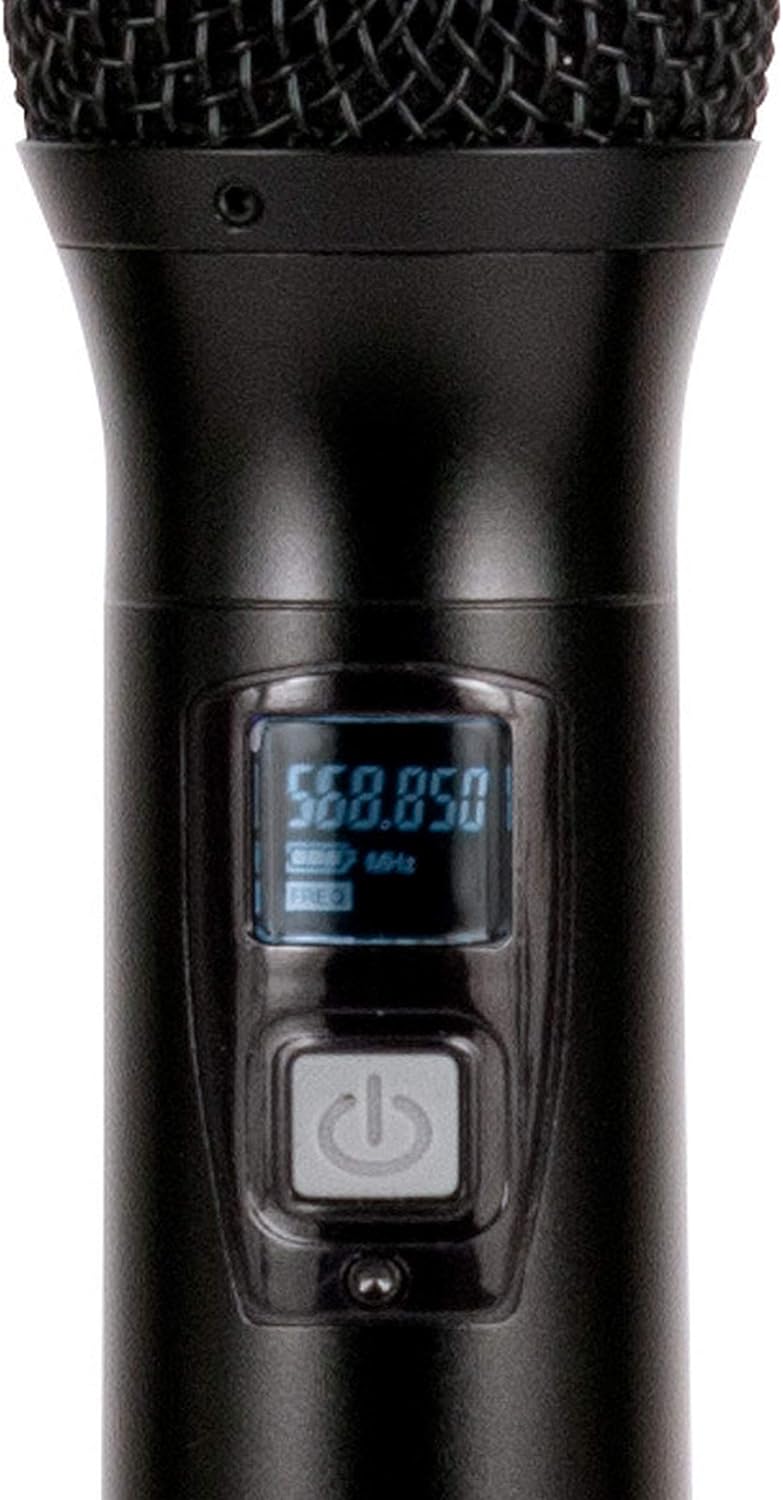
- מיקראָפאָן: Press and hold the power button on each handheld microphone for a few seconds to turn it on or off. The OLED screen will illuminate when powered on.
5.2 פרעקווענץ סינקראניזאציע (IR סינק)
The WM-419 features Intelligent Frequency Autoscan and IR Synchronization for easy setup.
- Turn on the receiver and the desired microphone.
- אויף דעם ריסיווער, דריק די יבערקוקן button for the channel you wish to set. The receiver will automatically scan for an available clear frequency.
- Once a frequency is found, the display will show "SYNC". Position the IR window of the microphone (usually near the bottom of the display) close to the IR sensor on the receiver (located near the channel display).
- דרוק די שטעלן button on the receiver for that channel. The frequency information will be transmitted to the microphone via infrared. The microphone's display should show the same frequency as the receiver, indicating successful synchronization.
- Repeat this process for each microphone.

פיגורע 5.1: Receiver front panel detail. This image provides a close-up view of the receiver's illuminated OLED displays for each channel, showing frequency information, signal strength, and individual volume controls.

פיגורע 5.2: Microphone OLED display. A detailed view of one handheld microphone's OLED screen, showing the current frequency and battery indicator, along with the power/mute button.
5.3 אַדזשאַסטירן באַנד
Each channel on the receiver has an independent volume control knob. Adjust these knobs to achieve the desired audio level for each microphone.
5.4 Muting Microphones
A short press of the power button on the handheld microphone will mute/unmute the microphone. The OLED display will indicate the mute status.
6. וישאַלט
- רייניקונג: Use a soft, dry cloth to clean the surfaces of the receiver and microphones. Do not use abrasive cleaners or solvents.
- באַטערי פאַרבייַט: Replace microphone batteries when the low battery indicator appears on the microphone's OLED screen or when audio quality degrades. Always use fresh AA batteries.
- סטאָרידזש: When not in use for extended periods, remove batteries from the microphones to prevent leakage. Store the system in a cool, dry place.
7. טראָובלעשאָאָטינג
| פּראָבלעם | מעגלעך סיבה | לייזונג |
|---|---|---|
| קיין געזונט פון מיקראָפאָן | Microphone not powered on; Batteries dead; Microphone not synchronized; Receiver volume too low; Output cable disconnected. | Ensure microphone is on; Replace batteries; Perform IR sync; Increase receiver channel volume; Check audio cable connections to mixer/PA. |
| אריינמישונג/סטאַטיק | Nearby electronic devices; Other wireless systems on same frequency; Obstructions between mic and receiver; Receiver too far from microphone. | Move receiver away from interference sources; Perform Autoscan and re-sync to a clear frequency; Ensure line of sight; Reduce distance between mic and receiver. |
| קורץ וויירליס קייט | Antennas not properly positioned; Obstructions; Low microphone battery. | Ensure antennas are vertical and unobstructed; Minimize physical barriers; Replace microphone batteries. |
| מיקראָפאָן דיספּליי אַרבעט נישט | Dead batteries; Microphone not powered on. | Replace batteries; Press and hold power button to turn on. |
8. ספּעסאַפאַקיישאַנז
| שטריך | דעטאַל |
|---|---|
| מאָדעל נאָמען | American Audio WM-419 |
| מיקראָפאָן פאָרם פאַקטאָר | מיקראָפאָן סיסטעם (האַנטכעלד) |
| נומער פון טשאַנאַלז | 4 (50 channels available per receiver, 200 total) |
| קאַנעקטיוויטי טעכנאָלאָגיע | UHF Wireless, XLR |
| מאַכט מקור | Receiver: AC Adapter; Microphones: 2 x AA Batteries (per mic) |
| Battery Life (Microphones) | 6-10 שעה |
| ווירעלעסס ראַנגע | Up to 300 feet / 90 meters (line of sight) |
| סיגנאַל-צו-נויז ראַטיאָ | 70 דב |
| ראַש מדרגה | 85 דב |
| פּראָדוקט דימענסיעס (ריסיווער) | 22 X 14 X 6 אינטשעס |
| פּונקט וואָג | 9 פונט |
| קאָליר | שוואַרץ |
| קאַמפּאַטאַבאַל דעוויסעס | PA System, Karaoke Machine |
| ספּעציעלע שטריך | Volume Control (individual channel) |
| פּאָליאַר מוסטער | ונידירעקטיאָנאַל |
9. וואָראַנטי און שטיצן
For warranty information and technical support, please contact ADJ Products directly or visit their official webזייטל. האַלט אייער קויף קוויטל ווי אַ באַווייַז פון קויפן פֿאַר קיין וואָראַנטי קליימז.
פאַבריקאַנט: אַדדזש פּראָדוקטן
סאָרט: ADJ
Webפּלאַץ: www.adj.com
10. זיכערקייַט אינפֿאָרמאַציע
ווארענונג: דער פּראָדוקט קענען ויסשטעלן איר צו קעמיקאַלז אַרייַנגערעכנט בליי, וואָס איז באַוווסט אין די שטאַט פון קאַליפאָרניאַ צו פאַרשאַפן ראַק און געבורט חסרונות אָדער אנדערע רעפּראָדוקטיווע שאָדן. פֿאַר מער אינפֿאָרמאַציע גיין צו www.P65Warnings.ca.gov.
- דו זאלסט נישט ויסשטעלן די אַפּאַראַט צו רעגן אָדער נעץ.
- נעמט נישט אַראָפּ דעם דעקל. עס זענען נישטאָ קיין טיילן אינעווייניק וואָס קענען דורכגעאַרבעט ווערן דורך דעם באַניצער. לאָזט איבער די סערוויסינג צו קוואַליפֿיצירטע פּערסאָנעל.
- זיכער מאַכן אַז די ווענטילאַציע איז ריכטיק. נישט פאַרשפּאַרן די ווענטילאַציע עפענונגען.
- ניצן בלויז די מאַכט אַדאַפּטער סאַפּלייד מיט די אַפּאַראַט.
- אַוועקוואַרפן באַטעריעס פאַראַנטוואָרטלעך לויט די לאָקאַלע רעגולאַציעס.


