פּראָדוקט איבערview
The Feit Electric Smart Wi-Fi LED Color Changing Dimmable 60W Light Bulbs offer advanced lighting control for your home. These A19 shape bulbs provide 800 lumens of brightness and are designed for indoor use. They feature color-changing capabilities, tunable white light, and dimming functionality, all controllable via a smartphone app or voice commands through compatible smart assistants.

Image: Front packaging of the Feit Electric Smart Wi-Fi LED Light Bulbs, showing two bulbs and features like Wi-Fi connectivity, Energy Star rating, 800 lumens brightness, and compatibility with Alexa, Siri, and Google Assistant.
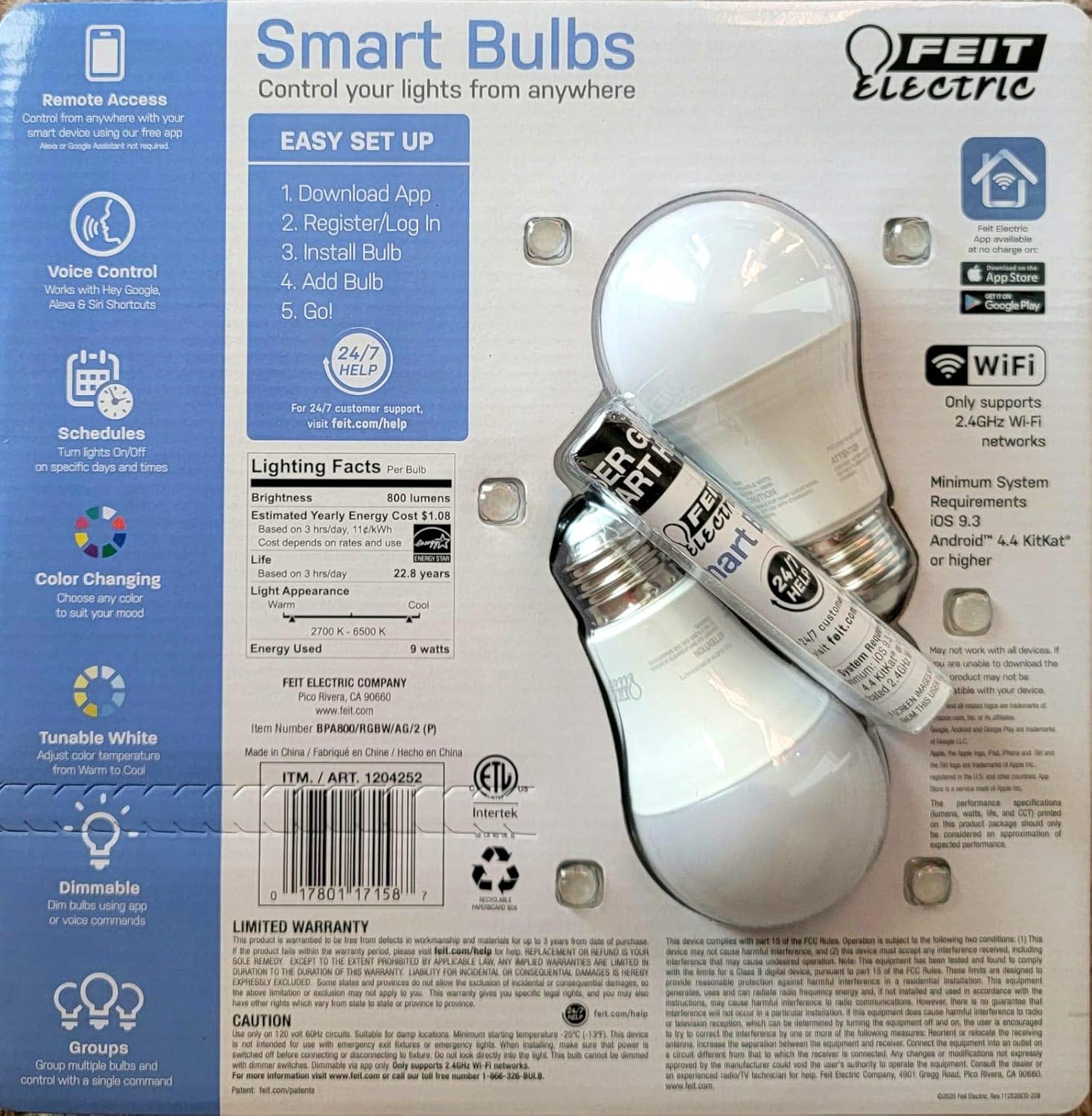
Image: Back packaging of the Feit Electric Smart Wi-Fi LED Light Bulbs, detailing easy setup steps, lighting facts (800 lumens, $1.08 estimated yearly cost, 22.8 years life), and system requirements.
שליסל פֿעיִקייטן
- Color Changing and Tunable White: Adjust light color from millions of options or choose from various shades of white (2700K-6500K).
- דימאַבלע: Smooth dimming from 100% down to 1% via the app or voice commands.
- קול קאָנטראָל: Works seamlessly with Amazon Alexa, Google Assistant, and Siri Shortcuts.
- ווייַט אַקסעס: Control your lights from anywhere using the Feit Electric mobile app.
- סקעדזשולז: Set custom schedules to turn lights on/off at specific times.
- ענערגיע עפעקטיוו: 9W power consumption, equivalent to a 60W incandescent bulb, with an estimated yearly energy cost of $1.08.
- לאנג לעבן: Designed to last up to 22.8 years based on 3 hours of daily use.
סעטאַפּ גייד
Follow these steps to set up your Feit Electric Smart Wi-Fi LED Bulbs:
- Download the Feit Electric App: זוכן פֿאַר "Feit Electric" in the Apple App Store or Google Play Store and download the official app.
- רעגיסטרירן/אריינלאָגירן: עפֿענען די אַפּ און שאַפֿן אַ נייַע חשבון אָדער קלאָץ אין אויב איר שוין האָבן איין.
- ינסטאַלירן די באַלב: Screw the Feit Electric Smart Wi-Fi LED bulb into any standard E26 medium base light fixture. Ensure the fixture is powered on.
- Add the Bulb in App:
- Open the Feit Electric app.
- צאַפּן די "+" בילדל צו לייגן צו אַ נייעם מיטל.
- Select "Lighting" and then "Light Source (Wi-Fi)".
- Follow the in-app instructions to connect the bulb to your 2.4GHz Wi-Fi network. (Note: These bulbs only support 2.4GHz Wi-Fi networks).
- The bulb will blink to indicate pairing mode. If it doesn't, turn the light switch off and on 5 times to reset it.
- Go!: Once connected, you can rename your bulb and start controlling it from the app.
For a visual guide, you can scan the QR code on the product packaging for a "HOW TO" video (if available).
אַפּערייטינג ינסטראַקשאַנז
אַפּ קאָנטראָל
The Feit Electric app provides full control over your smart bulbs:
- אויף / אַוועק: צאַפּן אויף דעם מאַכט בילדל לעבן דעם נאָמען פון דער גלאָביר צו עס אנצינדן אָדער אויסלעשן.
- ברייטקייט: Use the slider to adjust the brightness level from 1% to 100%.
- קאָליר סעלעקציע: Access the color wheel to choose from millions of colors.
- ווייסע ליכט אַדזשאַסטמענט: Select different shades of white, from warm (2700K) to cool (6500K).
- סצענעס: Apply pre-set scenes or create custom scenes for different moods or activities.
- סקעדזשולז: Set daily or weekly schedules for your lights to turn on/off automatically.
- גרופּינג: גרופּירט קייפל גלאָבירלעך צוזאַמען צו קאָנטראָלירן זיי סיימאַלטייניאַסלי.
קול קאָנטראָל
Integrate your Feit Electric Smart Bulbs with your preferred voice assistant:
- אַמאַזאָן אַלעקסאַ:
- Enable the "Feit Electric" skill in the Alexa app.
- אַנטדעקן דעוויסעס.
- Example commands: "Alexa, turn on [Light Name]", "Alexa, dim [Light Name] to 50%", "Alexa, set [Light Name] to blue".
- גוגל אַססיסטאַנט:
- Link your Feit Electric account in the Google Home app.
- Example commands: "Hey Google, turn off [Light Name]", "Hey Google, change [Light Name] to warm white".
- סירי שאָרטקאַץ:
- Create custom Siri Shortcuts within the Feit Electric app or Apple's Shortcuts app to control your lights with voice commands.
- Example: "Hey Siri, good morning lights" (if you've set up a shortcut for this).
וישאַלט
Feit Electric Smart Wi-Fi LED bulbs are designed for long-lasting performance with minimal maintenance. Follow these general guidelines:
- רייניקונג: זיכער מאַכן אַז די לאָמפּ איז אויסגעלאָשן און קיל איידער איר רייניקט. ווישט מיט אַ ווייכן, טרוקענעם שטאָף. ניצט נישט קיין פליסיקע אָדער שאַרפע רייניקונגסמיטלען.
- ייַנמאָנטירונג: Always ensure the bulb is securely screwed into the fixture. Do not overtighten.
- סוויווע: These bulbs are designed for indoor use in dry locations. Avoid exposure to water or high humidity.
- מאַכט סערדזשז: While LED bulbs are generally robust, consider using surge protectors for your lighting circuits in areas prone to power fluctuations.
טראָובלעשאָאָטינג
If you encounter issues with your Feit Electric Smart Wi-Fi LED Bulbs, try the following solutions:
| פּראָבלעם | מעגלעך סיבה / לייזונג |
|---|---|
| Bulb not connecting to Wi-Fi / App |
|
| ציבעלע ריספּאַנד נישט צו קול קאַמאַנדז |
|
| Bulb is flickering or dimming unexpectedly |
|
ספּעסאַפאַקיישאַנז
| שטריך | דעטאַל |
|---|---|
| סאָרט | פיט עלעקטריק |
| ליכט טיפּ | געפירט |
| ספּעציעלע שטריך | Color Changing, Tunable White |
| וואָסtage | 9 וואטס (60 וואטס גלייכנדיקער גלייכונגס-עקוויוואַלענט) |
| ציבעלע פאָרעם גרייס | A19 |
| ליכט קאָליר | מולטי קאָליר |
| Voltage | 110 וואלטס |
| יוניט גראף | 2 גראף |
| קאָליר טעמפּעראַטור | 2700-6500 קעלווין |
| ברייטנאַס | 800 לומענס |
| פאָרעם | קייַלעכיק |
| מאַטעריאַל | קופּער |
| קאַנעקטיוויטי טעכנאָלאָגיע | Wi-Fi (נאָר 2.4GHz) |
| דרינענדיק / דרויסנדיק באַניץ | דרינענדיק |
| קאָנטראָללער טיפּ | Amazon Alexa, Google Assistant, Siri Shortcuts |
| קאָליר רענדערינג אינדעקס (CRI) | 80 |
| עסטימאַטעד יערלעך ענערגיע קאָסט | $1.08 (based on 3 hrs/day) |
| לעבן | 22.8 years (based on 3 hrs/day) |
| UPC | 810744036599 |
| ASIN | B07RL48PFF |
וואָראַנטי און שטיצן
For customer support, warranty information, and additional resources, please visit the official Feit Electric webפּלאַץ:
Feit Electric offers 24/7 customer support to assist with any questions or issues you may have regarding your smart bulbs.


