1. הקדמה
The Transcend DrivePro 550 is a dual-lens dash camera designed to provide comprehensive recording of both the road ahead and the vehicle's interior. Equipped with a front lens featuring a Sony image sensor and a rear lens with infrared LEDs, it ensures clear video capture in various lighting conditions. This manual provides detailed instructions for setting up, operating, and maintaining your DrivePro 550 dash camera.
2. פּעקל אינהאַלט
באַשטעטיקט אַז אַלע זאכן וואָס זענען אויסגערעכנט אונטן זענען אַרייַנגערעכנט אין אייער פּעקל:
- Transcend DrivePro 550 Dash Camera Unit
- microSD Memory Card (64GB)
- Car Mount (Suction Mount)
- Car Lighter Power Adapter
- Hardwire Power Cable

Image: Retail box of the Transcend DrivePro 550 Dash Camera, showing included accessories.
3. פּראָדוקט איבערview
Familiarize yourself with the components of your DrivePro 550 dash camera.
3.1 פראָנט View

בילד: פראָנט view of the DrivePro 550, showing the main screen displaying live dual-channel recording.
- פראָנט לינז: Records the road ahead. Features a Sony image sensor for high-quality video.
- דערציען לענס: Records the vehicle's interior. Equipped with four infrared LEDs for enhanced night vision.
- 2.4-אינטש לקד פאַרשטעלן: ווייזט זיך ארויס לעבעדיגע view, recorded footage, and menu options.
- קאָנטראָל קנעפּלעך: For navigation and selection within the menu.
3.2 זייַט View און פּאָרטן

בילד: זייט view of the DrivePro 550, highlighting the power input and microSD card slot.
- DC אין פּאָרט: פֿאַר קאַנעקטינג די מאַכט אַדאַפּטער.
- מיקראָסד קאָרט שפּעלטל: פֿאַר אַרײַנשטעלן די זכּרון קאַרטל.
3.3 דימענשאַנז
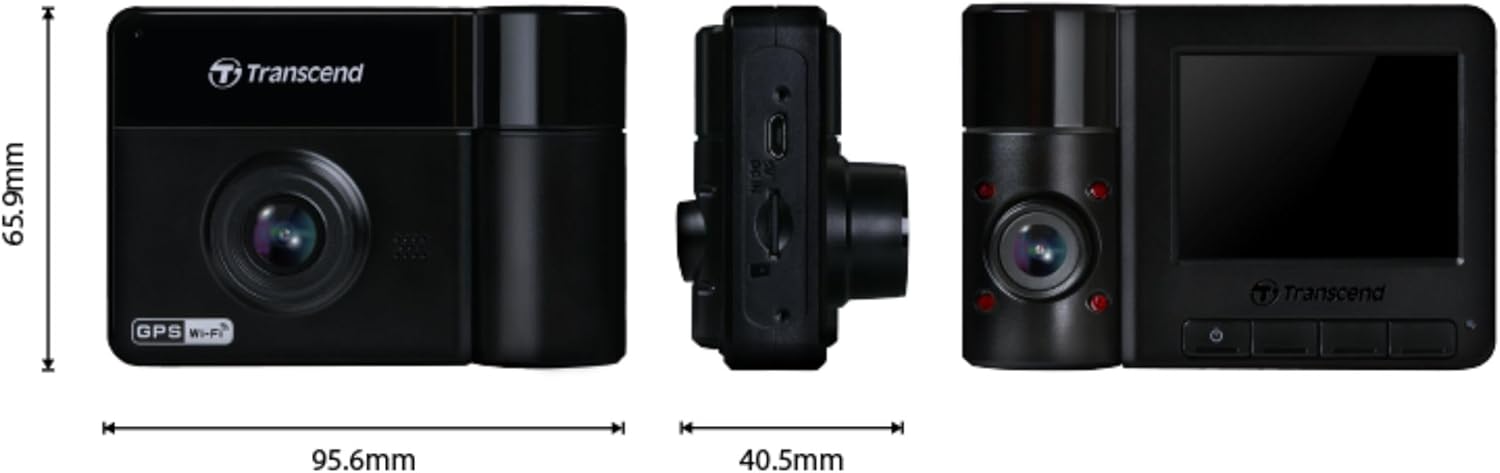
Image: Technical drawing showing the dimensions of the DrivePro 550 unit.
4. ינסטאַלירונג
Follow these steps to properly install your DrivePro 550 in your vehicle.
4.1 מאָנטירן די דאַש קאַמעראַ
- קלייבט אויס א פלאץ אויף אייער ווינטשילד וואס שטערט נישט אייער view of the road. The area behind the rearview mirror is often ideal.
- Clean the chosen area on the windshield thoroughly to ensure a strong suction.
- Attach the suction cup mount to the windshield and secure it by flipping the lever.
- Slide the DrivePro 550 onto the mount until it clicks into place. Adjust the camera angle to ensure both front and interior lenses have a clear view.

Image: The DrivePro 550 dash camera securely mounted on a car windshield.
4.2 אריינשטעלן די microSD קארטל
- זיכער מאַכן אַז די דאַש קאַמעראַ איז אויסגעלאָשן.
- Locate the microSD card slot on the side of the device.
- Insert the provided 64GB microSD card into the slot with the gold contacts facing the back of the camera until it clicks into place.
4.3 קאַנעקטינג מאַכט
- Connect the car lighter power adapter or the hardwire power cable to the DC IN port on the dash camera.
- Plug the other end of the power adapter into your vehicle's 12V power outlet (cigarette lighter socket). If using the hardwire cable, follow professional installation guidelines.
- Route the power cable neatly along the windshield and dashboard to avoid obstructing your view אדער אריינמישן זיך מיט די דרייווינג קאנטראלן.
5. יקערדיק אָפּעראַציע
5.1 פּאַוערינג אויף / אַוועק
- The DrivePro 550 will automatically power on and begin recording when your vehicle's engine starts and power is supplied.
- צו מאַנועל אָנצינדן/אויסלאָשן, דריק און האַלט דעם מאַכט קנעפּל.
5.2 רעקאָרדינג מאָדעס
- קעסיידערדיק רעקאָרדינג: The camera records continuously in a loop. When the memory card is full, the oldest files זענען אָוווערריטאַן.
- נויטפאַל רעקאָרדינג: Activated automatically by the built-in G-sensor upon detecting an impact or sudden movement. These files are protected from being overwritten. You can also manually trigger emergency recording by pressing the designated button.

Image: Split-screen view showing simultaneous recording from the front and interior lenses.
5.3 Taking Snapshots
During recording, press the snapshot button to capture a still image of the current view. This can be useful for documenting incidents or scenic views.
6. אַוואַנסירטע פֿעיִקייטן
6.1 Wi-Fi Connectivity and DrivePro App
The DrivePro 550 features built-in Wi-Fi, allowing you to connect it to your smartphone or tablet via the Transcend DrivePro App. The app enables:
- פאַקטיש-צייט לעבן view פון ביידע אַפּאַראַט פידז.
- Playback of recorded videos.
- Downloading video fileס גלייך צו אייער מאָביל מיטל.
- Adjusting camera settings.
Download the DrivePro App from the App Store (iOS) or Google Play Store (Android).

Image: Smartphone screen showing the Transcend DrivePro App interface, connected to the dash camera.
6.2 Enhanced Night Vision
The DrivePro 550 is designed for superior low-light performance:
- The front lens utilizes a Sony image sensor to capture high-resolution images with rich color, even in low light. It supports 1440P 2K QHD recording at 30fps for smooth and crisp footage.
- The rear lens is equipped with four infrared LEDs, significantly improving recording quality in dark interior environments.

Image: Visual comparison of video quality captured by the DrivePro 550 during daytime and nighttime conditions.
6.3 פּאַרקינג מאָדע
When enabled, Parking Mode activates recording when motion is detected, even when your vehicle is parked and the engine is off. This feature requires a continuous power supply to the dash camera (e.g., via the hardwire power cable).
6.4 Time-Lapse Recording
Time-lapse recording allows you to condense hours of footage into a shorter video, providing continuous surveillance without consuming excessive storage space.
6.5 Driver Assistance Systems (ADAS)
The DrivePro 550 includes several ADAS features to enhance driving safety:
- Head-up Display: Shows current speed and driver safety alerts.
- ליין אָפּפאָר וואָרענונג סיסטעם (LDWS): וואָרנט אייך אויב אייער אויטאָ פֿאַרשווינדט פֿון זײַן לײַן.
- Forward Collision Warning System (FCWS): Warns you if you are getting too close to the vehicle ahead.
- גיכקייַט שרעק: Notifies you if your vehicle's speed exceeds a preset limit.
- Headlight Reminder: Automatically activates when the DrivePro detects poor lighting conditions.
- דרייווער מידקייַט אַלערט: Reminds the driver to rest after driving for a set period.
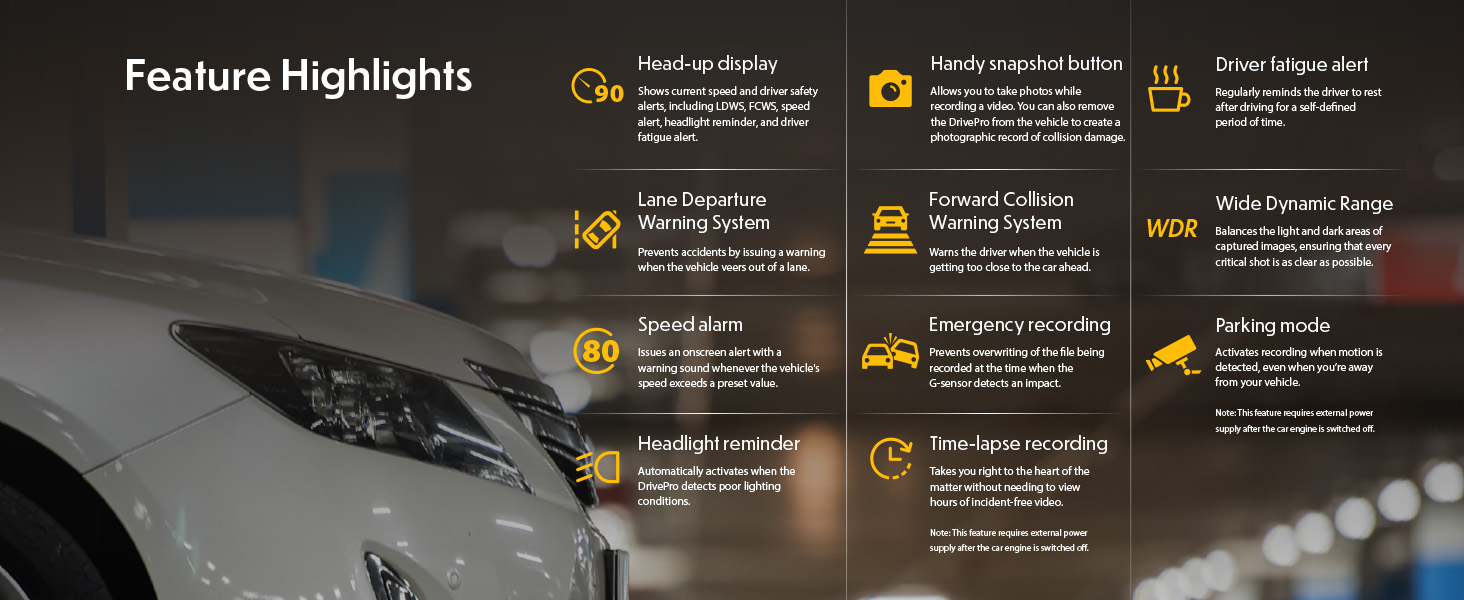
Image: Graphic illustrating the various feature highlights and ADAS functions of the DrivePro 550.
7. וישאַלט
7.1 Formatting the microSD Card
Regularly format the microSD card to ensure optimal performance and prevent data corruption. This can typically be done through the camera's menu settings. Formatting will erase all data on the card, so back up any important fileס ערשטער.
7.2 רייניקן די קאַמעראַ
Use a soft, dry cloth to clean the camera body and screen. For lenses, use a specialized lens cleaning cloth and solution to avoid scratches. Do not use harsh chemicals or abrasive materials.
8. טראָובלעשאָאָטינג
If you encounter issues with your DrivePro 550, refer to the following common problems and solutions:
- קאַמעראַ טוט זיך נישט אָן:
- Ensure the power cable is securely connected to both the camera and the vehicle's power outlet.
- קוקט איבער צי די 12V עלעקטרישע ווענטיל פונעם אויטאָ פונקציאָנירט.
- Camera is not recording:
- Verify that a microSD card is inserted correctly.
- Check if the microSD card is full; format it if necessary (after backing up important fileס).
- Ensure the recording function is enabled in the camera settings.
- נעבעך ווידעא קוואַליטעט:
- רייניקן די קאַמעראַ לענסעס.
- Ensure the windshield area in front of the camera is clean.
- Check video resolution settings; ensure it's set to the desired quality (e.g., 1440P 2K QHD for front lens).
- ווי-פי קשר ישוז:
- Ensure Wi-Fi is enabled on the camera and your mobile device.
- ריסטאַרט ביידע די קאַמעראַ און דיין מאָביל מיטל.
- Ensure you are within range of the camera's Wi-Fi signal.
9. ספּעסאַפאַקיישאַנז
| שטריך | באַשרייַבונג |
|---|---|
| סאָרט | טראַנססענד |
| מאָדעל נאָמען | DrivePro 550 |
| מאָדעל נומער | TS-DP550A-64G |
| פאָרמיטל סערוויס טיפּ | מאַשין |
| קאַנעקטיוויטי טעכנאָלאָגיע | ינפרערעד, ווי-פי |
| ווידעא קאַפּטורע רעסאָלוטיאָן | Front: 1440P 2K QHD (30fps), Rear: 1080p (30fps) |
| אַרייַנגערעכנט קאַמפּאָונאַנץ | Dash Camera, 64GB microSD Card, Car Mount, Car Lighter Adapter, Hardwire Power Cable |
| מאַונטינג טיפּ | Surface Mount (Suction Cup) |
| קאָליר | שוואַרץ |
| פעלד פון View | Front: 150 Degrees, Rear: 140 Degrees |
| פאַרשטעלן גרייס | 2.4 אינטשעס |
| אָפּטיש סענסאָר טעכנאָלאָגיע | Sony (Front Lens) |
| פלאַש זכּרון טיפּ | מיקראָסד |
| פּונקט וואָג | 107 גראַמז |
| נומער דימענשאַנז (ד רענטגענ וו רענטגענ ה) | 7.1" x 5.5" x 2.6" |
10. וואָראַנטי & שטיצן
10.1 וואָראַנטי אינפֿאָרמאַציע
The Transcend DrivePro 550 Dash Camera comes with a 2-יאָר לימיטעד וואָראַנטי. Please retain your proof of purchase for warranty claims. For detailed terms and conditions, refer to the warranty card included in your package or visit the official Transcend webפּלאַץ.
10.2 קונה שטיצן
For further assistance, technical support, or to download the latest firmware updates and user manuals, please visit the official Transcend website or contact their customer service department. Contact information can typically be found on the Transcend webזייטל אדער אין אייער פּראָדוקט פּאַקאַדזשינג.


