1. הקדמה
This manual provides detailed instructions for the installation, programming, and operation of your Orbit 2-Outlet Programmable Hose Faucet Timer, Model 24621. This device is designed to automate your watering schedule, ensuring efficient irrigation for your garden or lawn. Please read these instructions carefully before use to ensure proper function and longevity of the product.
2. פּראָדוקט איבערview
The Orbit 2-Outlet Programmable Hose Faucet Timer features a large digital display and intuitive controls for easy programming. It allows for independent programming of two watering zones from a single faucet.

בילד 2.1: פראָנט view of the Orbit 2-Outlet Programmable Hose Faucet Timer, displaying the digital screen and control dial.
שליסל פֿעיִקייטן:
- צווייענדיק אַוטלעץ: Control two separate watering zones independently.
- גרינג פּראָגראַממינג: Simple interface with a large, easy-to-read digital display.
- פלעקסיבלע סקעדזשולינג: Program watering intervals from every hour up to every 7th day.
- אַדזשאַסטאַבאַל געדויער: Set watering times from 1 to 360 minutes.
- רעגן פאַרהאַלטן: Pause your watering schedule for 1 to 7 days.
- מאַנואַל אָפּעראַציע: Instant faucet use without interrupting programmed schedules.
- באַטאַרייע פּאַוערד: Operates on batteries for convenience.
3. ינסטאַלירונג
3.1. באַטאַרייע ייַנמאָנטירונג
- געפינט די באַטאַרייע אָפּטייל אויף דער צוריק פון דעם טייַמער.
- אַראָפּנעמען די באַטאַרייע דעקן.
- Insert two fresh AA alkaline batteries, ensuring correct polarity (+/-).
- פאַרבייַטן די באַטאַרייע דעקן סיקיורלי.
3.2. צוטשעפּען דעם טייַמער צום קראַן
- זייט זיכער אז דער קראַן איז אויסגעלאָשן.
- Thread the timer's inlet collar onto your outdoor hose faucet. Hand-tighten only; do not use tools.
- Connect your garden hoses to the two outlets at the bottom of the timer. Hand-tighten only.
- Slowly turn on the faucet completely.

בילד 3.1: The timer connected to a water faucet with two hoses attached, ready for use in a garden setting.
4. Programming Instructions
The timer features a large dial and buttons for easy navigation through programming steps. Use the סטאַנציע button to select which outlet (1 or 2) you are programming.
4.1. שטעלן זייגער
- קער די רעדל צו שטעלן זייגער.
- ניצן די < און > buttons to adjust the current time.
- דרוק די OK קנעפּל צו באַשטעטיקן.
4.2. Set Start Time
- קער די רעדל צו אָנהייב צייט.
- ניצן די < און > buttons to set your desired watering start time.
- דרוק OK צו באַשטעטיקן.
4.3. Set Watering Duration (How Long)
- קער די רעדל צו ווי לאַנג.
- ניצן די < און > buttons to set the watering duration (from 1 to 360 minutes).
- דרוק OK צו באַשטעטיקן.
4.4. Set Watering Frequency (How Often)
- קער די רעדל צו ווי אָפט.
- ניצן די < און > buttons to set the watering frequency (from every hour up to every 7th day).
- דרוק OK צו באַשטעטיקן.
4.5. מאַנואַל אָפּעראַציע
To water manually without affecting your programmed schedule:
- קער די רעדל צו אַוטאָ / מאַנואַל.
- דרוק די מאַנואַל קנעפּל.
- ניצן די < און > buttons to set the desired manual watering duration.
- דרוק OK צו אָנהייבן מאַנואַל וואָטערינג.
- To stop manual watering, press the מאַנואַל button again or turn the dial to OFF.
4.6. רעגן פארלענגערונג פונקציע
To temporarily pause your watering schedule due to rain or other reasons:
- קער די רעדל צו אַוטאָ / מאַנואַל.
- דריקן און האַלטן די רעגן פאַרהאַלטן button (often integrated with AUTO/MANUAL or a dedicated button).
- ניצן די < און > buttons to select the delay duration (1 to 7 days).
- דרוק OK to activate the rain delay. The timer will resume its programmed schedule after the delay period.
5. וישאַלט
5.1. באַטערי פאַרבייַט
It is recommended to replace the batteries annually, or when the low battery indicator appears on the display, to ensure continuous operation. Refer to section 3.1 for battery installation steps.
5.2. ווינטער סטאָרידזש
Before the first frost, remove the timer from the faucet. Drain any water from the timer and store it indoors in a dry, protected location. Freezing temperatures can damage the internal components of the timer.
6. טראָובלעשאָאָטינג
| פּראָבלעם | מעגלעך סיבה | לייזונג |
|---|---|---|
| Timer does not turn on or display is blank. | טויטע אדער נישט ריכטיק אינסטאלירטע באַטעריעס. | Replace batteries with fresh AA alkaline batteries, ensuring correct polarity. |
| Water does not flow at scheduled time. | Faucet is off; rain delay is active; incorrect programming; low water pressure. | Ensure faucet is fully open. Check if rain delay is active. Verify programming settings (start time, duration, frequency). Check water pressure. |
| דער טייַמער שליסט זיך נישט אויס. | Internal valve malfunction; low battery. | Replace batteries. If problem persists, the unit may require replacement. |
| Water leaks from faucet connection. | Loose connection; worn washer. | Ensure connection is hand-tight. Check and replace the rubber washer inside the timer's inlet if it is worn or missing. |
| Timer resets or loses program. | Low batteries; power interruption. | Replace batteries. Reprogram the timer. |
7. ספּעסאַפאַקיישאַנז
- מאָדעל: 24621
- סאָרט: אָרביט
- מאַטעריאַל: פּלאַסטיק
- קאָליר: גרוי
- פּראָדוקט דימענשאַנז: 3"ד רענטגענ 2"וו רענטגענ 4"ה
- נומער וואָג: 1.2 פונט
- מאַכט מקור: 2 x AA אַלקאַליין באַטעריעס (נישט אַרייַנגערעכנט)
- נומער פון סעטטינגס: 3 (Start Time, How Long, How Often)
- וואַסערונג געדויער: 1 צו 360 מינוט
- וואַסערינג אָפטקייט: Every hour up to every 7th day
- Rain Delay Options: 1 צו 7 טעג
- UPC: 046878246218
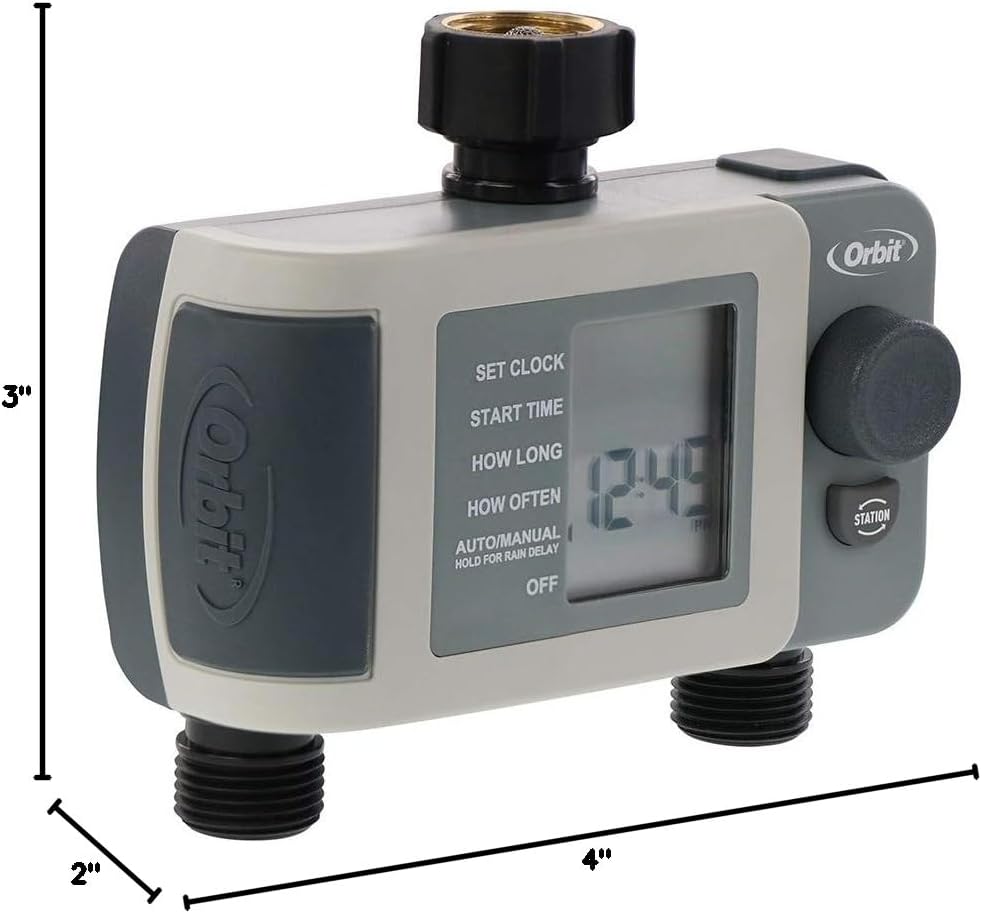
בילד 7.1: Diagram showing the approximate dimensions of the timer: 3 inches deep, 2 inches wide, and 4 inches high.
8. וואָראַנטי און שטיצן
Orbit products are designed for durability and performance. For specific warranty information or technical support, please refer to the official Orbit webזייטל אדער קאנטאקט זייער קאסטומער סערוויס גלייך. האלט אייער קויף קוויטל פאר גאראנטיע טענות.


