1. הקדמה
The Eizo ColorEdge CS2731 is a 27-inch IPS LCD monitor designed for creative professionals who demand exceptional color accuracy and image quality. This manual provides detailed instructions for setting up, operating, and maintaining your monitor to ensure optimal performance.

פיגורע 1.1: פראָנט view of the Eizo ColorEdge CS2731 Monitor, showcasing its sleek design and display capabilities.
2. שליסל פֿעיִקייטן
- 27-inch Wide Gamut LCD: Features a 2560x1440 resolution IPS panel for fine detail and wide viewינג אַנגלעס.
- 99% Adobe RGB Color Space: Ensures accurate reproduction of a wide range of colors, crucial for professional photo and video editing.
- Hardware Calibration Support: Compatible with free calibration software (ColorNavigator 7) for precise color management.
- ווערסאַטאַל ינפּוץ: Includes USB Type-C, DisplayPort, HDMI, and DVI-D for broad connectivity.
- 5-יאָר פאַבריקאַנט וואָראַנטי: Provides long-term assurance of product quality and reliability.
3. סעטאַפּ
3.1 אַנפּאַקינג און אַסעמבלי
Carefully remove the monitor and its components from the packaging. Assemble the stand according to the included quick setup guide, ensuring all connections are secure before placing the monitor on a stable surface.
3.2 קאַנעקטינג די מאָניטאָר
Connect the monitor to your computer using one of the available input ports. The ColorEdge CS2731 supports USB Type-C, DisplayPort, HDMI, and DVI-D connections. For optimal performance and color depth, DisplayPort or USB Type-C are recommended.

Figure 3.1: USB Type-C connection allows for video, USB signal, and power delivery (up to 60W) with a single cable.
Ensure the power cable is securely connected to the monitor and a power outlet. The monitor supports 240 Volts input.
3.3 פיזישע אַדזשאַסטמאַנץ
The monitor stand allows for various adjustments to enhance your viewing comfort and efficiency:
- הייך אַדזשאַסטמאַנט: Adjust the monitor's height to your eye level.
- טילט אַדזשאַסטמאַנט: Tilt the screen forward or backward to reduce glare and improve viewינג ווינקל.
- פּיוואַט פונקציע: דריי דעם עקראַן 90 גראַד פֿאַר פּאָרטרעט viewing, ideal for editing long documents or images.

Figure 3.2: Adjusting the monitor height for ergonomic viewing.


Figure 3.3: Monitor tilt adjustments (+5° to -35°).
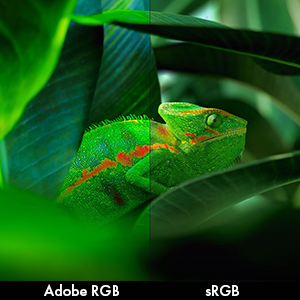
Figure 3.4: Monitor pivot function for portrait orientation.
4. אַפּערייטינג די מאָניטאָר
4.1 מאַכט אויף / אַוועק
Press the power button located on the front bezel to turn the monitor on or off. The power indicator light will illuminate when the monitor is active.
4.2 קאָליר פאַרוואַלטונג און קאַליבראַציע
The Eizo ColorEdge CS2731 is designed for precise color reproduction. It features a wide color gamut covering 99% of the Adobe RGB color space, ensuring accurate and vibrant colors.

Figure 4.1: Illustration of the monitor's 99% Adobe RGB color gamut coverage, ideal for creative work.
The monitor also includes a Digital Uniformity Equalizer (DUE) to ensure consistent brightness and chromaticity across the entire screen, minimizing variations that can affect color accuracy.

Figure 4.2: The Digital Uniformity Equalizer corrects tone deviations for consistent display across the screen.
For hardware calibration, use Eizo's ColorNavigator 7 software. This software, combined with an optional calibration sensor, simplifies the calibration process and ensures predictable, accurate results across all units.

Figure 4.3: ColorNavigator 7 software facilitates precise hardware calibration for various creative workflows.
ווידעא 4.1: אן איבערview of the ColorEdge CS Series Monitors, highlighting their features for creative professionals, including color reproduction, image quality, and ease of use. This video demonstrates the wide color gamut, digital uniformity equalizer, and hardware calibration capabilities.
5. וישאַלט
5.1 רייניקונג די מאָניטאָר
To clean the monitor screen, gently wipe it with a soft, lint-free cloth. For stubborn smudges, slightly dampווישט דעם שטאָף מיט וואַסער אָדער אַ רייניקונג לייזונג פֿאַר דעם עקראַן. פֿאַרמייַדט ניצן שטרענגע כעמיקאַלן אָדער אַברייסיוו מאַטעריאַלן.
5.2 אַלגעמיינע קער
Keep the monitor in a well-ventilated area, away from direct sunlight and excessive heat or moisture. Avoid placing heavy objects on the monitor or its cables. When moving the monitor, ensure it is powered off and disconnected from all cables.
6. טראָובלעשאָאָטינג
6.1 קיין מאַכט
- קוק אויב די מאַכט קאַבלע איז סיקיורלי פארבונדן צו די מאָניטאָר און די מאַכט ווענטיל.
- Ensure the power outlet is functional by plugging in another device.
6.2 קיין בילד נישט אויפן עקראַן
- Verify that the video cable (USB-C, DisplayPort, HDMI, or DVI-D) is securely connected to both the monitor and your computer.
- Ensure the correct input source is selected on the monitor's OSD (On-Screen Display) menu.
- Check your computer's display settings to ensure it is configured to output to the monitor.
6.3 קאָליר אומרעכטיקייטן
- Perform a hardware calibration using Eizo ColorNavigator 7 software and a compatible sensor.
- זייט זיכער אז אייערע גראַפיקס קאַרטל דרייווערס זענען אַרויף צו דאַטע.
- Check the monitor's color mode settings in the OSD menu.
For further assistance, please refer to the comprehensive troubleshooting guide available on the Eizo support webפּלאַץ.
7. ספּעסאַפאַקיישאַנז

Figure 7.1: Key dimensions of the Eizo ColorEdge CS2731 Monitor.
| אַטריביוט | ווערט |
|---|---|
| פאַרשטעלן גרייס | 27 אינטשעס |
| האַכלאָטע | 2560 x 1440 (QHD ברייט 1440p) |
| אַספּעקט פאַרהעלטעניש | 1.78:1 |
| בילד ברייטנאַס | 350 סי / מ 2 |
| באַשרייַבונג פון דער אויבערפלאַך פון דעם עקראַן | מאַט |
| ינפּוץ | USB Type-C, DisplayPort, HDMI, DVI-D |
| גאַנץ וסב פּאָרץ | 3 |
| Voltage | 240 וואלטס |
| פּונקט וואָג | 22.2 פונט |
| נומער מאָדעל נומער | CS2731-BK |
| ערשטער דאַטע בנימצא | 8 אפריל 2019 |
Note: Some regional models may have specific voltage requirements or warranty limitations. Refer to your product's specific documentation.

Figure 7.2: Specific warranty and input voltage information for models intended for the Japanese market.
8. וואָראַנטי און שטיצן
The Eizo ColorEdge CS2731 monitor comes with a 5-יאָר פאַבריקאַנט וואָראַנטי. די וואָראַנטי קאָווערס חסרונות אין מאַטעריאַלס און ווערקמאַנשיפּ אונטער נאָרמאַל נוצן.
For warranty claims, technical support, or additional product information, please visit the official Eizo support webזייטל אדער קאנטאקט זייער קאסטומער סערוויס. איר קענט געפינען מער אינפארמאציע און רעסורסן ביי די Eizo Store on Amazon.
Please note that the warranty may be region-specific. For example, some models may have a warranty valid only in Japan, as indicated in certain product images.


