הקדמה
Welcome to the Hoco CW13 Wireless Charger user manual. This guide provides detailed instructions on how to set up, operate, maintain, and troubleshoot your new wireless charger. Please read this manual carefully before using the product to ensure optimal performance and safety.
פּראָדוקט איבערview
The Hoco CW13 is a universal portable wireless charger designed for fast charging of mobile devices. Its compact and lightweight design makes it an ideal companion for home and travel.
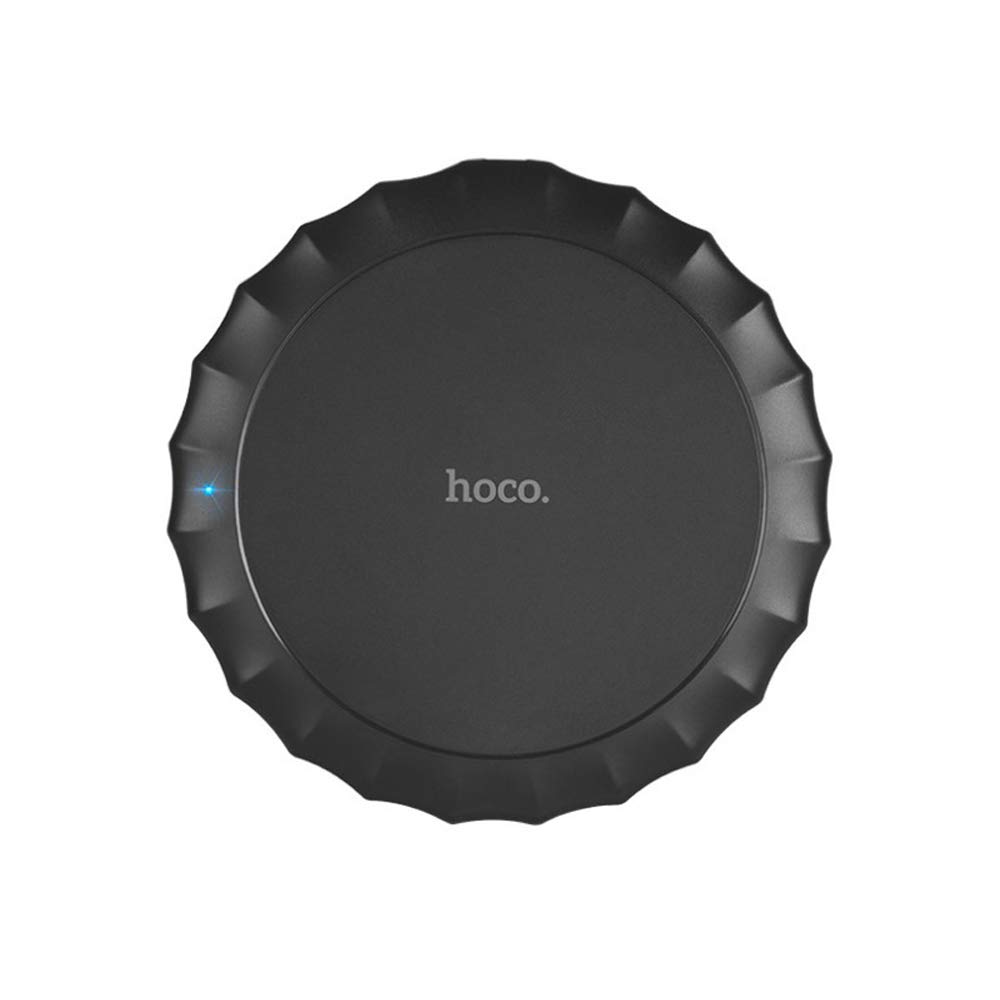
דאָס בילד ווײַזט די שפּיץ view of the Hoco CW13 wireless charger. It features a sleek, black circular design with a corrugated edge, resembling a bottle cap. The "hoco." logo is prominently displayed in the center, and a small blue LED indicator light is visible on the left side, indicating power or charging status.
פֿעיִקייטן
- סאָרט: Hoco
- מאָדעל: CW13
- קאָליר: שוואַרץ
- טיפּ: ווירעלעסס טשאַרדזשער
- ווירעלעסס רעזולטאַט: 5W
- טראַנסמיסיע דיסטאַנסע: 5-8מם
- סאָליד גרייס: Diameter 100mm, Thickness 10mm
- לייטווייט: 62 גראַמז
- שנעל טשאַרדזשינג פיייקייט
- פּאָרטאַטיוו פּלאַן
סעטאַפּ גייד
פּעקל אינהאַלט
איידער איר הייבט אן, זיכערט זיך אז אלע זאכן זענען פאראן אין פעקל:
- Hoco CW13 Wireless Charger
- וסב טשאַרדזשינג קאַבלע
- באַניצער מאַנואַל (דעם דאָקומענט)
קאַנעקטינג די טשאַרדזשער
- Connect the USB cable to the charging port on the Hoco CW13 wireless charger.
- Plug the other end of the USB cable into a compatible power adapter (e.g., wall charger, computer USB port) with a 5V input.
- The indicator light on the charger will illuminate, indicating it is powered on and ready for use.
אַפּערייטינג ינסטראַקשאַנז
טשאַרדזשינג דיין מיטל
- Ensure your mobile device is compatible with Qi wireless charging.
- Place your Qi-enabled device directly onto the center of the Hoco CW13 wireless charger.
- The indicator light on the charger may change color or blink to confirm that charging has begun. Your device's screen will also show a charging icon.
- For optimal charging, ensure the device is centered on the charging pad. Misalignment may reduce charging efficiency or prevent charging.
- אַמאָל דיין מיטל איז גאָר טשאַרדזשינג, אַראָפּנעמען עס פון די טשאַרדזשינג בלאָק.
וויכטיק נאָטעס
- Do not place metal objects, credit cards, or other foreign objects between the device and the charging pad, as this may interfere with charging or cause damage.
- Avoid using thick phone cases (over 3mm) as they might hinder wireless charging.
- The charger may become slightly warm during charging; this is normal.
וישאַלט
רייניקונג
To clean the charger, disconnect it from the power source. Use a soft, dry cloth to wipe the surface. Do not use harsh chemicals or abrasive cleaners.
סטאָרידזש
האַלט דעם טשאַרדזשער אין אַ קיל, טרוקן אָרט אַוועק פון דירעקט זונשייַן און עקסטרעמע טעמפּעראַטורן ווען נישט אין באַנוץ.
טראָובלעשאָאָטינג
| פּראָבלעם | מעגלעך סיבה | לייזונג |
|---|---|---|
| מיטל איז נישט טשאַרדזשינג | מיטל איז נישט רעכט אַליינד | ריפּאַזישאַן די מיטל אויף די צענטער פון די טשאַרדזשינג בלאָק. |
| Phone case is too thick | אַראָפּנעמען די טעלעפאָן פאַל און פּרובירן ווידער. | |
| Charger not powered on | Ensure the USB cable is securely connected to a working power source and the indicator light is on. | |
| פּאַמעלעך טשאַרדזשינג | Using a non-fast charging adapter | Use a Quick Charge (QC) 2.0/3.0 or Power Delivery (PD) compatible adapter for faster charging. |
| Background apps running on device | שליסט אומנייטיקע אַפּפּס אויף דיין מיטל. | |
| Charger getting hot | נאָרמאַל אָפּעראַציע | Slight warmth is normal. If it becomes excessively hot, disconnect immediately and contact support. |
ספּעסאַפאַקיישאַנז
| שטריך | דעטאַל |
|---|---|
| סאָרט | Hoco |
| מאָדעל | CW13 |
| קאָליר | שוואַרץ |
| אַרייַנשרייַב וואָלtage | 5V |
| ווירעלעסס רעזולטאַט | 5W |
| טראַנסמיסיע דיסטאַנסע | 5-8מם |
| דימענסיעס (דיאַמעטער x גרעב) | 100 מם X 10 מם |
| וואָג | 62 גראַמז |
| קאַמפּאַטאַבאַל דעוויסעס | Mobile Phones (Qi-enabled) |
| ספּעציעלע פֿעיִקייטן | Fast Charging, Lightweight Design |
| אַרייַנגערעכנט קאַמפּאָונאַנץ | טשאַרדזשער |
| גאַנץ וסב פּאָרץ | 1 (for power input) |
וואָראַנטי און שטיצן
וואָראַנטי אינפֿאָרמאַציע
This Hoco CW13 Wireless Charger comes with a standard manufacturer's warranty. Please refer to the warranty card included in your product packaging for specific terms and conditions, or visit the official Hoco webפּלאַץ פֿאַר מער דעטאַילס.
קונה שטיצן
If you encounter any issues or have questions regarding your Hoco CW13 Wireless Charger, please contact your retailer or the manufacturer's customer support. Contact information can typically be found on the product packaging or the official Hoco webפּלאַץ.
For online support, you may visit the Hoco official website or the retailer's support page.


