1. הקדמה
This manual provides detailed instructions for the operation and maintenance of your Trexonic TRX-68B-AMZ 3-Speed Turntable System. Please read this manual thoroughly before using the product to ensure proper function and to prevent damage.
2. זיכערקייַט אינסטרוקציעס
- דו זאלסט נישט ויסשטעלן די אַפּאַראַט צו רעגן אָדער נעץ.
- דו זאלסט נישט פאַרשפּאַרן קיין ווענטאַליישאַן אָופּאַנינגז.
- פאַרזיכערן אַז די מאַכט שנור איז נישט פּינטשט אָדער געגאנגען אויף.
- אָפּשטעקן די אַפּאַראַט בעשאַס בליץ סטאָרמז אָדער ווען אַניוזד פֿאַר לאַנג פּיריאַדז.
- אָפּשיקן אַלע סערוויסעס צו קוואַלאַפייד סערוויס פּערסאַנעל.
3. פּעקל אינהאַלט
באַשטעטיקן אַז אַלע זאכן זענען פאַראַן אין דער פּאַקאַדזשינג:
- Trexonic TRX-68B-AMZ Main Unit
- Wired Shelf Speakers (2)
- ווייַט קאָנטראָל
- באַניצער מאַנואַל (דעם דאָקומענט)
- מאַכט אַדאַפּטער

Figure 3.1: Trexonic TRX-68B-AMZ Turntable System with included wired shelf speakers.
4. פּראָדוקט איבערviewקאָנטראָלן און פֿעיִקייטן
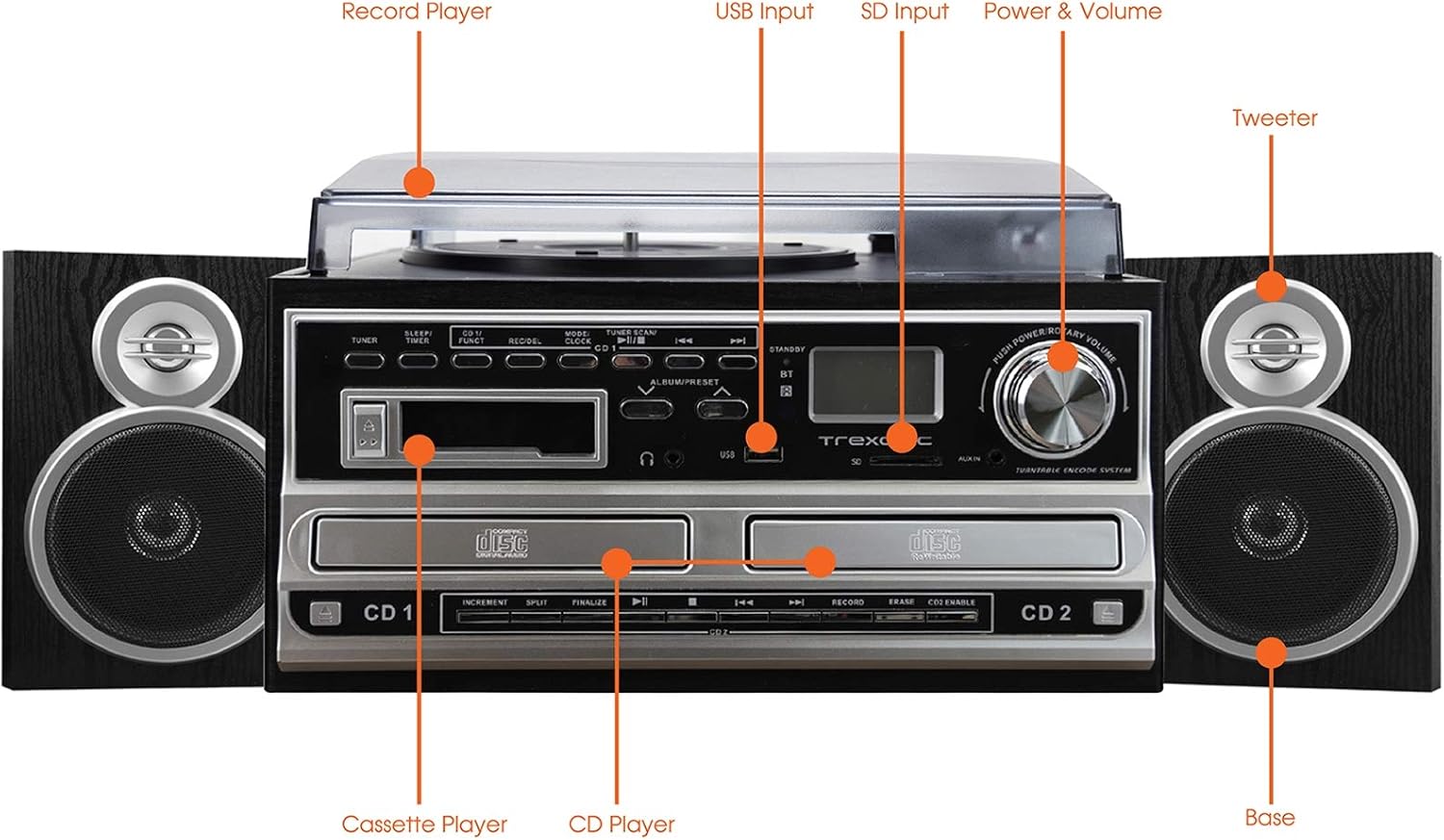
Figure 4.1: Front panel and top view of the Trexonic TRX-68B-AMZ with key components labeled.
- פּלאַטן שפּילער: For playing vinyl records.
- וסב ינפּוט: Connect USB drives for playback or recording.
- SD אַרייַנשרייַב: Insert SD cards for playback or recording.
- Power & Volume Knob: קאָנטראָלירט מאַכט אויף/אויס און אַודיאָ באַנד.
- טוויטטער: High-frequency speaker component.
- Base (Woofer): Low-frequency speaker component.
- קאָמפּאַקטדיסק שפּילער: For playing audio CDs and CD recording.
- קאַסעטע שפּילער: פֿאַר שפּילן און רעקאָרדירן קאַסעטע טייפּס.
5. סעטאַפּ
5.1 אַנפּאַקינג
נעמט פֿאָרזיכטיק אַרויס אַלע קאָמפּאָנענטן פֿון דער פּאַקאַדזשינג. האַלט די פּאַקאַדזשינג מאַטעריאַלן פֿאַר צוקונפֿטיקן טראַנספּאָרט אָדער סטאָרידזש.
5.2 רעדנער קאַנעקשאַן
Connect the wired shelf speakers to the speaker output terminals on the rear of the main unit. Ensure correct polarity (positive to positive, negative to negative) for optimal sound quality.
5.3 מאַכט קאַנעקשאַן
Plug the power adapter into the DC IN jack on the back of the unit, then plug the other end into a standard wall outlet (AC 100-240V, 50/60Hz).
6. אַפּערייטינג ינסטרוקטיאָנס
6.1 אַלגעמיינע קאָנטראָלן
- מאַכט / וואָלום קנופּ: Rotate to turn the unit on/off and adjust volume.
- מאָדע/פונקציע קנעפּל: Press to cycle through different modes (Turntable, CD, Cassette, FM, USB, SD, AUX, Bluetooth).
6.2 דריי-טיש אָפּעראַציע

פיגורע 6.1: נאָענט-אַרויף view of the turntable platter and tonearm.
- הייבן די שטויב דעקן.
- שטעלן אַ רעקאָרד אויף די טאַץ.
- אויסקלייבן די פאסיגע גיכקייט (33, 45, אדער 78 רפּם) ניצנדיק דעם גיכקייט אויסקלייבער קנעפל.
- Move the tonearm to the desired position on the record. The platter will begin to spin automatically.
- Lower the tonearm gently onto the record.
- To stop playback, lift the tonearm and return it to its rest.
6.3 סי-די שפּילער אָפּעראַציע
- Press the Mode/Function button to select CD mode.
- דריקן די OPEN/CLOSE קנעפּל צו עפענען די CD טאַץ.
- לייגט אַ סי-די מיט דער עטיקעט זײַט אַרויף.
- Press the OPEN/CLOSE button to close the tray. The CD will begin playing automatically.
- Use the PLAY/PAUSE, STOP, SKIP FORWARD, and SKIP BACKWARD buttons for control.
6.4 קאַסעטע שפּילער אָפּעראַציע

פיגורע 6.2: נאָענט-אַרויף view of the cassette player slot.
- Press the Mode/Function button to select Cassette mode.
- Insert a cassette tape into the cassette slot.
- Use the PLAY, PAUSE, FAST FORWARD, REWIND, and STOP buttons for control.
6.5 FM ראַדיאָ אָפּעראַציע
- Press the Mode/Function button to select FM Radio mode.
- Use the TUNER knob or SEEK buttons to find radio stations.
- Press the PRESET button to save or recall favorite stations.
6.6 USB/SD שפּיל
- Insert a USB drive into the USB port or an SD card into the SD slot.
- Press the Mode/Function button to select USB or SD mode.
- די איינהייט וועט אויטאמאטיש דעטעקטירן און שפילן קאמפאטיבלע אודיא files.
- Use the PLAY/PAUSE, STOP, SKIP FORWARD, and SKIP BACKWARD buttons for control.
6.7 רעקאָרדינג פונקציעס
The Trexonic TRX-68B-AMZ allows recording from various sources to USB or SD card.
- Recording from Vinyl, CD, Cassette, or AUX to USB/SD:
- Insert a USB drive or SD card into the respective slot.
- Select the desired source mode (Turntable, CD, Cassette, or AUX).
- Begin playback of the source material.
- Press the RECORD button. The recording indicator will illuminate.
- Press the STOP button to end the recording.
7. וישאַלט
7.1 רייניקונג די אַפּאַראַט
Wipe the unit with a soft, dry cloth. Do not use abrasive cleaners or solvents. For the dust cover, use a soft cloth and a mild detergent solution if necessary, then wipe dry.
7.2 Stylus Care and Replacement
The turntable stylus (needle) is a delicate component. Clean it periodically with a soft brush, brushing from back to front. A worn stylus can damage records and degrade sound quality. Replace the stylus approximately every 300-500 hours of playback, or if you notice a decrease in sound quality or increased record wear.
8. טראָובלעשאָאָטינג
| פּראָבלעם | מעגלעך סיבה | לייזונג |
|---|---|---|
| קיין מאַכט | שטראָם קאַבל נישט פארבונדן; שטראָם אַוטלעט דעפעקט | זיכער מאַכן אַז די עלעקטרישע שנור איז זיכער פארבונדן; פּרוּווט אַן אַנדער אַוטלעט. |
| קיין געזונט | Volume too low; Speakers not connected; Incorrect mode selected | Increase volume; Check speaker connections; Select correct input mode. |
| טערטייבאַל נישט ספּיננינג | Unit not powered on; Tonearm not moved over platter | Turn on unit; Move tonearm over the record to activate platter. |
| סי-די שפּילט נישט | CD inserted incorrectly; CD scratched/dirty; Incorrect mode | Reinsert CD correctly; Clean or replace CD; Select CD mode. |
| רעקאָרדינג פּראָבלעמען | USB/SD full or incompatible; Source not playing | Check USB/SD capacity and format; Ensure source is playing during recording. |
9. ספּעסאַפאַקיישאַנז
| שטריך | באַשרייַבונג |
|---|---|
| סאָרט | טרעקסאָניק |
| מאָדעל נומער | TRX-68B-AMZ |
| טערנטייבאַל ספּידז | 33/45/78 רפּם |
| רעקאָרדינג פֿאָרמאַטירונגען | MP3 (to USB/SD) |
| פּלייַבאַקק מידיאַ | Vinyl, CD, Cassette, FM Radio, USB, SD, AUX, Bluetooth |
| אַרייַנגערעכנט קאַמפּאָונאַנץ | Remote Control, Wired Shelf Speakers |
| מאַכט מקור | קאָרדעד עלעקטריק |
| דימענשאַנז (פּאַקאַץ) | 56.64 X 35.56 X 26.67 סענטימעטער |
| וואָג (פּאַקעט) | 6.89 קג |
10. וואָראַנטי אינפֿאָרמאַציע
Trexonic products are designed and manufactured to the highest quality standards. For specific warranty details, please refer to the warranty card included with your product or contact Trexonic customer support. Keep your purchase receipt as proof of purchase.
11. קונה שטיצן
If you encounter any issues not covered in this manual or require further assistance, please contact Trexonic customer support. Contact information can typically be found on the manufacturer's official webוועבזייטל אדער אויף דער פּראָדוקט פּאַקאַדזשינג.


