1. הקדמה
This user manual provides detailed instructions for the safe and efficient operation of your Veidoo 10-inch Android Tablet PC. Please read this manual thoroughly before using the device and retain it for future reference. This tablet is designed for various uses, including communication, entertainment, and productivity.

This image shows the Veidoo 10-inch Android Tablet PC. The front of the tablet displays the home screen with the current time, date, and various application icons such as Camera, Gallery, Settings, and Music. The rear of the tablet, visible behind the front, is black with a subtle textured design and features the rear camera module.
2. זיכערקייַט אינפֿאָרמאַציע
- שטעלט נישט אויס דעם אפאראט צו עקסטרעמע טעמפעראטורן, דירעקטע זונשייַן, אדער הויכע הומידיטי.
- ויסמיידן דראַפּינג אָדער אונטערטעניק די מיטל צו שטאַרק ימפּאַקץ.
- ניצן בלויז פאַבריקאַנט-באוויליקט טשאַרדזשערז און אַקסעסעריז.
- פּרוּווט נישט צו צענעמען אָדער פאַרריכטן דעם אַפּאַראַט אַליין. ווענדט זיך צו קוואַליפֿיצירטע סערוויס פּערסאָנעל.
- האַלטן די מיטל אַוועק פון קינדער און פּעץ.
- אַוועקוואַרפן דאָס אַפּאַראַט און זײַן באַטאַרייע פֿאַראַנטוואָרטלעך לויט די לאָקאַלע רעגולאַציעס.
3. פּראָדוקט איבערview
3.1 פיזיש פֿעיִקייטן
Familiarize yourself with the various ports and buttons on your Veidoo Tablet PC:

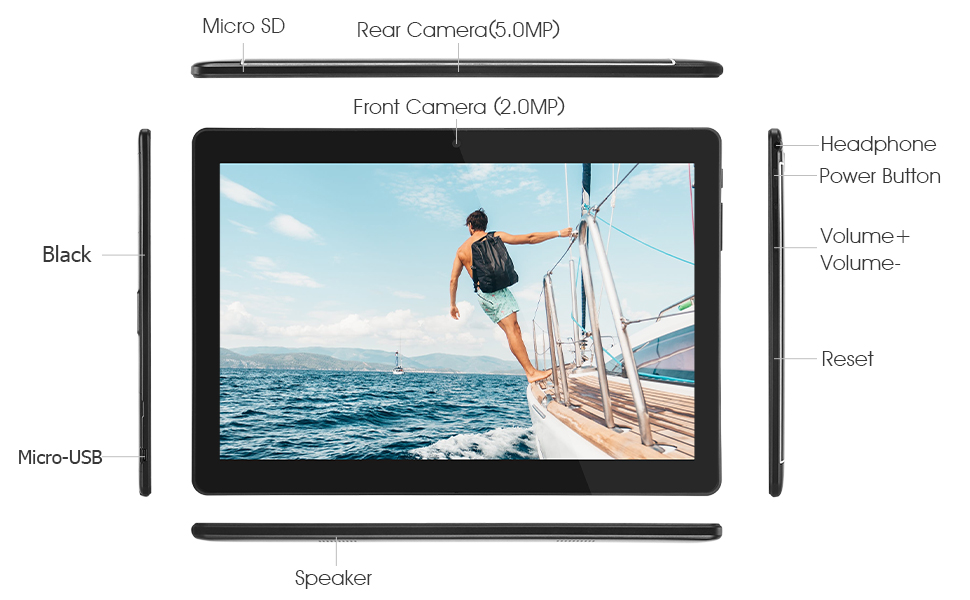
This diagram illustrates the various physical components and ports of the Veidoo 10-inch Android Tablet PC. It clearly labels the Micro SD card slot, the 5.0MP rear camera, the 2.0MP front camera, the headphone jack, the power button, the volume up and down buttons, the reset pinhole, the Micro-USB charging port, and the speaker.
- מיקראָ סד שפּעלטל: פֿאַר יקספּאַנדאַבאַל סטאָרידזש.
- הינטערשטע קאַמעראַ (5.0MP): פֿאַר נעמען בילדער און ווידעאָס.
- פראָנט קאַמעראַ (2.0MP): פֿאַר ווידעאָ קאָלס און סעלפֿיז.
- כעדפאָון דזשאַק: פאַרבינדן 3.5 מם כעדפאָונז.
- מאַכט קנעפּל: Press and hold to power on/off, short press to sleep/wake.
- באַנד קנעפּלעך: אַדזשאַסטירן אַודיאָ באַנד.
- באַשטעטיק פּינהאָלע: Use a thin object to reset the device if unresponsive.
- מיקראָ-וסב פּאָרט: פֿאַר טשאַרדזשינג און דאַטן אַריבערפירן.
- רעדנער: אַודיאָ רעזולטאַט.
3.2 פּעקל אינהאַלט
זיכער מאַכן אַז אַלע זאכן זענען פאַראַן אין דיין פּראָדוקט קעסטל:

This image displays the items typically found inside the Veidoo 10-inch Android Tablet PC product box. It includes the tablet itself, a black protective case, a power adapter (wall charger), a USB charging and data cable, a service warranty card, and a leaflet containing frequently asked questions and support information.
- Veidoo 10-inch Android Tablet PC
- מאַכט אַדאַפּטער
- וסב קאַבלע
- Protective Case (optional, may vary by package)
- באַניצער מאַנואַל (דעם דאָקומענט)
- סערוויס וואָראַנטי קאַרד
- FAQ Leaflet
4. סעטאַפּ
4.1 טשאַרדזשינג די באַטאַרייע
Before first use, fully charge the tablet. Connect the USB cable to the tablet's Micro-USB port and the other end to the power adapter. Plug the adapter into a wall outlet. The charging indicator will show the charging status. A full charge typically takes 3-4 hours.

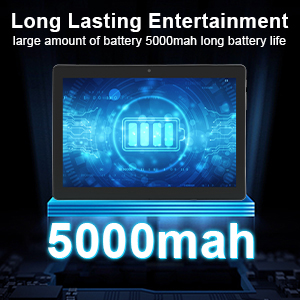
This image focuses on the Veidoo 10-inch Android Tablet PC's battery capacity, prominently displaying a battery icon and '5000mAh'. This signifies the tablet's 5000mAh battery, designed to provide extended usage time for entertainment and productivity.
4.2 פּאַוערינג אויף / אַוועק
- צו מאַכט אויף: Press and hold the Power button until the Veidoo logo appears on the screen.
- צו מאַכט אַוועק: דריק און האלט דעם פּאַוער קנעפּל ביז אַ מעניו דערשיינט. סעלעקטיר "אויסלאָשן" און באַשטעטיק.
- שלאָפן / וועקן: דריק קורץ דעם פּאַוער קנעפּל צו שטעלן די טאַבלעט אין שלאָף אָדער וועקן עס אויף.
4.3 אריינשטעלן סים און מיקראָ סד קאַרדס
The tablet supports dual SIM cards for 3G phone calls and a Micro SD card for expandable storage.
- Locate the SIM/SD card slot on the side of the tablet.
- פֿאָרזיכטיק עפֿנט דעם דעקל פֿון דעם שפּאַלט.
- Insert the SIM card(s) and/or Micro SD card into the designated slots with the gold contacts facing down. Ensure they are correctly seated.
- פֿאַרמאַכט דעם דעקל פֿון דעם שפּאַלט זיכער.
This image demonstrates the storage capabilities of the Veidoo 10-inch Android Tablet PC, showing multiple applications and content open. It highlights the device's 16GB internal storage (ROM) and its ability to expand storage up to 32GB via a Micro SD card, allowing for ampלע פּלאַץ פֿאַר אַפּפּס, פאָטאָס און ווידיאס.
4.4 ערשט סעטאַפּ
ביים ערשטן מאָל אנצינדן, וועט די טאַבלעט אייך פירן דורך דעם ערשטן סעטאַפּ פּראָצעס:
- אויסקלייַבן דיין בילכער שפּראַך.
- פאַרבינדן צו אַ Wi-Fi נעץ.
- לאָג אַרײַן מיט אײַער גוגל אַקאַונט אָדער שאַפֿט אַ נײַעם. דאָס איז נייטיק צו דאַונלאָודן אַפּפּס פֿון גוגל פּליי סטאָר.
- שטעלט אויף דעם עקראַן שלאָס (PIN, מוסטער, פּאַראָל).
- Review און אָננעמען די תּנאים און באַדינגונגען.
5. אפערירן די טאַבלעט
5.1 יקערדיק נאַוויגאַציע
- צאַפּן: אויסקלייבן אַן אייטעם אָדער עפֿענען אַן אַפּ.
- צאַפּן און האַלטן: צוטריטן קאנטעקסט מעניוס אדער באוועגן איקאנעס.
- לאַקכענען: סקראָלן דורך סקרינז אדער רשימות.
- קניפּ-צו-זומען: פארגרעסערן אדער פארקלענערן בילדער און web בלעטער.
5.2 קאָנעקטיוויטי (Wi-Fi און בלועטוט)
- ווי-פי: גיין צו סעטטינגס > נעץ און אינטערנעט > Wi-Fiצינד אן Wi-Fi, אויסקלייבן אייער נעץ, און אריינגעבן דאס פאסווארט.
- בלועטאָאָטה: גיין צו סעטטינגס > פארבונדענע דעווייסעס > בלועטוט. Turn Bluetooth on, scan for devices, and pair with your desired accessory.
5.3 Making Phone Calls (3G)
With a valid SIM card inserted, you can make and receive 3G phone calls:

This image shows a group of four individuals participating in a video call using the Veidoo 10-inch Android Tablet PC. This illustrates the tablet's capability for video conferencing and its 3G phone call functionality, allowing users to connect with others remotely.
- עפענען די טעלעפאָן אַפּ.
- Dial the number using the keypad or select a contact.
- צאַפּן אויף די רופן קנעפּל צו אָנהייבן דעם רופן.
5.4 ניצן די קאַמעראַס
The tablet is equipped with a front and rear camera for photos and videos.
- עפענען די אַפּאַראַט אַפּ.
- טוישט צווישן פראָנט און הינטערשטע קאַמעראַס ניצנדיק די קאַמעראַ ייקאַן.
- צאַפּן דעם שאַטער קנעפּל צו נעמען אַ פאָטאָ אָדער אָנהייבן/אָפּשטעלן ווידעאָ רעקאָרדינג.
5.5 פאַרוואַלטן סטאָרידזש
איר קענען view and manage your tablet's internal and external storage:
- גיין צו סעטטינגס> סטאָרידזש.
- Here you can see storage usage and free up space by deleting unnecessary files or uninstalling apps.
5.6 Installing and Uninstalling Apps
This image features the Veidoo 10-inch Android Tablet PC showcasing its Android 10 operating system with a multitude of application icons. This highlights that the device is GMS (Google Mobile Services) certified, ensuring access to Google Play Store and other Google services.
- ינסטאַלירן: עפענען די Google פּלייַ סטאָר אַפּ, זוכט פֿאַר דיין געוואונטשענע אַפּ, און צאַפּן ינסטאַלירן.
- נעם אַוועק: גיין צו Settings > Apps & notifications > See all apps. Select the app you wish to uninstall and tap נעם אַוועק.
6. וישאַלט
- רייניקונג: ניצט אַ ווייכע, לינט-פֿרייע שטאָף צו רייניקן דעם עקראַן און קערפּער. פֿאַרמייַדט אַברייסיוו רייניגער אָדער סאָלווענטן.
- ווייכווארג דערהייַנטיקונגען: טשעק רעגולער פֿאַר סיסטעם דערהייַנטיקונגען אין סעטטינגס > סיסטעם > סיסטעם דערהייַנטיקונג צו ענשור אָפּטימאַל פאָרשטעלונג און זיכערהייט.
- באַטערי זאָרגן: To prolong battery life, avoid fully discharging the battery frequently. Store the tablet in a cool, dry place when not in use for extended periods.
- דאַטאַ באַקקופּ: Regularly back up important data to a cloud service or external storage device to prevent data loss.
7. טראָובלעשאָאָטינג
| פּראָבלעם | מעגלעך לייזונג |
|---|---|
| טאַבלעט טוט זיך נישט אנצינדן | Ensure the battery is charged. Connect the charger and wait a few minutes before attempting to power on. If unresponsive, try pressing the reset pinhole. |
| די פאַרשטעלן איז ניט ריספּאַנדאַבאַל | Restart the tablet by holding the Power button. If that doesn't work, use the reset pinhole. Ensure the screen is clean and dry. |
| קענען ניט פאַרבינדן צו ווי-פי | Check if Wi-Fi is enabled in settings. Ensure the Wi-Fi password is correct. Restart your router and the tablet. |
| אַפּפּס קראַשן אָדער פרירן | שליסט און עפֿנט ווידער די אַפּ. רייניקט די אַפּ'ס קאַש אין סעטטינגס> אַפּפּס & נאָוטאַפאַקיישאַנז. Update the app or uninstall and reinstall it. Ensure sufficient storage space. |
| נעבעך באַטאַרייע לעבן | Reduce screen brightness. Close unused apps running in the background. Turn off Wi-Fi, Bluetooth, and GPS when not in use. Limit background data usage. |
8. ספּעסאַפאַקיישאַנז
Key technical specifications for the Veidoo 10-inch Android Tablet PC (Model T10):

This image provides a visual summary of the Veidoo Tablet PC's key specifications. It highlights features such as 1GB RAM, a 2MP front and 5MP rear camera setup, a 10.1-inch IPS HD display with 1280x800 resolution, 16GB of internal storage, Android 10 operating system, Wi-Fi connectivity, a Quad-Core CPU, and dual SIM card support.
| שטריך | דעטאַל |
|---|---|
| מאָדעל נאָמען | Touch (T10) |
| שטייענדיק פאַרשטעלן ווייַז גרייס | 10.1 אינטשעס |
| פאַרשטעלן האַכלאָטע | 800 x 1280 (IPS) |
| באַראַן | 1 גיגאבייט (DDR3 SDRAM) |
| האַרט דרייוו / פלאַש זכּרון גרייס | 16 גיגאבייט (אויסברייטבאר ביז 32 גיגאבייט דורך מיקראָ סד) |
| ווירעלעסס טיפּ | 802.11b, 802.11b/g (Wi-Fi), Bluetooth |
| דורכשניטלעך באַטאַרייע לעבן | 6 Hours (5000mAh Lithium Polymer) |
| ייַזנוואַרג פּלאַטפאָרמע | אַנדרויד |
| אָפּערייטינג סיסטעם | Android 6.0 Marshmallow (GMS Certified) |
| פּונקט וואָג | 2.86 פונט |
| פּראָדוקט דימענשאַנז | 9.49 X 6.69 X 0.37 אינטשעס |
| דערציען Webקאַם האַכלאָטע | 5 מפּ |
| פראָנט Webקאַם האַכלאָטע | 2 מפּ |
| נומער פון פּראַסעסערז | 4 (Quad-Core) |
| מאַכט מקור | באַטאַרייע פּאַוערד, קאָרדעד עלעקטריק |
9. וואָראַנטי און שטיצן
Your Veidoo Tablet PC comes with a service warranty. Please refer to the included Service Warranty Card for specific terms and conditions, including warranty period and coverage details.
For technical support, troubleshooting assistance, or warranty claims, please contact Veidoo customer service. Contact information can typically be found on the warranty card or the official Veidoo website. When contacting support, please have your model number (T10) and purchase information ready.
You can also visit the official Veidoo store on Amazon for more information and support resources: Veidoo Store


