ASUS ROG Strix XG49VQ 49-inch Curved Gaming Monitor User Manual
1. הקדמה
The ASUS ROG Strix XG49VQ is a super ultra-wide 49-inch Dual Full HD (3840 x 1080) 1800R curved gaming monitor designed to provide an immersive and smooth gaming experience. It features a 144Hz refresh rate, Radeon FreeSync 2 HDR technology, DCI-P3 90% professional color gamut coverage, and DisplayHDR 400 certification. This manual provides essential information for setting up, operating, maintaining, and troubleshooting your monitor.
2. וואָס איז אין דער קעסטל
באַשטעטיקט אַז אַלע די פאלגענדע זאכן זענען אַרייַנגערעכנט אין דיין פּעקל:
- ASUS ROG Strix XG49VQ Monitor
- DisplayPort קאַבלע
- הדמי קאַבלע
- מאַכט אַדאַפּטער
- שנעל אָנהייב פירער
- VESA בארג קיט
3. סעטאַפּ
3.1 מאָניטאָר פֿאַרזאַמלונג
Carefully remove the monitor and its components from the packaging. Attach the stand base to the monitor arm, then secure the assembled stand to the monitor. Ensure all connections are firm.
3.2 קאַנעקטינג קאַבלעס
Connect the power adapter to the monitor and a power outlet. Use the provided DisplayPort or HDMI cable to connect your computer or gaming console to the monitor. The monitor features multiple input ports for versatile connectivity.
בילד: הינטערשטע view of the monitor highlighting accessible I/O ports and smart cable management for a tidy setup.
3.3 פיזישע אַדזשאַסטמאַנץ
The monitor offers ergonomic adjustments for optimal viewטרייסט:
- טילט: אַדזשאַסטירן דעם ווינקל פֿון דעם עקראַן פֿון +20° ביז -5°.
- סוויוול: דריי דעם עקראַן האָריזאָנטאַל פֿון +16° ביז -16°.
- הייך אַדזשאַסטמאַנט: Adjust the screen height up to 120mm.

בילד: דער מאָניטאָר ווייזטasing its ergonomic design with arrows indicating available tilt, swivel, and height adjustment ranges.
4. אַפּערייטינג די מאָניטאָר
4.1 מאַכט אויף / אַוועק
דריק דעם מאַכט קנעפּל וואָס געפינט זיך אויפן מאָניטאָר צו עס אנצינדן אָדער אויסלעשן.
4.2 ווייַז פֿעיִקייטן
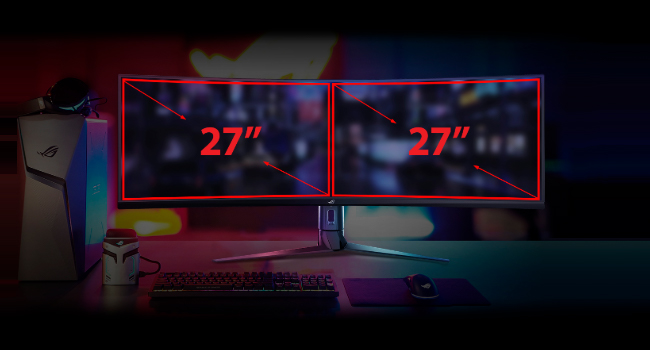
- Super Ultra-wide Display: The 49-inch curved screen provides an expansive view, equivalent to two 27-inch monitors side-by-side.
- 144Hz דערפרישן קורס: Experience smooth, lag-free visuals, crucial for fast-paced gaming.
- Radeon FreeSync 2 HDR: Synchronizes the monitor's refresh rate with your GPU's frame rate to eliminate screen tearing and stuttering, especially with HDR content.
- DisplayHDR 400 & DCI-P3 90%: Ensures high color contrast and cinematic color performance for vibrant and realistic visuals.

Image: Visual representation of the 49-inch super ultra-wide display, showing its equivalence to two 27-inch monitors for an expansive workspace.

Image: A split-screen comparison demonstrating the enhanced visual quality with High Dynamic Range (HDR) enabled, highlighting DCI-P3 90% and DisplayHDR 400 certification.

Image: A split-screen comparison illustrating the difference in gameplay smoothness with Radeon FreeSync 2 HDR turned 'On' versus 'Off'.
4.3 ASUS אויג קער טעכנאָלאָגיע
ASUS Eye Care technology is integrated to minimize eye fatigue during extended use. This includes flicker-free backlighting and blue light filters, certified by TÜV Rheinland, to protect your eyes.
4.4 GamePlus and GameVisual
Utilize exclusive GamePlus and GameVisual overlays and color modes to optimize your gaming experience. These features provide in-game enhancements and display adjustments tailored for various game genres.
4.5 Picture-by-Picture (PBP) Functionality
The ultra-wide display supports Picture-by-Picture (PBP) mode, allowing you to view content from multiple input sources simultaneously, effectively acting as multiple monitors on a single screen.
Video: Official ASUS ROG Strix XG49VQ product overview, demonstrating key features like the ultra-wide display, high refresh rate, HDR, and various gaming enhancements.
Video: A merchant's overview of the ASUS ROG Strix XG49VQ, highlighting its curved design, FreeSync technology, and eye care features.
5. וישאַלט
5.1 רייניקונג די מאָניטאָר
צו רייניקן דעם מאָניטאָר עקראַן, ווישט עס אָפּ מיט אַ ווייכן, לינט-פֿרייע שטאָף. פֿאַר שווערע פֿלעקן, ווישט עס אָפּ לייכט.ampווישט דעם שטאָף מיט וואַסער אָדער אַ מילדן, נישט-אַבראַוויזיוון עקראַן רייניגער. פֿאַרמייַדט ניצן שטרענגע כעמיקאַלן אָדער אַברייזיוו מאַטעריאַלן וואָס קענען שאַטן דעם עקראַן ייבערפלאַך.
5.2 אַלגעמיינע קער
Keep the monitor in a well-ventilated area. Avoid exposing it to direct sunlight, high humidity, or extreme temperatures. Do not block the ventilation openings on the monitor casing.
6. טראָובלעשאָאָטינג
6.1 קיין אַרויסווייַז / שוואַרצער עקראַן
- זיכער מאַכן אַז דער מאַכט קאַבל איז זיכער פארבונדן צו ביידע דעם מאָניטאָר און די מאַכט ווענטיל.
- Verify that the video cable (DisplayPort/HDMI) is firmly connected to both the monitor and your computer/console.
- Check if the correct input source is selected on the monitor's OSD (On-Screen Display) menu.
6.2 Image Quality Issues (e.g., Washed Out, Red Dot)
- If the display appears washed out or has unusual artifacts (like a red dot), try performing a "Reset All" from the monitor's OSD menu.
- Consider disabling HDR in your operating system or monitor settings if you experience poor image quality, as some content or system configurations may not fully support HDR effectively.
- Adjust brightness, contrast, and color settings via the OSD menu to suit your preferences.
6.3 Flickering or Stuttering
- זייט זיכער אז אייערע גראַפיקס קאַרטל דרייווערס זענען אַרויף צו דאַטע.
- Verify that Radeon FreeSync 2 HDR is enabled in both your monitor settings and graphics card control panel.
- קאָנטראָלירט דעם ווידעא קאַבל פֿאַר שעדיקן אָדער לויזע פֿאַרבינדונגען.
7. ספּעסאַפאַקיישאַנז
| שטריך | באַשרייַבונג |
|---|---|
| שטייענדיק פאַרשטעלן ווייַז גרייס | 49 אינטשעס |
| פאַרשטעלן האַכלאָטע | 3840x1080 |
| מאַקסימום סקרין האַכלאָטע | 3840 רענטגענ 1080 פּיקסעלס |
| סאָרט | ASUS |
| סעריע | XG49VQ |
| נומער מאָדעל נומער | XG49VQ |
| פּונקט וואָג | 21.4 פונט |
| פּראָדוקט דימענשאַנז | 46.98 X 20.83 X 13.57 אינטשעס |
| קאָליר | שוואַרץ |
| Voltage | 100-240 וואלטס |
| נומער פון וסב 2.0 פּאָרץ | 1 |
| נומער פון וסב 3.0 פּאָרץ | 2 |
| אַספּעקט פאַרהעלטעניש | 32:9 |
| באַשרייַבונג פון דער אויבערפלאַך פון דעם עקראַן | מאַט |
8. וואָראַנטי און שטיצן
פֿאַר דעטאַלירטע וואָראַנטי אינפֿאָרמאַציע און טעכנישע שטיצע, ביטע זען די באַאַמטער ASUS webוועבזייטל אדער די וואָראַנטי קאַרטל וואָס איז אַרייַנגעשלאָסן מיט אייער פּראָדוקט. האַלט אייער קויף קוויטל פֿאַר וואָראַנטי קליימז.


