הקדמה
This manual provides comprehensive instructions for the safe and efficient use of your Hoco E21 Razor-Edge Wireless Headset. Please read this manual thoroughly before using the device and retain it for future reference.
The Hoco E21 is a compact and lightweight wireless headset designed for mobile communication, featuring Bluetooth V4.1 connectivity.
פּעקל אינהאַלט
- Hoco E21 Razor-Edge Wireless Headset
- טשאַרדזשינג קאַבלע
- באַניצער מאַנואַל
Note: Specific accessories may vary. Please check the product packaging.
פּראָדוקט איבערview
Familiarize yourself with the components of your Hoco E21 headset.
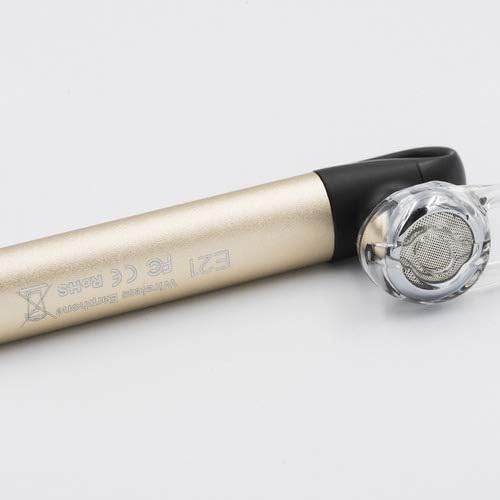
פיגורע 1: Hoco E21 Razor-Edge Wireless Headset, showing its compact design and gold finish.

פיגורע 2: נאָענט-אַרויף view of the Hoco E21 headset, highlighting the earbud and the "E21" model engraving on the gold body.

פיגורע 3: Detail of the Hoco E21 headset, showing the "hoco." brand logo and the integrated clip for secure attachment.

פיגורע 4: Close-up of the charging port located at the end of the Hoco E21 headset, indicating where the charging cable connects.
סעטאַפּ
1. טשאַרדזשינג די העאַדסעט
Before first use, fully charge the headset. Connect the charging cable to the headset's charging port and the other end to a USB power source (e.g., computer USB port, USB wall adapter).
- טשאַרדזשינג וואָלtage: DC5V
- טשאַרדזשינג צייט: בעערעך 2 שעה
The indicator light will typically show red during charging and turn off or blue when fully charged.
2. פּערינג מיט אַ מיטל
The Hoco E21 uses Bluetooth V4.1 for wireless connectivity.
- מאַכן זיכער אַז די כעדסעט איז אויסגעדרייט אַוועק.
- Press and hold the multi-function button (usually the main button) until the indicator light flashes red and blue alternately, indicating pairing mode.
- On your mobile phone or device, enable Bluetooth and search for available devices.
- Select "Hoco E21" (or similar name) from the list of found devices.
- אויב געבעטן פֿאַר אַ פּאַראָל, אַרייַן "0000" (פיר נולן).
- Once paired, the indicator light will typically flash blue slowly, and you may hear a confirmation tone.
The headset supports protocols such as headset, hands-free, A2DP, and Avrcp.
אַפּערייטינג ינסטראַקשאַנז
מאַכט אויף / אַוועק
- מאַכט אויף: דריק און האַלט דעם מולטי-פונקציע קנעפּל פֿאַר אַרום 3 סעקונדעס.
- מאַכט אַוועק: דריק און האַלט דעם מולטי-פונקציע קנעפּל פֿאַר אַרום 5 סעקונדעס.
רופן פאַרוואַלטונג
- ענטפער רופן: קורץ דריקן די מולטי-פונקציע קנעפּל.
- סוף רופן: דריק קורץ דעם מולטי-פונקציע קנעפּל בעת א רוף.
- אָפּוואַרפן רופן: דריק און האלט דעם מולטי-פונקציע קנעפל פאר 2 סעקונדעס בעת אן אנקומענדיקן רוף.
- ריאַל די לעצטע נומער: דריקט צוויי מאָל דעם מולטי-פונקציע קנעפּל.
מוזיק פּלייַבאַקק
- שפּיל / פּויזע: קורץ דריקן די מולטי-פונקציע קנעפּל.
The control method is listed as "Touch". Specific touch gestures for next/previous track are not detailed in the product specifications but are typical for such devices.
וישאַלט
- Keep the headset dry. Avoid exposure to moisture, rain, or liquids.
- שטעלט נישט אויס דעם כעדסעט צו עקסטרעמע טעמפּעראַטורן.
- Clean the headset with a soft, dry cloth. Do not use harsh chemicals or abrasive cleaners.
- סטאָר די כעדסעט אין אַ קיל, טרוקן אָרט ווען ניט אין נוצן.
- פֿאַרמײַדט צו לאָזן פאַלן אָדער אויסשטעלן דעם כעדסעט צו שטאַרקע קלאַפּן.
טראָובלעשאָאָטינג
| פּראָבלעם | מעגלעך סיבה | לייזונג |
|---|---|---|
| כעדסעט גייט נישט אן. | נידעריק באַטאַרייע. | לאָדט אויף דעם כעדסעט גאָר. |
| קען נישט צופּאַסן מיטן דעווייס. | כעדסעט נישט אין פּערינג מאָדע; בלועטוט אויסגעלאָשן אויף דעם מיטל; מיטל צו ווייט. | זיכער מאַכן אַז די כעדסעט איז אין פּערינג מאָדע (בלינקען רויט/בלוי). אַקטיווירן בלועטוט אויף דיין מיטל. ריקן די כעדסעט נענטער צום מיטל (אינערהאלב 10 מעטער). |
| קיין קלאַנג אדער שלעכטע קלאַנג קוואַליטעט. | קול צו נידעריג; כעדסעט נישט ריכטיג פארבונדן; שטערונג. | Adjust volume on both headset and device. Re-pair the headset. Move away from sources of interference. |
| כעדסעט דיסקאָנעקט זיך אָפט. | Out of range; low battery. | Stay within 10m transmission range. Charge the headset. |
ספּעסאַפאַקיישאַנז
| שטריך | דעטאַל |
|---|---|
| מאָדעל נאָמען | E21 |
| סאָרט | HOCO |
| קאַנעקטיוויטי טעכנאָלאָגיע | דראָטלאָז (בלוטוט V4.1) |
| Bluetooth Protocols Supported | Headset, Hands-free, A2DP, Avrcp |
| טראַנסמיסיע ראַנגע | 10 מעטער |
| טראַנסמיסיע אָפטקייַט | 2.4 גהז |
| באַטאַרייע קאַפּאַציטעט | 45 מאַה |
| טשאַרדזשינג וואָלtage | DC5V |
| טשאַרדזשינג צייט | בעערעך 2 שעה |
| פּראָדוקט דימענשאַנז | 65 × 13 × 25 מם |
| פּעקל דימענשאַנז | 6.4 X 3.4 X 1.1 סענטימעטער |
| פּעקל וואָג | 60 ג |
| קאָליר | גאָלד |
| מאַטעריאַל | פּלאַסטיק, גומע |
| קאָנטראָל מעטאָד | ריר |
| קאַמפּאַטאַבאַל דעוויסעס | סעלפאָונז |
| אַרייַנגערעכנט קאַמפּאָונאַנץ | אויער קישנס, קאפבאנד |
| פאַבריקאַנט | Hoco |
וואָראַנטי און שטיצן
Specific warranty information is not provided in this manual. Please refer to the warranty card included with your product or visit the official HOCO webזייטל פֿאַר דעטאַלירטע וואָראַנטי טערמינען און באדינגונגען.
For technical support or customer service inquiries, please contact your retailer or the HOCO customer support channels as indicated on the product packaging or official webפּלאַץ.