1. הקדמה
Thank you for choosing the Hoco E30 Wireless Earphone. This manual provides essential information for setting up, operating, and maintaining your earphone. Please read it carefully before use to ensure optimal performance and longevity of your device.
2. זיכערקייַט אינפֿאָרמאַציע
To prevent damage to your device or injury to yourself and others, please observe the following safety precautions:
- ויסמיידן פּראַלאָנגד ויסשטעלן צו הויך באַנד לעוועלס צו פאַרמייַדן געהער שעדיקן.
- Do not use the earphone while driving or in situations where you need to be aware of your surroundings.
- האַלטן די מיטל אַוועק פון וואַסער, נעץ און עקסטרעם טעמפּעראַטורעס.
- Do not attempt to disassemble, repair, or modify the earphone. This will void the warranty.
- ניצט נאָר די צוגעשטעלטע אָדער סערטיפיצירטע טשאַרדזשינג קייבלס און אַדאַפּטערס.
- האַלטן אויס פון דערגרייכן פון קינדער און פּעץ.
3. פּעקל אינהאַלט
ביטע אָפּהאַקן דאָס קעסטל פֿאַר די פֿאָלגנדיקע זאַכן:
- Hoco E30 Wireless Earphone
- וסב טשאַרדזשינג קאַבלע
- באַניצער מאַנואַל
4. פּראָדוקט איבערview
Familiarize yourself with the components of your Hoco E30 Wireless Earphone:

פיגורע 4.1: זייַט view of the Hoco E30 Wireless Earphone, highlighting its sleek design and ear hook.

פיגורע 4.2: The Hoco E30 Wireless Earphone positioned next to a smartphone, illustrating its compact size and wireless connectivity.
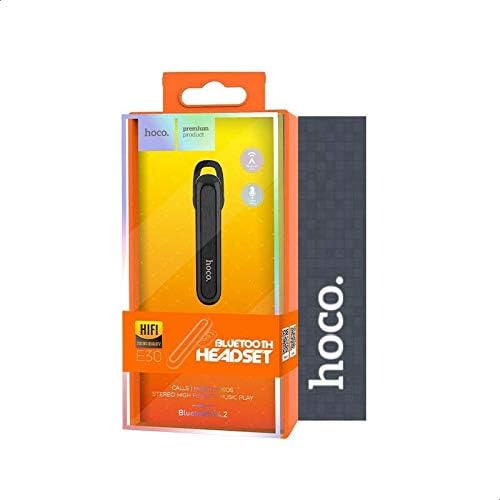
פיגורע 4.3: The retail packaging for the Hoco E30 Wireless Earphone, displaying branding and key features.
5. סעטאַפּ
5.1 אויפלאָדן די אויערפאָן
Before first use, fully charge your Hoco E30 earphone.
- Connect the provided USB charging cable to the charging port on the earphone.
- Connect the other end of the USB cable to a DC 5V power source (e.g., a USB wall adapter or computer USB port).
- די טשאַרדזשינג אינדיקאַטאָר ליכט וועט זיך אָנצינדן.
- Charging typically takes approximately 2 hours. The indicator light will change or turn off once charging is complete.
5.2 פּערינג מיט אַ מיטל
To connect your Hoco E30 earphone to your smartphone or other Bluetooth-enabled device:
- Ensure the earphone is fully charged and turned off.
- דריק און האלט דעם מולטי-פונקציע קנעפל אויף די אויערפאן ביז די אינדיקאטאר ליכט בלינקט רויט און בלוי אָלטערנאַטיוולי, וואָס ווייַזט אַז עס איז אין פּערינג מאָדע.
- אויף דיין מיטל, געבן בלועטאָאָטה און זוכן פֿאַר בנימצא דעוויסעס.
- Select "Hoco E30" from the list of found devices.
- Once paired, the indicator light on the earphone will flash blue slowly, and you will hear a confirmation tone.
- The earphone has a transmission range of up to 10 meters (33 feet).
6. אַפּערייטינג ינסטרוקטיאָנס
6.1 מאַכט אויף / אַוועק
- מאַכט אויף: Press and hold the multi-function button for approximately 3 seconds until the blue indicator light flashes and you hear a power-on tone.
- מאַכט אַוועק: Press and hold the multi-function button for approximately 5 seconds until the red indicator light flashes and you hear a power-off tone.
6.2 רוף פאַרוואַלטונג
- ענטפער רופן: Briefly press the multi-function button when an incoming call rings.
- סוף רופן: Briefly press the multi-function button during a call.
- אָפּוואַרפן רופן: Press and hold the multi-function button for 2 seconds when an incoming call rings.
- ריאַל די לעצטע נומער: דריקט צוויי מאָל דעם מולטי-פונקציע קנעפּל ווען איר זענט נישט אויף אַ רוף.
6.3 מוזיק פּלייבאַק
- שפּיל / פּויזע: Briefly press the multi-function button to play or pause music.
- ווייַטער שפּור: Press and hold the multi-function button for 2 seconds to skip to the next track.
- פֿריִערדיקע שפּור: Press and hold the multi-function button for 2 seconds (during playback) to go to the previous track.
Note: The Hoco E30 supports A2DP and AVRCP protocols for high-quality audio streaming and remote control. Volume control is typically managed via the connected device.
6.4 Battery Status Display
The Hoco E30 earphone supports battery level display on compatible Apple iOS devices and some Android smartphones. Check your device's notification bar or Bluetooth settings for this feature.
7. וישאַלט
- רייניקונג: Use a soft, dry cloth to clean the earphone. Do not use harsh chemicals or abrasive materials.
- סטאָרידזש: האַלט די אויערפאָן אין אַ קיל, טרוקן אָרט אַוועק פון דירעקט זונשייַן און עקסטרעמע טעמפּעראַטורן.
- באַטערי זאָרגן: כדי צו פארלענגערן די לעבן פון די באַטעריע, זאָלט איר נישט אָפט אויסלאָדן די אויערפאָן. לאָדט עס אָפט אויף, אפילו אויב עס ווערט נישט גענוצט פאר לענגערע צייטן.
8. טראָובלעשאָאָטינג
If you encounter issues with your Hoco E30 earphone, try the following solutions:
| פּראָבלעם | לייזונג |
|---|---|
| די אויערפאָן גייט נישט אָן. | Ensure the earphone is fully charged. Connect it to a power source and try again. |
| קען נישט צופּאַסן מיטן דעווייס. |
|
| קיין קלאַנג אדער שלעכטע קלאַנג קוואַליטעט. |
|
| טשאַרדזשינג אַרבעט נישט. |
|
9. ספּעסאַפאַקיישאַנז
| שטריך | דעטאַל |
|---|---|
| מאָדעל | E30 |
| בלועטאָאָטה ווערסיע | V4.2 WT |
| שטיצט פּראָטאָקאָלס | כעדסעט, האַנד-פריי, A2DP, AVRCP |
| טראַנסמיסיע ראַנגע | 10 מעטער (33 פֿיס) |
| טראַנסמיסיע אָפטקייַט | 2.4 גהז |
| טשאַרדזשינג וואָלtage | DC 5V |
| טשאַרדזשינג צייט | בעערעך. 2 שעה |
| באַטאַרייע קאַפּאַציטעט | 60 מאַה |
| רעדן צייט | בעערעך. 3.5 שעה |
| מוזיק פּלייַבאַקק צייט | בעערעך. 3.5 שעה |
| סטאַנדביי צייט | בעערעך. 110 שעה |
| נעץ פּראָדוקט וואָג | 6 גראַמז |
| דימענסיעס (L X W X H) | 58 מם X 14 מם X 25 מם |
| מאַטעריאַל | פּלאַסטיק |
| קאָנטראָל מעטאָד | ריר |
| קאָליר | שוואַרץ און זילבער |
10. וואָראַנטי און שטיצן
Hoco products are designed and manufactured to the highest quality standards. This product is covered by a limited warranty from the date of purchase. Please refer to the warranty card included in your package for specific terms and conditions.
For technical support or warranty claims, please contact your local Hoco distributor or visit the official Hoco webפּלאַץ פֿאַר מער אינפֿאָרמאַציע.


