1. הקדמה
The Pyle PD1000BA is a versatile 4-channel home theater preamplifier receiver designed to enhance your audio and video entertainment experience. It features a built-in Bluetooth receiver for wireless audio streaming, a front-loading CD/DVD player, AM/FM radio, and multiple input options including USB, SD card, and microphone inputs. This manual provides detailed instructions for setting up, operating, and maintaining your PD1000BA receiver.

Figure 1.1: Pyle PD1000BA 4-Channel 1000W Bluetooth Home Theater Preamplifier Receiver front view.
2. זיכערקייַט אינסטרוקציעס
Please read all safety and operating instructions carefully before using this product. Retain these instructions for future reference.
- מאַכט מקור: Connect the unit only to the power supply type marked on the unit.
- ווענטילאַטיאָן: זיכער מאַכן אַז די ווענטילאַציע איז ריכטיק. נישט פאַרשפּאַרן די ווענטילאַציע עפענונגען.
- וואַסער און נעץ: שטעלט נישט אויס דעם אַפּאַראַט צו רעגן אָדער פייכטקייט. שטעלט נישט קיין זאכן אָנגעפילט מיט פליסיקייטן אויף דעם אַפּאַראַט.
- היץ: האַלט דעם אַפּאַראַט אַוועק פון היץ קוועלער ווי ראַדיאַטאָרן, היץ רעגיסטערס, אויוון, אָדער אַנדערע היץ-פּראָדוצירנדיקע אַפּאַראַטן.
- רייניקונג: ריין בלויז מיט אַ טרוקן שטאָף.
- סערוויס: דו זאלסט נישט פּרווון צו דינען דעם פּראָדוקט זיך. קאָנטאַקט אַלע קוואַלאַפייד סערוויס פּערסאַנעל.
3. פּעקל אינהאַלט
באַשטעטיקן אַז אַלע זאכן זענען אַרייַנגערעכנט אין פּעקל:
- Preamplifier Receiver (PD1000BA)
- ווייַט קאָנטראָל
- דעטאַטשאַבלע ראַק בארג בראַקאַץ
- רקאַ קאַנעקשאַן קאַבלע
- AM + FM אַנטענאַז
- מאַכט קאַבלע

Figure 3.1: Included accessories with the Pyle PD1000BA receiver.
4. פּראָדוקט פֿעיִקייטן
The Pyle PD1000BA offers a range of features for a comprehensive home audio and video experience:
- אַודיאָ + ווידעא היים טעאַטער סיסטעם
- Built-in Bluetooth for Wireless Audio Streaming (Up to 35 ft range)
- Connects to TVs, Soundbars, and Speaker Systems
- מאַכט אַרויף צו (4) הויך ספּיקערז
- פראָנט לאָודינג קאָמפּאַקטדיסק / ווי שפּילער
- 4-טשאַננעל ריסיווער סיסטעם
- פראָנט פּאַנעל קאָנטראָל צענטער מיט דיגיטאַל לקד ווייַז
- AM / FM ראַדיאָ מיט 50 סטאַנציע זכּרון פּרעסעץ
- MP3 דיגיטאַל אַודיאָ File Playback via USB Flash Drive & SD Memory Card Readers
- אַוקס (3.5 מם) ינפּוט דזשאַק
- Two 1/4'' Microphone Inputs with Echo, Treble, Bass, and Volume Controls
- 1/4'' Headphone Jack
- Video Outputs: S-Video, RCA, YPbPr (Component Video)
- רעזולטאַט דב (דעסיבעל) לעוועל געפֿירט ווייַז
- סובוואָאָפער RCA (L / R) רעזולטאַט
- אָפּטיש (דיגיטאַל) אַודיאָ רעזולטאַט
- געבויט-אין ווענטאַליישאַן קאָאָלינג פאַן
- געשטעל מאָונטאַבלע סיסטעם

Figure 4.1: The PD1000BA supports numerous audio input methods.

Figure 4.2: The PD1000BA supports dual microphone inputs for karaoke with echo effect.
5. סעטאַפּ און קאַנעקשאַנז
Follow these steps to properly set up your Pyle PD1000BA receiver.
5.1 אַפּאַראַט פּלייסמאַנט
Place the receiver on a stable, flat surface or install it in a standard audio rack using the provided brackets. Ensure adequate ventilation around the unit to prevent overheating.
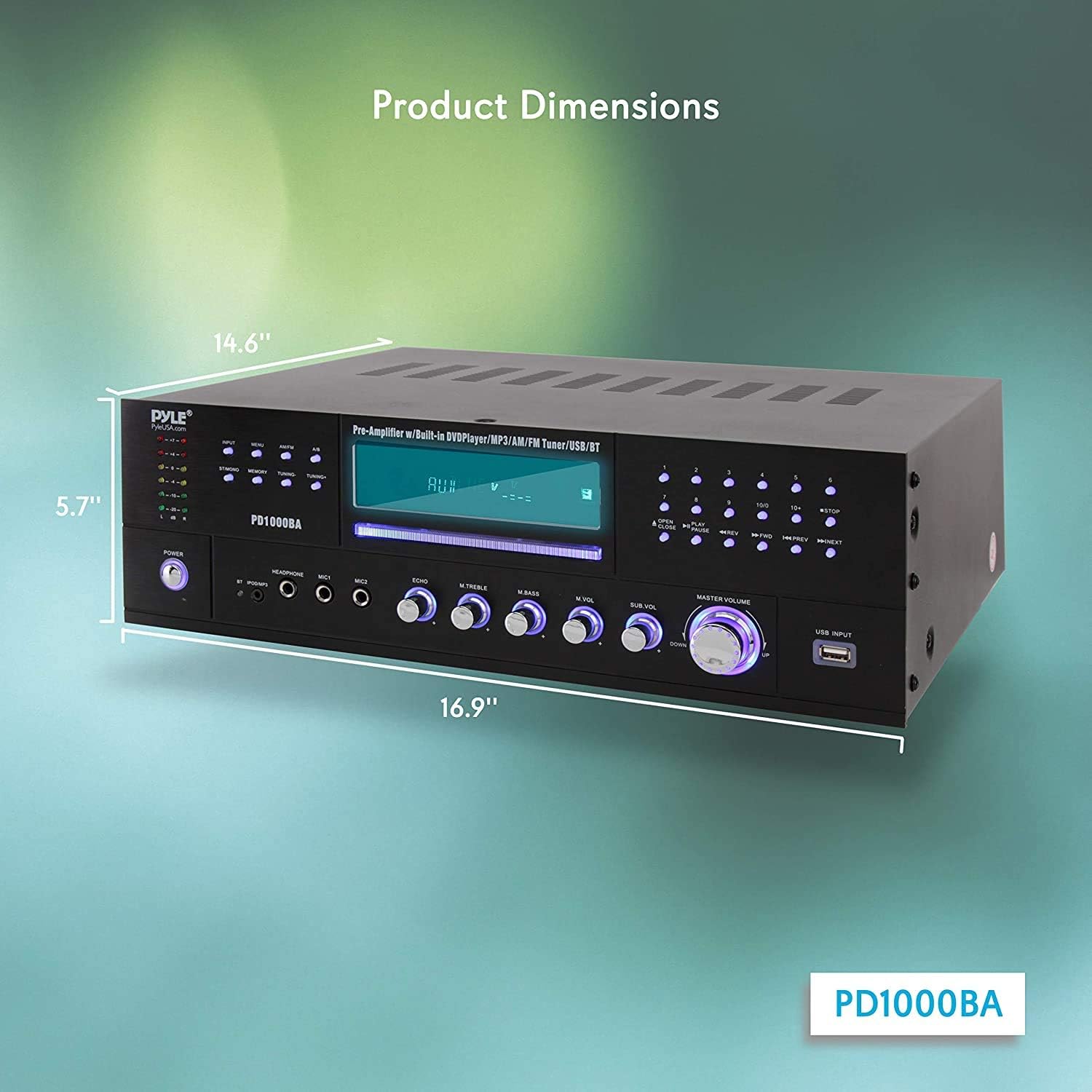
Figure 5.1: Product dimensions for placement and rack mounting.
5.2 רעדנער קאַנעקשאַנז
The PD1000BA can power up to four speakers. Connect your speakers to the speaker terminal binding posts on the rear panel. Ensure correct polarity (positive to positive, negative to negative) for optimal sound quality.
5.3 אַודיאָ ינפּוץ
- RCA (L/R) Audio Inputs: Connect external audio sources like a turntable (with a pre-amp), cassette deck, or other audio players using RCA cables.
- Aux (3.5mm) Input: Use the 3.5mm jack on the front panel for quick connection of portable audio devices.
- USB & SD Card Readers: Insert a USB flash drive or SD memory card into the front panel slots for MP3 audio playback.
5.4 Video Outputs
Connect the receiver to your TV or display using one of the following video output options:
- S-ווידעא אויסגאַנג: For S-Video compatible displays.
- RCA Video Output: Standard composite video output.
- YPbPr (Component Video) Output: For higher quality component video connections.
5.5 מיקראָפאָן ינפּוץ
Plug up to two 1/4'' microphones into the front panel MIC1 and MIC2 jacks for karaoke or public address functions.
5.6 בלועטוט קאָנעקטיוויטי
The built-in Bluetooth receiver allows wireless audio streaming from compatible devices. The Bluetooth wireless network name is 'PYLE'.

Figure 5.2: Wireless Bluetooth connectivity for streaming audio.

Figure 5.3: Rear panel connections for speakers, audio, and video.
6. אָפּעראַציע
This section details the operation of various functions of your PD1000BA receiver.
6.1 מאַכט אויף / אַוועק
דרוק די מאַכט button on the front panel to turn the unit on or off. The remote control also has a standby button.
6.2 מקור סעלעקציע
Use the input selector buttons on the front panel or the remote control to choose your desired audio/video source (e.g., CD/DVD, FM/AM, Bluetooth, USB, AUX, RCA).
6.3 CD/DVD Player
Insert a CD or DVD into the front-loading slot. The unit will automatically detect the disc and begin playback. Use the playback controls (Play, Pause, Stop, Skip) on the front panel or remote.
6.4 AM/FM ראַדיאָ
Select the FM/AM input. Use the tuning buttons to scan for stations. You can save up to 50 stations in memory presets.
6.5 בלועטוט סטרימינג
Select the Bluetooth input. On your device (smartphone, tablet, etc.), search for Bluetooth devices and select 'PYLE' to pair. Once paired, you can stream audio wirelessly.
6.6 USB/SD שפּיל
אַרײַנשטעלן אַ USB פֿלעש דרייוו אָדער SD קאַרטל מיט MP3 אַודיאָ files into the respective front panel slot. The unit will automatically switch to USB/SD mode and begin playback. Use the playback controls.
6.7 Microphone and Echo Control
Adjust the microphone volume using the 'MIC VOL' knob. The 'ECHO' knob controls the echo effect for the microphones.
6.8 Equalizer (EQ) Controls
Use the 'TREBLE' and 'BASS' rotary controls on the front panel to adjust the high and low frequencies of the audio output.
6.9 כעדפאָון רעזולטאַט
Connect headphones to the 1/4'' headphone jack on the front panel for private listening.
ווידעא 6.1: איבערview of the Pyle PD1000BA 4-Channel Wireless Bluetooth Power Ampליפיער, ארויסהייבנדיק זיינע פֿעיִקייטן און קאָנעקטיוויטי אָפּציעס.
7. טראָובלעשאָאָטינג
If you encounter issues with your PD1000BA, refer to the following common problems and solutions:
- קיין מאַכט: Ensure the power cable is securely connected and the power outlet is functional. Check the power switch on the unit.
- קיין קול: Verify speaker connections and polarity. Check the input source selection and volume levels. Ensure headphones are not plugged in if expecting speaker output.
- בלועטאָאָטה פּערינג ישוז: Make sure the unit is in Bluetooth mode. Ensure your device's Bluetooth is enabled and within range (up to 35 ft). Try unpairing and re-pairing the device.
- CD/DVD Not Playing: Ensure the disc is inserted correctly and is clean and free of scratches. Check disc compatibility (DVD/CD/VCD/CD-R/CD-RW/MP4).
- שלעכטע ראַדיאָ אָפּנאַם: Extend and adjust the AM and FM antennas for better signal reception.
- מיקראָפאָן איז נישט ארבעטן: Ensure microphones are securely plugged in and the 'MIC VOL' knob is turned up.
If the problem persists, contact Pyle customer support for assistance.
8. ספּעסאַפאַקיישאַנז
| שטריך | באַשרייַבונג |
|---|---|
| מאַקס רעזולטאַט מאַכט | 1000 וואט |
| רעזולטאַט מאַכט (RMS) | 200 Watts x 2 @ 8 Ohm, 360 Watts x 2 @ 4 Ohm, 450 Watts x 2 @ 2 Ohm |
| ימפּידאַנס | 8 Ohm |
| אַספּעקט פאַרהעלטעניש | 4:3 / 16:9 |
| ווידעא סיסטעם | PAL/NTSC |
| אַודיאָ S/N פאַרהעלטעניש | > 90 דב |
| אָפטקייַט ראַנגע | +/-14 דב |
| CD/DVD Disc Compatibility | DVD/CD/VCD/CD-R/CD-RW/MP4 |
| בלועטאָאָטה ווערסיע | 3.0 |
| בלועטאָאָטה ווירעלעסס קייט | אַרויף צו 35 ft. |
| מאַכט | 110/220 וואלט סוויטטשאַבלע |
| דימענסיעס (L X W X H) | 16.9'' x 14.6'' x 5.7'' אינטשעס |
| פּונקט וואָג | 20.5 פונט |
9. וואָראַנטי און שטיצן
פּייל פּראָדוקטן זענען דיזיינד פֿאַר פֿאַרלעסלעכקייט און פאָרשטעלונג. פֿאַר וואָראַנטי אינפֿאָרמאַציע אָדער טעכנישע שטיצע, ביטע זען די דאָקומענטאַציע וואָס איז אַרייַנגערעכנט מיט דיין קויפן אָדער באַזוכן די באַאַמטער פּייל וועבזייטל. webזייטל. האַלט דיין קויפן באַווייַז פֿאַר וואָראַנטי קליימז.


