1. הקדמה
This manual provides essential information for the safe and efficient operation of your Vonyx CDJ450 DJ Workstation. Please read it thoroughly before using the device and retain it for future reference. The Vonyx CDJ450 is a versatile DJ workstation featuring dual CD/MP3 players, Bluetooth connectivity, two USB ports, and a 2-channel mixer, designed for comprehensive audio control.
2. זיכערקייַט אינסטרוקציעס
- פאַרזיכערן די מאַכט צושטעלן שוועבעלעך די וואָלtagעס איז ספּעסיפיעד אויף די אַפּאַראַט.
- שטעלט נישט אויס דעם אַפּאַראַט צו רעגן אָדער פייכטקייט כּדי צו פאַרמייַדן עלעקטרישע קלאַפּן.
- ויסמיידן פּלייסינג די אַפּאַראַט לעבן היץ קוואלן אָדער אין דירעקט זונשייַן.
- נישט עפענען דעם סיasinג; רעפֿערירט אַלע סערוויסינג צו קוואַליפֿיצירטע פּערסאָנעל.
- האַלטן ווענטאַליישאַן אָופּאַנינגז קלאָר צו פאַרמייַדן אָוווערכיטינג.
- טרענט אפ דעם עלעקטרישן שנור בעת בליץ-שטורעמס אדער ווען עס ווערט נישט גענוצט פאר לאנגע צייטן.
3. פּראָדוקט איבערview
The Vonyx CDJ450 integrates two media players and a central mixer into a single unit, offering a compact and powerful solution for DJs.

פיגורע 3.1: Top-down view of the Vonyx CDJ450 DJ Workstation, showing the dual players and central mixer controls.

פיגורע 3.2: אַנגגאַלד view of the workstation, highlighting its compact design and accessible controls.

פיגורע 3.3: Close-up of the central mixer and player controls, including jog wheels, pitch faders, and display screens.

פיגורע 3.4: USB ports located on the top panel, demonstrating USB drive connectivity for MP3 playback.

פיגורע 3.5: פראָנט view with both CD trays open, ready for disc insertion.

פיגורע 3.6: דעטאַילעד view of a player's display, showing track information, and associated playback controls.
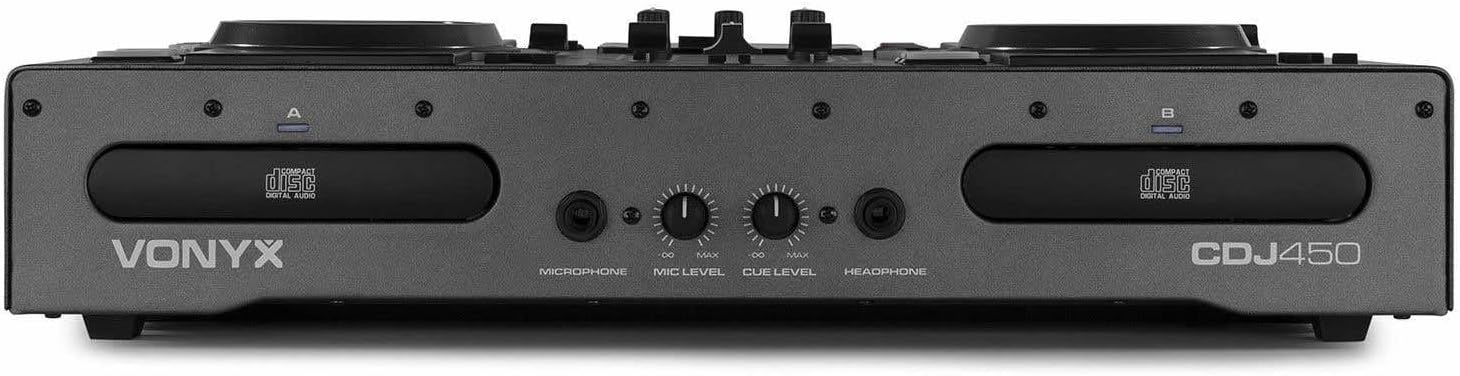
פיגורע 3.7: Front panel featuring microphone input, microphone level control, cue level, and headphone output.

פיגורע 3.8: Rear panel showing power input, main outputs (XLR, RCA), record output, USB Type-B port, and switchable Phono/Line inputs.
4. סעטאַפּ
- אָרט: Place the CDJ450 on a stable, flat surface with adequate ventilation.
- מאַכט קשר: Connect the included power cable to the unit's power input and then to a suitable wall outlet. Ensure the power switch is in the OFF position before connecting.
- אַודיאָ רעזולטאַט: Connect the main outputs (XLR or RCA) to your amplifier, powered speakers, or PA system.
- External Devices (Optional): Connect external audio sources (e.g., turntables, additional CD players) to the Phono/Line inputs on the rear panel. Use the switches to select the correct input type.
- Microphone/Headphones: Connect your microphone to the XLR-DJ input or the 6.3mm jack on the front. Plug your headphones into the 3.5mm jack on the front.
- USB פֿאַרבינדונג (אָפּציאָנעל): For computer control or recording, connect a USB Type-B cable from the unit to your computer.
5. אַפּערייטינג ינסטרוקטיאָנס
5.1. מאַכט אויף / אויסגעלאשן
Flip the power switch on the rear panel to the 'ON' position. The displays will illuminate. To power off, flip the switch back to 'OFF'.
5.2. Media Playback (CD/USB)
- קאָמפּאַקטדיסק פּלייבאַק: Insert an audio CD or MP3 CD into one of the CD trays. The unit will automatically read the disc.
- וסב פּלייַבאַקק: אַרייַנלייגן אַ וסב בליץ פאָר מיט mp3 files into one of the USB ports on the top panel.
- מקור סעלעקציע: Use the 'SOURCE' button above each player to switch between CD and USB input.
- שפּור סעלעקציע: Use the navigation buttons or the numeric keypad to select tracks. The integrated folder search function allows quick access to files on USB drives.
- פּלייבאַק קאָנטראָל: Use the 'PLAY/PAUSE' and 'CUE' buttons for standard playback control.
5.3. בלועטאָאָטה קאַנעקטיוויטי
- אַקטיווירן בלועטוט אויף דיין סמאַרטפאָון, טאַבלעט אָדער לאַפּטאַפּ.
- Select 'Bluetooth' as the source on the desired player.
- זוכן פֿאַר available devices on your external device and select 'Vonyx CDJ450'.
- Once paired, you can stream audio wirelessly to the workstation.
5.4. Mixer Functions
- טשאַננעל פאַדערז: Adjust the volume level for each player (Channel A and B).
- EQ קאָנטראָלס: Use the HIGH, MID, and LOW knobs for each channel to adjust the frequency response.
- Gain/Level: Adjust the input gain for each channel to match levels.
- קראָסספאַדער: Blend between Channel A and Channel B.
- מאַסטער רעזולטאַט: Control the overall volume of the mix.
- מיקראָפאָן: Adjust microphone volume using the 'MIC LEVEL' knob on the front panel.
- כעדפאָונז: Use the 'CUE LEVEL' knob to adjust headphone volume and the 'CUE' buttons on each channel to monitor specific sources.
5.5. ספּעציעלע פֿעיִקייטן
- קראַצן: Use the jog wheels for scratching effects.
- פאַרקערט: Play audio in reverse.
- ברעכן: Create a brake effect on playback.
- פּעך: Adjust the playback speed and pitch using the pitch faders.
- שלייף: Use 'LOOP IN', 'LOOP OUT', and 'RELOOP' buttons to create and manage seamless loops.
6. קאַנעקשאַנז
The CDJ450 offers a variety of input and output options:
- אויסגאבעס:
- 2 x XLR Speaker Outputs
- 1 x RCA Master Output
- 1 x RCA Recorder Output
- אַרייַנשרייַבן:
- 2 x Switchable Phono/Line RCA Inputs (for external devices)
- 1 x XLR-DJ Microphone Input
- 1 x 6.3mm Jack Microphone Input (front)
- Digital/Control:
- 2 x USB Ports (Type-A, top panel, for media playback)
- 1 x USB Type-B Port (rear, for computer connection)
- בלועטאָאָטה קאַנעקטיוויטי
- מאָניטאָרינג:
- 1 x 3.5mm Jack Headphone Output (front)
7. וישאַלט
- רייניקונג: ניצט אַ ווייכע, טרוקענע שטאָף צו רייניקן די אויסערלעכע זייט פון דעם אַפּאַראַט. ניצט נישט קיין שרײַבנדיקע רייניגער אָדער סאָלווענטן.
- CD Trays: Keep CD trays free of dust and debris. Avoid touching the lens inside the CD player.
- סטאָרידזש: ווען נישט אין באַנוץ, האַלט די אַפּאַראַט אין אַ קיל, טרוקן אָרט, אַוועק פון דירעקט זונשייַן און עקסטרעמע טעמפּעראַטורן.
8. טראָובלעשאָאָטינג
| פּראָבלעם | מעגלעך סיבה | לייזונג |
|---|---|---|
| קיין מאַכט | Power cable disconnected; power switch off; faulty outlet. | Check power cable connection; ensure power switch is ON; try a different outlet. |
| קיין געזונט רעזולטאַט | Volume levels too low; incorrect input/output connections; external ampליפיער אַוועק. | Increase master/channel volumes; verify all audio connections; ensure external ampליפיער איז אויף. |
| סי-די שפּילט נישט/לייענט נישט | Disc dirty or scratched; incorrect disc format; source not selected. | Clean or replace disc; ensure disc is audio CD or MP3 CD; select 'CD' source. |
| וסב איז נישט פּלייינג | USB דרייוו נישט ריכטיק פֿאָרמאַטירט; נישט געשטיצט file type; source not selected. | Ensure USB is FAT32 formatted; only MP3 files supported; select 'USB' source. |
| בלועטאָאָטה איז נישט קאַנעקטינג | Bluetooth not enabled on external device; unit not in pairing mode; interference. | Enable Bluetooth on your device; select 'Bluetooth' source on CDJ450; try re-pairing. |
9. ספּעסאַפאַקיישאַנז
- מאָדעל נאָמען: CDJ450
- קאַנעקטיוויטי טעכנאָלאָגיע: בלועטאָאָטה, וסב
- נומער פון דיסקס: 2
- שטיצט אַודיאָ פֿאָרמאַטירונגען: CD, MP3, USB, AAC (Bluetooth)
- קאַנעקטער טיפּ: Bluetooth, Jack 6.35 mm, RCA, USB, XLR 3-pin
- נומער פון טשאַנאַלז: 2
- נומער וואָג: 7.8 קילאָגראַמס
- קאַמפּאַטאַבאַל דעוויסעס: כעדפאָונז, ספּיקערז
- פאַבריקאַנט: וואָניקס
10. וואָראַנטי און שטיצן
For warranty information, please refer to the documentation provided at the time of purchase or contact your retailer. For technical support, please visit the official Vonyx webפּלאַץ אָדער קאָנטאַקט זייער קונה סערוויס אָפּטיילונג.


