1. פּראָדוקט איבערview
This variable speed rotary detail carver is designed for precision operation in various applications, including carving, engraving, routing, grinding, sharpening, sanding, polishing, and drilling. Its lightweight and portable design makes it suitable for both professional and home use, particularly for natural and artificial nail care.

Image 1.1: The lightweight pink electric nail drill machine.
2. זיכערקייַט אינסטרוקציעס
- Always unplug the tool from the electrical outlet before changing bits or performing any maintenance.
- Ensure the collet nut is securely tightened before operation. Avoid excessive tightening.
- Never use damaged or bent bits, as this can cause injury or damage to the tool.
- Keep the tool away from water or other liquids.
- Do not touch the rotating bit during operation.
- Store the tool in a dry, safe place out of reach of children.
- Use appropriate eye protection during operation.
3. פּעקל אינהאַלט
ביטע באַשטעטיקן אַז אַלע זאכן וואָס זענען ליסטעד אונטן זענען אַרייַנגערעכנט אין דיין פּעקל:
- 1 x Electric nail drill machine
- 1 x AC adapter (EU plug)
- 6 x Bits (5 diamond bits, 1 emery rod with 4 sanding bands)
- 1 x User manual (in English)

בילד 3.1: איבערview of the product packaging and included components.
4. סעטאַפּ
- Ensure the tool is unplugged from the electrical outlet before proceeding.
- Locate the shaft lock button on the tool. Press and hold this button.
- Using the provided collet wrench, loosen the collet nut at the tip of the tool by turning it counter-clockwise.
- Insert the desired bit into the collet. Ensure the bit is fully seated.
- While still holding the shaft lock button, tighten the collet nut securely by turning it clockwise. Do not overtighten.
- מעלדונג די שטיל שלאָס קנעפּל.
- Connect the AC adapter to the tool and then plug the adapter into a suitable electrical outlet (AC 100-240V, 50/60HZ).
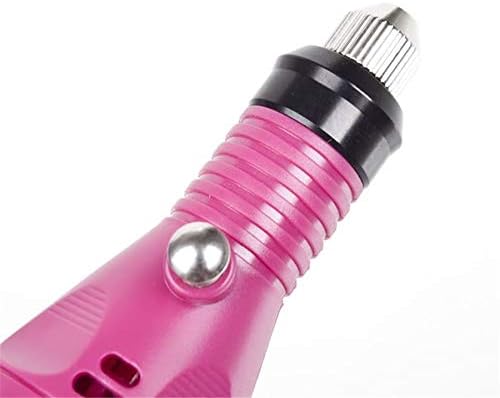
Image 4.1: Detail of the collet and shaft lock button for bit installation.
5. אַפּערייטינג ינסטרוקטיאָנס
- After setup, ensure the tool is plugged in.
- Locate the ON/OFF switch on the tool. This switch also functions as the variable speed control.
- Slide the switch from the "OFF" position towards the "ON" position. The tool will start operating.
- To adjust the speed, continue sliding the switch. The tool offers variable speed control from 18,000 RPM up to 20,000 RPM. An orange line indicator on the switch helps in setting the desired speed.
- For complete stoppage, slide the switch back to the black dot (OFF position).
- When finished with operation, turn off the tool by sliding the switch to the "OFF" position and then unplug it from the electrical outlet.

Image 5.1: The ON/OFF and variable speed control switch.
6. וישאַלט
- שטענדיק אָפּשטויסן די געצייַג איידער רייניקונג.
- Wipe the tool's exterior with a soft, dry cloth. Do not use harsh chemicals or abrasive cleaners.
- Regularly inspect bits for wear and tear. Replace worn or damaged bits to ensure optimal performance and safety.
- Keep the collet area clean from dust and debris to ensure proper bit seating.
- Store the tool and its accessories in a clean, dry environment.
7. טראָובלעשאָאָטינג
| פּראָבלעם | מעגלעך סיבה | לייזונג |
|---|---|---|
| דער געצייַג טוט זיך נישט אָן. | Not plugged in; power outlet issue; switch not fully engaged. | Ensure AC adapter is securely plugged into the tool and a working electrical outlet. Slide the ON/OFF switch fully to the "ON" position. |
| Bit is loose or wobbles. | Collet nut not tightened; incorrect bit size. | Unplug the tool, press the shaft lock button, and re-tighten the collet nut securely. Ensure the bit's shank diameter matches the collet type (2.4mm). |
| Tool runs slowly or inconsistently. | Speed setting too low; power supply issue. | Adjust the variable speed switch to a higher setting. Check the power connection. |
8. ספּעסאַפאַקיישאַנז
| שטריך | דעטאַל |
|---|---|
| מאָדעל נומער | YH--3101 |
| Voltage | אַק 100-240 וו, 50/60 הז |
| וואַריאַבלע ספּיד קאָנטראָל | 18,000 רפּם צו 20,000 רפּם |
| טיפּ קאַלאַט | 2.4 מם |
| Sprinkchuck Type | 0.3 מם-3.2 מם |
| דימענשאַנז | 160 מם X 24 מם |
| נעץ וואָג | 160ג |
| מאַטעריאַל | ומבאַפלעקט שטאָל |
| קאָליר | ראָזעווע |
| Certification | CE |
9. וואָראַנטי און שטיצן
Specific warranty information for this product is not provided in the available documentation. For any support inquiries, please refer to the retailer or point of purchase.


