1. הקדמה
The Green Cell UPS 600VA (360W) Line-Interactive AVR is an Uninterruptible Power Supply designed to provide reliable power backup and surge protection for your electronic devices. This device ensures that your connected equipment, such as computers, routers, and other sensitive electronics, remains operational during power outages and is protected from voltage fluctuations. This manual provides essential information for the safe and efficient use of your UPS.
2. זיכערקייַט אינסטרוקציעס
- Read all instructions carefully before operating the UPS.
- עפֿנט נישט די UPS casinז. עס זענען נישטאָ קיין טיילן וואָס דער באַניצער קען סערוויסן אינעווייניק. לאָזט איבער די סערוויסינג צו קוואַליפֿיצירטע סערוויס פּערסאָנעל.
- Do not expose the UPS to rain, moisture, or direct sunlight. Operate in a well-ventilated area.
- זיכער מאַכן אַז די UPS איז פארבונדן צו אַ געערדטע עלעקטרישע ווענטיל.
- Do not connect appliances that draw high current, such as laser printers, heaters, or vacuum cleaners, to the UPS outlets.
- The internal battery is a VRLA lead-acid type. Do not dispose of batteries in a fire, as they may explode. Follow local regulations for battery disposal.
- In case of emergency, press the power button to turn off the UPS and disconnect it from the main power supply.
3. פּעקל אינהאַלט
באַשטעטיקן אַז אַלע זאכן זענען פאַראַן אין פּעקל:
- Green Cell UPS 600VA (360W)
- Power Cable (C13 type)
- וסב קאָמוניקאַציע קאַבלע
- באַניצער מאַנואַל
4. פּראָדוקט איבערview
4.1 פראָנט און אויבערשטער פּאַנעל

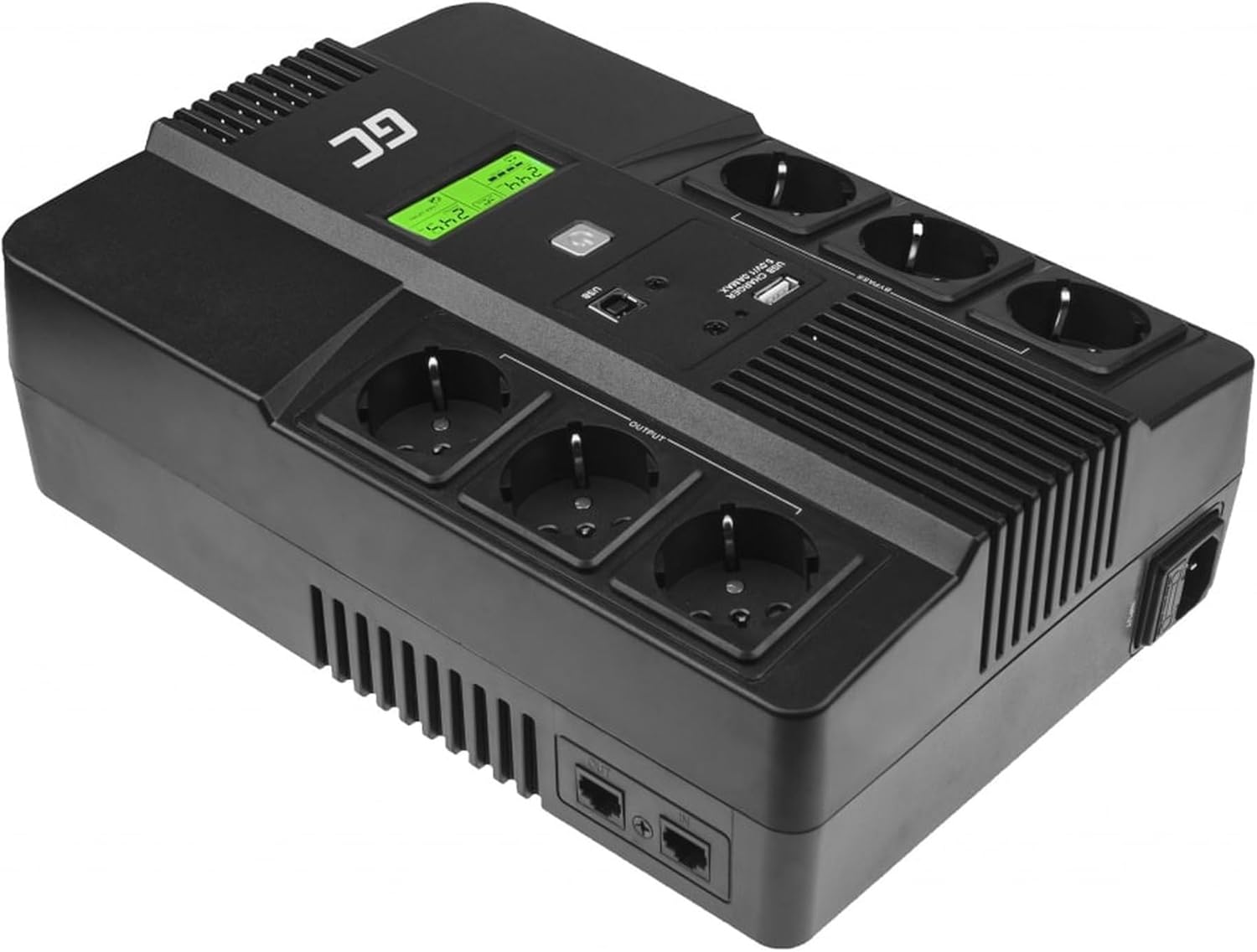
בילד באַשרייַבונג: א אויבן-אַראָפּ view of the Green Cell UPS. The front features a green LCD display and a power button. The top panel includes multiple Schuko outlets for connecting devices and USB ports for charging or data communication.
4.2 דערציען פּאַנעל
בילד באַשרייַבונג: The rear panel of the Green Cell UPS. It shows the main power input port, additional Schuko outlets, and RJ45 ports for network/phone line surge protection.
4.3 לקד ווייַז
The LCD display provides real-time information about the UPS status, including input/output voltagE, באַטאַרייע אָפּצאָל מדרגה, מאַסע פּראָצענטtage, and operational mode. This allows for quick monitoring of the power supply conditions.
5. סעטאַפּ
5.1 ערשט טשאַרדזשינג
Before initial use, connect the UPS to a wall outlet and allow it to charge for at least 8 hours. This ensures the internal battery is fully charged and ready to provide optimal backup power. The UPS will charge whether it is turned on or off.
5.2 קאַנעקטינג דעוויסעס
Plug your electronic devices into the Schuko outlets on the UPS. Ensure that the total power consumption of all connected devices does not exceed the UPS's maximum capacity of 360W (600VA). Use the USB ports for charging compatible devices or for connecting the UPS to a computer for monitoring.

בילד באַשרייַבונג: The Green Cell UPS positioned on a desk, actively providing power to several electronic devices plugged into its outlets. The LCD screen is illuminated, indicating operational status.
5.3 ווייכווארג ינסטאַלירונג
For advanced monitoring and management features, install the Green Cell UPS software on your computer. Connect the UPS to your computer using the provided USB cable. The software allows you to:
- Monitor UPS status and parameters in real-time.
- Receive notifications for power events.
- Schedule automatic shutdowns or startups.
- Analyze power usage graphs.

בילד באַשרייַבונג: A computer screen displaying the Green Cell UPS management software dashboard. It shows various parameters like input voltagE, אָפטקייַט, רעזולטאַט וואָלtagE, מאַסע פּראָצענטtage, and battery charge level, providing a comprehensive overview of the UPS's operational status.

בילד באַשרייַבונג: A screenshot of the Green Cell UPS software's 'Scheduler' interface. This feature enables users to configure automated actions, such as turning off the PC, based on various power events like no mains power, low battery, or UPS temperature exceeding limits.
6. אַפּערייטינג ינסטרוקטיאָנס
6.1 מאַכט אויף / אַוועק
To turn on the UPS, press and hold the power button for a few seconds until the LCD display illuminates. To turn off the UPS, press and hold the power button again until the display turns off.
6.2 Understanding LCD Display
The LCD display cycles through various information screens. Common indicators include:
- אַרייַנשרייַב וואָלtage: דער וואָלtage received from the wall outlet.
- רעזולטאַט חלקtage: דער וואָלtage צוגעשטעלט דורך די UPS צו פארבונדענע דעווייסעס.
- באַטערי מדרגה: The current charge status of the internal battery.
- מאַסע פּערסענטtage: די פּראָצענטtage of the UPS's capacity currently being used by connected devices.
- אַפּערייטינג מאָדע: Indicates if the UPS is operating on utility power or battery power.
6.3 Using Software for Monitoring
The dedicated software provides a detailed view of the UPS's performance and allows for configuration of various settings. Regularly check the software for battery health and system alerts.

בילד באַשרייַבונג: A screenshot from the Green Cell UPS software, specifically the 'Device Parameters' section. It displays critical information such as input voltagE, רעזולטאַט וואָלtage, battery charge level (78%), battery voltage (24.5V), and battery status ('correct').
7. וישאַלט
7.1 באַטערי פאַרבייַט
The UPS uses a 12V/7Ah VRLA lead-acid battery. The lifespan of the battery is typically 2-3 years, depending on usage and environmental conditions. If the UPS consistently provides short backup times or indicates a battery fault, the battery may need replacement. Contact Green Cell support for guidance on battery replacement.
7.2 רייניקונג
Regularly clean the exterior of the UPS with a soft, dry cloth. Do not use liquid cleaners or solvents. Ensure ventilation openings are free from dust and debris to prevent overheating.
7.3 סטאָרידזש
If storing the UPS for an extended period, ensure the battery is fully charged. Store in a cool, dry place. Recharge the battery every 3-6 months to prevent deep discharge and prolong battery life.
8. טראָובלעשאָאָטינג
| פּראָבלעם | מעגלעך סיבה | לייזונג |
|---|---|---|
| די UPS טוט זיך נישט אן. | No power from wall outlet; Battery discharged. | Check power connection; Charge UPS for 8 hours. |
| קורצע באַקאַפּ צייט. | Overload; Battery old or faulty. | Reduce connected load; Replace battery. |
| די UPS ביפּט אָן אויפהער. | Overload; Low battery; Fault condition. | Reduce load; Allow battery to charge; Consult manual for specific beep codes. |
| Software not detecting UPS. | USB cable not connected; Driver issue. | Ensure USB cable is securely connected; Reinstall software and drivers. |
9. ספּעסאַפאַקיישאַנז
| שטריך | באַשרייַבונג |
|---|---|
| מאָדעל נומער | UPS06 |
| סאָרט | גרין צעל |
| קלאָר מאַכט | 600VA |
| מאַקסימום מאַכט | 360 וו |
| אַרייַנשרייַב וואָלtage | 230 וואלטס |
| רעזולטאַט חלקtage | 230 וואלטס |
| וואַוועפאָרם | מאַדאַפייד סינע וואַווע |
| באַטערי טיפּ | 1 x 12V/7Ah VRLA Lead-Acid |
| אָפּצאָל צייט | 8 שעה |
| באַשטימען צייט | 2-6 מיליסעקאַנדז |
| אַוטלעץ | 6x Schuko |
| פּאָרץ | USB, RJ45 |
| פּונקט וואָג | 3000 גראַם (3 ק"ג) |
| פאָרם פאַקטאָר | סאָליד |
| לאַנד פון אָריגין | כינע |
10. וואָראַנטי און שטיצן
Green Cell products are covered by a manufacturer's warranty. For specific warranty terms and conditions, please refer to the warranty card included with your product or visit the official Green Cell website. For technical support, troubleshooting assistance, or inquiries regarding parts and service, please contact Green Cell customer service through their official channels.


