הקדמה
א דאנק פארן קויפןasing the AmazonBasics Vertical Ergonomic 2.4G Wireless Optical Mouse. This manual provides essential information for setting up, operating, and maintaining your new mouse. Please read these instructions carefully before use and retain them for future reference.

Image: The AmazonBasics Vertical Ergonomic Wireless Optical Mouse positioned on a white desk alongside a laptop, demonstrating a typical usage scenario.
פּעקל אינהאַלט
ביטע טשעק די פּאַקעט פֿאַר די פאלגענדע זאכן:
- AmazonBasics Vertical Ergonomic 2.4G Wireless Optical Mouse
- וסב ופנעמער
באַמערקונג: באַטעריעס זענען נישט אַרייַנגערעכנט און מוזן זיין געקויפט באַזונדער.
פֿעיִקייטן
- ערגאָנאָמיש ווערטיקאַל פּלאַן: Promotes a natural hand and wrist posture, reducing strain.
- 2.4G ווירעלעס קאָנעקטיוויטי: Provides a reliable connection for use with PCs and laptops.
- אָפּטישע טראַקינג: Ensures precise and smooth cursor control.
- אַדזשאַסטאַבאַל דפּי: Allows customization of cursor sensitivity for different tasks.
- Multiple Buttons: Includes left/right click, scroll wheel, DPI button, and forward/back buttons for enhanced productivity.
- באַטאַרייע פּאַוערד: Operates on AAA batteries for portability.

בילד: א זייט view of the AmazonBasics Vertical Ergonomic Wireless Optical Mouse, highlighting its contoured shape, thumb rest, and the forward/back buttons along with the DPI button.
סעטאַפּ
1. ינסטאַלירן באַטעריז
- געפינען די באַטאַרייע אָפּטייל אויף די אַנדערסייד פון די מויז.
- פארזיכטיק עפֿנט דעם דעקל פֿון דער באַטעריע־אָפּטיילונג.
- אַרײַנשטעלן צוויי AAA באַטעריעס, און זיכער מאַכן אַז די פּאָלאַריטעט איז ריכטיק (+/-).
- לייג צוריק דעם דעקל פונעם באַטעריע־אָפּטייל ביז עס קליקט זיכער אַרײַן אין פּלאַץ.
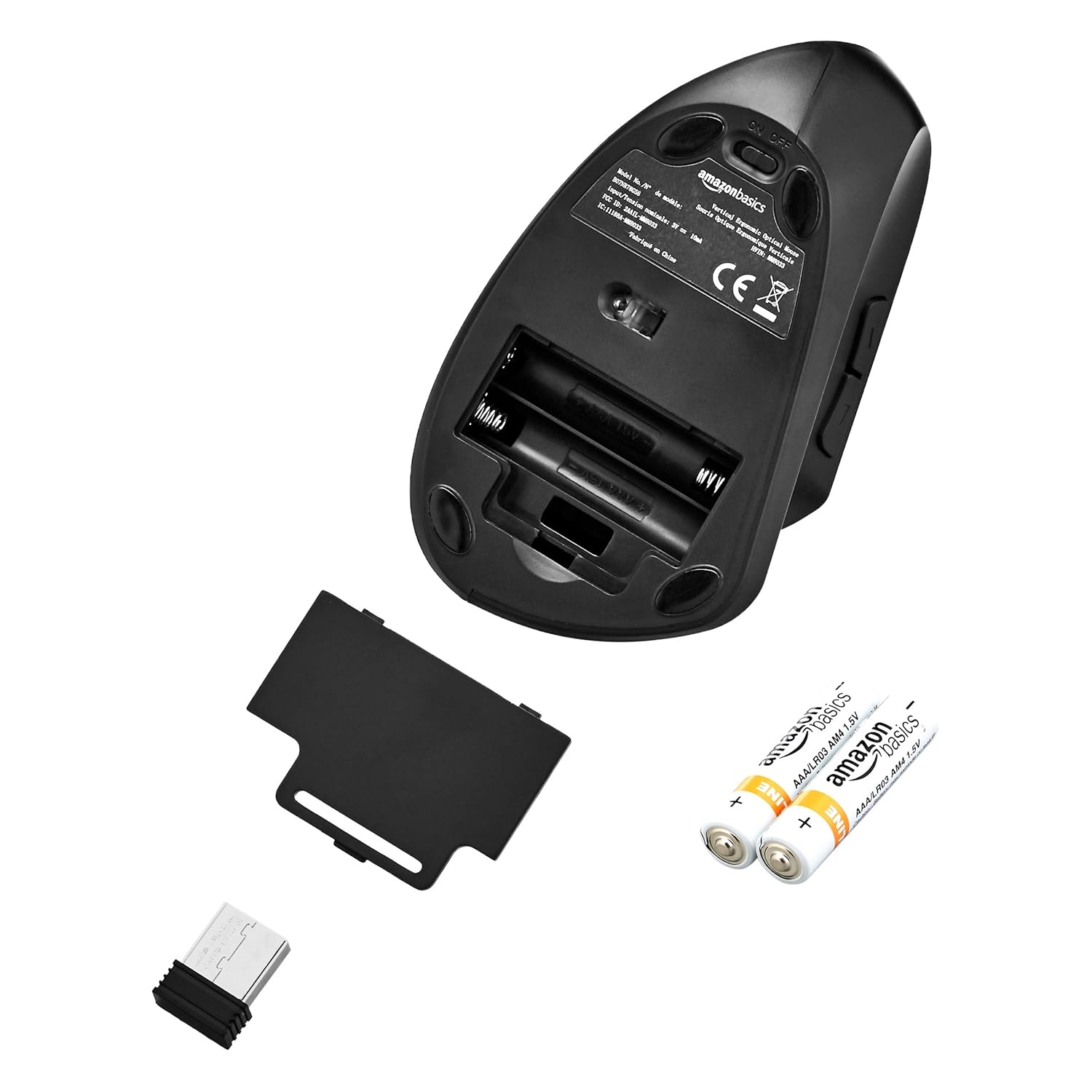
Image: The underside of the mouse with the battery compartment cover removed, showing the slots for two AAA batteries and the storage slot for the USB receiver.
2. פֿאַרבינדן דעם USB ריסיווער
- Remove the USB receiver from its storage slot within the battery compartment.
- Plug the USB receiver into an available USB port on your computer (PC or laptop).
- אייער קאָמפּיוטער זאָל אויטאָמאַטיש דעטעקטירן און אינסטאַלירן די נויטיקע דרייווערס. דאָס קען נעמען אַ פּאָר מינוט.
3. צינד אן די מויז
- Locate the ON/OFF switch on the underside of the mouse.
- רוקט דעם סוויטש צו דער "ON" פאזיציע.
- די מויז איז איצט גרייט פֿאַר נוצן.

Image: The bottom of the AmazonBasics Vertical Ergonomic Wireless Optical Mouse, displaying the ON/OFF switch, the optical sensor, and the product label with model information.
אַפּערייטינג ינסטראַקשאַנז
יקערדיק פאַנגקשאַנז
- לינק קליקט: ערשטיקע סעלעקציע און אַקטיוואַציע.
- רעכט גיט: עפֿנט קאָנטעקסטואַלע מעניוז.
- סקראָל ראָד: סקראלט דאקומענטן און web pages vertically. Can also be pressed for middle-click functionality.

בילד: א פון אויבן אראפ view of the AmazonBasics Vertical Ergonomic Wireless Optical Mouse, clearly showing the left and right click buttons separated by the scroll wheel.
אַוואַנסירטע פאַנגקשאַנז
- DPI קנעפּל: Located near the top of the mouse. Press this button to cycle through different DPI (Dots Per Inch) settings, adjusting cursor sensitivity. This allows you to switch between faster and slower cursor speeds as needed.
- פאָרויס/צוריק קנעפּלעך: Located on the side of the mouse, accessible by your thumb. These buttons typically function as 'Forward' and 'Back' in web בראַוזערז און file עקספּלאָרערס.
וישאַלט
רייניקונג
צו רייניקן די מויז, ניצט א ווייכע, טרוקענע שטאָף. פֿאַר שווערע שמוץ, אַ ביסל ווייכער.ampen the cloth with water or a mild cleaning solution. Avoid using harsh chemicals or abrasive materials, as these can damage the mouse's surface.
באַטערי פאַרבייַט
When the mouse's performance degrades or it stops responding, it may be time to replace the batteries. Follow the steps in the "Install Batteries" section under Setup to replace the two AAA batteries.
טראָובלעשאָאָטינג
- מויז ענטפערט נישט:
- Ensure the mouse is switched to the "ON" position.
- קאָנטראָלירט צי די באַטעריעס זענען ריכטיק אינסטאַלירט און האָבן גענוג אָפּצאָל. טוישט זיי אויב נייטיק.
- זיכער מאַכן אַז דער USB ריסיווער איז זיכער אַרײַנגעשטעקט אין אַ פֿונקציאָנירנדיקן USB פּאָרט אויף אײַער קאָמפּיוטער. פּרוּווט אַן אַנדער USB פּאָרט.
- ריסטאַרט דיין קאָמפּיוטער.
- אומשטענדלעכע קורסאָר באַוועגונג:
- רייניקט דעם אָפּטישן סענסאָר אויף דער אונטערשטער זײַט פֿון דער מויז מיט אַ ווייכן, טרוקענעם שטאָף.
- Ensure you are using the mouse on a suitable surface. Highly reflective or transparent surfaces may affect tracking. A mouse pad is recommended.
- קוק פֿאַר ינטערפיראַנס פון אנדערע וויירליס דעוויסעס.
- קשר ישוז:
- מאַך די מויז נעענטער צו די וסב ופנעמער.
- Avoid placing the receiver near large metal objects or other electronic devices that might cause interference.
ספּעסאַפאַקיישאַנז
| מאָדעל נומער | MM-8033 |
| קאַנעקטיוויטי טעכנאָלאָגיע | 2.4G ווירעלעסס |
| באַוועגונג דעטעקטיאָן | אָפּטיש |
| נומער פון קנעפּלעך | 5 (לינקס, רעכטס, סקראָל ראָד, DPI, פאָרווערטס, צוריק) |
| מאַכט מקור | 2 X AAA באַטעריז (ניט אַרייַנגערעכנט) |
| דורכשניטלעך באַטאַרייע לעבן | אַרויף צו 12 חדשים |
| קאַמפּאַטאַבאַל אַפּערייטינג סיסטעמס | Linux, Windows 7, Windows XP (and newer versions) |
| Compatible Hardware Platforms | לאַפּטאַפּ, פּיסי |
| פּראָדוקט דימענשאַנז (LxWxH) | 15.32 X 7.8 X 8.92 סענטימעטער (6.03 X 3.07 X 3.51 אינטשעס) |
| פּונקט וואָג | 122 ג |
וואָראַנטי און שטיצן
For warranty information or technical support, please refer to the AmazonBasics product page or contact Amazon customer service directly. Keep your purchase receipt for warranty claims.


