הקדמה
This manual provides comprehensive instructions for the Hoco ES20 Original Series Wireless V5.0 Earphones. Please read this manual carefully before using the product to ensure proper operation and to maximize your user experience. Keep this manual for future reference.
פּראָדוקט איבערview
The Hoco ES20 earphones are designed for wireless audio playback and hands-free communication. The package includes two wireless earphones and a portable charging case.

בילד 1: Hoco ES20 Wireless Earphones. This image displays both the left and right earphones, highlighting their in-ear design and compact form factor.
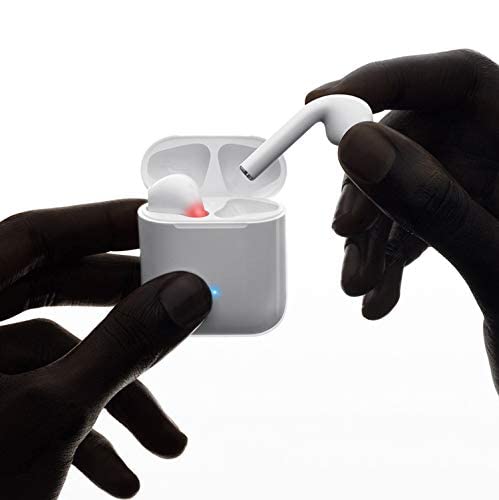
בילד 2: Hoco ES20 Earphones in Charging Case. The earphones are shown placed inside their charging case, indicating the charging status with an illuminated LED.
ספּעסאַפאַקיישאַנז
| שטריך | דעטאַל |
|---|---|
| ווירעלעסס ווערסיע | V5.0 |
| שטיצט פּראָטאָקאָלס | Headset, Hands-free, A2DP, Avrcp |
| טראַנסמיסיע אָפטקייַט | 2.4 גהז |
| טראַנסמיסיע ראַנגע | 10 מעטער |
| טשאַרדזשינג וואָלtage | DC5V |
| טשאַרדזשינג צייט (אויערפאָונז) | בעערעך 1 שעה |
| רעדן צייט | 2 שעה |
| מוזיק פּלייַבאַקק צייט | 2 שעה |
| טשאַרדזשינג קאַסע באַטאַרייע קאַפּאַציטעט | 400 מאַה |
| Earphone Battery Capacity (Each) | 40 מאַה |
| סטאַנדביי צייט | 200 שעה |
| גאַנץ וואָג (מיט קעסטל) | 44.8ג |
| איין ירפאָון וואָג | 3.8ג |
| אַרייַנגערעכנט קאַמפּאָונאַנץ | Bluetooth Headphones, 1 Charging Cable |
סעטאַפּ
1. אויפלאָדן די אויערפאָונז און קעסטל
- Place both earphones into the charging case. Ensure they are correctly seated.
- Connect the charging cable to the charging port on the case and to a DC5V power source (e.g., USB wall adapter, computer USB port).
- The indicator light on the charging case will show charging status. A full charge for the earphones takes approximately 1 hour. The charging case itself has a 400mAh battery capacity.
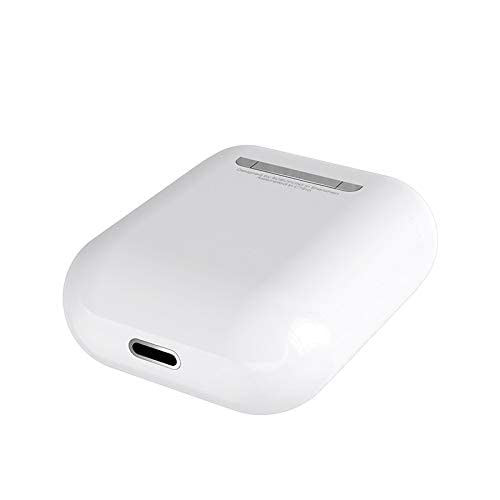
בילד 3: Hoco ES20 Charging Case Port. This image shows the charging port located at the bottom of the charging case, where the charging cable is connected.
2. פּערינג מיט אַ מיטל
- מאַכן זיכער אַז די ירפאָונז זענען טשאַרדזשינג.
- עפֿנט דעם טשאַרדזשינג קעסטל. די אויערפֿאָנען וועלן אויטאָמאַטיש אַרײַן אין פּערינג מאָדע.
- אויף אייער סמאַרטפאָון אָדער אַנדער בלוטוט-ענייבאַלד מיטל, גייט צו די בלוטוט סעטטינגס.
- זוכן פֿאַר available devices and select "Hoco ES20" (or similar name) from the list.
- Once connected, the earphones will indicate successful pairing (e.g., an audio prompt or LED change).
- For Apple phones and some Android phones, the battery level of the earphones may be displayed on your device.
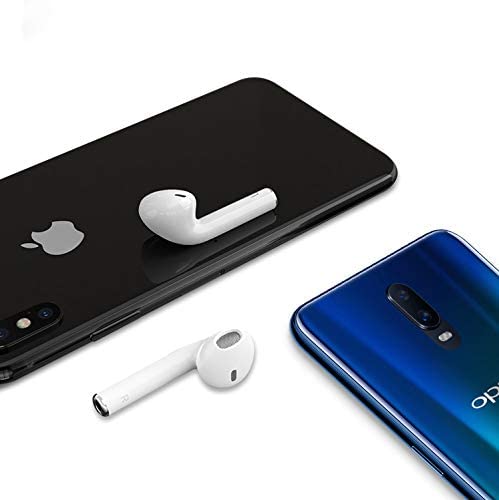
בילד 4: Hoco ES20 Earphones with Smartphones. This image illustrates the earphones positioned near two different smartphones, demonstrating their compatibility with various mobile devices.
אַפּערייטינג ינסטראַקשאַנז
Basic Functions (Touch Control)
- מאַכט אויף: Earphones power on automatically when removed from the charging case.
- מאַכט אַוועק: Earphones power off automatically when placed back into the charging case.
- שפּיל / פּויזע: צאַפּן איין מאָל אויף דעם ריר-געגנט אויף יעדן אויערפאָן.
- ענטפֿערן / סוף רופן: Tap the touch area on either earphone once during an incoming call or an active call.
- אָפּוואַרפן רופן: Press and hold the touch area on either earphone for approximately 2 seconds during an incoming call.
- ווייַטער שפּור: טאָפּל צאַפּן די פאַרבינדן געגנט אויף די רעכט ירפאָון.
- פֿריִערדיקע שפּור: טאָפּל צאַפּן אויף די פאַרבינדן געגנט אויף די לינקס ירפאָון.
- אַקטאַווייט קול אַססיסטאַנט: Triple-tap the touch area on either earphone.
וישאַלט
- האַלט די אויערפאָונז און טשאַרדזשינג קעסטל ריין און טרוקן.
- Avoid exposing the product to extreme temperatures, humidity, or corrosive substances.
- פּרוּווט נישט צו צענעמען אָדער מאָדיפֿיצירן די אויערפֿאָנען אָדער טשאַרדזשינג קעסטל, ווײַל דאָס וועט בטל מאַכן די וואָראַנטי און קען שאַטן די סיסטעם.
- ניצט אַ ווייכן, טרוקענעם שטאָף צו רייניקן די אויערפאָונז און טשאַרדזשינג קאָנטאַקטן.
- לייגט די אויערפאָונז אין זייער טשאַרדזשינג קעסטל ווען זיי ווערן נישט גענוצט, כדי זיי צו באַשיצן און האַלטן זיי אָנגעלאָדן.
טראָובלעשאָאָטינג
פּראָסט ישוז און סאַלושאַנז
- אויערפאָונז נישט פּערינג:
- זיכער מאַכן אַז ביידע אויערפאָונז זענען אויפגעלאָדן.
- Place earphones back in the case, close it, then open it again.
- אויסלעשן און אנשטעלן בלועטוט אויף אייער דעווייס.
- Delete "Hoco ES20" from your device's Bluetooth list and try pairing again.
- נאָר איין אויערפאָן אַרבעט:
- זיכער מאַכן אַז ביידע אויערפאָונז זענען אויפגעלאָדן.
- Place both earphones back in the charging case, close the lid, wait a few seconds, then open the lid and remove them together.
- If the issue persists, try resetting the earphones (refer to manufacturer's website if a specific reset procedure is not in this manual).
- קיין קלאַנג אָדער נידעריקע באַנד:
- קאָנטראָלירט דעם וואָלומען לעוועל אויף ביידע אייער דעווייס און די אויערפאָונז.
- זיכער מאַכן אַז די אויערפאָונז זענען ריכטיק פארבונדן צו דיין מיטל.
- פרובירט צו שפּילן אַודיאָ פֿון אַן אַנדער אַפּליקאַציע אָדער מקור.
- טשאַרדזשינג ישוז:
- זיכער מאַכן אַז דער טשאַרדזשינג קאַבל איז זיכער פארבונדן צו ביידע דעם קעסטל און די מאַכט מקור.
- קאָנטראָלירט צי דער טשאַרדזשינג פּאָרט אויף דער קעיס איז ריין און פריי פון שמוץ.
- פּרוּווט ניצן אַ אַנדערש טשאַרדזשינג קאַבלע אָדער מאַכט אַדאַפּטער.
- Poor connection/intermittent audio:
- Ensure your device is within the 10-meter transmission range.
- פֿאַרמײַדט שטערונגען צווישן אײַער אַפּאַראַט און די אויערפֿאָנען.
- מינימיזירן אריינמישונג פון אנדערע וויירלעס דעווייסעס.
וואָראַנטי און שטיצן
The Hoco ES20 Wireless Earphones come with a 6-חודש וואָראַנטי פֿון דעם קויפֿדאַטום. די וואָראַנטי דעקט פֿאַבריקאַציע־דעפֿעקטן. ביטע באַהאַלטן אייער קויפֿבאַווײַז פֿאַר וואָראַנטי־קליימז.
For technical support or warranty inquiries, please contact your retailer or the official Hoco support channels. Refer to the product packaging or Hoco's official webפּלאַץ פֿאַר קאָנטאַקט אינפֿאָרמאַציע.