1. הקדמה
The Comtrend PG-9172PT-KIT G.hn Powerline Ethernet Adapter transforms your standard electrical outlets into a high-speed wired network connection. This kit provides a reliable internet connection, extending network access to areas where Wi-Fi signals may be weak or inconsistent. It is an ideal solution for applications requiring stable bandwidth, such as online gaming, high-definition streaming, and home office setups.
2. פּעקל אינהאַלט
באַשטעטיקן אַז אַלע זאכן זענען פאַראַן אין דיין פּעקל:
- 2 x Comtrend G.hn Powerline Adapters (PG-9172PT)
- 1 X RJ-45 עטהערנעט קאַבלע
- 1 x שנעל ינסטאַללאַטיאָן גייד
3. פּראָדוקט איבערview
Each Comtrend PG-9172PT adapter features a compact design with a pass-through electrical outlet and essential indicators for easy monitoring.

Figure 1: Two Comtrend PG-9172PT G.hn Powerline Ethernet Adapters included in the kit.
3.1 פראָנט פּאַנעל
The front panel includes the pass-through electrical outlet and LED indicators.

פיגורע 2: פראָנט view of a single Comtrend PG-9172PT Powerline Adapter, showing the pass-through outlet and LED indicators.
- Pass-Through Outlet: Allows you to plug in another electrical device, ensuring the power outlet remains available.
- Power LED: Indicates the power status of the adapter.
- פּאַוערליין LED: Indicates the status of the powerline connection. A solid light typically means a stable connection.
- עטהערנעט געפֿירט: Indicates the status of the Ethernet connection to a device.
3.2 דנאָ פּאַנעל
The bottom panel houses the Ethernet port.

פיגורע 3: דנאָ view of the Comtrend PG-9172PT Powerline Adapter, highlighting the Ethernet port.
- עטהערנעט פּאָרט: Connects to your router, computer, gaming console, or other network-enabled devices using an RJ-45 Ethernet cable.
3.3 זייַט פּאַנעל
The side panel features the Security/Reset button.
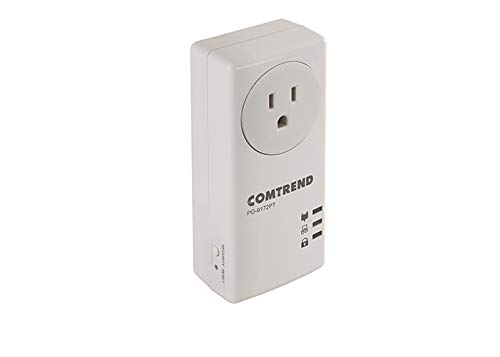
פיגורע 4: זייַט view of the Comtrend PG-9172PT Powerline Adapter, showing the Security/Reset button.
- Security/Reset Button: Used for establishing a secure powerline network or resetting the device to factory defaults.
4. סעטאַפּ און ייַנמאָנטירונג
The Comtrend PG-9172PT-KIT is designed for easy plug-and-play setup. Follow these steps to establish your powerline network:
- פֿאַרבינדט דעם ערשטן אַדאַפּטער: Plug one PG-9172PT adapter directly into a wall electrical outlet near your internet router. Avoid using surge protectors or power strips, as they can interfere with powerline performance.
- פאַרבינדן צו ראָוטער: Use an Ethernet cable to connect the Ethernet port on this adapter to an available LAN port on your internet router.
- פֿאַרבינדט דעם צווייטן אַדאַפּטער: Plug the second PG-9172PT adapter directly into a wall electrical outlet in the room where you need network access. Again, avoid surge protectors or power strips.
- פאַרבינדן צו מיטל: Use an Ethernet cable to connect the Ethernet port on this second adapter to your computer, smart TV, gaming console, or other network-enabled device.
- באַשטעטיקן קשר: Wait a few moments for the adapters to establish a connection. The Powerline LED on both adapters should turn solid, indicating a successful connection. The Ethernet LED should also light up when connected to a device.
- Secure Network (Optional): To enhance security, press the Security/Reset button on one adapter for 1-2 seconds, then within two minutes, press the Security/Reset button on the other adapter for 1-2 seconds. The Powerline LEDs will flash during this process and then turn solid when a secure connection is established.
Note: Performance may vary based on home wiring and electrical conditions. For optimal performance, plug adapters directly into wall outlets.
5. אַפּערייטינג ינסטרוקטיאָנס
Once installed, the Comtrend G.hn Powerline Ethernet Adapters operate automatically. They extend your network by transmitting data over your home's electrical wiring. Any device connected via Ethernet to an adapter will have network access.
- G.hn טעכנאָלאָגיע: This technology optimizes bandwidth efficiency, which can improve video quality and reduce lag for online activities.
- Pass-Through Outlet: The integrated pass-through outlet allows you to continue using the electrical socket for other devices without compromising the powerline connection.
6. וישאַלט
To ensure the longevity and optimal performance of your Comtrend Powerline Ethernet Adapters, consider the following:
- האַלט די אַדאַפּטערס ריין און פריי פון שטויב. ניצט אַ ווייכע, טרוקענע שטאָף פֿאַר רייניקונג.
- Avoid placing the adapters in direct sunlight or in areas with high humidity or extreme temperatures.
- Do not block the ventilation holes on the adapters.
- Always plug the adapters directly into a wall outlet. Avoid power strips, extension cords, or surge protectors, as these can degrade performance.
7. טראָובלעשאָאָטינג
If you encounter issues with your Comtrend Powerline Ethernet Adapters, refer to the following common solutions:
- No Powerline Connection (Powerline LED Off/Flashing):
- Ensure both adapters are plugged directly into wall outlets and powered on.
- Try plugging the adapters into different outlets to rule out issues with a specific electrical circuit.
- Avoid plugging adapters into surge protectors, power strips, or extension cords.
- Ensure the electrical wiring in your home is suitable for powerline communication. Performance can be affected by older or complex wiring.
- No Internet Access on Connected Device:
- Verify that the Powerline LED is solid on both adapters.
- Check the Ethernet cable connection between the adapter and your device, and between the first adapter and your router.
- זיכער מאַכן אַז אייער ראַוטער האט אַן אַקטיווע אינטערנעט פֿאַרבינדונג.
- Restart your router and both powerline adapters.
- לאַנגזאַמע פֿאַרבינדונג גיכקייט:
- Performance is highly dependent on electrical wiring conditions. Try moving adapters to outlets on the same electrical circuit if possible.
- Ensure no high-power electrical appliances (e.g., washing machines, refrigerators) are on the same circuit as the adapters, as they can cause interference.
- Avoid using surge protectors or power strips.
- Configuration Issues (Advanced Users):
- The adapters may default to a static IP address (e.g., 192.168.0.5) with DHCP disabled. If you need to access the web interface for advanced configuration, connect a computer directly to one adapter and manually configure your computer's IP address to be on the same subnet (e.g., 192.168.0.10).
- A factory reset will revert all settings, including IP configuration, to their defaults. To perform a factory reset, press and hold the Security/Reset button for more than 10 seconds until the LEDs flash, then release.
8. ספּעסאַפאַקיישאַנז
| שטריך | דעטאַל |
|---|---|
| מאָדעל נומער | PG-9172PT-KIT |
| סאָרט | COMTREND |
| ייַזנוואַרג צובינד | עטהערנעט |
| דאַטאַ לינק פּראָטאָקאָל | עטהערנעט |
| דאַטאַ אַריבערפירן קורס | 1200 מעגאַביטן פּער סעקונדע (Mbps) |
| פּראָדוקט דימענשאַנז | 2.25 X 4.85 X 1.45 אינטשעס |
| פּונקט וואָג | 1.32 פונט |
| UPC | 897384000876 |
| קאָליר | ווייַס |
9. וואָראַנטי אינפֿאָרמאַציע
Specific warranty details for the Comtrend PG-9172PT-KIT are typically provided with the product packaging or available on the manufacturer's official webזייטל. ביטע זעט די רעסורסן פאר פולשטענדיגע גאראנטיע טערמינען און באדינגונגען.
10. שטיצן
For further assistance, technical support, or to download the latest firmware and documentation, please visit the official Comtrend webזייטל. שטיצע רעסורסן אָפט אַרייַננעמען אָפֿט געשטעלטע פֿראַגעס, טראָובלעשווטינג גיידס, און קאָנטאַקט אינפֿאָרמאַציע פֿאַר קונה סערוויס.


