הקדמה
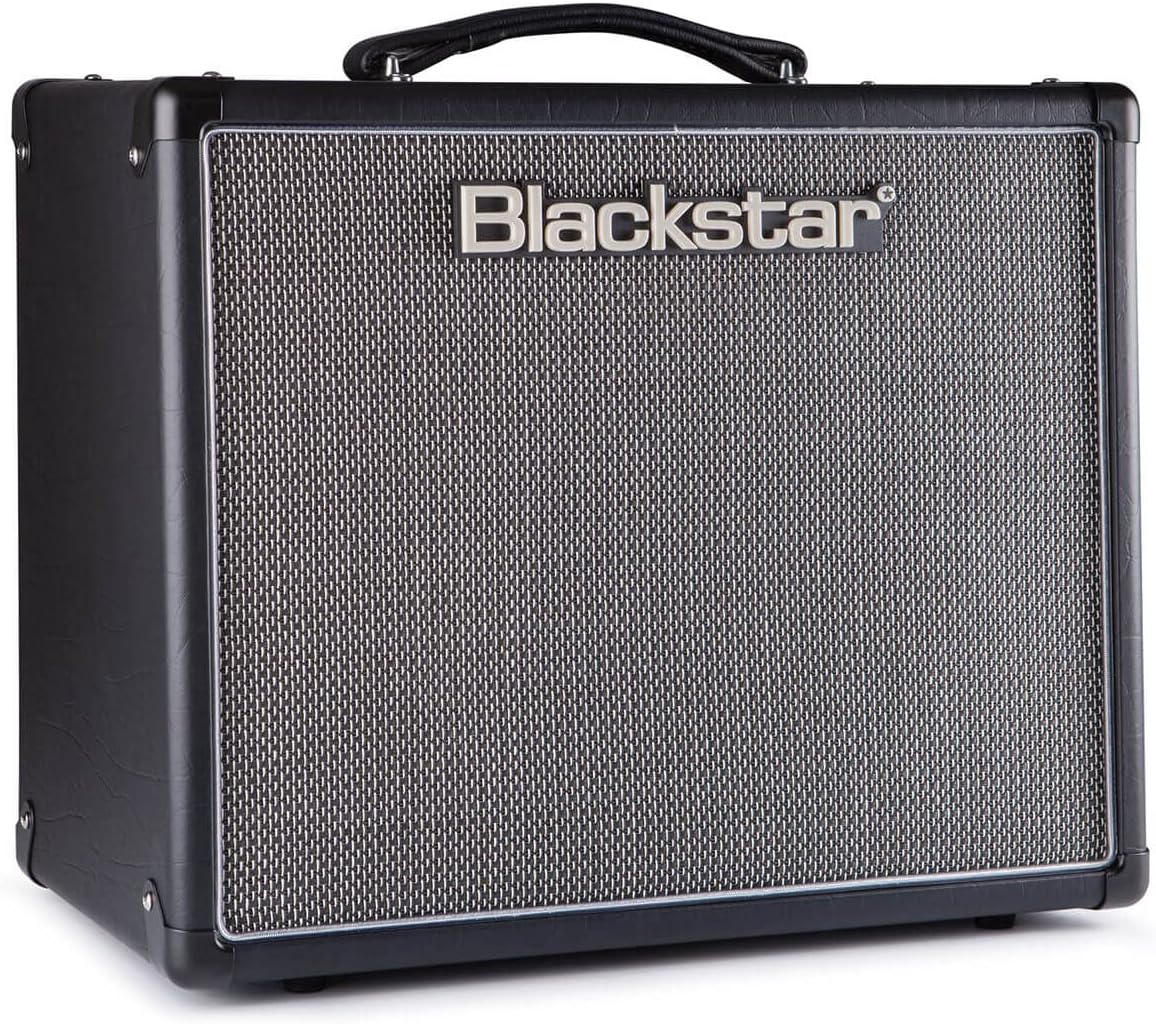
The Blackstar HT-5R MK III is a versatile 5-watt 1x12 inch guitar tube combo amplifier designed for both practice and performance. It features a powerful tube amplifier, a 12-inch Celestion speaker, and a dual-channel design offering clean and overdrive tones. Key features include the patented ISF (Infinite Shape Feature) for tonal shaping, power reduction to 0.5W for quiet practice, a built-in CabRig speaker simulator, and a USB output for direct recording. Its compact and portable design makes it suitable for various environments.

פראָנט view of the Blackstar HT-5R MK III Guitar Ampלײַכטער, ווײַזןasing its classic black finish and speaker grille.
סעטאַפּ
Follow these steps to set up your Blackstar HT-5R MK III ampלייבער:
- מאַכט קשר: פאַרבינדן די amplifier to a suitable power outlet using the provided cord. Ensure the power switch is in the OFF position before connecting.
- גיטאַרע אַרייַנשרייַב: צאַפּן דיין גיטאַרע אין די אַרייַנשרייַב דזשאַק אויף די פראָנט טאַפליע.
- עקסטערנער רעדנער (אפציאנאל): If using an external speaker cabinet, connect it to the appropriate רעדנער אַוטפּוץ on the rear panel (1 x 16 OHM or 1 x 8 OHM / 2 x 16 OHM). Ensure the impedance matches your cabinet.
- Headphones/Emulated Output (Optional): For silent practice or direct recording, connect headphones or a recording device to the EMULATED OUTPUT & HEADPHONES דזשאַק.
- MP3 / Line Input (Optional): Connect an external audio source (e.g., MP3 player, phone) to the MP3 / LINE INPUT jack to play along with music.
- פֿוסשוויטש (אָפּציאָנעל): Connect a compatible footswitch to the פֿיס באַשטימען input for remote channel switching.
- מאַכט אויף: פליפּ די מאַכט switch to ON. The amplifier will enter standby mode. Wait approximately one minute for the tubes to warm up before engaging the סטאַנדביי באַשטימען צו ON.
Rear panel of the Blackstar HT-5R MK III, showing speaker outputs, emulated output, MP3 input, and effects loop connections.
אַפּערייטינג ינסטראַקשאַנז
באקענען זיך מיט די amplifier's controls for optimal performance:
פראָנט פּאַנעל קאָנטראָלס:
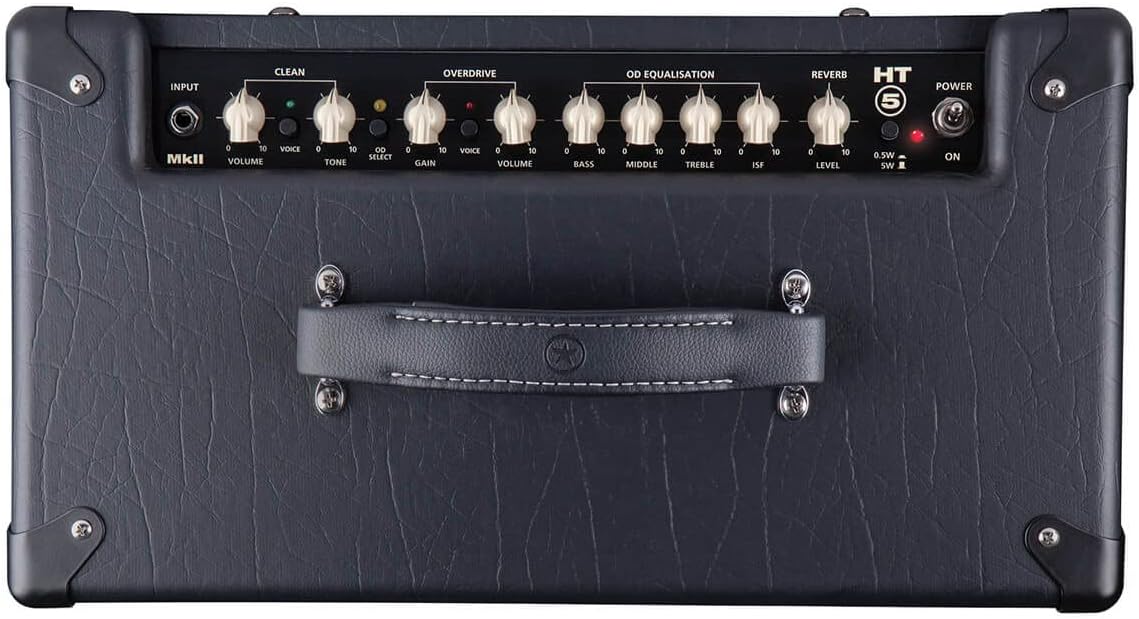
- Power Standby / On: קאָנטראָלס די amplifier's power state. Allow tubes to warm up in standby before switching to ON.
- Cabinet Select (HT5): Selects the internal speaker or emulated output settings.
- Emulated Output & Headphones: Provides a speaker-emulated signal for headphones or direct recording.
- Equalisation (Treble, Middle, Bass): Adjusts the tone of your ampליפער.
- ISF (Infinite Shape Feature): This patented control allows you to dial in tones from classic British crunch to modern American high-gain. Turning clockwise shifts the tone from a British characteristic to an American characteristic.
- Overdrive Channel (Volume, Gain, Voice):
- געווינס: Controls the amount of overdrive.
- באַנד: Adjusts the output level of the overdrive channel.
- קול: Selects between different overdrive voicings.
- Clean Channel (Volume, Tone, Voice):
- באַנד: Adjusts the output level of the clean channel.
- טאָן: Controls the brightness of the clean tone.
- קול: Selects between different clean voicings.
- רעווערב לעוועל: Controls the amount of built-in reverb effect.
- Power Reduction (0.5W / 5W): Switches between full 5-watt output and a reduced 0.5-watt output, ideal for lower volume practice without sacrificing tone.
Close-up of the Blackstar HT-5R MK III front panel, detailing the various knobs and switches for tone shaping and channel selection.
וישאַלט
געהעריקע אויפהאלטונג זיכערט די לאנגעוויטי און אפטימאלע פאָרשטעלונג פון אייער ampלייבער:
- רייניקונג: ניצט אַ ווייכע, טרוקענע שטאָף צו רייניקן די אויסערלעכע זייט. פֿאַרמייַדט אַברייסיוו רייניגער אָדער סאָלווענטן.
- סוויווע: אַרבעטן די amplifier in a dry, well-ventilated area. Avoid exposure to extreme temperatures, humidity, or direct sunlight.
- רער זאָרג: As a tube amplifier, the internal vacuum tubes have a finite lifespan. If you notice a decrease in performance or unusual noise, tube replacement may be necessary. Consult a qualified technician for tube replacement.
- רעדנער זאָרגן: The 12-inch Celestion speaker is designed for durability. Avoid puncturing or exposing the cone to excessive force.
- טראנספארטאציע: ווען מאָווינג די amplifier, ensure it is powered off and disconnected from all cables. Use the integrated handle for carrying.
טראָובלעשאָאָטינג
אויב איר טרעפט פראבלעמען מיט אייער amplifier, consider the following common troubleshooting steps:
- קיין קול:
- פאַרזיכערן די amplifier is powered on and out of standby mode.
- Check all cable connections (guitar, speaker, power).
- Verify the guitar's volume and tone controls are not set to zero.
- Test with a different guitar cable or guitar.
- Unwanted Noise (Humming, Buzzing, Crackling):
- זיכער מאַכן אַז אַלע קייבלס זענען זיכער פארבונדן און נישט געשעדיגט.
- פּרוּווט פּלאַגינג די amplifier into a different power outlet.
- מאַך די amplifier away from other electronic devices that might cause interference.
- Excessive noise can sometimes indicate aging or faulty tubes. If the issue persists, professional servicing may be required.
- שוואַך אָדער פאַרדרייט קלאַנג:
- קוק די amplifier's volume and gain settings.
- Ensure the power reduction switch is set appropriately for your desired volume level.
- Inspect the speaker for any visible damage.
- Faulty tubes can also cause weak or distorted sound.
For issues not resolved by these steps, please contact Blackstar customer support or a certified service technician.
ספּעסאַפאַקיישאַנז
| שטריך | דעטאַל |
|---|---|
| מאָדעל נומער | HT5RMK3 |
| רעזולטאַט וואָסtage | 5 Watts (switchable to 0.5W) |
| רעדנער | 12-inch Celestion Speaker |
| טשאַנאַלז | Clean, Overdrive |
| קאָנטראָלס | Volume, Tone, Gain, EQ (Treble, Middle, Bass), ISF, Reverb, Voice switches |
| קאַנעקטיוויטי | Guitar Input, Speaker Outputs, Emulated Output & Headphones, MP3 / Line Input, USB, Effects Loop (Send/Return), Footswitch |
| מאַכט מקור | קאָרדעד עלעקטריק |
| קאָליר | שוואַרץ |
| מאַטעריאַל | Blackstar designed [speaker material] |
| פּונקט וואָג | 28.8 פונט |
| ערשטער בנימצא טאָג | 8 יאנואר 2019 |
וואָראַנטי און שטיצן
This product may be eligible for an extended protection plan. For specific details regarding your product's warranty, please refer to the documentation included with your purchase or visit the official Blackstar webפּלאַץ.
For technical assistance, service, or warranty claims, please contact Blackstar customer support. Keep your purchase receipt and product serial number handy when contacting support.
- שוץ פּלאַן: A 4-Year Protection Plan may be available for purchase.
- Manufacturer Support: Refer to the official Blackstar webזייטל פֿאַר קאָנטאַקט אינפֿאָרמאַציע און ווייטערדיקע שטיצע רעסורסן.


