1. וויכטיק סאַפעטי אינסטרוקציעס
Please read all instructions carefully before using the Caso Coffee Compact Electronic coffee machine. Keep this manual for future reference.
- עלעקטריקאַל זיכערקייַט: פאַרזיכערן די וואָלtagדי ווערט וואָס איז אָנגעגעבן אויף דעם אַפּאַראַט שטימט מיט אייער לאָקאַלער עלעקטרישער עלעקטרישער וואָלומען.tage before connecting. Do not immerse the appliance, cord, or plug in water or other liquids.
- הייס סורפאַסעס: The coffee machine's heating plate and carafe will become hot during and after operation. Always use the handle when touching the carafe. Allow the appliance to cool completely before cleaning.
- קינדער און פּעץ: Keep the appliance out of reach of children and pets. This appliance is not intended for use by persons with reduced physical, sensory or mental capabilities, or lack of experience and knowledge, unless they have been given supervision or instruction.
- געהעריק נוצן: Use the appliance only for its intended purpose of brewing coffee. Do not operate the appliance with a damaged cord or plug, or after the appliance malfunctions or has been damaged in any manner.
- ווענטילאַטיאָן: Ensure adequate ventilation around the appliance during operation. Do not place it on or near hot gas or electric burners, or in a heated oven.
2. פּראָדוקט איבערview
Familiarize yourself with the components of your Caso Coffee Compact Electronic coffee machine.

פיגורע 2.1: פראָנט view of the Caso Coffee Compact Electronic coffee machine, showcasing its compact design and stainless steel finish.

פיגורע 2.2: אַנגגאַלד view of the coffee machine, highlighting its sleek profile and integrated components.

פיגורע 2.3: Close-up of the control panel with LCD display, showing the various buttons for operation.

פיגורע 2.4: אינערלעכער view of the coffee machine's grinding mechanism and integrated filter basket.
קאַמפּאָונאַנץ:
- אינטעגרירטע גרינדער: פֿאַר פֿרישע קאַווע בינען.
- וואַסער טאַנק: With clear level indicator.
- גלאז קאַפע: With handle and capacity markings.
- קאָנטראָל פּאַנעל: With LCD display and intuitive buttons.
- אַרויסנעמבאַרע פילטער קאָרב: פֿאַר גרינג רייניקונג.
קאָנטראָל פּאַנעל פאַנגקשאַנז:
- מאַכט קנעפּל: צו אנצינדן/אויסלעשן די מאשין.
- Grind Level Button (%): Adjusts the fineness of the coffee grind (two adjustable levels).
- Quantity Buttons (+/-): Selects the number of cups (up to 4).
- Timer Button (Clock icon): Sets the current time and programs delayed brewing.
- אָנהייב קנעפּל: Initiates the brewing process.
3. סעטאַפּ
- אויספּאַקן: Carefully remove all packaging materials and check for any damage. Retain packaging for future transport if needed.
- ערשט רייניקונג: Before first use, clean all removable parts (carafe, filter basket, grinder components) with warm soapy water. Wipe the exterior of the machine with a damp cloth. Run one or two cycles with only water to rinse the internal system.
- אָרט: Place the coffee machine on a stable, flat, heat-resistant surface, away from direct sunlight and heat sources. Ensure there is sufficient space around the unit for ventilation.
- פילונג וואַסער: Open the water tank lid and fill the water tank with fresh, cold water up to the desired level, corresponding to the number of cups you wish to brew. Do not exceed the maximum fill line.
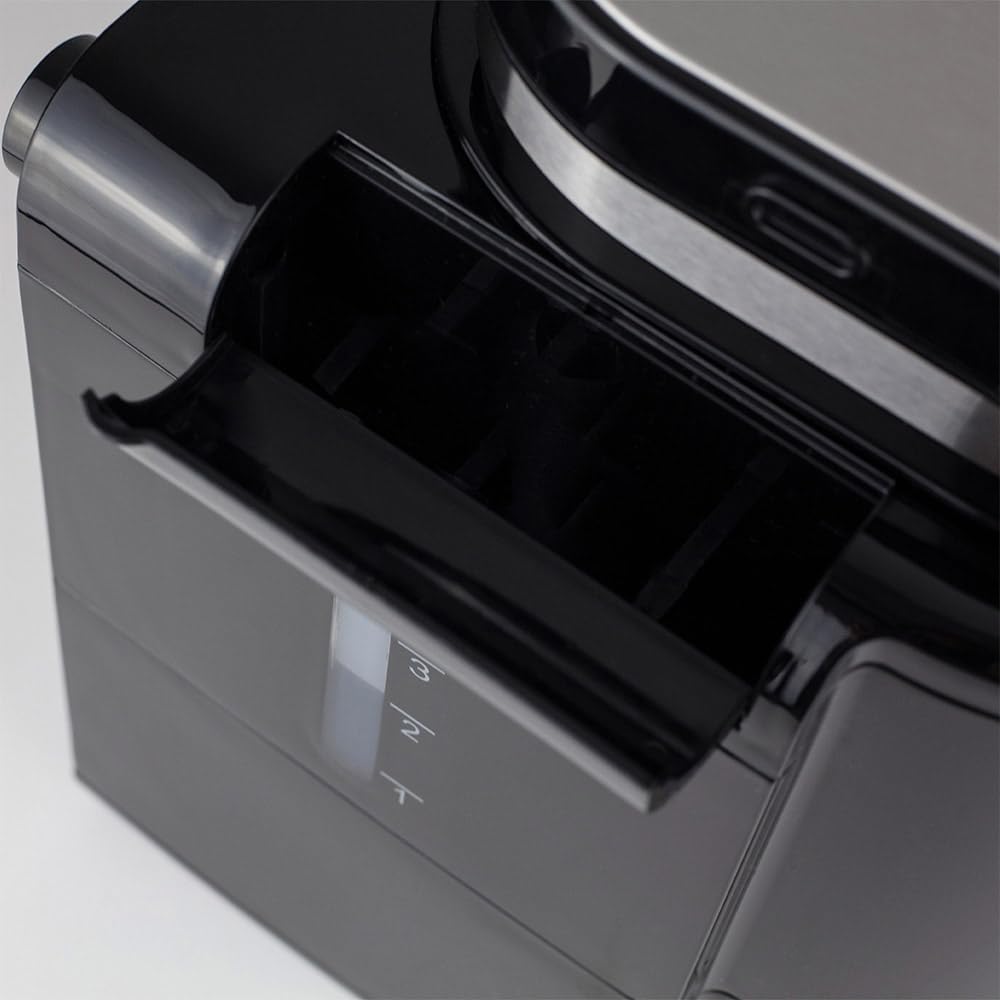
פיגורע 3.1: זייַט view illustrating the water tank with its clear level indicator.
- Adding Coffee:
- For Coffee Beans: Open the grinder lid and pour the desired amount of fresh coffee beans into the grinder chamber.

פיגורע 3.2: Adding fresh coffee beans into the integrated grinder.
- פֿאַר ערד קאַווע: If using pre-ground coffee, ensure the grinder is empty and clean. Place the ground coffee directly into the filter basket.
- For Coffee Beans: Open the grinder lid and pour the desired amount of fresh coffee beans into the grinder chamber.
4. אַפּערייטינג ינסטרוקטיאָנס
4.1. Brewing Coffee from Beans:
- Ensure the water tank is filled and coffee beans are in the grinder.
- שטעלט די ליידיגע גלאָז קאַראַפע אויף דער הייצונג פּלאַטע.
- Press the Power button to turn on the machine. The LCD display will illuminate.
- ניצן די +/- buttons to select the desired number of cups (1-4).
- דרוק די % button to cycle through the two available grind levels (fine or coarse), depending on your preference for coffee strength and aroma.
- דרוק די אָנהייב button to begin the grinding and brewing process. The machine will automatically grind the beans and then brew the coffee.
4.2. Brewing with Pre-Ground Coffee:
- ענשור אַז די וואַסער טאַנק איז אָנגעפילט.
- Add the desired amount of pre-ground coffee directly into the filter basket.
- שטעלט די ליידיגע גלאָז קאַראַפע אויף דער הייצונג פּלאַטע.
- דרוק די מאַכט קנעפּל צו קער אויף די מאַשין.
- ניצן די +/- buttons to select the desired number of cups.
- דרוק די אָנהייב button. The machine will bypass the grinding process and proceed directly to brewing.
4.3. Using the Timer Function:
The integrated timer allows you to program the machine to start brewing at a specific time.
- באַשטעטיקן די איצטיקע צייט:
- With the machine on, press and hold the טיימער קנעפּל ביז די צייט-אויסשטעלונג בלינקט.
- ניצן די +/- buttons to set the current hour, then press טיימער ווידער צו באַשטעטיקן.
- ניצן די +/- buttons to set the current minute, then press טיימער צו באַשטעטיקן און אַרויסגיין פון צייט-שטעל-מאָדוס.
- Programming Delayed Start:
- Prepare the machine with water and coffee (beans or ground) as described in sections 4.1 or 4.2.
- דרוק די טיימער button once. The display will show "PROG" or a similar indicator.
- ניצן די +/- buttons to set the desired brewing start time.
- דרוק די טיימער button again to confirm the programmed time. The machine will now be in standby mode, waiting for the set time to begin brewing.
4.4. Keep Warm Function:
After brewing, the machine automatically activates a keep warm function for 30 minutes, maintaining the coffee's temperature. After 30 minutes, the machine will automatically shut off for safety and energy saving.
5. וישאַלט און רייניקונג
רעגולערע רייניקונג גאַראַנטירט אָפּטימאַלע פאָרשטעלונג און פאַרלענגערט די לעבנסדויער פון דיין קאַווע מאַשין.
- איידער רייניקונג: Always unplug the coffee machine from the power outlet and allow it to cool completely before cleaning any parts.
- קאַראַפע און פילטער קאָרב:
- Remove the glass carafe and filter basket after each use.
- Discard used coffee grounds.
- Wash the carafe and filter basket with warm, soapy water. Rinse thoroughly and dry. These parts may also be dishwasher safe (check product specifications for confirmation).
- רייניקונג מילכל: The integrated grinder is fully removable for easy cleaning.
- Carefully remove the grinder assembly from the top of the machine.
- Brush away any residual coffee grounds. The grinding mechanism can be rinsed under running water, but ensure it is completely dry before reassembling.
- Refer to Figure 2.4 for a visual reference of the grinder area.
- עקסטעריאָר רייניקונג: ווישט די אויסערלעכע ייבערפלאַכן פון דער קאַווע מאַשין מיט אַ ווייכן, דamp טוך. ניצט נישט קיין שרײַבנדיקע רייניגערס אדער שרויבענדיקע פּאַדס, ווײַל זיי קענען שאַטן דעם ענדיקונג.
- דעסקאַלינג: Mineral deposits from water can build up over time, affecting performance. Descale your machine regularly (e.g., every 2-3 months, or more often in hard water areas).
- Use a commercial descaling solution suitable for coffee machines, or a mixture of white vinegar and water (1:2 ratio).
- גיסן די דיסקאַלינג לייזונג אין די וואַסער טאַנק.
- לאָזט לויפן אַ ברוינג ציקל אָן קאַווע.
- After the cycle, run 2-3 cycles with fresh water to rinse out any descaling residue.
6. טראָובלעשאָאָטינג
If you encounter issues with your coffee machine, refer to the following table before contacting support.
| פּראָבלעם | מעגלעך סיבה | לייזונג |
|---|---|---|
| מאַשין טוט נישט קער אויף. | נישט איינגעשטאכן; פראבלעם מיטן עלעקטרישן אויסגאבע. | קאָנטראָלירט די פֿאַרבינדונג פֿון דער עלעקטרישער שנור; פּרוּווט אַן אַנדער אַוטלעט. |
| קאַווע איז נישט ברוינג. | No water in tank; carafe not correctly placed; filter basket clogged. | Fill water tank; ensure carafe is correctly seated; clean filter basket. |
| די מאַשינע אַרבעט נישט. | No beans; grinder clogged; grinder assembly not properly installed. | Add beans; clean grinder thoroughly; ensure grinder is securely in place. |
| קאַווע שמעקט שוואַך אָדער צו שטאַרק. | Incorrect coffee-to-water ratio; wrong grind level. | Adjust coffee quantity or water level; experiment with grind settings. |
| מאַשין איז ליקינג. | Water tank or carafe not properly seated; overfilled water tank. | Ensure all components are correctly positioned; do not overfill water tank. |
7. ספּעסאַפאַקיישאַנז
Technical details for the Caso Coffee Compact Electronic coffee machine.
| שטריך | דעטאַל |
|---|---|
| סאָרט | CASO דיזיין |
| מאָדעל נומער | 1848 |
| קאָליר | ומבאַפלעקט שטאָל, שוואַרץ |
| דימענסיעס (L X W X H) | 26 X 17.5 X 27.5 סענטימעטער |
| וואָג | 2.2 קג |
| קאַפּאַציטעט | 960 מל (ביז 4 גלעזלעך) |
| מאַכט | 600 וו |
| Voltage | 230 וואלטס |
| מאַטעריאַל | ומבאַפלעקט שטאָל |
| ספּעציעלע פֿעיִקייטן | Integrated Grinder, LCD Display with Timer, Automatic Shut-off (30 min), Keep Warm Function (30 min), Two Adjustable Grind Levels, Processes Ground Coffee, Removable Grinder for Easy Cleaning. |

פיגורע 7.1: Product dimensions: 26 cm (width) x 17.5 cm (depth) x 27.5 cm (height).
8. וואָראַנטי און שטיצן
Your Caso Coffee Compact Electronic coffee machine comes with a manufacturer's warranty. For detailed warranty information, please refer to the warranty card included with your product or visit the official CASO Design webפּלאַץ.
If you require technical support, have questions about operation, or need to arrange for service, please contact CASO Design customer service. Contact details can typically be found on the manufacturer's webפּלאַץ אָדער אין די פּראָדוקט פּאַקקאַגינג.
ביטע האַלט אייער מאָדעל נומער (1848) און קויף דאַטע גרייט ווען איר קאָנטאַקטירט שטיצע.


