1. פּראָדוקט איבערview
The NUBWO U3 Wired Gaming Headset is designed for an immersive audio experience across multiple gaming platforms. It features high-quality stereo sound, a noise-canceling microphone, and a comfortable, lightweight design for extended use.

Image: The NUBWO U3 headset, showcasing its over-ear design, adjustable microphone, and in-line volume/mute controls with a 3.5mm audio jack.
שליסל פֿעיִקייטן:
- וניווערסאַל קאַמפּאַטאַבילאַטי: Supports PS5, PS4, New Xbox One, PC, Nintendo Switch, Laptop, PSP, Tablet, iPad, Computer, and Mobile Phone.
- העכער געזונט קוואַליטעט: High-quality stereo with enhanced bass for clear audio.
- ראַש-קאַנסילינג מיקראָפאָן: Flexible microphone for clear communication, reducing background noise.
- הומאַניזעד פּלאַן: Soft, skin-friendly leather ear pads and an adjustable headband ensure comfort during long gaming sessions.
- Adjustable Volume & Mute Control: Convenient in-line controls for volume adjustment and microphone muting.
2. סעטאַפּ אינסטרוקציעס
Follow these steps to connect your NUBWO U3 Gaming Headset to your device.
2.1 Connecting to PC, PS4, PS5, Nintendo Switch, Laptop, Tablet, Mobile Phone:
- Locate the 3.5mm audio jack on your device.
- Plug the 3.5mm connector from the NUBWO U3 headset into the audio jack.
- Ensure the headset is recognized by your device's audio settings. You may need to select the headset as the default input/output device in your system settings.
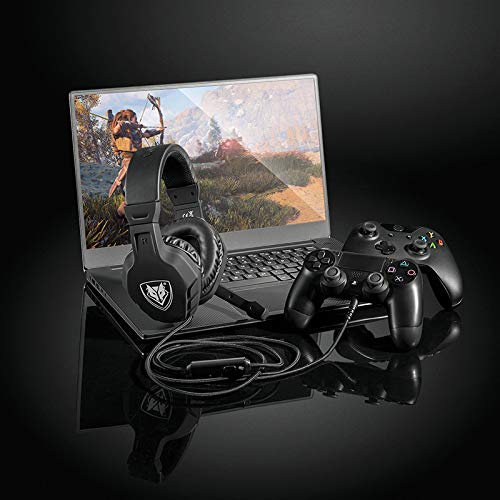
Image: The NUBWO U3 headset connected to a laptop and a game controller, illustrating multi-device compatibility.
2.2 Connecting to Xbox One (Older Versions):
For older versions of the Xbox One controller that do not have a 3.5mm audio jack, an additional Microsoft Adapter (not included) is required. Connect the headset to the adapter, then connect the adapter to the Xbox One controller.
3. אַפּערייטינג ינסטרוקטיאָנס
Utilize the in-line controls and adjustable microphone for optimal performance.
3.1 באַנד קאָנטראָל:
The headset features an in-line volume control wheel. Rotate the wheel up to increase volume and down to decrease volume.
3.2 שטיל מיקראָפאָן:
A mute switch is located on the in-line control unit. Slide the switch to mute or unmute the microphone as needed during gameplay or communication.
3.3 Microphone Positioning:
The microphone boom is flexible. Adjust its position to ensure it is close to your mouth for clear voice pickup, while avoiding direct airflow to minimize breath sounds.

Image: A young person wearing the NUBWO U3 headset, highlighting its lightweight and comfortable design during use.
4. וישאַלט
Proper care will extend the lifespan and maintain the performance of your headset.
- רייניקונג: ניצט אַ ווייכע, טרוקענע שטאָף צו ווישן די אויערקעפּלעך און קאָפּבאַנד. פֿאַר שווערן שמוץ, אַ ביסל טרוקןamp מען קען ניצן אַ שטאָף, אָבער זאָרגט זיך אַז קיין נאַס זאָל נישט אַרײַן אין די רעדנער גרילן אָדער מיקראָפאָן.
- סטאָרידזש: Store the headset in a clean, dry place away from extreme temperatures and direct sunlight. Avoid wrapping the cable tightly around the headset to prevent damage.
- קאַבלע זאָרגן: Handle the cable gently. Avoid pulling on the cable to disconnect it from devices; always grasp the plug.
5. טראָובלעשאָאָטינג
If you encounter issues with your NUBWO U3 headset, refer to the following common solutions.
| פּראָבלעם | מעגלעך סיבה | לייזונג |
|---|---|---|
| קיין קלאַנג פֿון כעדסעט |
|
|
| מיקראָפאָן טוט נישט אַרבעטן |
|
|
| געזונט קוואַליטעט איז נעבעך אָדער פאַרקרימט |
|
|
6. ספּעסאַפאַקיישאַנז
Technical details for the NUBWO U3 Gaming Headset.
- מאָדעל נאָמען: U3
- קאַנעקטיוויטי טעכנאָלאָגיע: מיט אַ דראָט (3.5 מ״מ דזשעק)
- אַודיאָ דרייווער גרייס: 50 מם
- אָפטקייַט קייט: 20 הערץ - 20 קילאָהערץ
- סענסיטיוויטי: 95 דב
- מיקראָפאָן: Noise-canceling, flexible boom
- קאָנטראָל טיפּ: In-line Volume Control, Mute Button
- מאַטעריאַל: Plastic, Skin-friendly leather ear pads
- נומער וואָג: אומגעפער 0.38 קילאָגראַם (13.4 אונסעס)
- קאַמפּאַטאַבאַל דעוויסעס: PlayStation 4, PlayStation 5, New Xbox One, PC, Nintendo 3DS, Nintendo Switch, Laptop, PSP, Tablet, iPad, Computer, Mobile Phone, Wii U. (Note: Older Xbox One controllers may require a Microsoft Adapter, not included).

בילד: אן אינערליכע view of the headset's 50mm audio driver, illustrating the components responsible for sound output, alongside indicators for safe volume levels.
7. וואָראַנטי און שטיצן
For warranty information or technical support, please refer to the documentation included with your product or contact NUBWO customer service through their official webפּלאַץ. האַלטן דיין קויפן קאַבאָלע פֿאַר וואָראַנטי קליימז.


