הקדמה
This manual provides instructions for the Elekpia CT-RC2US-17 remote control. This remote is designed for use with various Toshiba Smart LED HDTV models, offering a direct replacement experience without complex setup.
Compatible Toshiba Smart LED HDTV Models: 32L221U, 43L621U, 49L621U, 55L421U, 55L621U, 65L621U.
סעטאַפּ
The Elekpia CT-RC2US-17 remote control requires two AAA batteries (not included) for operation. No programming or pairing is necessary; the remote is ready for use once batteries are installed.
ייַנמאָנטירונג פון באַטאַרייע
- געפֿינען די באַטאַרייע אָפּטייל אויף די צוריק פון די ווייַט קאָנטראָל.
- רוקט דעם באַטעריע דעקל אַראָפּ צו עפֿענען.
- אַרײַנשטעלן צוויי AAA באַטעריעס, און זיכער מאַכן אַז די פּאָלאַריטעט איז ריכטיק (+ און - עקן זענען אויסגעשטעלט צו די מאַרקירונגען אינעווייניק פֿון דעם אָפּטייל).
- רוק די באַטאַרייע דעקן צוריק אין פּלאַץ ביז עס קליקס סיקיורלי.

Image: Back of the remote control, illustrating the battery compartment.
אַפּערייטינג ינסטראַקשאַנז
The CT-RC2US-17 remote control features standard buttons for navigating your Toshiba Smart LED HDTV. Below is a general overview of common button functions.
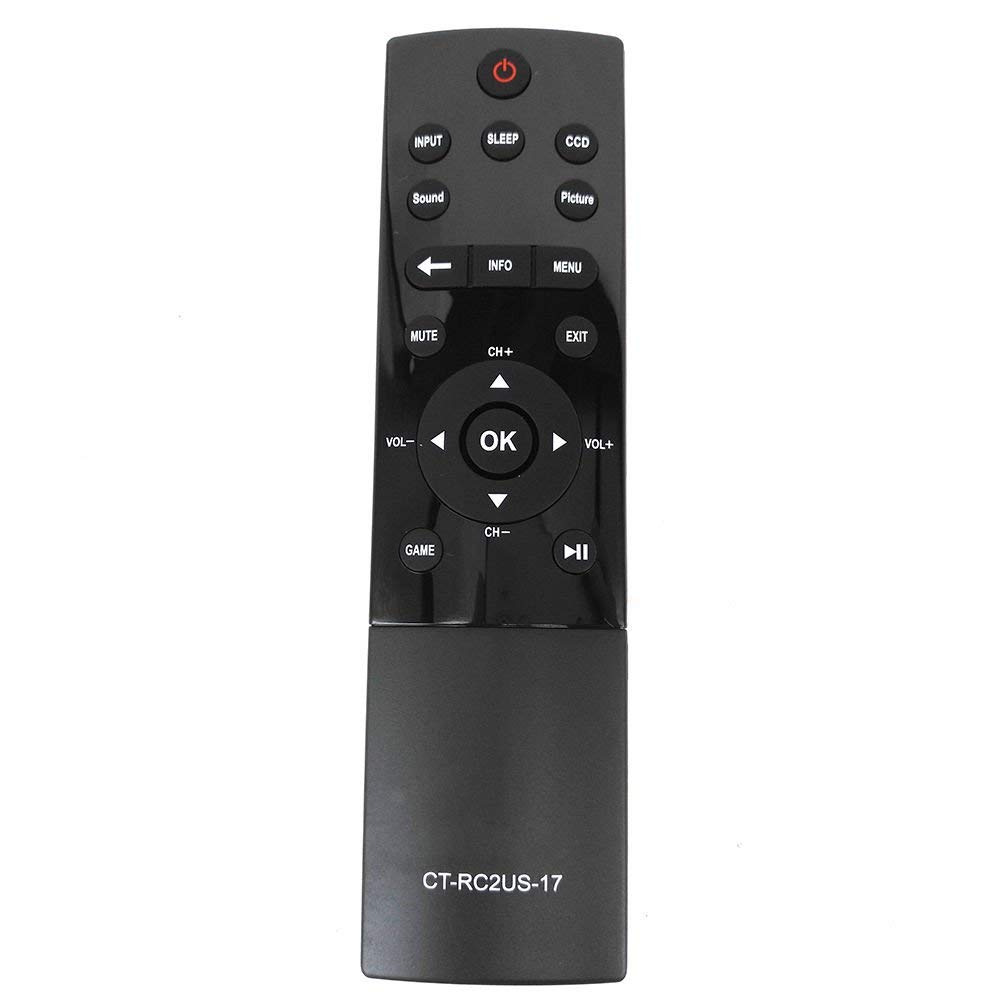
Image: Front of the remote control, displaying button layout.
קנעפּל פאַנגקשאַנז
- מאַכט קנעפּל: טורנס די טעלעוויזיע אויף אָדער אַוועק.
- אַרייַנשרייַב קנעפּל: Selects the input source (e.g., HDMI 1, HDMI 2, AV).
- שלאָף קנעפּל: Activates the TV's sleep timer function.
- CCD Button: Controls Closed Captioning display.
- בילד קנעפּל: Adjusts picture modes or settings.
- Sound Button: Adjusts sound modes or settings.
- שטיל קנעפּל: שטומט אדער אנשטומט דעם טעלעוויזאר'ס אודיא.
- אינפֿאָרמאַציע קנעפּל: Displays on-screen information about the current program or input.
- מעניו קנעפּל: גייט אריין אין דעם הויפּט מעניו פון דער טעלעוויזיע.
- נאַוויגאַציע פּאַד (אַרויף, אַראָפּ, לינקס, רעכטס, גוט): געניצט צו נאַוויגירן מעניוז און באַשטעטיקן אויסוואלן.
- CH+ / CH- Buttons: טוישט קאַנאַלן אַרויף אָדער אַראָפּ.
- VOL+ / VOL- Buttons: Increases or decreases volume.
- אַרויסגאַנג קנעפּל: אַרויסגאַנג דעם קראַנט מעניו אָדער פאַרשטעלן.
- Game Button: May activate a specific game mode or input.
- Playback Controls (Play/Pause, Rewind, Fast Forward): Used for media playback functions.
וישאַלט
To ensure optimal performance and longevity of your remote control, follow these maintenance guidelines:
- באַטערי פאַרבייַט: Replace batteries when the remote's response becomes sluggish or stops working. Always replace both batteries simultaneously with new AAA batteries.
- רייניקונג: Wipe the remote control with a soft, dry cloth. Avoid using liquid cleaners or abrasive materials, as they may damage the remote's surface or internal components.
- סטאָרידזש: האַלט די ווײַטקאָנטראָל אין אַ קיל, טרוקן אָרט אַוועק פון דירעקט זונשייַן און עקסטרעמע טעמפּעראַטורן. אויב איר האַלט עס פֿאַר אַ לענגערע צייט, נעמט אַרויס די באַטעריעס צו פאַרמייַדן ליקאַדזש.
טראָובלעשאָאָטינג
If you encounter issues with your Elekpia CT-RC2US-17 remote control, refer to the following common problems and solutions:
- Remote is unresponsive:
- Ensure there is a clear line of sight between the remote and the TV's infrared sensor.
- קאָנטראָלירט צי די באַטעריעס זענען ריכטיק אַרײַנגעשטעלט מיט דער ריכטיקער פּאָלאַריטעט.
- פאַרבייַטן אַלטע באַטעריעס מיט נייַע AAA באַטעריעס.
- Limited functionality (e.g., only power and volume work):
- Some users have reported that this replacement remote may have limited functionality on certain Toshiba Smart LED HDTV models, primarily controlling power, volume, and basic menu access. Full navigation or advanced smart TV features might require the original TV remote or a universal remote specifically programmed for those functions.
- Verify your TV model is listed as compatible. If issues persist, consult the TV's original manual for remote control compatibility details.
- קנעפּלעך זענען קלעפּיק אָדער רעאַגירן נישט:
- This may indicate dirt or debris under the buttons. Gently clean around the buttons with a dry cotton swab. Do not attempt to disassemble the remote.
ספּעסאַפאַקיישאַנז
| שטריך | דעטאַל |
|---|---|
| מאָדעל נומער | CT-RC2US-17 |
| סאָרט | אלקפיא |
| פּראָדוקט דימענשאַנז | 6.5 X 1.5 X 0.5 אינטשעס |
| פּונקט וואָג | 2.08 אונסעס |
| באַטעריז פארלאנגט | 2 AAA באַטעריז (ניט אַרייַנגערעכנט) |
| קאַנעקטיוויטי טעכנאָלאָגיע | ינפרערעד |
| קאַמפּאַטאַבאַל דעוויסעס | Toshiba Smart LED HDTVs |
| ספּעציעלע שטריך | ערגאַנאַמיק פּלאַן |
| מאַקס נומער פון שטיצט דעוויסעס | 1 |
שטיצן אינפֿאָרמאַציע
For product support related to your Toshiba TV, please refer to the official Toshiba support channels:
- Webפּלאַץ: www.toshiba.com
- Phone (US & Canada Market): 855-527-2411
Note: This remote control is a compatible replacement manufactured by Elekpia. For specific TV features or advanced troubleshooting, consult your Toshiba TV's original user manual.


